The Financial Services CRM Dilemma
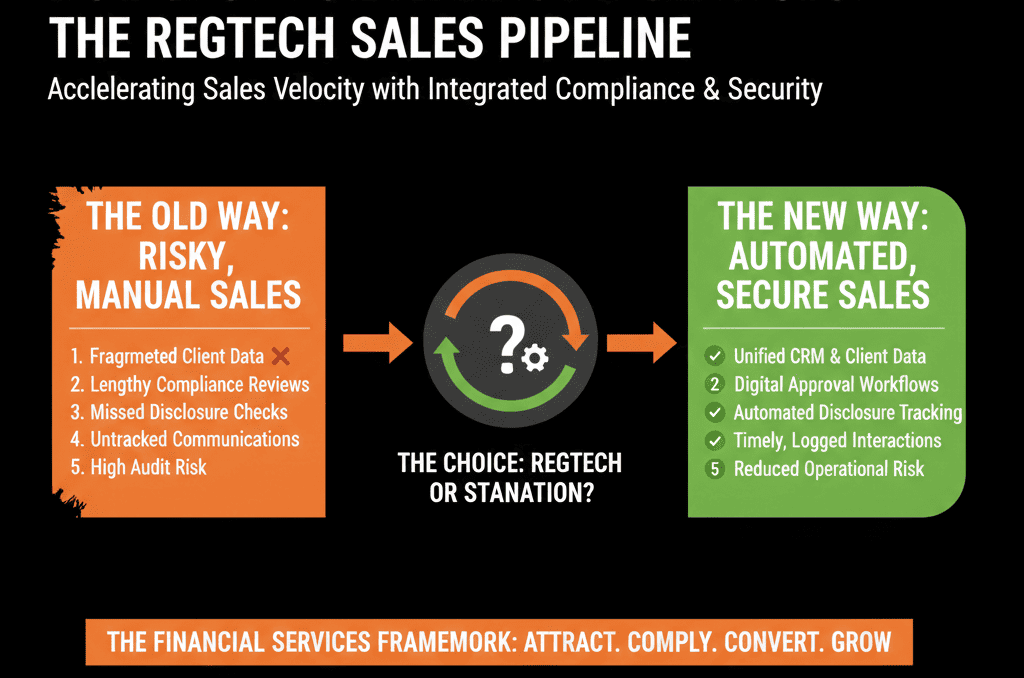
If you sell financial products (lending, insurance, wealth, SaaS for FS, fintech), you live between two pressures:
- Compliance wants airtight documentation and strict controls.
- Sales wants speed, flexibility, and minimal clicks.
When CRMs are set up to please only one side:
- Pure-compliance setups bury reps in fields, forms, and approvals.
- Pure-sales setups create risk: missing disclosures, poor audit trails, and regulator exposure.
HubSpot can sit in the middle—as a compliance-aware revenue engine—if you:
- Design pipelines around regulatory checkpoints.
- Capture required data without bloating every step.
- Automate documentation and approvals instead of leaving them to chance.
This article shows how to do that.
Step 1: Agree on What “Compliance-Friendly” Actually Means
Before you touch HubSpot, align compliance, legal, and sales on a few definitions.
For your business, “compliance-friendly” usually means:
- Every regulated decision (approval, decline, risk rating, suitability) is traceable.
- Required documents are consistently captured and linked to the client/opportunity.
- Customer communications meet required standards (disclosures, consent, opt-in/opt-out).
- Audit trails exist for who did what, when, and based on which information.
Turn this into a short, shared list:
- 5–10 “non-negotiables” (must exist for every relevant deal/client).
- 5–10 “nice-to-haves” (ideal but not blocking).
This list will anchor your pipeline and property design.
Step 2: Map the Regulated Journey to a HubSpot Pipeline
Your current pipeline might be built around internal admin tasks.
You want to rebuild it around regulatory and customer decision milestones.
Typical financial services milestones:
- Initial inquiry / lead created.
- KYC/AML checks initiated and completed.
- Fact-find / needs analysis completed.
- Product recommendation or proposal delivered.
- Compliance review / sign-off (where required).
- Customer acceptance / signature.
- Funding / policy issuance / account opening.
In HubSpot:
- Create a deals pipeline (or multiple, per product line) with stages that reflect these milestones.
- Use pipeline rules/conditional stage properties to require specific fields at specific stages (instead of asking for everything upfront).
For each stage, define:
- Entry criteria (what must be true to move here).
- Exit criteria (what must be done to move out).
- Compliance requirements at that point: data fields, documents, approvals/checks.
Example (simplified):
Stage: Fact-Find Completed
- Entry: Client fact-find completed and recorded.
- Requirements: KYC status = “Complete”, risk profile filled, disclosures documented (yes/no).
Stage: Compliance Review
- Entry: Recommendation drafted and attached.
- Requirements: suitability fields completed, compliance reviewer assigned.
You’re designing a regulatory workflow in pipeline form.
Step 3: Design Properties That Capture Compliance-Critical Data (Without Bloat)
Compliance often pushes for “capture everything.”
HubSpot gets unwieldy quickly.
Instead, identify compliance-critical fields:
- KYC/AML status and dates.
- Source of funds / wealth (where required).
- Risk appetite / profile.
- Product suitability flags.
- Advice type (independent, restricted, execution-only).
- Key approvals and override reasons.
Decide where they belong:
- Contacts (natural persons).
- Companies (corporate clients).
- Deals (specific product/application events).
- Tickets (service issues, complaints).
Make fields conditional and stage-aware:
- Use progressive profiling and required fields at relevant stages, not at lead capture.
- Use conditional stage properties (suggested/required) so reps must complete only what matters at that stage.
Examples:
- Don’t ask an inbound lead for full KYC at first touch.
- Require KYC status before moving into “Offer Sent.”
- Require suitability fields before “Recommendation Finalized.”
This keeps the front of the pipeline fast while tightening controls as risk increases.
Step 4: Use Attachments, Links, and Notes as Part of the Audit Trail
Compliance is not just fields, it’s evidence.
In HubSpot, you can:
- Store or link key documents: KYC forms, signed disclosures, advice letters, risk assessments.
- Use notes and logged activities to show conversation history, confirmations (with timestamps), escalations and decisions.
Best practice:
- Standardize naming for attached documents (e.g., “KYC_Form_YYYYMMDD”).
- Use custom properties to track: “Required docs received?” (yes/no/list), “Advice letter issued?” (date), “Complaint raised?” (yes/no, with ticket association).
For high-risk or high-value deals, this is what protects you in audits and disputes.

Step 5: Build Compliance Gates That Don’t Kill Speed
You need some gates, but you don’t want reps stuck waiting days for simple approvals.
In HubSpot, combine:
Deal-stage requirements
Require only a short but strict list of properties to move to the next stage using pipeline rules/conditional stage properties.
Automated checks and notifications
Use workflows to flag missing information, notify compliance when a deal enters “Review,” and auto-assign tasks with SLAs.
Tiered risk handling
Use properties (risk level, deal size, client type) to trigger heavier review only for high-risk/high-value cases.
Example:
- Deals under $X and low risk → lighter path with basic checks.
- Deals above $X or high risk → route to named compliance approver, create a review task/ticket, and require sign-off.
Workflows support this branching without reps needing to remember each rule.
Step 6: Capture Consent and Communication Preferences Properly
Regulations (GDPR, CAN-SPAM, local privacy laws) demand good consent management, especially in financial services.
Use HubSpot to:
- Create and manage messaging subscription types and track subscription status.
- Configure privacy and consent settings (GDPR functionality) in the portal when required.
- Log consent events: when/how consent was obtained and subsequent changes.
Practical configuration:
- Use HubSpot subscription types aligned to your communication categories.
- Use contact properties for: “Legal basis,” “Consent source,” “Consent date.”
- Ensure forms and manual entry points respect these fields and use compliance-reviewed copy.
This reduces regulatory risk without adding extra friction later in the pipeline.
Step 7: Use Service Hub for Complaints and Incident Handling
Complaints and service issues are a hot spot for regulators.
Use Tickets to:
- Log complaints (category, severity, product type, regulatory flags).
- Track SLAs (response and resolution time, acknowledgment and follow-up).
- Link complaints to contacts/companies and related deals where relevant.
You can also configure ticket pipelines and automate routing/escalations with workflows and service processes.
This allows:
- Pattern analysis (where issues cluster).
- Evidence of proper complaint handling flows.
Step 8: Build Reporting That Keeps Compliance and Sales Looking at the Same Data
Instead of separate worlds, you want shared visibility with different lenses.
8.1 Compliance & risk dashboards
- Deals by risk level and stage.
- KYC-complete vs KYC-pending pipeline.
- Complaints by product, team, and outcome.
- Exceptions/overrides and rationale (pulled from properties).
8.2 Sales & performance dashboards
- Pipeline and forecast by product and segment.
- Conversion rates by stage (see where compliance gates slow things).
- Time-in-stage metrics (including compliance stages).
- Activity metrics vs outcomes.
Key idea:
- Use the same underlying objects and fields.
- Slice and surface differently for each audience.
When both teams trust the same data set, trade-offs become negotiable instead of emotional.
Step 9: Govern HubSpot Changes with a Joint Working Group
Because of regulatory stakes, any CRM change in financial services must be controlled.
Set up a simple governance model:
Joint HubSpot steering group
- Sales/RevOps.
- Compliance/risk.
- IT/operations (if required).
Change process
- New fields/stages/workflows must include: business goal, compliance impact, risk mitigation.
- Test in a sandbox or pilot group.
- Document and communicate to users.
Regular review
- Quarterly: check whether compliance fields are over- or under-used.
- Refine gates to reduce unnecessary friction.
- Update for new regulations or internal policies.
This keeps your HubSpot pipeline aligned with both regulatory changes and sales realities.
Make HubSpot Your Compliance-Aware Revenue Engine
In financial services, ignoring compliance is not an option.
But over-building controls can suffocate sales and create shadow systems.
The way out is to:
- Map your regulated journey into clear HubSpot pipeline stages.
- Capture only the compliance-critical data at each step.
- Use workflows and properties to enforce rules at the right time.
- Share one data model across compliance, sales, and service.
- Govern changes with a joint lens, not in departmental silos.
If your current HubSpot portal either feels too loose for compliance or too heavy for sales, we can help you rebalance it.
Our team at ElanceMind works with financial services and fintech organizations to:
- Re-architect HubSpot around compliance-aware pipelines.
- Design data models and workflows that satisfy regulators and empower sales.
- Build dashboards that give both compliance and revenue leaders the visibility they need.