🕸️ The "Zombie" Apps in Your Portal
It’s easy to install an app.
- A marketing manager tries a new "webinar tool" in 2020.
- A sales rep connects a "calendar scheduler" in 2021.
- An intern tests a "data scraper" in 2022.
They all leave the company. But the apps stay connected.
Go to Settings > Connected Apps.
Do you see 50+ integrations? Do you know what they all do? Do you know who owns them?
If the answer is "No," you have a "Shadow IT" problem.
- These apps have API access to your database.
- They can read your contacts.
- They can export your deals.
- They are potential "backdoors" for a data breach.

A clean portal is a secure portal. Here is how to run the Great App Audit.
🛡️ Step 1: The Inventory (Who is that?)
Go to Connected Apps. Look at the list.
- Identify the "Ghosts": Apps connected by users who have been deactivated. (e.g., "Connected by: John Smith (Deactivated)").
- Identify the "Dupes": Do you have 3 different "Calendar" apps connected? (Calendly, Chili Piper, HubSpot Meetings).
- Identify the "Unknowns": "Test App 1." "Zapier (Old Account)."
🛡️ Step 2: The Assessment (What can it do?)
Click on an app. Look at the Permissions.
- Read Access: Can it see all contacts?
- Write Access: Can it delete deals?
- Risk Level: An app that only "Reads Calendar" is low risk. An app that "Reads/Writes All CRM Data" is high risk.
🛡️ Step 3: The Purge (Uninstall)
Be ruthless.
- Rule: If it hasn't been used in 90 days -> Uninstall.
- Rule: If the owner has left the company -> Re-authenticate with a Service Account (e.g., revops@company.com) or Uninstall.
- Warning: Before you uninstall, check if it powers a live workflow! (Check "Workflow Dependencies").
🛡️ Step 4: The Lockdown (Governance)
Stop the bleeding.
Settings: Go to App Marketplace > Settings.
Require Approval: Turn on "Require approval for app installation."
The Process: Now, if a user wants to install "Random Tool X," they have to click "Request." You (the Admin) get an email. You vet it. You approve/deny.
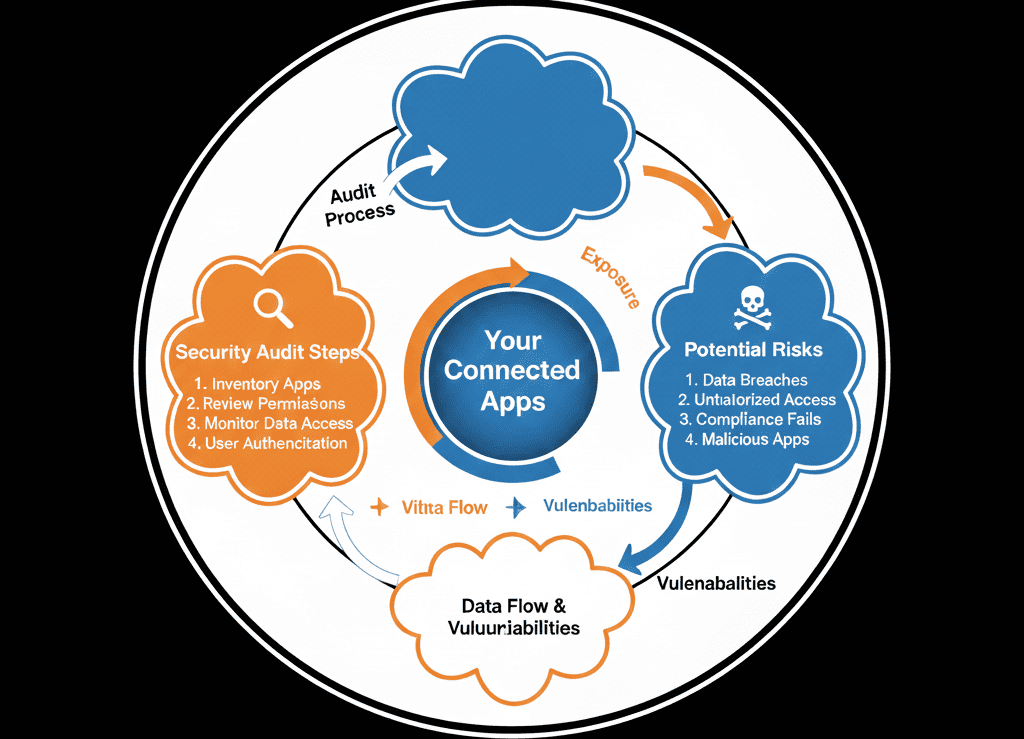
Security is a Process, Not a State.
You cannot audit once and forget it. "Shadow IT" creeps back in.
Make the "App Audit" a quarterly ritual.
- Q1: Clean up.
- Q2: Review permissions.
- Q3: Rotate API keys.
Your customer data is your most valuable asset. Don't leave the back door open.
Not sure if an app is safe to delete?
Secure Your Portal
This is part of our Free HubSpot Health Check. We will run a "Security Scan." We'll list all your connected apps, identify the "high risk" zombies, and help you safely disconnect them without breaking your live automation.
Secure Your Portal.Get Free Hubspot Audit.