🎯 The "Sticker" Strategy
You told your board you are pivoting to Account-Based Marketing (ABM).
You bought HubSpot Marketing Hub Professional.
You went into the CRM and marked your top 100 prospects as "Target Accounts."
And then... you went back to business as usual.
Marketing is still sending generic newsletters.
Sales is still cold calling random contacts.
The "Target Account" property is just a digital sticker. It does nothing.
This is "ABM Theater." It looks like strategy, but it's just data entry.
Real ABM is an orchestration. It changes how the system behaves for those 100 accounts.
- They get different ads.
- They get different emails.
- Sales gets different alerts.

If your "Target Account" checkbox doesn't trigger a "Red Alert" across your entire tech stack, your ABM is broken. Here is the diagnostic to fix it.
🩺 Diagnostic 1: The "Buying Role" Vacuum
The Symptom: You have a Target Account (e.g., "Acme Corp"), but you only have one contact (j.smith@acme.com) and you don't know who he is.
The Root Cause: You are tracking Companies, not Buying Committees.
The Fix: Buying Roles.
ABM requires mapping the political landscape.
Go to the Contact record. Use the Buying Role property.
Label them: "Decision Maker," "Blocker," "Champion," "Budget Holder."
The Dashboard: Use the "Target Account Overview" dashboard to see "Role Coverage." If you have a Target Account with 0 Decision Makers, it's not a Target; it's a wish.
🩺 Diagnostic 2: The "Tier" Flatline
The Symptom: You treat "Coca-Cola" (Fortune 500) the same as "Bob's Burgers" (SMB). They both get the same "Target Account" treatment.
The Root Cause: Binary thinking (Yes/No).
The Fix: Tiered Logic.
- Tier 1 (The Whales): Top 10 accounts. 1:1 Marketing. The CEO is involved.
- Tier 2 (The Mid-Market): Top 50. Segmented Industry Marketing.
- Tier 3 (The Mass Market): Top 1000. Programmatic ABM.
The Action: Create a custom property ABM Tier and route workflows differently for each.
🩺 Diagnostic 3: The "Sales Alert" Silence
The Symptom: A Decision Maker at a Tier 1 account visits your pricing page. No one knows.
The Root Cause: Your notifications are "Lead-Based," not "Account-Based."
The Fix: Company-Level Triggers.
Don't just track individual contacts. Track the aggregate behavior.
The Workflow:
- Trigger: Target Account = True AND Number of Page Views (Company) increased by 5 in the last day.
- Action: Send Slack Alert to Account Owner: "🚨 SURGE ALERT: [Account] is swarming your site."
- Result: Sales reacts to account momentum, even if they don't know which person is looking.
🩺 Diagnostic 4: The "Content" Disconnect
The Symptom: Your Target Accounts see the same generic "Welcome" banner on your website as everyone else.
The Root Cause: Not using Smart Content.
The Fix: Personalized Experience.
- The Setup: Create an Active List: "Target Accounts."
- The Asset: On your Home Page or Landing Page, use "Smart Content" modules.
- The Rule: If List Membership = "Target Accounts" -> Show "Enterprise Case Study" (instead of "Generic Ebook").
- Result: They feel understood the moment they land.
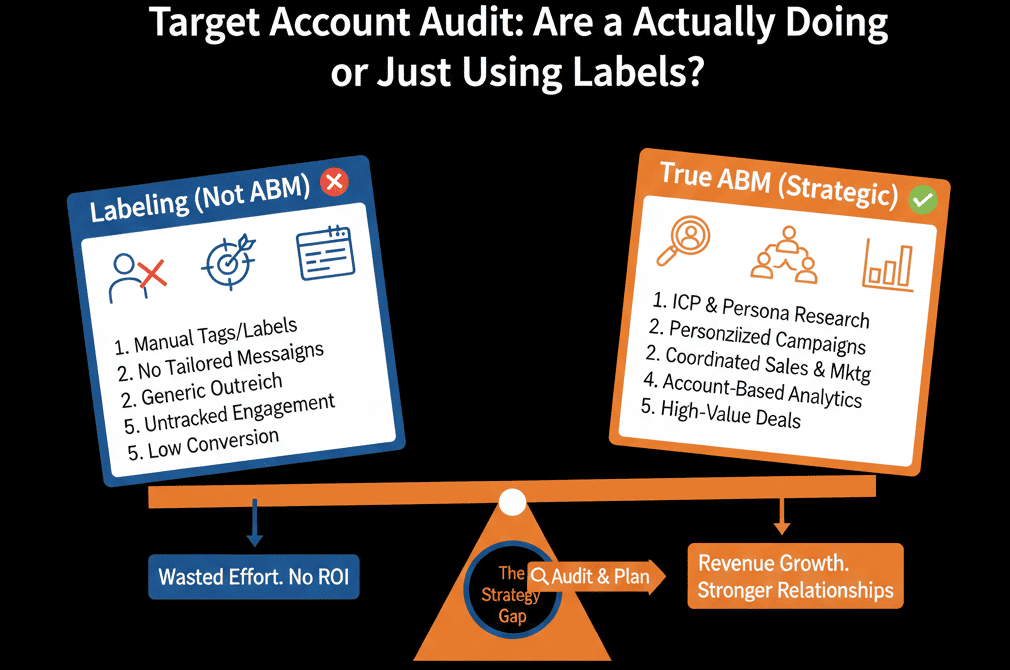
Stop "Listing." Start "Orchestrating."
ABM isn't a list of companies. It's a "Shared Workflow" between Sales and Marketing.
- Marketing warms them up (Ads/Content).
- Sales strikes when the heat is high (Surge Alerts).
- Operations keeps the data clean (Buying Roles).
If you are missing any of these pillars, you are just doing "Outbound Sales" with a fancy name.
Not sure if your "Target Account Dashboard" is configured?
Target Better. Get Your Free Health Check.
This is part of our Free HubSpot Health Check. We will audit your ABM setup. We'll check your Role Coverage, your Tiering logic, and your Slack Alerts. We’ll turn your "Stickers" into "Strategy."
Target Better. Get Your Free Health Check.