
😱 The #1 Fear of a CRM Migration: "Will We Lose Everything?"
You've made the decision. You've hit the "Pipedrive Ceiling," and your B2B company is ready to graduate from a "sales-only" tool to a "self-driven" RevOps platform. You're moving to HubSpot.
This is a critical, high-stakes moment for your company. And with that excitement comes a single, terrifying fear: What about our data?
- What happens to the notes on that $500k deal?
- What about the email history with our top 10 enterprise clients?
- How do we move our deals without "breaking" their links to the right contacts and companies?
This fear is completely valid. A "lift and shift"—just exporting a CSV from Pipedrive and uploading it into HubSpot—is the #1 cause of migration failure. It's how you end up with 50,000 "orphaned" contacts, 10,000 deals with no history, and a brand new, $100,000 HubSpot portal that is "messy" and "broken" on Day 1.
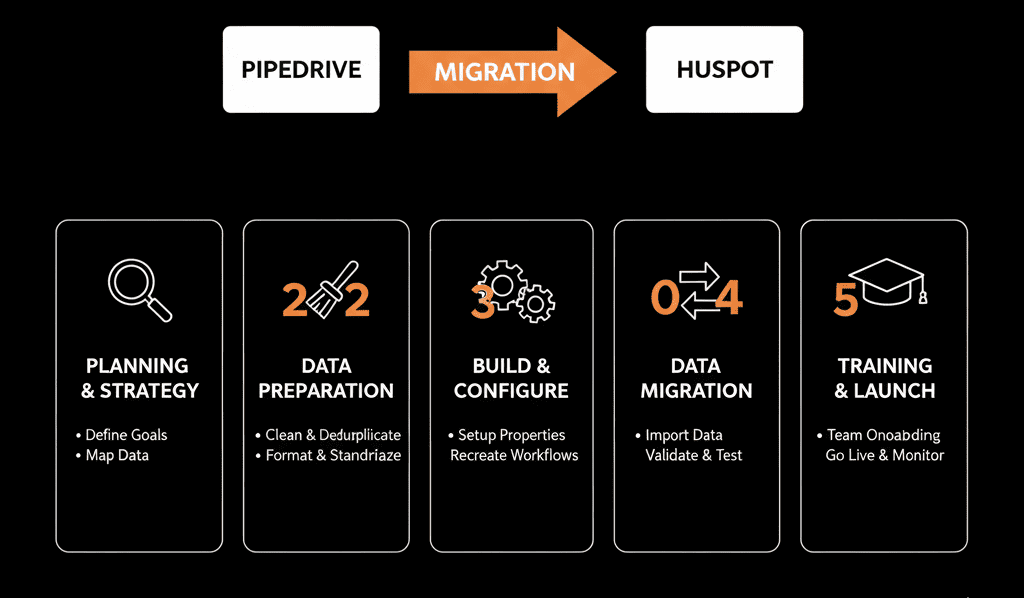
The problem is a fundamental mismatch: Pipedrive is "deal-centric," and HubSpot is "contact-centric." They are built on different philosophies.
A simple export/import will break your business logic. You cannot migrate your data without first migrating your strategy.
As a HubSpot Gold Partner who has run this play countless times, this is the 5-step playbook we use to de-risk the entire process and ensure nothing gets lost.
📋 The 5-Step Migration & ROI Playbook
Step 1: The "Configuration Plan" (Strategy Before Data)
You do not open Pipedrive. You open a "whiteboard" (or a flowcharting tool). Your first step is to forget your old system and design your new one. If you just copy/paste your Pipedrive setup, you're just moving the mess.
- Map Your Objects: How will you handle data that doesn't "match"?
- Pipedrive "People" → HubSpot Contacts (Easy)
- Pipedrive "Organizations" → HubSpot Companies (Easy)
- Pipedrive "Leads Inbox" → This is the first landmine. HubSpot has no "Leads Inbox." Does this data become new Contacts with a "Lead" lifecycle stage? Or do they get imported into a "Leads" custom pipeline? You must decide this first.
- Map Your Properties: Your Pipedrive "deal" properties are probably a mess. This is your one chance for a "data amnesty." Define the 5-10 mandatory properties for a deal to be created in HubSpot. Archive the other 50 "junk" fields.
- Design Your "Self-Driven" System: How will your new sales process, marketing handoff, and service handoff work? You are not buying a new CRM; you are building a new "Revenue Machine." This "Configuration Plan" is your blueprint.
Step 2: The "Data Cleanse" (Scrub Before You Move)
- Export Everything: Have a global admin in Pipedrive export all core objects (Deals, People, Organizations, Activities, Notes) as separate CSVs. This is your "backup" and your "working file."
- De-duplicate: Run a "de-dupe" in Pipedrive before you export. Then, run another one in your spreadsheets.
- Standardize & Format: Clean up your data. This is the "grunt work" that saves your migration.
- Change "USA," "United States," and "US" to one standard United States.
- Ensure all Email fields are properly formatted.
- Ensure all Company Name fields are consistent.
Step 3: The "Record ID" Map (The Secret to Not Losing History)
This is the most critical technical step. This is what prevents 10,000 "orphaned" records.
HubSpot's import tool can associate records if you give it a "key" to match them. You have to create this key yourself.
- Export Companies: When you export your Organizations file from Pipedrive, it will have a unique Pipedrive Organization ID for each company.
- Export Contacts: When you export your People file, it also has a column showing the Pipedrive Organization ID that the person belongs to.
- This ID: is your key! You'll rename this column in both spreadsheets to "Unique Company ID" (or something similar).
- Import Companies First: You will import your clean Companies file into HubSpot. HubSpot will create all the company records.
- Import Contacts Second: You will then import your Contacts file. During the HubSpot import process, you will tell the tool: "Map the 'Email' column to the Email property... AND map the 'Unique Company ID' column to the Company ID property."
- HubSpot will: now "look up" that ID, find the matching company record you just created, and automatically associate the contact with the correct company. You must repeat this process for Deals, matching them to both Contacts and Companies.
Step 4: The "Sandbox" Test Migration
- Import a Sample: Take 100 "safe" records (contacts, companies, and deals you know well).
- Run the 3-Step Import: Import your test Companies, then Contacts, then Deals, using your "Record ID" association map from Step 3.
- Audit the Record: Open a test Company record. Did its test Contacts associate properly? Did its test Deals associate? Are all the custom properties (Deal Stage, Value) correct?
- Check Activities: What about notes, calls, and emails? This is the second landmine. Most historical activities will not import via CSV. You'll see a "gap." This is when you realize you need an API-based tool or a partner to migrate your history.
Step 5: "Go Live" (Migration) & "Delta" (Adoption)
- "Go Live" Migration: You run the final, full migration using your tested playbook. This is typically done on a Friday night or over a weekend to minimize disruption.
- The "Delta" Plan: A migration isn't done when the data is moved. It's done when your team is using the new system. You need an Adoption & Onboarding Plan. How will you train your sales team on the new "self-driven" system you built? (Hint: It's not the same as your old Pipedrive process).
- The "Data Delta": What about the 20 new deals that came in during the migration? You need a "data delta" plan to manually move any records that were created in Pipedrive after your final export.
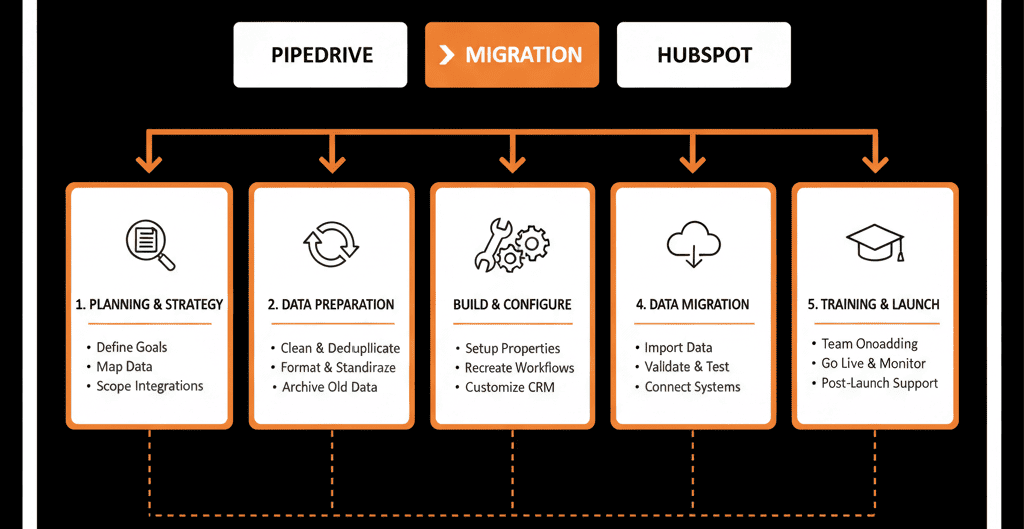
Don't Migrate a Mess. Migrate a Strategy.
As you can see, this "5-step playbook" is technical, complex, and full of "landmines" that can cost you your entire customer history.
That fear you have about "losing data"? It's what happens when you attempt a "lift and shift" without a plan. You don't just need a "data mover"; you need a "process architect."
This is precisely what our Free Migration & ROI Plan is for. This isn't a "demo." It is a strategic engagement where we become your migration architects. A HubSpot Gold Partner will run this 5-step playbook for you.
We will map your strategy, build your new "self-driven" system, and use our own API-based tools to move your data—including the notes, emails, and activities that CSVs leave behind.
Stop worrying about losing your old data. Get the plan to start using your new data.


