🌪️ The "Zoho Hangover": Untangling the 40-App Mess
You did what seemed logical. You bought the "all-in-one" dream of Zoho One: 40+ apps for one low price. You had Zoho CRM for sales, Zoho Desk for support, Zoho Projects for delivery, and Zoho Campaigns for marketing.
And now, two years later, you're drowning in "integration spaghetti" and data silos. You've realized you didn't buy an "all-in-one platform"; you bought a "40-part DIY kit."
- Your sales team in CRM has no idea what the service team in Desk is doing.
- Your project manager in Projects can't see the original deal terms from CRM.
- Your marketing team in Campaigns is sending "new customer" discounts to 10-year clients.
This is the Zoho Hangover. You're spending more time (and consulting money) trying to make your own apps talk to each other than you are serving your clients.
You've made the right decision: it's time to migrate to HubSpot's truly unified platform. But this creates a new, terrifying problem. A Zoho migration isn't one migration; it's five (or more).
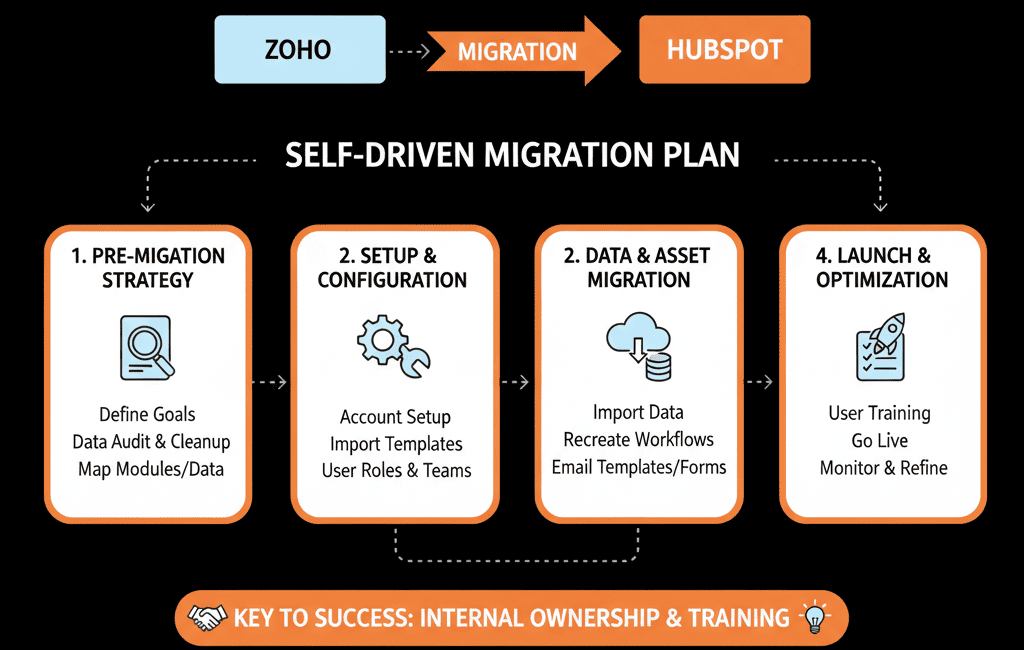
How do you untangle this mess without losing a decade of deal history, service tickets, and project notes?
A "lift and shift"—just dumping your CSVs into HubSpot—is a guaranteed catastrophe. You will create a "messy" portal that's even worse than your Zoho setup.
You need a "Self-Driven" Migration Plan. You must migrate your strategy first, then your data. This is the 5-phase playbook we execute as a HubSpot Gold Partner.
🔬 The 3 Landmines Specific to a Zoho Migration
- The "Siloed Database" Landmine: Zoho CRM, Desk, and Projects do not share one database. A "Company" in CRM is a different object than a "Company" in Desk. You cannot just "export your company list." You have to export all of them and manually consolidate them into a "single source of truth."
- The "Multi-Object" Landmine: You don't just have Contacts and Deals. You have Tickets (Desk), Projects (Projects), and Invoices (Books). A standard HubSpot migration plan doesn't account for this. You have to map each of these objects to their new home in HubSpot (e.g., Service Hub Tickets, HubSpot Projects).
- The "Zoho Flow" Landmine: You've spent years building custom Zoho Flow automations. None of this migrates. It's all "automation debt" that must be abandoned. You will have to rebuild your entire automation logic from scratch in HubSpot Workflows.
📋 The 5-Phase "Self-Driven" Migration Plan
Phase 1: The "Configuration & ROI Plan" (Strategy First)
- Conduct a "Silo Audit": Map out every Zoho app you use and the exact data that lives in it. (CRM has deals, Desk has tickets, Projects has tasks, etc.).
- Map to HubSpot Hubs: Now, map this to your new HubSpot home.
Zoho CRM -> HubSpot Sales Hub
Zoho Desk -> HubSpot Service Hub
Zoho Campaigns -> HubSpot Marketing Hub
Zoho Projects -> HubSpot Projects (in the Service/Operations Hub)
Zoho Analytics -> HubSpot Reporting - Define Your "Single Source of Truth": For the first time, you will have one client record. What are the 50 "Gold Standard" properties that will make up this record? Define your Lifecycle Stages, Deal Stages, and Ticket Pipelines before you move a single piece of data. This "Configuration Plan" is your blueprint.
Phase 2: The "Data Triage" (Export & Consolidate)
- Export Everything... Separately: Export all data from all apps. You will now have 5+ sets of CSVs (Contacts from CRM, Contacts from Desk, Companies, Deals, Tickets, Projects, Notes, etc.).
- Create Your "Master" Lists: This is the key. You must consolidate these files.
- Create one "Master Company" spreadsheet: Use a VLOOKUP (or other spreadsheet magic) to merge your CRM company list and your Desk company list.
- "De-duplicate": This "Master" list is your new "single source of truth" for all Companies.
- Repeat: This entire process for your "Master Contact" list.
Phase 3: The "Association Map" (The Technical Key)
- Export Deals: When you export your Deals from Zoho CRM, the file will have a Zoho Company ID and Zoho Contact ID.
- Export Tickets: When you export your Tickets from Zoho Desk, it will also have its own Zoho Company ID and Zoho Contact ID.
- Clean IDs: You must replace the old, siloed Zoho IDs with the new "Master IDs" you created in your "Master Company" spreadsheet.
- Import Deals: This "re-mapping" step ensures that when you import your Deals, they automatically "find" and "attach" to the correct Company record. Skipping this creates 10,000 "orphaned" deals.
Phase 4: The Phased Import (Sandbox First)
- Import Companies: Import your "Master Company" list first. This creates the "anchor" records.
- Import Contacts: Import your "Master Contact" list, using your ID map to associate them with the Companies you just imported.
- Import Deals: Import your clean Deals file, using your map to associate them with both Companies and Contacts.
- Import Tickets: Import your clean Tickets file, mapping them to Companies and Contacts.
- Import Projects & Notes: Finally, import your "activity" data.
- Audit Sandbox: Open a Company record. Do its Contacts, Deals, and Tickets all appear on the timeline? If yes, you are ready to repeat this process on your "Go Live" date.
Phase 5: The "Workflow Rebuild" (Go Live & Adopt)
- Go Live: You run the final migration (ideally over a weekend).
- Workflow Rebuild: Your Zoho Flow automations are gone. Now is the time to build your new "self-driven" system in HubSpot Workflows.
- Build "Sold-to-Delivery" Handoff: Deal = "Closed Won" -> Create a Project from a template -> Create tasks for the delivery team.
- Build "Service-to-Sales" Alert: Ticket = "High Priority" -> Notify the "Account Owner."
- Train Your Team: You are not training them on "HubSpot." You are training them on your new "self-driven" process that is built inside HubSpot.
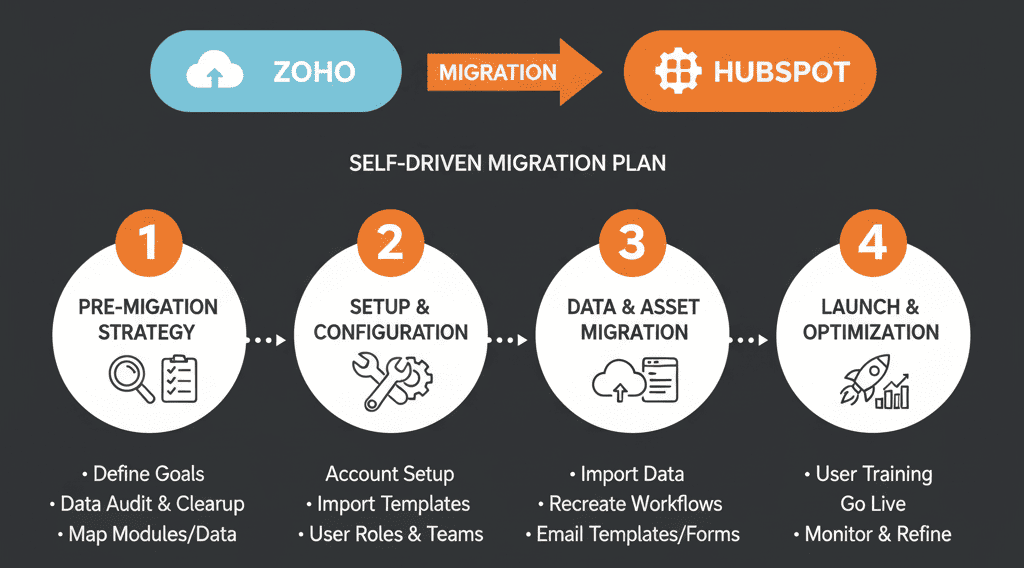
Don't Just Move a "Mess." Build a "Machine."
If you read this 5-phase plan and felt overwhelmed, that's a normal reaction. This is a complex, high-stakes architectural project. It's not a "data import."
The "landmines" in a Zoho migration are real—especially the "Data Triage" and "Association Map" phases. This is where 99% of DIY migrations fail, leaving you with a polluted, broken portal from Day 1.
This 5-phase "Self-Driven" Migration Plan is the process we use for our Free Migration & ROI Plan.
This isn't a "sales call." It is a strategic engagement where a HubSpot Gold Partner becomes your migration architect. We untangle the 40-app "Zoho Hangover" for you. We map your strategy, build your "Configuration Plan," and use our own API-based tools to migrate all of your data (Contacts, Deals, Tickets, Projects, and History) safely.
Stop trying to patch a "DIY kit." Get the plan to build a "self-driven" revenue machine.