CRE Teams Don’t Just Sell Deals—They Manage Relationships and Capital
Commercial real estate is messy in normal CRMs:
You’re juggling:
- Properties and listings.
- Tenants, buyers, and sellers.
- Investors and LPs.
Deals are complex and long-cycle.
A lot of the value is in the relationships and pipeline visibility.
HubSpot can be your “front office OS” for CRE if you structure it around:
- Opportunities (deals).
- Investors/capital relationships.
- Owners/tenants/buyers.
Here’s a practical way to set it up.

Step 1 – Decide Your CRE Motions
First, be clear what you do:
- Investment sales (acquisitions/dispositions).
- Leasing (landlord/tenant rep).
- Capital raising (for funds/SPVs).
- Property/asset management.
HubSpot is best for:
- Sourcing and tracking investment and leasing opportunities.
- Managing investor and capital partner relationships.
- Coordinating BD and deal teams.
You’ll adjust the model slightly per motion, but the backbone remains.
Step 2 – Use Companies and Contacts to Represent Market Players
Companies
- Owners and landlords.
- Tenants (corporates).
- Investors (funds, family offices, REITs).
- Brokers and partners.
Key fields:
- Company type (Owner, Tenant, Investor, Lender, Broker, etc.).
- Segment (Institutional, Private, Family office, SME).
- Region / Market.
- Asset focus (Office, Industrial, Retail, Multifamily, Mixed-use, etc.).
Contacts
Roles:
- Investment director, Asset manager, CFO, CEO, Tenant rep, etc.
Fields:
- Decision-maker / Influencer flag.
- Investor type (for investors: LP, GP, Co-investor).
- Preferences (ticket size, asset type, geographies).
This gives you a clean network map.
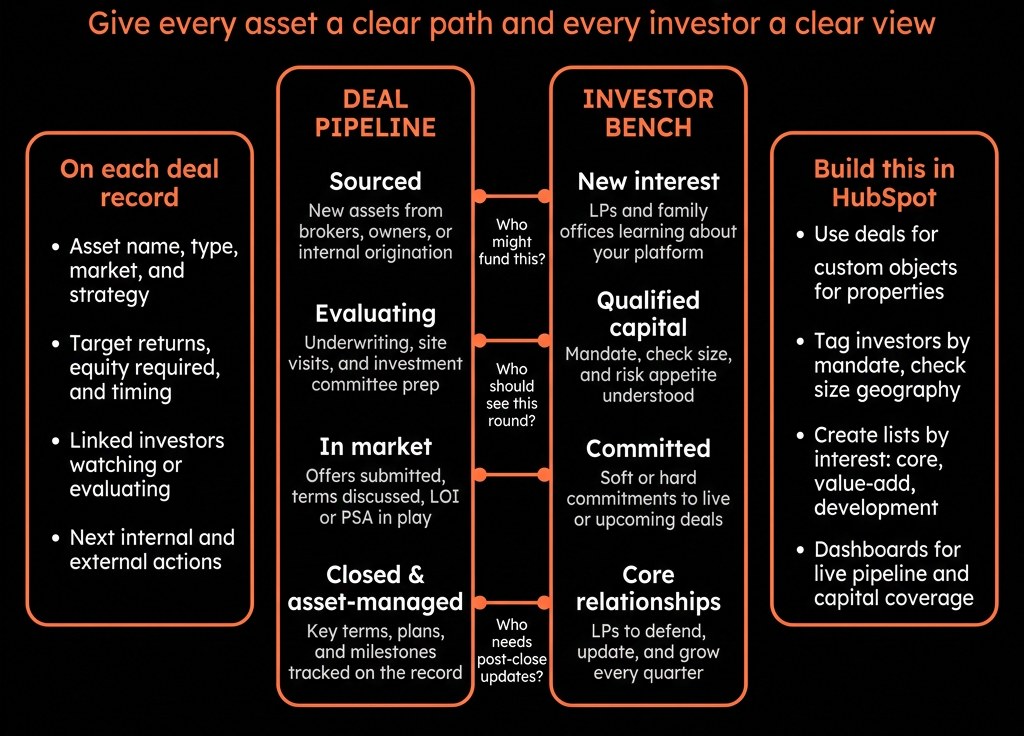
Step 3 – Treat Each CRE Transaction as a Deal
Every acquisition/disposition/leasing assignment becomes a Deal.
On Deals:
- Deal type (Acquisition, Disposition, Landlord rep leasing, Tenant rep, Capital raise).
- Property name / asset ID (text or association to a “Property” custom object if you go advanced).
- Asset type (Office, Industrial, etc.).
- Market / Submarket.
- Deal size (asking price, expected sale price, annual rent, etc.).
- Commission / fee band (optional).
- Owner/Landlord Company and relevant Tenant/Buyer companies as associated records.
Pipeline stages vary by motion, e.g., for investment sales:
- Sourcing / Off-market lead.
- Underwriting / Initial analysis.
- Mandate / Listing secured.
- Marketing.
- Offers received.
- Best & final / LOI.
- Under contract / DD.
- Closed Won / Closed Lost.
This gives you visibility across your deal pipeline.
Step 4 – Optionally Create a Property Custom Object
If you do a lot of repeat work around assets or manage portfolios:
Create a custom object: Property with:
- Address and basic details.
- Asset type, size, year built.
- Current owner (Company association).
- Occupancy, key tenants.
Associate:
- Deals ↔ Properties.
- Companies ↔ Properties (Owner/Tenant).
Then:
- You can view all Deals and Contacts linked to each asset.
- Asset managers and deal teams get a central view.
If you’re just starting, keep property as fields on the Deal and graduate to custom objects later.
Step 5 – Model Investors and Capital Sources
For capital raising / investment sales, investors need their own lens.
On Investor Companies:
- Investor type (Fund, REIT, Family office, HNWI, Institutional).
- Ticket size range.
- Target IRR / yield preferences (bands, not sensitive detail).
- Preferred asset types & markets.
- Dry powder / capacity (bands).
On Investor Contacts:
- Role (Investment director, CIO, acquisitions lead).
- Relationship owner (internal).
This positions HubSpot as your investor CRM.
Step 6 – Track Investor Interest and Matching to Deals
For each Deal:
- Associate interested/approached Investor Companies and Contacts.
Use a simple field: Investor interest stage (Not contacted / Contacted / NDA signed / In DD / Bid submitted / Lost / Won).
Use Playbooks for investor calls:
- Capture:
- Fit vs mandate.
- Concerns.
- Target return and hold period.
- Status (active/passive).
This forms a history of who saw what and how they responded, for regulatory and relationship context.
Step 7 – Build Pipelines and Views for Different Teams
You may need:
- Acquisitions/Dispositions pipeline – for brokers and investment teams.
- Leasing pipeline – for landlord/tenant reps.
- Capital raise pipeline – for fund/SPV raises.
Create saved views:
- “My active deals – Investment sales”.
- “My deals in DD / Under contract”.
- “Capital raise – investors in DD/Bids submitted”.
- “Key investor relationships – last contacted > 60 days”.
This keeps day-to-day work simple for producers and deal teams.
Step 8 – Use HubSpot for BD and Marketing to Owners and Investors
HubSpot can power:
Targeted lists:
- Owners in a given market/asset type.
- Investors with specific criteria.
Email sequences or campaigns:
- Market updates.
- New offerings/deals.
- Thought leadership.
Track:
- Who opens/clicks.
- Who requests more info.
- Who attends webinars/site tours.
Feed this back into:
- Lead scoring for investors/owners.
- PQL-like signals (“engaged investor”, “hot owner”).
Step 9 – Reporting: Pipeline, Fees, and Relationship Health
Dashboards to build:
Deal Pipeline & Fees
- Active Deals by stage and type (Acquisition, Disposition, Leasing, Capital raise).
- Expected fees/commissions by close date.
- Win rate and cycle length by asset type and market.
Investor & Owner Coverage
- Number of active investors by type and mandate.
- Touchpoints per quarter (meetings, calls, email engagement).
- Upcoming investor/owner meetings.
Source & Performance
- Deals sourced by channel (Inbound, Cold, Repeat client, Co-broker).
- Repeat business from key owners/investors.
This gives leadership a full view of deal and capital flows.
Step 10 – Keep Specialized Systems for Transactions, Use HubSpot for GTM
You likely have:
- Data rooms (Intralinks, DealRoom, etc.).
- Financial models (Excel, ARGUS).
- Legal / closing tools.
Don’t cram all that into HubSpot.
Instead:
- Store links to data rooms/models/contracts in Deal fields.
- Keep notes and relationship context in HubSpot.
Use HubSpot for:
- “Who’s involved?”
- “What stage are we at?”
- “What’s our fee outlook?”
- “Who are our best clients and investors?”
HubSpot is the relationship & pipeline OS, not the transaction back-office.
Want Help Turning HubSpot Into a Real CER / Investment CRM?
If your commercial real estate team is still running deals and investor relationships via spreadsheets and inboxes, HubSpot can centralize this without fighting your existing tools.
Through our HubSpot Implementation Blueprints, Portal Health Check, and Managed RevOps Retainer, we:
- Design a CRE-specific data model (owners, tenants, investors, properties, deals).
- Configure pipelines for acquisitions, dispositions, leasing, and capital raises.
- Implement investor and owner tracking, plus BD/marketing flows.
- Build dashboards so you can see pipeline, relationships, and fee outlook at a glance.