Why Consulting Pipelines Break Inside Generic CRMs
Consultants don’t sell “units”.
We sell trust, outcomes, and scoped engagements.
Common failure modes:
- Discovery notes live in random docs and never shape pricing.
- Proposals are rushed, inconsistent, and hard to track.
- Scope creep starts before the ink is dry.
We design HubSpot so your scoping, pricing, and proposals move through a pipeline that reflects how you actually win work.
Step 1 – Define Your Consulting Deal Types and Revenue Motions
First, separate how you make money:
- One-off projects (audits, implementations, transformations).
- Recurring retainers (advisory, managed services, RevOps).
- Productized services (fixed-fee, fixed-scope offers).
In HubSpot Deals, standardize:
- Engagement type (Audit, Implementation, Retainer, Workshop, Advisory).
- Commercial motion (New project, New retainer, Expansion, Renewal).
- Commercial model (Fixed fee, Time & materials, Value-based, Hybrid).
- Estimated delivery effort (days/hours).
- Estimated start date and Go-live date.
This lets you segment deals and later compare win rate and profitability by engagement type.
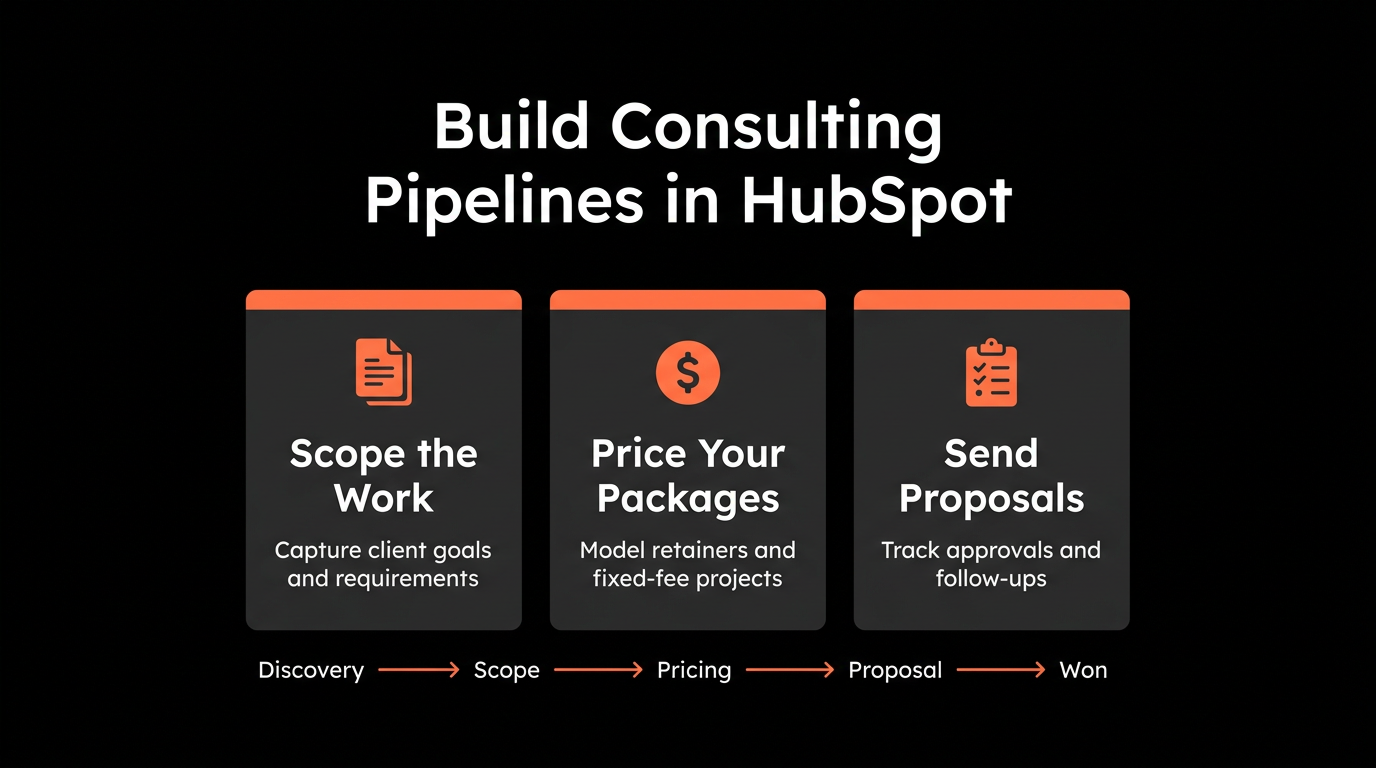
Step 2 – Build a Scoping-First Sales Pipeline
We don’t jump from “Interested” to “Proposal Sent”.
We layer scoping in the middle.
Example Consulting Pipeline:
- Discovery Scheduled
- Discovery Completed – Qualifying
- Scoping in Progress
- Scope Agreed / Awaiting Proposal
- Proposal Sent
- Verbal Yes / Legal & Procurement
- Closed Won
- Closed Lost
At each stage, define required fields and exit criteria:
After Discovery Completed:
- Primary problem statement.
- Budget fit (Yes/No/Unknown).
- Timeline urgency (Now / This quarter / Later).
- Buying committee, Economic buyer identified.
After Scoping in Progress:
- Engagement type, Commercial model.
- Estimated delivery effort, Target fee range.
- Risks and assumptions captured.
After Scope Agreed:
- Draft SOW sections completed or equivalent checklist.
- Decision on phased vs big-bang engagement.
HubSpot’s required properties per stage feature forces your team to think before clicking “next”.
Step 3 – Use Playbooks to Standardize Discovery and Scoping
Playbooks are where you turn “consulting art” into repeatable IP.
Discovery Call Playbook
Attach a Playbook to Contacts/Companies/Deals:
- Business context: current situation, initiatives, KPIs.
- Pain and impact: what happens if nothing changes.
- Constraints: budget, team capacity, tech stack.
- Decision process: who, how, and by when.
- Next steps: mutual action plan basics.
Map answers into properties:
- Primary pain.
- Desired outcome.
- Budget confidence (High/Medium/Low).
- Buying temperature.
Scoping Playbook
Used at “Scoping in Progress” stage:
- Break work into workstreams (e.g., “CRM cleanup”, “Automation build”, “Training”).
For each workstream:
- Objectives, key activities, assumptions, risks, and estimated effort.
Capture options:
- Option A: Minimum viable scope.
- Option B: Recommended.
- Option C: Premium / transformation.
Store totals:
- Estimated days (min), Estimated days (max).
- Recommended price.
- Floor price (for discount guardrails).
Now every proposal is anchored in structured scoping, not guesswork.
Step 4 – Translate Scoping into Pricing Rules
Once scoping is structured, you can build simple pricing logic in HubSpot properties and internal guidelines.
Example approach:
- Each workstream has a reference day rate band:
- Strategy: higher rate.
- Implementation: base rate.
- Training: sometimes lower rate.
Multiply estimated days by rates to form:
- Cost estimate (internal).
- Target margin percentage.
- List price, Floor price, Stretch price.
You do not have to calculate all of this in HubSpot automatically.
Instead, you:
- Use Playbooks and properties to store key numbers.
Use internal reports to compare:
- Actual deal amount vs Recommended price vs Floor price.
- Discount level by deal owner, segment, and service.
Over time, this shows where your team over-discounts and where certain scopes are underpriced.
Step 5 – Configure Proposal Stages and Document Generation
You can manage proposals in one of two ways:
- Use HubSpot Quotes (if invoices/use-cases are simple).
- Use an external proposal tool, but still track status via HubSpot fields.
At Scope Agreed / Awaiting Proposal:
- Create a draft proposal record (or quote) tied to the Deal.
Auto-populate:
- Engagement type, Deal amount, Term length.
- Optionally, line items for main workstreams or packages.
We recommend:
- A Proposal status property (Draft, Internal review, Sent, Revised, Signed, Lost).
Timestamps:
- Proposal sent date.
- Proposal signed date.
Workflow examples:
When Proposal status = Sent:
- Task for owner: “Follow up 2 business days after sending”.
- Optional email template for a light nudge.
If Proposal status = Sent AND no change in 14 days:
- Create a task: “Re-engage proposal – ask if priorities changed”.
- Consider moving Deal to “Stalled” sub-stage for reporting.
This lets you track speed-to-proposal and proposal aging, which are critical for consultants.
Step 6 – Deal Properties for Profitability and Capacity Planning
Consultants care about profit and delivery capacity as much as revenue.
On each Deal, track:
- Estimated delivery days.
- Delivery ownership (which team, pod, or lead consultant).
- Delivery start month and Delivery end month.
- Optional internal fields: Estimated cost, Planned margin.
Use reports:
- Deals by Delivery start month + Estimated days to see likely utilization.
- Margin by engagement type to see which offers are most profitable.
You can keep detailed resourcing in a PSA tool or spreadsheet.
HubSpot gives you a forward-looking sales-to-capacity view so you avoid overselling.
Step 7 – Separate Pipelines for Projects vs Retainers (If Needed)
As your consulting practice grows, split motions:
- New Business – Projects
- One-off, fixed-scope work.
- New Business – Retainers
- Ongoing advisory or managed services.
- Expansion & Renewals
- Add-on phases, upsells, and renewals.
For Retainers, add:
- MRR / Retainer value.
- Contract term and Renewal date.
- Renewal likelihood.
For Projects, emphasize:
- Total project value.
- Duration (months).
- Phase number (Phase 1, Phase 2, etc).
This separation helps you see:
- Pipeline mix between recurring and non-recurring revenue.
- Renewal and expansion motion health.
Step 8 – Build Consultant-Friendly Dashboards
Dashboards we typically set up for consulting teams:
Proposal and Scoping Performance
- Deals by stage with filters for Engagement type.
- Average days from Discovery → Proposal Sent.
- Win rate by engagement type and deal owner.
Pricing and Discounting
- Deal amount vs Recommended price.
- Average discount by service line and segment.
- Margin bands (if you track cost).
Capacity and Delivery Outlook
- Deals by Delivery start month and Estimated days.
- Total days sold vs target capacity per team.
Offer Performance
- Revenue and win rate by Engagement type and package.
- Conversion from “Blueprint/Audit” to “Implementation / Retainer”.
These insights let you refine packages, pricing, and which offers you promote.
Step 9 – Phase the Rollout for a Boutique Consulting Firm
We normally roll this out in three waves:
Phase 1 – Pipeline and Playbooks
- Clean pipeline stages.
- Discovery and Scoping Playbooks.
- Basic deal properties: engagement type, estimated days, commercial model.
Phase 2 – Proposal Process and Guardrails
- Proposal status field + workflows.
- Required fields before leaving Scoping.
- Simple “recommended vs floor price” guidance.
Phase 3 – Profitability and Capacity
- Delivery timing and estimated days on deals.
- Margin tracking and discount reports.
- Dashboards for leadership and practice leads.
This keeps change manageable and quickly shows value to senior partners.
Want Help Designing a Consulting-Ready HubSpot Pipeline?
Our team works with consulting and professional services firms to turn unstructured discovery notes and ad-hoc proposals into a repeatable, profitable sales engine in HubSpot.
Through our HubSpot Implementation Blueprints, Free HubSpot Health Check, and Managed RevOps Retainers, we:
- Design consulting-specific pipelines for projects, retainers, and renewals.
- Build Discovery and Scoping Playbooks that feed pricing and proposals.
- Implement proposal tracking, follow-ups, and discount guardrails.
- Create dashboards that show win rate, pricing discipline, and capacity outlook.