The Core Challenge for Real Estate Developers
Real estate developers sit in the middle of three moving parts.
- Investors.
- Projects and units.
We see the same pattern:
- Investor conversations live in email and WhatsApp.
- Project inventory is trapped in spreadsheets or a project system.
- Sales teams use whatever CRM they like—or none.
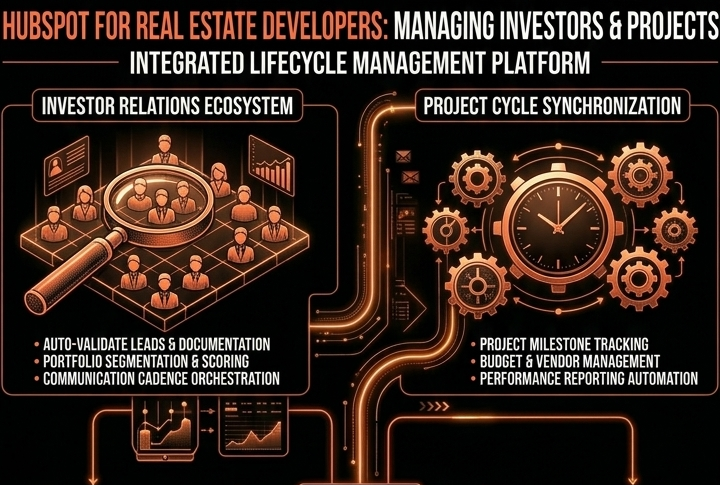
Our goal with HubSpot is simple. We design a structure where investors, projects, units, and deals live in one system, so you can see:
- How much capital is raised vs target.
- Which projects and units are selling.
- Which investors and channels drive real revenue.
The Right Data Model: Investors, Projects, Units, Deals
You cannot manage developers on a flat contact list.
You need a clean data model.
We typically recommend:
Contacts – individual people
- Investors, agents, buyers, JV partners.
- Key fields: Contact type (Investor, Buyer, Agent), Risk profile, Preferred asset class, Citizenship, Accreditation status (if relevant).
Companies – investor entities and organizations
- SPVs, funds, family offices, agencies, corporate buyers.
- Key fields: Investor tier, AUM band, Total committed capital, Total invested capital.
Custom Object: Projects
- Each development: “Project A – Downtown Towers”.
- Key fields: Project status (Planning, Pre-launch, Launch, Under construction, Completed), Target raise, Target sales revenue, Country, City, Delivery date.
Custom Object: Units (or Lots)
- Inventory under a project: individual apartments, villas, plots, commercial units.
- Key fields: Unit ID, Unit type (Apartment, Villa, Retail, Office, Plot), Bedroom count, Floor, Size (sqft), List price, Current status (Available, Reserved, Sold, Cancelled, On hold).
Deals – capital commitments and unit sales
- Pipeline 1: Capital Raising (investor commitments per project/SPV).
- Pipeline 2: Unit Sales (buyers purchasing specific units).
Associations:
- Contact ↔ Company (person to investor entity).
- Company/Contact ↔ Deals.
- Deals ↔ Projects and Units.
- Projects ↔ Units (one-to-many).
This gives you a single view:
- For an investor: what they committed, what they actually funded, and which projects.
- For a project: capital raised, units reserved/sold, and remaining inventory.
Tracking Capital Raising and Investor Commitments
We split capital raising from unit sales.
It keeps investor relations cleaner and reporting clearer.
Capital Raising Pipeline
Example stages:
- Targeted Investor Identified
- Initial Discussion
- Interest Indicated
- Term Sheet Shared
- Soft Commit
- Legal / DD
- Funded
- Lost / No Go
Key deal properties:
- Pipeline = Capital Raising.
- Deal type = New Investment / Follow-on.
- Fund target amount.
- Soft commit amount.
- Final committed amount.
- Funded amount.
- Investment vehicle (SPV, Fund, Direct).
- Associated project(s).
Workflows you’ll want:
- Auto-create a Capital Raising Deal when Investor opportunity = Yes and a project is in Pre-launch/Launch.
- Auto-update Total committed capital on the investor Company when Deals move to Funded.
- Create tasks for Investor Relations when a soft commitment is older than X days without legal documents logged.
This lets your team see, per project and across the portfolio, where capital is stuck.
Managing Projects, Inventory, and Reservations
HubSpot is not a construction ERP.
We design it as the commercial brain above your finance and project tools.
Projects
Use a Project custom object to hold:
- Milestones: Launch date, Sales open date, Handover date.
- Targets: Target units, Target revenue, Target IRR (if you want to track it qualitatively).
- Status summary: Sales progress %, Capital raised %.
You can:
- Use workflows to update Sales progress % based on Units with related Closed Won Deals.
- Use properties to flag Priority project so sales and marketing know where to push.
Units and Reservations
For Units:
- Each Unit record represents one sellable asset.
- Status is updated based on deals and tasks.
We recommend:
A Unit Reservation Deal or a flag on Unit:
- Trigger: when a buyer is interested and you confirm a hold fee or reservation.
- Actions: set Unit Status = Reserved, set Reservation expiry date.
Workflow to auto-release reservations:
- When Reservation expiry date is today and no Closed Won Deal exists → set Unit Status = Available, notify the sales rep, and create a task.
This prevents invisible holds in spreadsheets and reduces double-selling risk.
Investor Communication, Updates, and Tasks
Investor trust depends on proactive, consistent communication.
HubSpot helps you standardize it.
Structured Playbooks for Investor Meetings
Use HubSpot Playbooks on Contacts/Companies:
- “Investor Intro Call”
- “Quarterly Investor Update”
- “Capital Raising Meeting – Term Sheet Review”
Within each:
- Capture risk appetite, time horizon, preferences.
- Document project-specific concerns.
- Log next steps and follow-up commitments.
This standardizes calls across your Investor Relations team and feeds data back into properties.
Investor Communication Workflows
Examples:
Quarterly Investor Update Workflow
- Trigger: Investor Company with Active investor = Yes.
- Actions:
- Enroll key Contacts into a Quarterly Update email.
- Personalize sections by Project associations (summary of construction status, sales velocity, major milestones).
- Create tasks for IR to follow up with top-tier investors manually.
Capital Call Reminder Workflow (if you run calls)
- Trigger: Capital Raising Deal where Capital call date is in X days.
- Actions:
- Task: “Send capital call notice” to IR.
- Optional email (transactional if appropriate) referencing the project and amount due.
- Follow-up task if no payment is logged after Y days.
Key Milestone Announcements
- When a Project hits “Under Construction” or “Handover Started”, trigger segmented investor communication.
All of this is governed by your consent and regulatory requirements.
Reporting: From Unit Sales to Investor Dashboards
Once the data model is right, reporting becomes straightforward.
Dashboards we typically design:
Capital Raising Dashboard
- Capital Raising Deals by stage and project.
- Committed vs Funded by investor type and region.
- Pipeline value by expected close date for upcoming rounds.
Project Sales Performance
- Unit Sales Deals by Project and Unit type.
- Units sold / reserved / available by Project.
- Average selling price vs list price by Unit type.
Investor Performance
- Total committed capital by investor tier.
- Repeat investors: count and capital raised from existing vs new investors.
- Top 20 investors by invested capital and number of projects.
Channel and Agent Performance
- For developer sales via brokers:
- Deals by Channel and Agent company.
- Commission forecasts.
Result: leadership can see which projects, investors, and partners drive real performance across the portfolio.
Governance, Permissions, and Compliance Basics
Real estate development has several sensitivities:
- Investor identities and allocations.
- Pricing and discounting details for units.
- Documents like term sheets and contracts.
We typically:
- Use Teams and permissions so investor data is restricted to IR leadership and relevant stakeholders.
- Lock down specific properties like Final committed amount, Discount %, and Net selling price to certain roles.
- Use field history tracking for key financial fields where your jurisdiction expects auditability.
Document what lives in HubSpot vs your legal/finance systems, so it’s clear HubSpot is the commercial and relationship source of truth—not the legal ledger.
Phased Rollout for a Developer Using HubSpot
We almost never advise turning everything on at once.
We phase the build.
Phase 1 – Foundation
- Clean structure for Contacts and Companies with Contact type and Investor tier.
- One Capital Raising pipeline.
- Basic Projects custom object (no Units yet).
- Simple dashboards: Capital raising by project, top investors, and current pipeline.
Phase 2 – Inventory and Sales
- Introduce Units custom object and Unit Sales pipeline.
- Build reservation rules and workflows (reserve / release).
- Add Playbooks for investor and buyer calls.
- Add dashboards for project inventory and unit performance.
Phase 3 – Investor Ops and Advanced Reporting
- Quarterly investor update workflows by project.
- Capital call reminders and post-funding communication flows.
- Investor performance dashboards and cohort analysis (who keeps reinvesting).
- Integration with your finance or project systems for baseline numbers.
Every phase is designed to stand alone and build trust with your team before the next layer.
How Our Team Can Help
Our team works with developers and investment-backed real estate businesses to design HubSpot as the commercial and investor OS—not just a contact list.
Through our HubSpot Implementation Blueprints, Free HubSpot Health Check, and Managed RevOps Retainers, we:
- Design a real-estate–specific data model for investors, projects, units, and deals.
- Build capital raising and unit sales pipelines that match how your teams actually work.
- Implement reservations, follow-ups, and investor communication workflows.
- Configure dashboards for leadership, investor relations, and sales teams.