The Challenge: Trials in Product, Nurture in HubSpot
B2B SaaS teams usually split reality:
- Product usage lives in the app.
- Marketing and sales live in HubSpot.
Without a bridge, your team can’t answer:
- Which trials are actually using the product.
- Which freemium accounts are ready for sales.
- Which in-app behaviors predict paid upgrades.
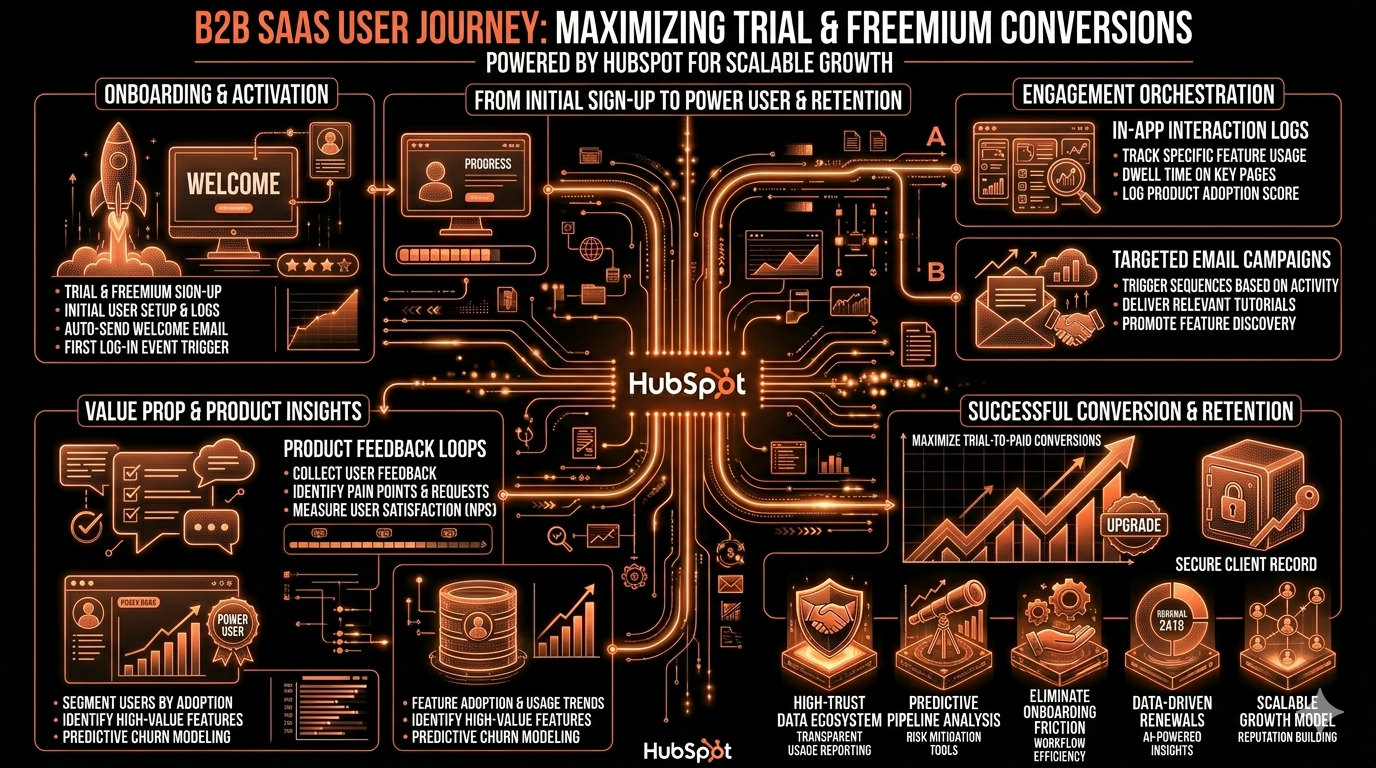
We design HubSpot so product signals become journeys, scores, and sales motions.
Step 1 – Decide Your Core Data Model for Trials/Freemium
First, decide what a “customer” means in your product:
- User-level: individual seats trial the product.
- Account/workspace-level: teams sign up and invite others.
A simple starting model:
Contacts
- Fields: Signup source (Free trial, Freemium, Sales-led), Plan type (Free, Trial, Pro, Enterprise), Trial start date, Trial end date, Primary use case.
Companies (for account-based SaaS)
- Fields: Account plan type, Seats, MRR, CS segment (High-touch, Tech-touch), Primary persona (IC, Manager, Exec).
Deals
- Pipeline 1: New Business for upgrading free → paid.
- Optional: Expansion for later seat/plan growth.
Product object / custom object (Workspace / Account / Subscription)
- Fields: Workspace ID, Current plan, Active users count, Key feature adopted (Yes/No), Last active date.
Associations:
- Contact ↔ Company.
- Contact ↔ Workspace/Subscription.
- Company ↔ Workspace/Subscription.
- Deals ↔ Company + Workspace.
This is enough to power nurture, scoring, and sales plays.
Step 2 – Bring Product Usage Signals Into HubSpot
You do not need every event.
You need a small, opinionated set.
We usually sync:
- Signed up date.
- Trial start / Trial end.
- Last active date.
Key activation events as boolean + counters:
- Invited teammate (count).
- Created core object (e.g., project, campaign, board).
- Hit value moment (e.g., sent first campaign, closed first ticket).
- Feature flags (used Integrations, Automation, Reporting, etc.).
You can do this via:
- Native product → HubSpot integration.
- Webhooks + Operations Hub custom code.
- iPaaS (e.g., Zapier/Make) emitting only the curated fields.
The goal: a compact “Product Usage Profile” on each Workspace/Subscription, and rolled up to Company and primary Contact.
Step 3 – Lifecycle and Status for Trials and Freemium
Avoid throwing all trials into “Lead” forever.
We recommend:
Lifecycle stage:
- Subscriber → new signups.
- Lead → marketing-qualified freemium who engaged.
- MQL → behaviorally warm (scored) trials.
- SQL → sales-accepted trials/accounts under active pursuit.
- Opportunity → active Deal for upgrade.
- Customer → paid.
Status fields:
- Trial status (Active, Expired, Converted, No-show).
- Freemium status (New, Engaged, Dormant, Churn risk).
- Product fit (Low / Medium / High) once sales talks to them.
Workflows:
When someone starts a trial:
- Set Lifecycle stage = Lead if new.
- Set Trial status = Active, populate dates.
When Trial end date passes and no paid plan:
- Set Trial status = Expired.
- Optionally downgrade Plan type to Freemium.
This keeps your nurture and reporting clean.
Step 4 – Build a Simple, Behavior-Led Lead Scoring Model
We use two parallel ideas:
- Fit score: are they the right ICP.
- Intent score: are they behaving like an upgrader.
Fit examples:
- +20: Company size in your target band (e.g., 11–250).
- +15: Email domain is not free (@company.com).
- +20: Job title contains Founder, VP, Director, Head of.
- -20: Industry in “No-go” list.
Intent examples (tied to product):
- +15: Invited teammate ≥ 1.
- +20: Hit core value moment.
- +10: Active users count ≥ 3.
- +10: Visited pricing page ≥2 in last 7 days.
- +15: Clicked in-app “Upgrade” but did not complete.
- -15: Last active date > 14 days.
Workflows:
- When Fit + Intent score > threshold (say 60–80):
- Set Lifecycle stage = MQL.
- Set Lead status = Product-qualified.
- Create a Deal or Task for sales, depending on your model.
This is how you move from raw signups to product-qualified leads (PQLs) in HubSpot.
Step 5 – Nurture Journeys for Trials and Freemium
We separate three plays:
- Onboarding sequence (Day 0–7)
- Mid-trial progression (Day 7–Trial end)
- Post-trial and freemium nurture (after Trial end)
1) Trial Onboarding
Trigger: Trial status = Active AND Day 0.
Email steps:
- Day 0: Welcome + “do this first” (one core action).
- Day 1–2: Feature spotlight based on persona/use case.
- Day 3–4: Social proof and common use cases.
- Day 5–7: Setup checklist, integration prompts, “book a setup call” CTA for high-value segments.
Personalization:
- If Job title is IC → product tips.
- If Job title is exec → business outcomes and ROI angle.
2) Mid-Trial and Pre-Expiry
Trigger: Trial end date in 7 days, still not paid.
Branches:
High-usage trials (met key activation criteria):
- Light-touch: reminders plus an option to talk to sales.
- Sales task: “Reach out to active trial – discuss value and pricing”.
Low-usage trials:
- Education-led: guides, checklists, pattern examples.
- “Extend trial?” CTA if they didn’t get to value.
Emails:
- “Trial ending soon – here’s what you’ll lose.”
- “Do you want help getting set up?” with direct calendar link.
3) Post-Trial and Freemium Nurture
For users who do not convert:
Move them to a Freemium nurture program:
- Monthly product updates relevant to their use case.
- Occasional “power user tips” and webinars.
- Limited-time promos when you launch features aligned to their behavior.
Guardrails:
- Respect subscription types.
- Reduce frequency if Last active date is extremely old to avoid spam.
Step 6 – Sales Plays on Top of Product Qualified Leads
Sales should not call every signup.
They should focus on high-intent trials and accounts.
We typically build:
View/queue for PQLs:
- Filters: Lifecycle stage = MQL, Lead status = Product-qualified, Open deal is none or only trial opp, Job title includes decision-maker keywords.
Sequences for PQL outreach:
- Email 1: “Saw you invited X teammates / did Y action – what are you trying to solve?”
- Email 2: Case study tied to their use case + value.
- Email 3: Short Loom walkthrough on how similar teams use the product.
- Calls and LinkedIn steps layered in.
Playbooks for PQL calls:
- Discovery questions about workflow, team size, and current tools.
- Space to capture “timeline for rollout” and “success criteria”.
- Map answers into MEDDIC/BANT fields for your deals.
Workflows:
- When a PQL hits threshold and is from a Scaling Founder / RevOps persona (your core buyer):
- Auto-create an Upgrade Opportunity Deal in the New Business pipeline.
- Assign to AE or PLG specialist.
- Add to a dedicated PQL sequence.
Step 7 – Reporting: What’s Working Across Trials and Freemium
Key dashboards we usually implement:
Signup and Trial Funnel
- Signups by source, persona, and plan.
- % of signups reaching key activation events.
- Trial → PQL → Opportunity → Customer conversion.
Product-Qualified Pipeline
- Count and amount of PQL accounts.
- Time from PQL to opportunity and to Closed Won.
- Win rate by use case, segment, and channel.
Freemium to Paid
- Freemium accounts by activity band (Engaged vs Dormant).
- Upgrades originating from freemium vs direct trials.
- Revenue from freemium over time.
Cohort and Behavior Insights
- Retention and expansion by activation depth.
- Features used at signup that correlate with higher conversion.
These dashboards help growth, product, and sales align.
Step 8 – Phase Your Implementation to Avoid Noise
We usually roll this out in three phases:
Phase 1 – Instrumentation
- Bring in core product fields (Trial dates, Last active, 2–3 key events).
- Set lifecycle and trial/freemium statuses.
- Basic onboarding and pre-expiry emails.
Phase 2 – PQL and Sales Plays
- Add fit + intent scoring.
- Build PQL queues, sequences, and Playbooks.
- Align sales around when to engage and how.
Phase 3 – Expansion and Advanced Reporting
- More nuanced behavioral flags and segmentation.
- Expansion pipeline for seat/plan upgrades.
- Cohort dashboards and experiment tracking.
Each phase is manageable and shows ROI without overwhelming your team.
Want Help Turning Trials into a Predictable Revenue Engine?
Our team designs HubSpot as the GTM brain on top of your SaaS product—so trials, freemium, and product signals drive focused sales motions, not noise.
Through our HubSpot Implementation Blueprints, Free HubSpot Health Check, and Managed RevOps Retainers, we:
- Design a SaaS data model for users, workspaces/accounts, and subscriptions in HubSpot.
- Integrate curated product events to power PQL scoring and lifecycle logic.
- Build onboarding, trial, and freemium nurture journeys aligned with your product.
- Set up PQL queues, sequences, and dashboards your team can actually run.