Trade Shows Generate Contacts. HubSpot Turns Them Into Pipeline.
Most B2B manufacturers:
- Spend heavily on trade shows.
- Come home with a list of scans or business cards.
- Do one bulk email.
- Then… nothing structured.
Sales says: “Shows are good, we met people.”
Finance says: “What did we get for that $50k booth?”
HubSpot can:
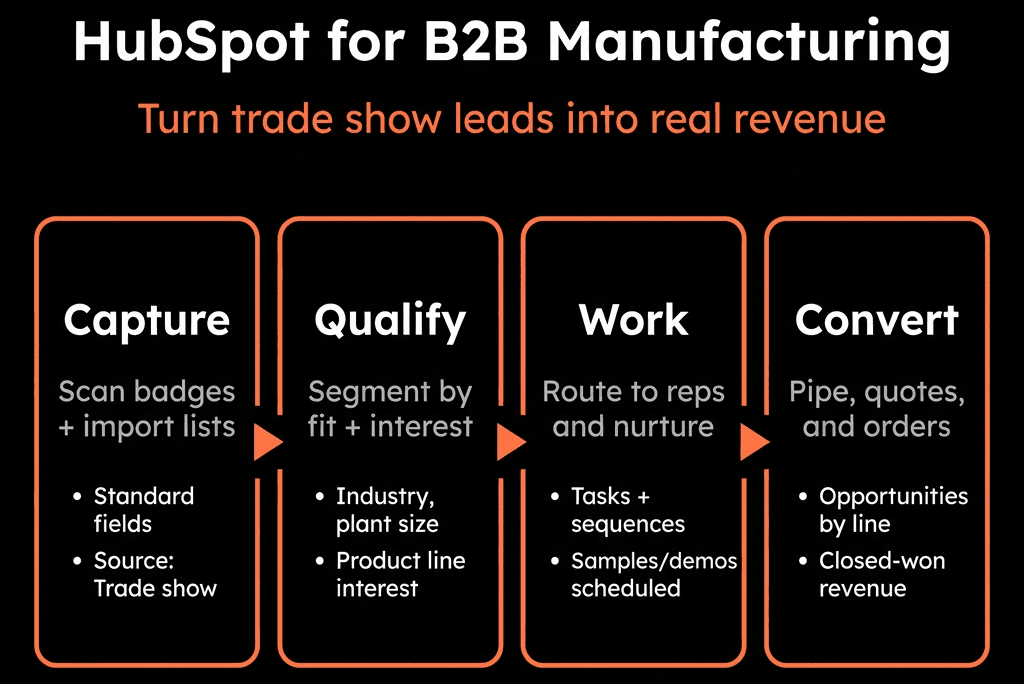
- Standardize how you capture trade show leads.
- Route and qualify them properly.
- Run structured follow-up.
- Attribute pipeline and revenue back to each show.
Here’s the architecture we use.
Step 1 – Standardize Trade Show Lead Capture Into HubSpot
Stop letting each rep “do their own thing”.
Before each show:
- Create a campaign in HubSpot:
e.g., TS – Hannover Messe 2026.
Decide how you’ll capture leads onsite:
- Badge scanner with CSV export → mapped to HubSpot fields.
- Tablet form (HubSpot form on a landing page).
- Business cards → quick internal form/Playbook for manual entry.
Standard lead capture fields:
- Contact info (name, email, phone).
- Company name + country.
- Job title + department.
- Interest area / product line.
- Timeframe (Now / 6–12 months / Later).
- “Hot lead?” flag (Yes/No).
- Notes (conversation summary).
Everything should land in Contacts associated with Companies, tagged with:
- Lead source = Trade show.
- Trade show name (dropdown).
- HubSpot Campaign set to that show.
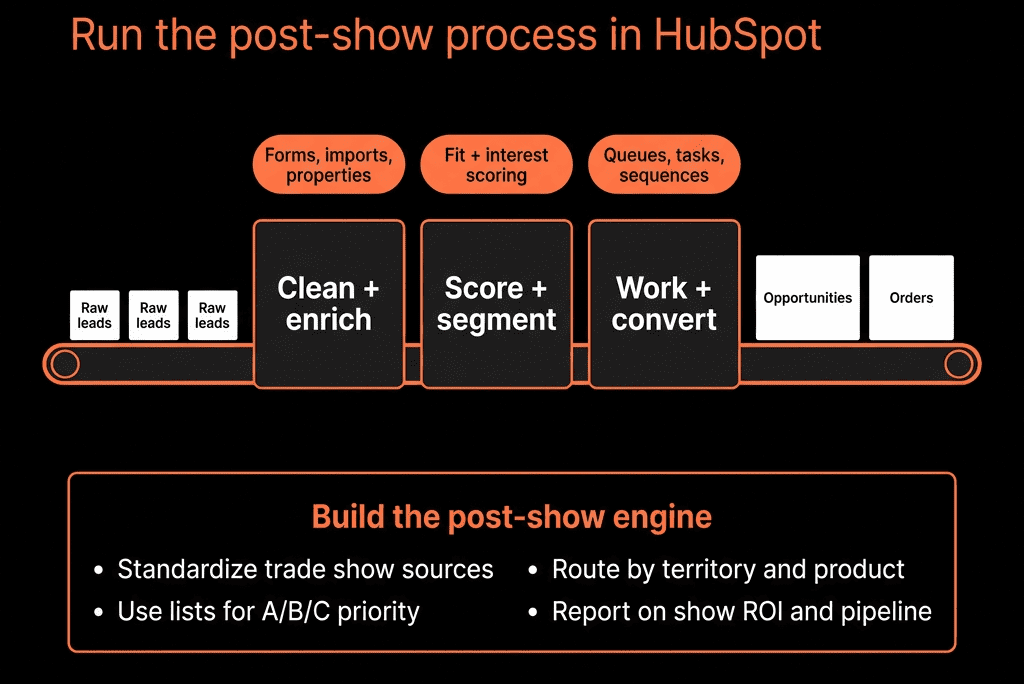
Step 2 – Clean and De-duplicate Fast After the Show
Within 24–72 hours:
- Import badge/CSV data into HubSpot:
Use import mapping to:
- Match existing Contacts/Companies where possible.
- Avoid creating duplicates (use email + company logic).
- Enrich companies if needed (industry, size, etc.) via enrichment tools.
Apply:
- Lifecycle stage (Lead or MQL depending on interest).
- Lead status = New – Trade show.
Goal: by the time reps follow up, they’re looking at clean records with context.
Step 3 – Segment Trade Show Leads by Priority
Not every scan is equal.
Use simple segmentation:
- Hot – strong fit + clear project/need + short timeframe.
- Warm – relevant but exploratory / longer timeframe.
- Cold – students, vendors, very early-stage.
Implementation:
- Map a “Hot/Warm/Cold” or Lead rating field from the form or rep notes.
- Or derive priority from:
- Role (purchasing/engineering/plant vs student/vendor).
- Interest area and timeframe.
Create active lists:
- TS – [Show] – Hot leads.
- TS – [Show] – Warm leads.
- TS – [Show] – Cold/general.
This drives routing and follow-up type.
Step 4 – Route Hot Trade Show Leads to the Right Sales Owners
Use contact-based workflows:
Trigger:
- Lead status = New – Trade show AND Priority = Hot.
Branch:
- By region (country).
- By product line / interest.
- By existing account vs new logo (if Company already exists with an owner).
Actions:
- Assign Contact owner (and Company owner if needed).
- Create a Deal only if the lead is a confirmed opportunity (see next step).
- Create a task:
- “Call trade show lead [Name] – [Show] – [Interest]” within X hours.
- Send internal email or Slack/Teams notification with:
- Notes.
- Show name.
- Interest area.
Now hot leads get to the right person fast.
Step 5 – Define When a Trade Show Lead Becomes an Opportunity
Avoid flooding your pipeline with every conversation.
Set clear rules:
- Create a Deal when:
- There is a defined project/need.
- Rough volumes/specs discussed.
- There is a decision-maker or strong champion.
- Timeline is real (within 12–18 months, depending on your cycle).
In HubSpot:
- Reps create Deals from Contact/Company records for qualified leads:
- Associate with show via Trade show field or Campaign.
- Link to specific product line/pipeline.
Optionally:
- Use a playbook for post-show discovery call to guide qualification and write into fields:
- Application/use case.
- Estimated volume or budget.
- Decision process.
- Competitors or in-house options.
This separates actual pipeline from general “interested” leads.
Step 6 – Design Follow-Up Plays for Hot, Warm, and Cold Segments
Use sequences and workflows appropriately.
Hot leads (sales-led)
- Owner-based sequences:
- Call + email pattern over 1–2 weeks.
- Reference the meeting/conversation at the show.
- Include application-specific content or case study.
Warm leads (marketing + light sales)
- Add to a nurture workflow tailored to show theme or product line:
- Thank you email.
- Follow-up with relevant content (videos, datasheets, ROI stories).
- Occasional check-ins/offers for a deeper consultation.
- Optionally create a reminder task for sales 30–60 days later.
Cold leads
- General follow-up:
- Thank you for visiting.
- Opt-in to newsletter / updates.
- Occasional industry-relevant updates.
The key is consistency, not one-size-fits-all.
Step 7 – Track Trade Show Attribution to Pipeline and Revenue
With Campaigns and Trade show fields in place:
Build reports:
- Contacts created by Trade show.
Deals created linked to each show:
- Count and value.
- Stage distribution.
Closed Won revenue by Trade show and by:
- Segment (industry, region).
- Product line.
Also:
- Time from show → opportunity created.
- Show → Closed Won cycle length.
This answers:
- Which shows actually drive revenue, not just foot traffic?
- Which shows are better for which product lines or segments?
Step 8 – Integrate Trade Show Data With Overall Funnel and Segment Reporting
Don’t isolate shows in their own world.
Combine:
- Trade show leads vs other sources:
- MQL → SQL → Opportunity → Customer conversion.
Trade show-sourced opportunities vs other channels:
- Win rate.
- Deal size.
- Sales cycle.
Segment by:
- Industry.
- Region.
- Product application.
You’ll see:
- Where trade shows are the best acquisition channel.
- Where digital or partner channels work better.
This guides your overall GTM, not just events.
Step 9 – Use HubSpot for Pre-Show and On-Site Coordination
Beyond post-show follow-up:
Pre-show:
- Build lists of existing customers and prospects in the region.
- Invite them to your booth or meetings via sequences/marketing emails.
- Book on-site meetings (track as meetings on Contacts/Deals).
On-site:
- Use a simple HubSpot form on tablets/phones:
- Quick capture of new contacts and notes.
- Immediately tags with the show campaign.
During show:
- Daily view of newly captured leads and top conversations for leadership.
HubSpot becomes the coordination hub before, during, and after the event.
Step 10 – Turn Lessons into Next-Show Improvements
After each show, run a retrospective from HubSpot data:
- Volume and quality of leads by day/time and booth activity.
- Which reps captured the most qualified leads.
- Which follow-up sequences performed best (meetings booked, opps created).
- Actual pipeline and revenue impact after 3, 6, 12 months.
Use this to adjust:
- Lead capture forms and fields.
- Qualification criteria.
- Follow-up cadences.
- Show selection and booth investment.
You move from “trade shows are a cost of doing business” to trade shows as a measured growth channel.
Want Help Turning Trade Show Chaos Into a Measurable HubSpot Motion?
If your trade show leads are still living in badge exports, shared drives, and forgotten email threads, we can help you operationalize them in HubSpot.
Through our HubSpot Implementation Blueprints, Portal Health Check, and Managed RevOps Retainer, we:
- Design your manufacturing-specific trade show data model and intake flows.
- Implement routing, follow-up plays, and pipelines.
- Build attribution dashboards so you can see which shows, segments, and products actually drive revenue.
- Train your marketing and sales teams to run every show as a repeatable motion—not a one-off scramble.
So the next time someone asks, “Was that show worth it?”, you can answer from HubSpot—not from gut feel.