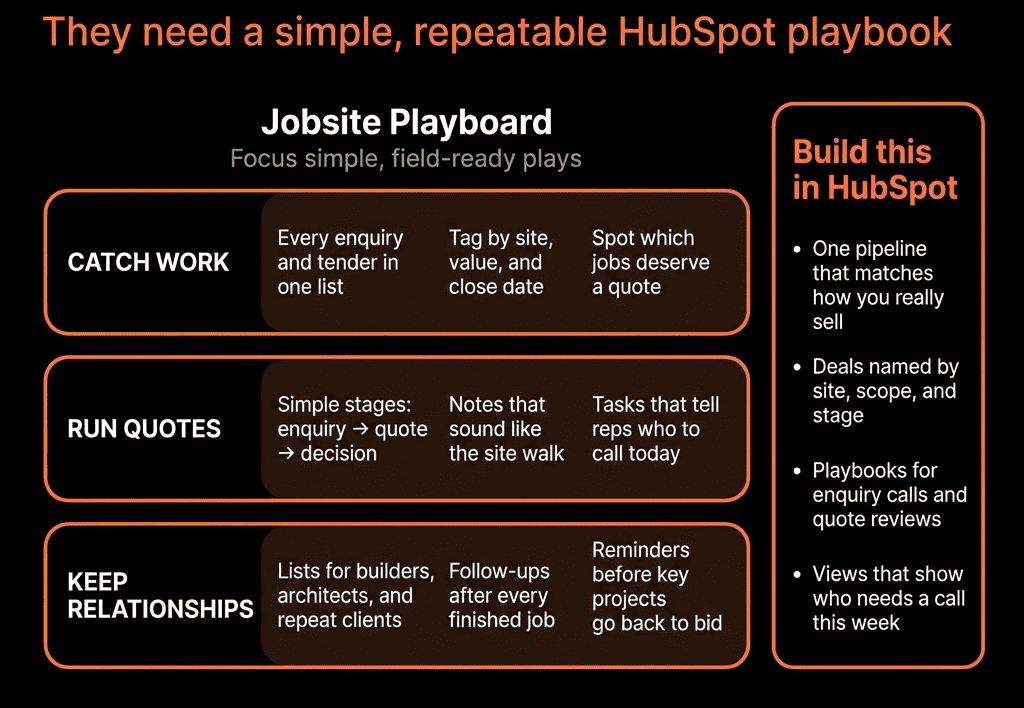
Spreadsheets Work—Until You Need to See the Whole Picture
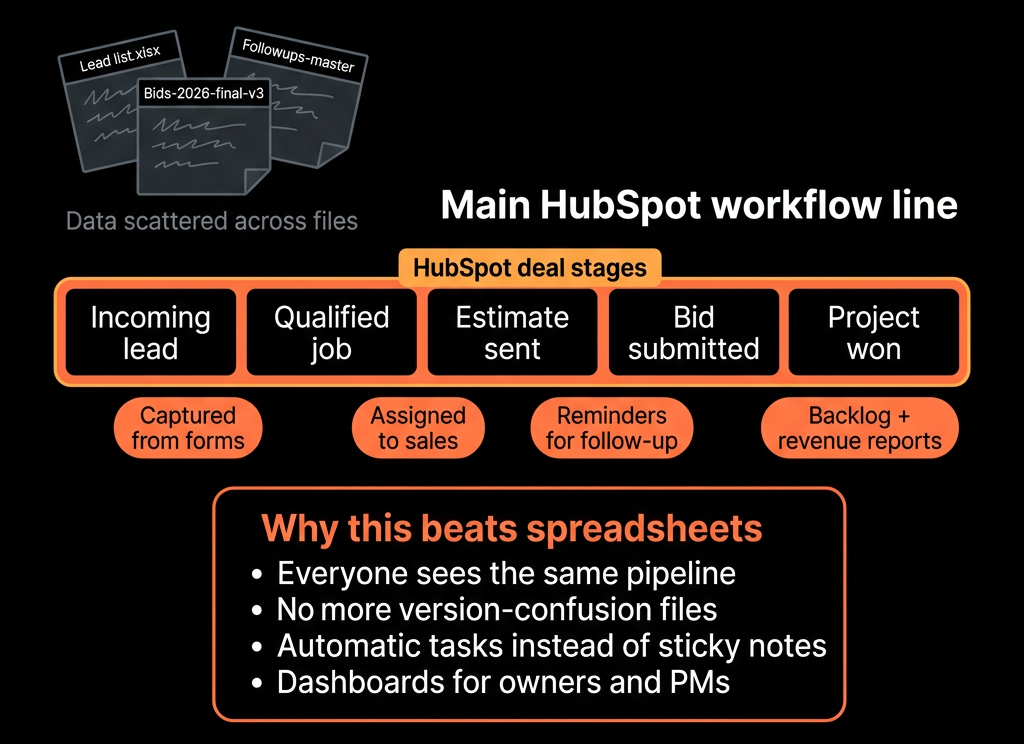
Most construction and contracting businesses run on:
- Estimating spreadsheets.
- Bid logs in Excel.
- Site contacts in phones and inboxes.
- Whiteboards for pipeline.
It’s familiar. But:
- No single view of upcoming work.
- No history of bids by client, sector, or region.
- Hard to forecast crew and equipment needs.
- Follow-ups on quotes are inconsistent.
HubSpot doesn’t replace your estimating software.
It replaces the messy “people and pipeline” spreadsheets with a proper CRM.
Here’s how we set it up for construction firms.

Step 1 – Decide What HubSpot Should Own vs What Stays in Ops Systems
For construction, we draw a simple line:
HubSpot should own:
- Clients (owners, GCs, subs, architects, developers).
- Contacts (decision-makers, site contacts, estimators, PMs).
- Opportunities / Bids / Tenders (high-level job info and pipeline).
- Sales activity and follow-up (calls, emails, meetings).
- Basic marketing (website leads, campaigns, newsletters).
- High-level post-award handoff into your project system.
Operational systems (estimating, project management, ERP) should own:
- Detailed estimates, BOQs, drawings, takeoffs.
- Job costing and actuals.
- Field reporting.
HubSpot is the front office: where relationships and upcoming work are tracked.
Step 2 – Build a Construction-Friendly Data Model
Companies
- Company type (Owner, General Contractor, Subcontractor, Architect, Consultant).
- Sector (Residential, Commercial, Industrial, Infrastructure, etc.).
- Region / Service area.
- Key accounts flag (Yes/No).
- Customer status (Prospect, Active, Dormant).
Contacts
- Role (Owner rep, GC PM, Estimator, Architect, etc.).
- Influence level (Decision-maker / Influencer / Site contact).
- Preferred communication method.
Deals (Bids / Opportunities)
Treat each bid / project as a Deal:
- Project name.
- Project type (New build, Renovation, Fit-out, Maintenance).
- Location.
- Estimated value (band or specific).
- Bid due date.
- Scope (brief description).
- Source (Invitation to bid, Referral, Website, Repeat client).
This replaces bid spreadsheets and whiteboards.
Step 3 – Design a Pipeline That Mirrors Your Bid/Job Flow
A typical construction sales/bid pipeline:
Lead / Opportunity Identified
- Rumor, early-stage opportunity, or ITB/RFP received.
Qualifying
- Check fit (scope, geography, capacity, margin).
Estimate in Progress
- Estimating team working on numbers.
- Drawings/specs received.
Bid Submitted
- Proposal/quote sent.
Negotiation / Best and Final
- Clarifications, value engineering, revised pricing.
Preferred / Verbal Award
- Indications you’re the front-runner.
Awarded / Lost / No Award
- Job awarded to you.
- Lost to competitor.
- Project canceled or postponed.
Define entry/exit criteria so stage usage is consistent across estimators, BD, and PMs.
Step 4 – Replace Website and Referral Spreadsheets With Proper Intake
Most firms get new work from:
- Referral / relationship.
- GC or owner invitations.
- Website/contact forms.
- Bid boards or public tenders (for some segments).
Use HubSpot forms and internal processes to:
- Capture inbound leads and basic project info.
- Create Companies, Contacts, and Deals directly in HubSpot.
- Set Lead source properly (Referral, Website, ITB, etc.).
- Assign owners (BD manager, estimator, regional lead).
This moves opportunity tracking out of inboxes and into a central pipeline.
Step 5 – Tie Estimating and Follow-Up Together
Estimating often lives in its own world. We connect it lightly without overcomplicating.
In HubSpot:
- Move Deal into Estimate in Progress when estimating starts.
- Link to estimating files/tools via a URL field if needed.
- Use tasks to track:
- RFIs.
- Site visits.
- Internal review milestones.
After Bid Submitted:
- Create follow-up tasks:
- “Call GC about bid feedback 3 days after due date.”
- “Check award status 2 weeks post-bid.”
Use sequences or reminders so BD doesn’t rely on memory.
Step 6 – Use HubSpot for Relationship Management Around Key Clients
In construction, a handful of:
- GCs
- Owners
- Architects
often drive a big share of your work.
Use HubSpot to:
- Tag Key accounts.
- Record meeting notes and site visits against Contacts/Companies.
- Track all open and historical bids per client.
- See Won/Lost history by GC/Owner.
Then:
- Build simple dashboards:
- Revenue and win rate by GC/Owner.
- Upcoming bids by key account.
- Touchpoints and meetings by account.
This replaces multiple spreadsheets and gives leadership a view of relationship strength.
Step 7 – Build Basic Marketing and BD Motion Inside HubSpot
Construction marketing doesn’t have to be fancy to be effective.
In HubSpot:
- Maintain segmented lists:
- GCs by region.
- Architects/consultants by sector.
- Owners/developers.
Send periodic, relevant updates:
- Project win announcements.
- Case studies per sector.
- Safety/quality certifications and updates.
- Capability statements.
Track:
- Opens, clicks.
- Responses and meetings booked.
This keeps you top-of-mind beyond one-off bids.
Step 8 – Build a Construction-Specific Reporting Set
Replace manual bid logs with HubSpot dashboards:
Key reports:
Pipeline by stage and sector
- Deals and value by stage (this quarter/half/year).
- Filter by region, service, client type.
Hit rate / win rate
- Bids Won / (Bids Won + Lost), by:
- GC/Owner.
- Sector.
- Region.
Backlog and forecast
- Awarded projects by expected start date.
- Pipeline of likely awards (e.g., late-stage) for next X months.
Source effectiveness
- Opportunities and awards by source (Referral, ITB, Repeat client).
This gives leadership a single view of demand, not scattered sheets.
Step 9 – Use HubSpot to Improve Handoffs to Operations
HubSpot doesn’t run jobs—but it can make handoffs cleaner.
When a Deal is Awarded:
- Create a standardized handoff note/template (Playbook):
- Scope summary.
- Key contacts (owner rep, GC PM).
- Special terms, risks, constraints.
Use Tickets or an integration to create a new project/job in your ops system with:
- Linked Company and Contact records.
- Reference to the awarded Deal.
This ensures operations receives consistent context from BD/estimating, not scattered emails.
Step 10 – Roll HubSpot Out in Phases So Field Teams Aren’t Overwhelmed
Construction teams are busy; adoption must be practical.
Phase 1:
- Get leadership and office/BD using pipeline and dashboards.
- Migrate bid log into Deals.
- Clean Companies and Contacts for key accounts.
Phase 2:
- Train estimators and BD on:
- How to update Deal stages.
- How to log important notes.
- How to use simple views.
Phase 3:
- Extend to PMs/operations for:
- Client touchpoints.
- Variation/upsell tracking.
- Post-job follow-up and referral requests.
Keep forms, fields, and steps as light as possible.
Every extra field should explain itself in terms of better hit rates or smoother jobs.
Want Help Moving Your Construction Firm Off Spreadsheets and Into HubSpot?
If your current world is bid logs, contact spreadsheets, and whiteboards, HubSpot can centralize your pipeline and client relationships without slowing people down.
Through our HubSpot Implementation Blueprints, Portal Health Check, and Managed RevOps Retainer, we:
- Design a construction-specific CRM model (clients, bids, pipelines, key accounts).
- Migrate your existing spreadsheets into clean, usable HubSpot objects.
- Implement simple intake, follow-up, and reporting workflows.
- Train your BD, estimating, and leadership teams to run pipeline and client reviews directly from HubSpot.
So you can still use your estimating and project tools—but finally have a real, predictable pipeline view instead of scattered sheets.