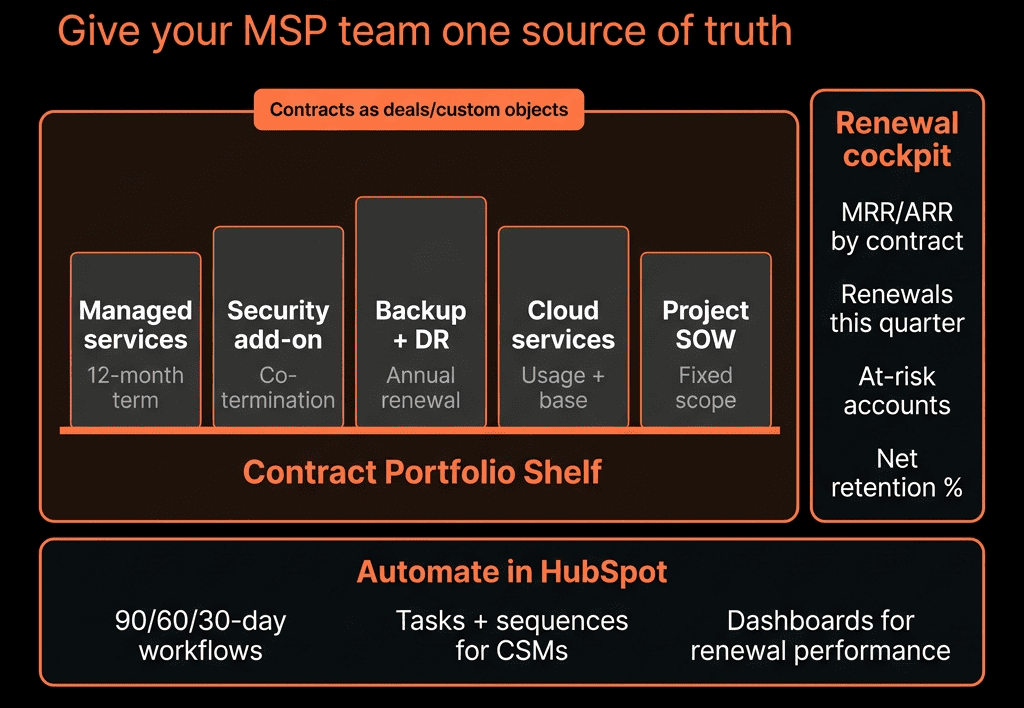
MSP Revenue Is in the Contracts—But the Contracts Are Hard to See
Typical MSP/IT services setup:
- PSA/RMM tools (Autotask, ConnectWise, Halo, etc.) for tickets and service.
- Billing system for invoices.
- Spreadsheets for renewals and vendor contracts.
- HubSpot used lightly for marketing and some deals.
Problems:
- No single view of client MRR, renewal dates, and contract scope.
- Renewals handled reactively.
- Expansion/upsell is mostly “when the client asks”.
HubSpot doesn’t replace your PSA or RMM.
It becomes the revenue command center for contracts, renewals, and growth.
Here’s how we structure it.
Step 1 – Decide What Lives in HubSpot vs PSA/Billing
Clear split:
HubSpot should own:
- Accounts (companies) and buying contacts.
- Pipelines for new, renewal, and expansion deals.
- High-level contract summaries (MRR, term, key services).
- Renewal workflows and expansion plays.
- GTM reporting (pipeline, NRR, churn, expansion).
PSA/billing should own:
- Detailed service items, users, and device counts.
- Tickets and SLAs.
- Actual invoices and payments.
HubSpot is where you see and manage the money motion, not every device.
Step 2 – Build an MSP-Friendly Data Model
Companies
- Client status (Prospect, Onboarding, Active, At risk, Churned).
- Segment (SMB / Mid-market / Enterprise).
- Industry.
- Region.
- Primary CSM / AM.
- Current MRR / Current ARR.
- Contract start date, Contract end / renewal date.
- Service stack (checklist or text: Managed IT, Security, Backup, VoIP, etc.).
- Primary PSA ID (for linking to PSA records).
Contacts
- Role (Owner, CFO, IT Manager, End user, Procurement).
- Decision-maker vs influencer vs user.
- Communication preferences.
Deals
Each commercial motion as a Deal:
- Deal type (New Contract, Renewal, Expansion, Project/One-off).
- MRR / ARR impact.
- Term (months).
- Primary service (e.g., Managed IT, M365, SOC, etc.).
- Vendor (if relevant—e.g., security stack provider).
You now have the foundation for MRR, NRR, and churn visibility.
Step 3 – Separate Pipelines for New, Renewal, and Expansion
Avoid mixing everything into one pipeline.
New Business pipeline
- Stages like:
- Qualified.
- Discovery / Assessment.
- Solution Design.
- Proposal Sent.
- Verbal Commit.
- Closed Won / Closed Lost.
Renewal pipeline
- Renewal Identified.
- Health/Value Review.
- Proposal (same scope or re-scope).
- In Review.
- Renewed / Downgraded / Churned.
Expansion pipeline
- Opportunity Identified (additional users/sites/services).
- Solution & Pricing.
- Proposal Sent.
- In Review.
- Closed Won / Lost.
You get focused views for each revenue motion.
Step 4 – Sync High-Level Contract Data Into HubSpot
From your PSA/billing, sync into Company (or a custom Contract object if needed):
- Current MRR/ARR.
- Contract start and end/renewal date.
- Key services (Managed IT, Security, Backup, VoIP, etc.).
- License/user counts (if helpful in aggregate).
Design:
If you have multiple contracts per client:
- Use a custom “Contract” object associated to Company + Deals.
- Fields: Service bundle, MRR, Start, End, Status.
If contracts are straightforward:
- Keep summary fields directly on Company; use Deals for movements.
This gives HubSpot a clean, up-to-date view of the book.
Step 5 – Build a Renewal Engine Inside HubSpot
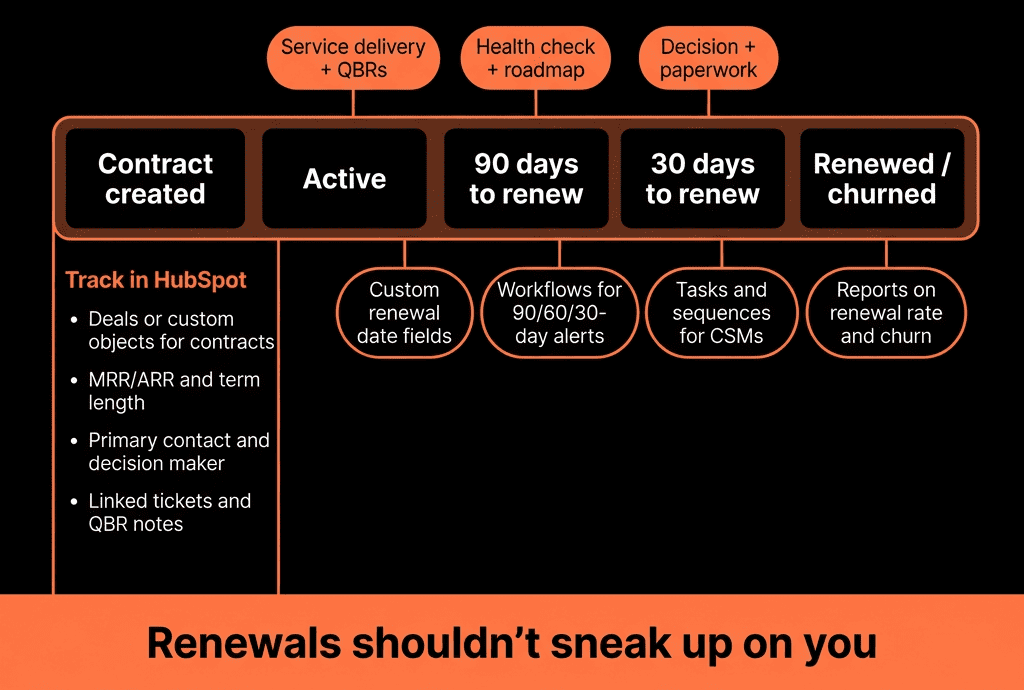
Turn “oops, that client renews next month” into a system.
Using Company or Contract data:
Workflow:
- X days before Contract end (e.g., 120/90/60):
- Check if a Renewal Deal already exists.
- If not → create a Renewal Deal:
- Pipeline = Renewals.
- Deal type = Renewal.
- MRR equal to current MRR (default).
- Close date = Contract end.
- Owner = CSM/AM.
Create tasks:
- “Run QBR / value review.”
- “Confirm scope and pricing for renewal.”
Now every upcoming renewal is a Deal in HubSpot, visible in pipelines and forecasts.
Step 6 – Add Health and Risk Signals to Prioritize Renewals
Layer in simple health scoring:
On Company:
- Health band (Green / Amber / Red).
- Risk flags (High ticket volume, Low usage, Security incidents, NPS detractor).
Inputs from PSA/CSAT/product:
- Ticket count and severity.
- SLA breaches.
- Project overruns.
- Survey scores (NPS/CSAT).
Workflows:
- Set Health band based on simple rules.
- Mark accounts At risk when certain thresholds hit.
Use this in Renewals pipeline to:
- Prioritize at-risk renewals for more attention.
- Focus expansion on healthy, satisfied clients.
Step 7 – Systematize Expansion Opportunities
MSP growth = more:
- Users.
- Sites.
- Services (security, backup, VoIP, vCIO, etc.).
In HubSpot:
- Store coverage flags on Company or Contract:
- Has Managed IT, Has Security, Has Backup, Has VoIP, etc.
- Sync user/device counts from PSA (or categories like Small/Medium/Large).
Then:
- Build lists:
- “Active Managed IT clients without Security, by segment.”
- “Clients where user count increased by >X% in last 6 months.”
For each expansion opportunity:
- Create an Expansion Deal.
- Use sequences/Playbooks for structured expansion conversations.
- Track close rates and MRR uplift.
You go from ad hoc upsell to deliberate cross-sell motions.
Step 8 – Use HubSpot for QBRs and Account Planning
QBRs (or regular business reviews) are key renewal protectors.
In HubSpot:
- Create a QBR Playbook:
- Current environment & services.
- Ticket trends and key issues.
- Business changes (growth, new sites, cloud projects).
- Security/compliance discussions.
- Opportunities and roadmap.
Map notes into properties:
- Expansion potential (Low/Med/High).
- Strategic initiative tags (cloud migration, security program, etc.).
- Next steps.
Associate QBR notes with Renewal and Expansion Deals.
This ties account planning directly to pipeline.
Step 9 – Build MSP-Focused Dashboards
Dashboards we rely on:
MRR & NRR Overview
- Current MRR/ARR total and by segment.
- New MRR, Expansion MRR, Churned MRR per period.
- NRR/GRR by segment/vertical.
Renewals & Risk
- Renewal pipeline by stage and MRR.
- Renewals by Health band (Green/Amber/Red).
- Renewed vs Churned vs Downgraded, with reasons.
Expansion
- Expansion pipeline by service (Security, Backup, VoIP…).
- Expansion Closed Won MRR.
- Coverage penetration: % of clients with each service.
New Business & Source
- New logo pipeline and wins.
- New business MRR by source/channel.
- CAC proxy if you track marketing/sales costs.
This gives leaders a live view of the contract book and future revenue.
Step 10 – Align GTM, CS, and Ops Around HubSpot
To make it real:
Sales & marketing
- Use HubSpot for lead intake, opp creation, and new business pipeline.
CS/Account management
- Use HubSpot for renewal and expansion pipeline + QBR documentation.
Ops/Service (via PSA)
- Feed health and usage signals into HubSpot.
- Highlight risk and upsell signals.
Run:
- Weekly revenue/renewals meetings from HubSpot dashboards.
- Monthly NRR/GRR and segment reviews.
- Quarterly strategy sessions on:
- Which services/verticals drive best NRR.
- Where churn is highest and why.
HubSpot becomes the go-to view of where contracts and revenue are headed.
Want Help Turning Your MSP/IT Services HubSpot Into a Renewal Machine?
If you’re currently tracking contracts and renewals in spreadsheets + PSA exports, HubSpot can centralize your revenue view and plays.
Through our HubSpot Implementation Blueprints, Portal Health Check, and Managed RevOps Retainer, we:
- Design your MSP data model for Companies, Deals, and (optionally) Contracts.
- Integrate high-level contract and health data from PSA/billing.
- Implement renewal and expansion pipelines and workflows.
- Build NRR, renewal, and expansion dashboards for leadership and CS.
So you know exactly:
- Which contracts renew when.
- Which clients are at risk.
- Where your next MRR growth will come from.