A “Generic” Lifecycle Doesn’t Work for Advisors
Standard B2B lifecycles (Lead → MQL → SQL → Customer) ignore:
- Discovery meetings.
- Compliance steps.
- Onboarding and annual reviews.
- Long-term AUM/client value.
Advisors need a lifecycle that:
- Is simple enough to use.
- Reflects real stages of advice and implementation.
- Supports both one-off and ongoing relationships.
Here’s a lifecycle design that works well for most advisory firms.
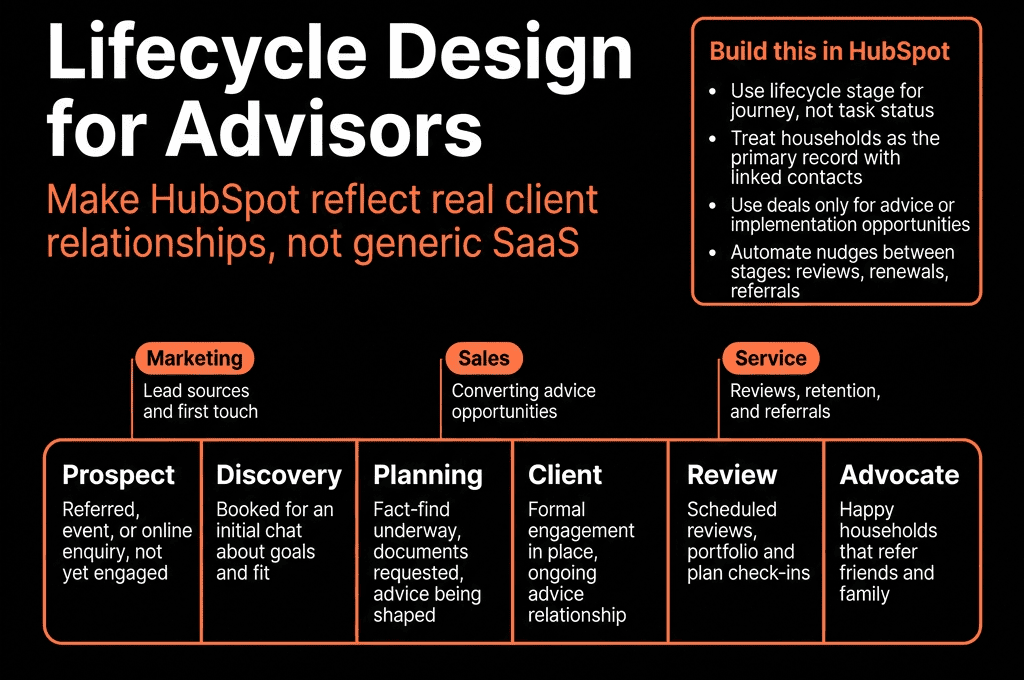
Step 1 – Define the Core Lifecycle Stages
On the Contact (or Household) in HubSpot, we recommend:
Prospect
- You have their info. No meeting yet.
- Source: referrals, website, events, marketing.
Engaged Prospect
- Discovery/intro meeting(s) held.
- You’re exploring fit and broad goals.
Planning
- Fact-finding/KYC underway.
- You’re analyzing and building a recommendation.
Client – Onboarding
- They’ve agreed to proceed.
- Accounts being set up / transfers in progress.
Client – Active
- Onboarded; advice implemented.
- Regular review cadence (annual, semi-annual, etc.).
Client – Dormant / Ex-Client
- Relationship paused or ended.
This becomes your primary lifecycle property.
Step 2 – Add a Secondary “Pipeline Status” for Sales Detail
Lifecycle should stay high-level. Use a second property for day-to-day workflow, for example:
Advice pipeline status (or Client journey status):
- New lead.
- Contacted.
- Discovery booked.
- Discovery completed.
- Proposal delivered.
- Considering.
- Decided – Yes.
- Decided – No.
This lives alongside Lifecycle:
- Prospect + New/Contacted/Discovery…
- Engaged Prospect + Discovery/Proposal.
- Planning + Proposal/Considering.
- Client – Onboarding/Active.
You report on funnel with Lifecycle and inspect daily work via pipeline status.
Step 3 – Capture Key Advice-Specific Fields
Add structured properties to support lifecycle transitions:
On Contacts (or Households):
- Client type (Individual, Couple, Business, Trust).
- Persona (Accumulator, Pre-retiree, Retiree, Business owner, etc.).
- AUM band (e.g., <250k, 250–500k, 500k–1M, 1–3M, 3M+).
- Risk profile (Low/Med/High).
- Primary goals (multi-select: Retirement, College, Business exit, Tax, etc.).
- Advice service type (One-off plan, Ongoing AUM, Retainer, etc.).
- Review cadence (Annually/Semi-annually/Quarterly).
These let you:
- Tailor communication.
- Filter and report on your book.
- Trigger review workflows.
Step 4 – Map Real-World Triggers to Lifecycle Changes
Use contact-based workflows for consistent lifecycle updates:
Prospect → Engaged Prospect
- Trigger: First meeting held (you use HubSpot meetings or log a meeting with “Discovery” outcome).
- Action: Set Lifecycle = Engaged Prospect.
Engaged Prospect → Planning
- Trigger: You send fact-finding/KYC forms or mark Discovery completed and Client interested = Yes.
- Action: Set Lifecycle = Planning.
Planning → Client – Onboarding
- Trigger: Proposal accepted flag (Yes) or Advice accepted date set.
- Action: Lifecycle = Client – Onboarding.
Client – Onboarding → Client – Active
- Trigger: Onboarding checklist completed (account set up, transfer received) or Onboarding complete date set.
- Action: Lifecycle = Client – Active.
Client → Dormant / Ex-Client
- Trigger: Advisory agreement ended, AUM moved out, or Client status set to Ex-client.
- Action: Lifecycle = Client – Dormant/Ex-Client.
Don’t allow random manual changes; guide advisors to use the underlying flags while workflows manage Lifecycle.
Step 5 – Align Deals (Opportunities) With Lifecycle
Use Deals for:
- Significant advice opportunities (e.g., new AUM mandates, major planning projects).
- Tracking potential inflows (vs just interest).
Guidelines:
- Create a Deal when there is a real possibility of meaningful AUM or fee-based work.
- Associate Deal with the Contact/Household and Company (if business-related).
When a Deal moves to Closed Won:
- Workflow pushes Lifecycle to Client – Onboarding or Client – Active.
Deal stages:
- Discovery.
- Proposal in progress.
- Proposal delivered.
- Verbal commitment.
- Closed Won / Closed Lost.
Lifecycle gives you client journey; Deals give you revenue pipeline.
Step 6 – Build Nurture Paths for Each Non-Client Stage
Each non-client stage should have a clear plan:
Prospect
- Light-touch content (education, planning basics).
- Encouraging them to book a discovery call.
Engaged Prospect
- Pre-meeting and follow-up sequences.
- Case studies and specific guidance linked to their goals/persona.
Planning
- Regular updates (“Where we are in your plan”).
- FAQs about implementation, fees, risk.
Use HubSpot lists + workflows to:
- Enroll contacts in stage-appropriate nurture.
- Stop or switch sequences as Lifecycle advances.
This keeps your pipeline “warm” instead of one-off.
Step 7 – Use Lifecycle to Drive Review and Retention Work
For Client – Active:
- Use Review cadence + Last review date to:
- Trigger tasks 30–60 days before next review.
- Enroll them in review preparation email flows.
Example workflow:
- Trigger:
- Lifecycle = Client – Active AND Next review date in 45 days.
Actions:
- Task for advisor: “Schedule review with [Client].”
- Series of emails: pre-meeting prep, agenda, reminders (where appropriate and compliant).
For Dormant/Ex-Client:
- Separate them into “no contact”, “light contact”, etc., based on compliance.
- For allowed segments, consider periodic check-ins or value-add content.

Step 8 – Build Lifecycle Dashboards for Advisors and Partners
Dashboards to support this lifecycle:
Prospect & Pipeline View
- Prospects and Engaged Prospects by source and persona.
- Deals by stage and estimated inflows.
- Time in each lifecycle stage.
Client Book & Segmentation
- Clients – Active by persona, AUM band, and service type.
- New clients by quarter.
- Client distribution by review cadence.
Reviews & Retention
- Clients with reviews due in next X days.
- Clients overdue for review.
- Lost clients by reason and segment.
This helps advisors prioritize work and helps leadership see practice health.
Step 9 – Keep Compliance in Focus
While designing lifecycle:
- Avoid storing sensitive financial details in HubSpot where not needed.
- Use bands instead of exact net worth/income where possible.
- Distinguish between:
- Marketing communications (following consent rules).
- Client service communications (operational).
Work with compliance to:
- Approve consent wording on forms.
- Approve automation that sends emails based on Lifecycle.
- Lock down sensitive properties and exports via permissions.
Lifecycle should support compliance, not conflict with it.
Step 10 – Evolve Lifecycle as the Practice Matures
Start simple:
- Prospect → Engaged Prospect → Planning → Client – Active → Ex-Client.
Then add nuance only when needed:
- Split Client – Active into tiers (A/B/C).
- Add “Onboarding” explicitly when you have a team/process.
- Layer in firm-specific steps (e.g., internal investment committee, special approval).
Review quarterly:
- Where are people getting “stuck”?
- Are there stages nobody uses?
- Do advisors understand and follow the definitions?
Refine based on data + advisor feedback, not just theory.
Want Help Designing a Lifecycle That Matches Your Advisory Practice?
If your HubSpot lifecycle is still generic and doesn’t reflect how you actually win and serve clients, we can help you redesign it.
Through our HubSpot Implementation Blueprints, Portal Health Check, and Managed RevOps Retainer, we:
- Map your current client journey into a practical lifecycle and pipeline.
- Implement the properties, workflows, and dashboards described above.
- Respect compliance boundaries while enabling smart automation.
- Train advisors and admins on using lifecycle data to prioritize, retain, and grow clients.