Training Teaches the Method. HubSpot Makes It Stick.
Most teams:
- Run a methodology training (MEDDIC, BANT, Challenger, SPICED, etc.).
- Reps get excited for 2–3 weeks.
- Then it fades, because nothing in HubSpot changed.
If your CRM doesn’t reflect the methodology, reps default to old habits.
Win rates don’t move. Forecasts stay “directional guesses”.
The goal is not to rebuild HubSpot around a vendor’s acronyms.
The goal is to layer methodology on top of clean pipelines so you can:
- Guide better conversations.
- Capture the right data.
- Inspect deals in a consistent way.
Here’s how we do that.
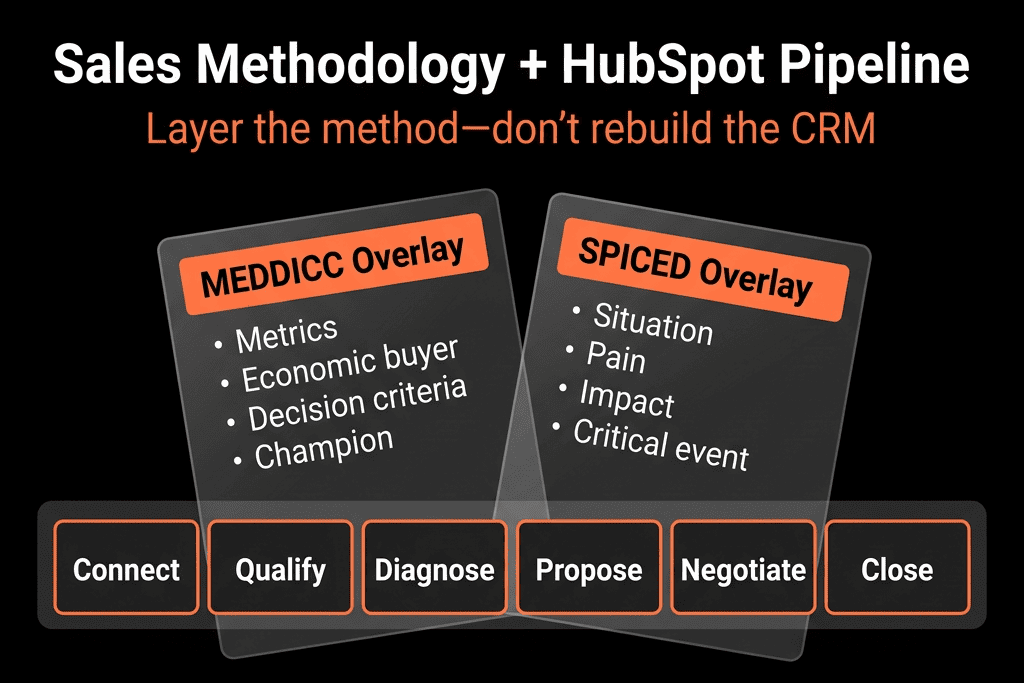
Step 1 – Keep Pipelines Customer-Centric, Not Method-Centric
First principle:
Your pipeline stages should reflect the buyer’s journey, not your methodology steps.
Example New Business pipeline:
- Qualified.
- Problem & impact agreed.
- Solution fit confirmed.
- Decision process mapped.
- Business case approved.
- Verbal commit.
- Closed Won / Lost.
We don’t rename stages to “MEDDIC 1, MEDDIC 2” or “BANT completed”.
Instead, we map methodology elements to stages with properties and Playbooks.
If your pipeline is already activity-based (Demo, Proposal Sent, etc.), fix that first, then layer methodology.
Step 2 – Map Your Methodology to Concrete Fields
Pick your methodology (or hybrid) and translate the acronym into properties.
Example – MEDDIC:
- Metrics → Value metrics defined (Yes/No) + Economic impact estimate.
- Economic buyer → Economic buyer identified (Yes/No) + Economic buyer name/role.
- Decision criteria → Decision criteria captured (Yes/No) + Decision criteria notes.
- Decision process → Decision process mapped (Yes/No) + Decision process notes.
- Implications of pain → Primary pain + Impact/urgency.
- Champion → Champion identified (Yes/No) + Champion name/role.
Example – BANT:
- Budget → Budget status (Approved / In discussion / Not allocated / Unknown).
- Authority → Decision maker identified (Yes/No).
- Need → Primary pain/use case, Priority.
- Timeline → Target go-live date / Decision date.
Create these as deal properties with dropdowns/checkboxes wherever possible.
Step 3 – Tie Methodology Fields to Specific Stages
Next, decide when each element should be known.
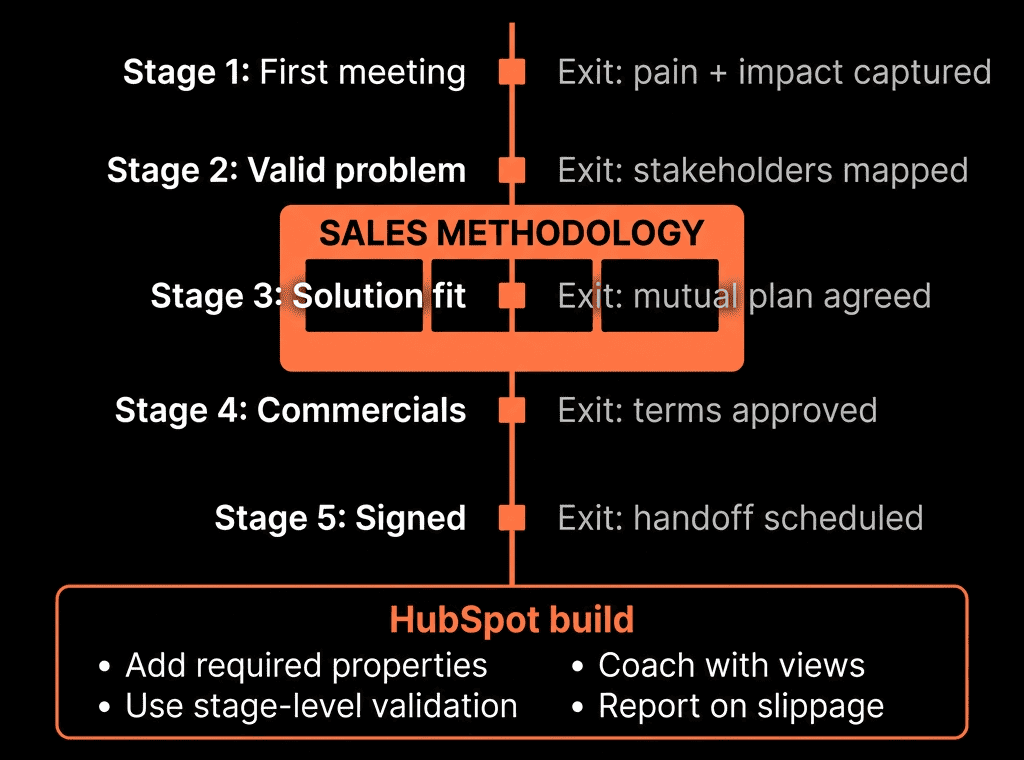
For each stage, define required methodology elements, e.g.:
Qualified
- Need (pain) and high-level fit captured.
- Timeline rough idea.
Solution fit confirmed
- Need + basic BANT complete.
- Champion tentatively identified.
Decision process mapped
- Decision maker identified.
- Decision process and criteria fields completed.
Business case approved
- Metrics/value defined.
- Budget status clear.
Use:
- Stage descriptions in HubSpot to document this.
- Required fields (where appropriate) when moving forward.
This connects pipelines to methodology without reshaping stages around acronyms.
Step 4 – Use Playbooks to Guide Methodology-Driven Conversations
Playbooks are where methodology becomes live guidance.
Create Playbooks like:
- “Discovery – [Methodology]”
- “Decision Process Deep Dive”
- “Value & Metrics Conversation”
Inside each:
- Add questions aligned to your methodology.
- Map answers directly to the fields from Step 2.
- Group sections by element (e.g., B, A, N, T; or MEDDIC sections).
Examples:
- “Who else needs to be involved for this to be signed off?” → Decision maker identified, Number of stakeholders.
- “What metrics will be used to judge success?” → Value metrics defined, Economic impact estimate.
Reps get in-call guidance.
Managers get structured data to inspect.
Step 5 – Add Light Governance With Workflows and Required Fields
You don’t want to block reps at every stage, but you do want minimum standards.
Options:
Use required fields on stage changes sparingly:
- E.g., you can’t move to “Decision process mapped” without Decision process mapped = Yes and Decision maker identified = Yes.
Use deal-based workflows to nudge, not block:
- When a deal enters a certain stage and key methodology fields are blank:
- Send internal notification: “To fully qualify this stage under [methodology], please complete: [fields].”
- Create one-time task: “Complete [MEDDIC/BANT] fields before next call.”
This gently enforces methodology without creating admin walls.
Step 6 – Build Methodology-Focused Pipeline Views for Managers
Managers need to inspect deals through the methodology lens.
Create filtered views like:
- “My team – Late stage, missing Decision Maker”
- Filters: Stage in late stages, Decision maker identified = No.
- “Deals in Commit, weak Metrics/Economic case”
- Filters: Forecast category = Commit, Value metrics defined = No OR Budget status = Unknown.
- “Stalled deals with incomplete MEDDIC/BANT”
- Stage unchanged for X days AND key fields blank.
These views power coaching and forecast reviews.
Step 7 – Add Methodology Metrics to Your Dashboards
Make methodology visible at leadership and RevOps level.
Useful reports:
- % of late-stage deals with:
- Decision maker identified.
- Decision process mapped.
- Value metrics defined.
- Champion identified.
- Win rate vs methodology completeness:
- Deals with all key fields filled vs deals with gaps.
- Average sales cycle vs methodology completeness.
This lets you answer:
- “Does running the methodology properly actually improve outcomes?”
- “Which parts of the methodology do our reps consistently skip?”
Step 8 – Use Methodology Data in Forecast and QBRs
In forecast calls and QBRs:
Don’t just ask “Will this close?”
Ask:
- “Who is the decision maker?”
- “Have we mapped the decision process?”
- “What metrics will they use to justify this?”
- “Who is our champion?”
Then:
- Validate answers against what’s in HubSpot.
If fields are blank, that’s a flag to downgrade Commit or delay forecast.
This is how methodology moves from theory to forecast discipline.
Step 9 – Train and Reinforce With HubSpot, Not Just Slides
Methodology training must be anchored in the system reps use daily.
Enablement plan:
Run training showing:
- Where methodology fields live on the Deal.
- Which Playbooks to use at which stages.
- How managers will inspect deals using these fields.
In early weeks:
- Managers consistently mention methodology properties in 1:1s and deal reviews.
- RevOps shares quick win stories: “Deals with X filled see Y% higher win rate.”
Align incentives:
- Make methodology completeness part of performance conversations—not just call recordings or random spot checks.
Step 10 – Iterate the Methodology Layer Based on Real Data
After 1–2 quarters:
Check which fields are actually used and predictive:
- Some may be noise; others are critical.
Simplify:
- Remove or merge low-signal fields.
- Double down on those strongly correlated with win rate and cycle time.
Adapt:
If your sales motion changes (new products, segments, PLG), update:
- Playbooks.
- Required fields by stage.
- Inspection views.
Methodology in HubSpot should grow with your GTM, not stay frozen in the training deck from two years ago.
Want Help Operationalizing MEDDIC/BANT/Challenger Inside Your HubSpot?
If you’ve invested in methodology training but don’t see it reflected in your pipelines, we can help you turn it into a real system.
Through our HubSpot Implementation Blueprints, Portal Health Check, and Managed RevOps Retainer, we:
- Map your chosen methodology onto your existing HubSpot pipelines.
- Design properties, Playbooks, workflows, and views that make it easy to use every day.
- Build dashboards so you can see how methodology adherence affects win rates and forecasts.
- Coach your managers to inspect and reinforce methodology through HubSpot, not memory.
- So your methodology stops being a one-off training—and becomes part of how you sell, forecast, and improve revenue.