A Rolodex Is Not a Practice Management System
Most firms use HubSpot (or any CRM) like this:
- Newsletter lists.
- Basic contact storage.
- Occasional “BD pipeline” spreadsheet bolted on.
Meanwhile, real work is tracked in:
- Practice management or time & billing tools.
- Shared drives and email threads.
- Individual partner notebooks.
You don’t need HubSpot to replace your PMS or billing.
You need it to:
- Centralize relationships.
- Track new client and new matter opportunities.
- Drive cross-sell and key account growth.
Here’s how we structure HubSpot for legal and accounting firms.
Step 1 – Clarify What HubSpot Will and Won’t Do
HubSpot will:
- Manage marketing and BD.
- Track prospects, clients, referrers, and centers of influence.
- Track pipelines: new clients, new matters, cross-sell.
- Support key account management and reporting.
HubSpot will not:
- Replace time & billing or detailed matter management.
- Store sensitive client documents or detailed case files.
- Replace compliance/records systems.
Think of HubSpot as the front office GTM system, not the back-office practice platform.
Step 2 – Model Clients, Organizations, and Referrers Correctly
Use:
Companies for organizations:
- Corporate clients.
- Owner-managed businesses.
- Referrer firms (other lawyers, accountants, advisors).
- Internal entities (if needed).
Contacts for people:
- Client decision-makers (GCs, CFOs, founders, partners).
- Individual clients (for B2C practices) – sometimes you can use Contact only.
- Referrers and introducers.
- Board members and influencers.
Key Company fields:
- Company type (Client, Prospect, Referrer, Partner, Internal).
- Client status (Prospect, Active, Dormant, Ex-client).
- Segment (SME, Enterprise, Private client, etc.).
- Industry or sector.
- Key account flag (Yes/No).
- Primary relationship partner / BD owner.
Key Contact fields:
- Role (GC, CFO, Owner, CEO, Finance director, Individual).
- Influence (Decision-maker / Influencer / User / Referrer).
- Contact preferences / consent.
This gives you a clean relationship map.
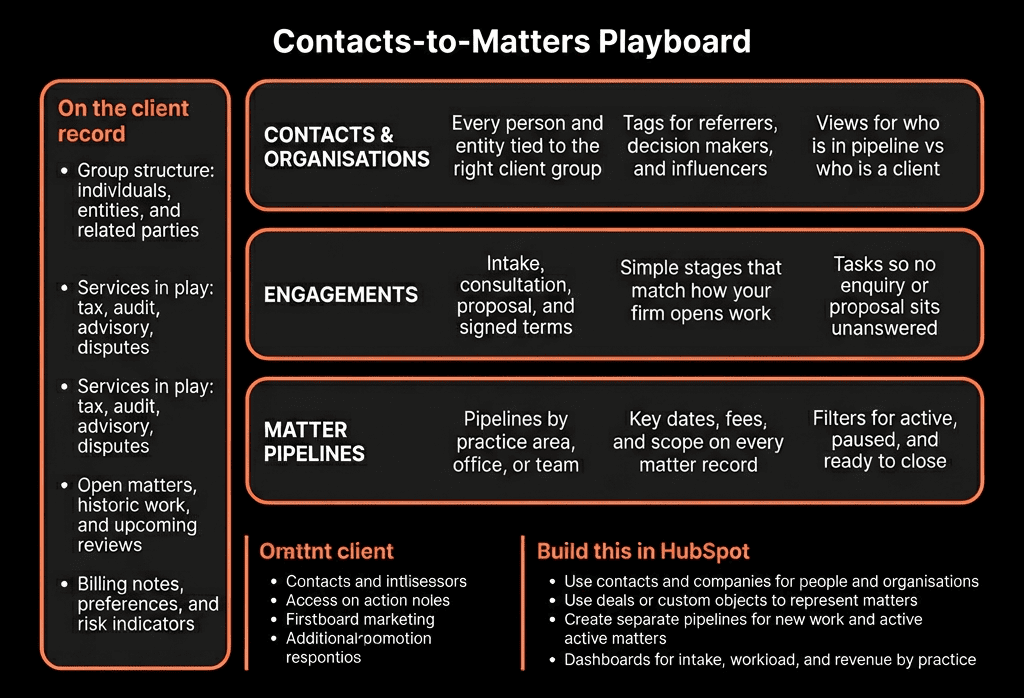
Step 3 – Represent Matters / Engagements as Deals (or a Custom Object)
You need to track:
- New client opportunities.
- New matters with existing clients.
- Significant cross-sell engagements.
Simplest, high-leverage pattern: use Deals as “matters/engagements” for GTM.
On Deals:
- Deal type (New client, New matter – existing client, Cross-sell, Renewal/Retainer).
- Practice area / service line (Litigation, Corporate, Tax, Audit, Advisory, etc.).
- Matter type (M&A, IP dispute, Employment claim, Tax planning, Audit, etc.).
- Estimated value or fee band (no need for billing-level granularity).
- Fee model (Hourly, Fixed fee, Retainer, Success-based, Hybrid).
Associate each Deal to:
- The client Company.
- Key Contacts (decision-maker, day-to-day contact, referrer).
For more mature setups:
- Add a Matter custom object if you want more detail and separate internal stages, but still keep Deals as the “commercial view”.
Step 4 – Build Pipelines for New Clients and New Matters
Use at least two pipelines:
1) New Client pipeline
For brand-new relationships:
- Stages e.g.:
- Lead / Inbound enquiry / Referral.
- Qualification & conflict check.
- Scoping & proposal.
- Proposal sent.
- Verbal acceptance.
- Engagement letter / KYC.
- Active client (Closed Won) / Lost.
2) Existing Client pipeline (New matters / Cross-sell)
For additional work from current clients:
- Opportunity identified.
- Needs analysis / scoping.
- Proposal / fee discussion.
- Accepted / instruction confirmed.
- Engagement in progress (Closed Won) / Lost.
Both pipelines use Deals, but deal type and practice area help you slice by motion and service.
Step 5 – Capture Matter Intake and Qualification in HubSpot
Standardise how work starts:
Use a Matter Intake Playbook for calls/emails:
- Client context.
- Issue summary.
- Urgency.
- Jurisdiction(s).
- Other parties involved.
- Internal expertise/practice area routing.
Map key items into Deal fields:
- Matter type.
- Urgency (High/Med/Low).
- Conflict check required?.
- Fit (High/Med/Low).
This supports:
- Fast go/no-go decisions.
- Consistent BD views across partners.
Step 6 – Track Retainers and Ongoing Relationships
For recurring work (retainers/ongoing support):
On Companies:
- Retainer type (Legal retainer, Outsourced CFO, Tax, etc.).
- Retainer start date, Retainer end/renewal date.
- Retainer fee band (monthly/annual).
On Deals:
- Use Deal type = Retainer / Renewal for renegotiation or renewal cycles.
Create a Retainer/Renewal pipeline:
- Renewal identified.
- Value review / scope discussion.
- Proposal for new term.
- In review.
- Renewed / Churned / Downgraded.
Use workflows to:
- Auto-create renewal Deals X days before end date.
- Assign to relationship partner or BD lead.
- Trigger tasks for review and renegotiation.
Step 7 – Use Lifecycle and Status Properly
Keep Lifecycle on Contacts high-level and minimal:
- Prospect.
- Engaged prospect (met, call, or meeting held).
- Client – Active.
- Client – Dormant/Ex-client.
- Referrer / Partner (if you choose to distinguish).
Use Lead status or a custom “BD status” for more granular, day-to-day tracking (New, Contacted, Meeting set, Proposal sent, etc.).
Automate Lifecycle where possible:
- New client Deal Closed Won → move primary Contact to Client – Active.
- No engagements for X time and/or mark Client as inactive → Client – Dormant.

Step 8 – Run Cross-Sell and Key Account Plays From HubSpot
Once matters and services are tracked per client, you can:
Add flags on Companies:
- Has Litigation, Has Corporate, Has Tax, Has Audit, etc.
Then build lists:
- Corporate clients with no Tax services.
- Audit-only clients with no Advisory.
- High-value litigation clients with no Corporate work.
Use:
- Playbooks for account reviews / QBRs with key clients:
- Capture new needs or risk events (new markets, hires, deals).
- Expansion Deals when a new practice area opportunity is identified.
This turns “incidental cross-sell” into a planned account growth motion.
Step 9 – Keep Billing and Matter Systems Integrated at a Summary Level
You likely have:
- Practice management / time & billing.
- Document management (DMS).
Do not overload HubSpot with:
- Time entries.
- Detailed billing lines.
- Full case documentation.
Instead:
From PMS → HubSpot:
- Client status (Active, Dormant).
- High-level revenue/AUM band per client.
- Matter counts / last active date.
From HubSpot → PMS:
- New client sign-ups and contact details.
- New matter summaries after Deals are Closed Won.
Link:
- Deal records to PMS matter IDs via a simple reference field.
- Use links to DMS / PMS matter pages when needed.
HubSpot remains the client/matter pipeline view, not the full practice engine.
Step 10 – Build BD and Partner Dashboards That Lawyers/Accountants Actually Use
Focus on what partners care about:
New business pipeline
- New client Deals by stage and partner.
- Estimated fees by practice area.
- Win rate by source (referrer, inbound, outbound).
Existing client growth
- New matter Deals from existing clients.
- Revenue/fees by client and practice area (summary from PMS).
- Cross-sell performance.
Key account overview
- Top X clients:
- Fields: matters in last 12 months, services in use, relationship partner.
- Next review date.
Referrer performance
- Deals and fees attributable to specific referrers.
- Win rates and cycle times by referrer.
Use these dashboards in:
- Monthly partner/BD meetings.
- Key account planning sessions.
When partners see their practice in HubSpot, they’ll actually use it.
Want Help Turning HubSpot Into a Client + Matter Growth System?
If your legal or accounting firm is using HubSpot just for newsletters and basic contacts, we can help you build the client and matter pipelines layer on top.
Through our HubSpot Implementation Blueprints, Portal Health Check, and Managed RevOps Retainer, we:
- Design your client/referrer/matter data model in HubSpot.
- Configure pipelines for new clients, new matters, and retainers.
- Implement intake Playbooks, renewal workflows, and cross-sell lists.
- Build BD and partner dashboards so you can run growth meetings from HubSpot.