If Your “Pipeline” Is Just a Lead List, You Don’t Really Have One
Mortgage and lending teams often:
- Capture leads from web forms, referral partners, and call centers.
- Throw them into lists or LOS queues.
- Call their LOS screens “pipeline.”
The gaps:
- No clean view from lead → app → approval → funded.
- No consistent follow-up on pre-approvals or declines.
- Leadership can’t see real volume and conversion across sources and originators.
Your LOS (Encompass, MeridianLink, etc.) is the system of record for loan data and docs.
HubSpot should be the system of record for GTM and pipeline.
Here’s how to structure it.
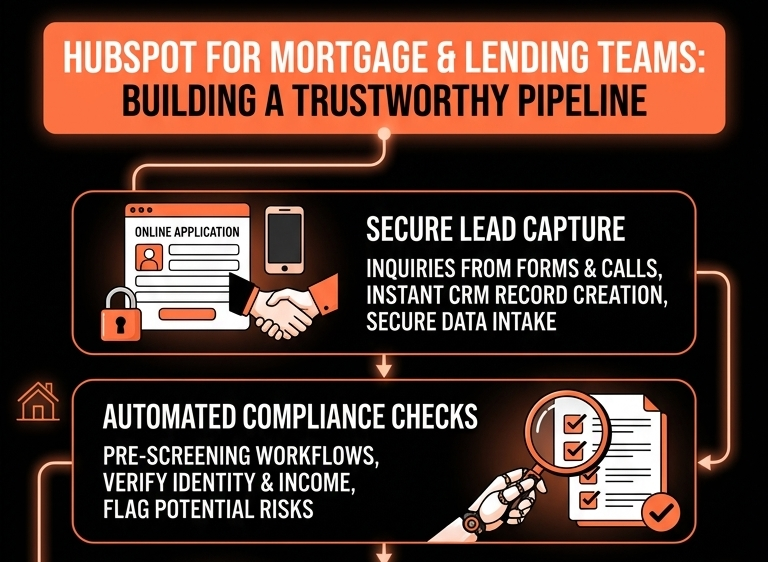
Step 1 – Define What HubSpot Will Track in the Lending Journey
High-level journey for most mortgages/loans:
- Lead / Inquiry.
- Pre-qualification / Pre-approval (optional).
- Application in progress.
- Submitted / In underwriting.
- Approved / Conditional approval.
- Clear to close.
- Funded / Closed.
- Post-close / Cross-sell or refinance potential.
HubSpot tracks:
- Stages 1–7 as Deals and Contact lifecycles.
- Sources, follow-up, and conversion.
- Post-close marketing and retention.
LOS tracks:
- Detailed application data.
- Credit, income, property, documentation.
- Compliance and closing processes.
Step 2 – Model Borrowers, Partners, and Loans in HubSpot
Use:
- Contacts for borrowers (and co-borrowers), realtors, and referral partners.
- Companies (optional) for referral partner firms or employer groups.
- Deals for loan opportunities.
On Contacts (borrowers):
- Borrower type (Primary, Co-borrower).
- Lead source (Direct, Realtor, Broker, Online, Branch, Campaign).
- Loan purpose (Purchase, Refinance, HELOC, etc., as a high-level field).
- Consent and communication preferences (critical for compliance).
On Contacts (referral partners / realtors):
- Partner type (Realtor, Broker, Builder, Employer, Other).
- Region/market.
- Relationship owner.
On Deals (loans):
- Loan type (Conventional, FHA, VA, Jumbo, Auto, SME, etc.).
- Purpose (Purchase, Refi, Cash-out, etc.).
- Loan amount band (no need for exact if that’s sensitive).
- Pipeline stage (see next step).
- Channel (Retail, Brokered, Online only, etc.).
Associate each Deal with:
- Borrower Contact(s).
- Referral partner Contact/Company (where relevant).
Step 3 – Build a Loan Pipeline That Matches Your Process (Not Generic Stages)
Example loan pipeline stages:
New Lead
- Contact captured; basic interest known.
Contacted / Discovery
- Spoke with borrower, gathered initial info.
Pre-qualification / Pre-approval
- Soft check; provided pre-qual or pre-approval letter.
Application in Progress
- Full application in LOS; docs requested.
Submitted to Underwriting
- App and docs submitted for decision.
Approved / Conditional Approval
- Terms offered; conditions outstanding.
Clear to Close
- All conditions cleared; closing scheduled.
Closed / Funded (Closed Won).
Closed – Not Funded / Declined / Withdrawn (Closed Lost variants).
Document entry/exit criteria, then align with LOS statuses where possible.
Step 4 – Clean Lead Capture and Routing Into HubSpot
Lead sources:
- Website forms and rate quote tools.
- Lead gen partners.
- Call center or branch calls.
- Realtor and builder referrals.
All should land in HubSpot via:
- Forms (with clear consent).
- Integrations (from lead vendors / call platforms).
- Manual entry by staff via a simple internal form or Playbook.
Use contact-based workflows to:
- Set Lifecycle stage (Lead / MQL) and Lead source.
Assign owner (loan officer / originator / team) based on:
- Region/branch.
- Channel.
- Product type.
Create follow-up tasks with SLAs (e.g., contact within 1 hour on high-intent leads).
Now leadership can see where leads come from and who owns them.
Step 5 – Tie LOS Application Stages Back to HubSpot Deals
Connect HubSpot ↔ LOS (direct integration, middleware, or warehouse-sync):
From LOS to HubSpot, push:
- Application status (App Started, Submitted, Conditionally Approved, Declined, etc.).
- Key dates (App received, Approved, Funded).
- Loan amount band.
Map these to:
- HubSpot Deal stage updates.
- Deal properties (e.g., App status, Funded? flag).
You can either:
- Let LOS drive stage changes in HubSpot.
- Or keep stage changes manual in HubSpot and use LOS statuses as validation.
Either way, HubSpot deals should align directionally with reality in LOS.
Step 6 – Standardize Borrower Follow-Up and Nurture
Use HubSpot sequences and workflows for:
New lead sequences (loan officer-led):
- Multi-touch call + email patterns referencing their situation (purchase/refi/location).
Pre-approval nurture:
- Educate on next steps, timelines, and documentation.
- Keep pre-approved borrowers warm until they find a property.
Declined or not ready leads:
- Long-term nurture for credit improvement or future purchase/refi.
Ensure every workflow and template is:
- Approved for regulatory language.
- Mapped to correct subscription types and consent.
Step 7 – Make Pipeline Trustworthy: Required Fields and Hygiene
To avoid inflated or messy pipeline:
Require key holdings on Deals at certain stages:
- Loan type, Purpose, Channel.
- App status once submitted.
- Estimated closing date for later stages.
Use workflows to:
- Flag Deals stuck too long at a stage (no status update).
- Flag Deals without activity or key documents beyond X days.
- Auto-close or move Deals out if LOS status = Declined/Withdrawn.
This keeps the pipeline realistic for lenders and managers.
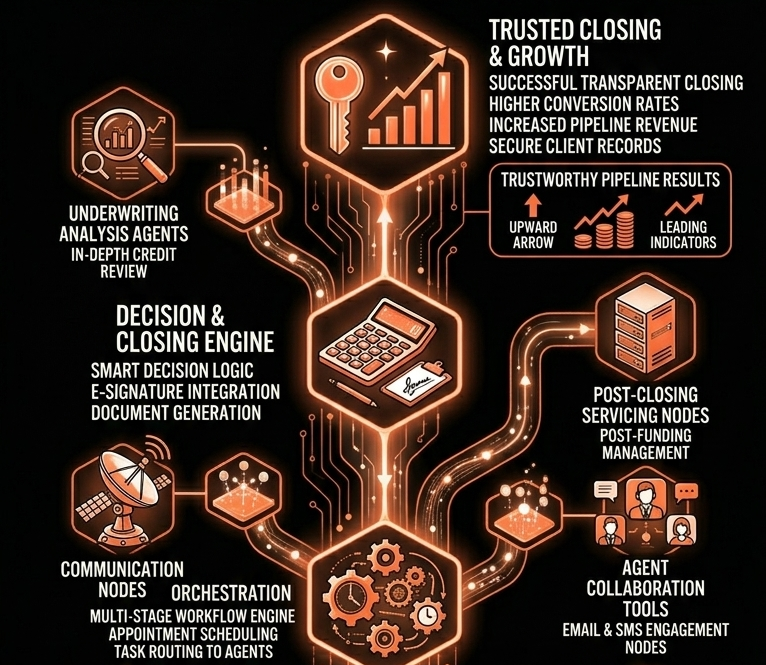
Step 8 – Build Lender-Ready Dashboards
Dashboards for originators/team leaders:
Lead & App Funnel
- Leads by source/channel.
- Lead → App → Approval → Funded conversion rates.
- Speed-to-contact and speed-to-application.
Pipeline & Forecast
- Deals by stage and expected close month.
- Funded volume vs target.
- Pipeline by loan type/purpose.
Partner Performance
- Volume and conversion from key referral partners.
- Top-performing realtors, builders, brokers.
Rep/LO Performance
- Deals by LO and stage.
- Funded deals and volume by LO.
- Decline/withdrawn rates (for coaching).
Leadership sees volume, quality, and performance trends directly from HubSpot.
Step 9 – Compliance and Data Hygiene Considerations
Be careful with:
- Storing sensitive personal and financial data in HubSpot.
Avoid full SSNs, full income details, credit scores.
Use bands (e.g., income bracket) if needed for segmentation.
Ensure consent for marketing vs transactional communications:
- Subscription types and opt-in managed via forms and workflows.
Restrict exports and access:
- Permissions so only appropriate roles can export or see full contact sets.
- Admin control over properties linked to LOS data.
Work with compliance to agree:
- Which fields belong in HubSpot.
- How long data should be retained.
- Who can edit certain properties.
Step 10 – Use HubSpot for Retention and Re-Fi Opportunities
Post-funding, HubSpot should support:
Post-close journeys:
- Welcome and onboarding emails.
- Requests for reviews or referrals.
Refinance or cross-sell triggers:
- Rate changes.
- Property value changes (if you integrate such signals).
- Term milestones (e.g., at year 2–3 for certain products).
Use simple flags:
- Eligible for refinance (Yes/No).
- Cross-sell potential (HELOC, insurance, credit cards, etc.).
And:
- Build lists and tasks for LOs/CS staff to reach out proactively.
HubSpot becomes the place to protect and grow lifetime value, not just close the first loan.
Want Help Turning HubSpot Into a Real Lending Pipeline Engine?
If your lending pipeline is split across LOS screens, spreadsheets, and email, HubSpot can bring the GTM picture together.
Through our HubSpot Implementation Blueprints, Portal Health Check, and Managed RevOps Retainer, we:
- Design a lending-specific data model, lifecycle, and pipeline in HubSpot.
- Connect LOS and key systems at a safe, summary level.
- Implement SLAs, workflows, and dashboards for originators and leaders.
- Respect compliance and data boundaries while enabling velocity.