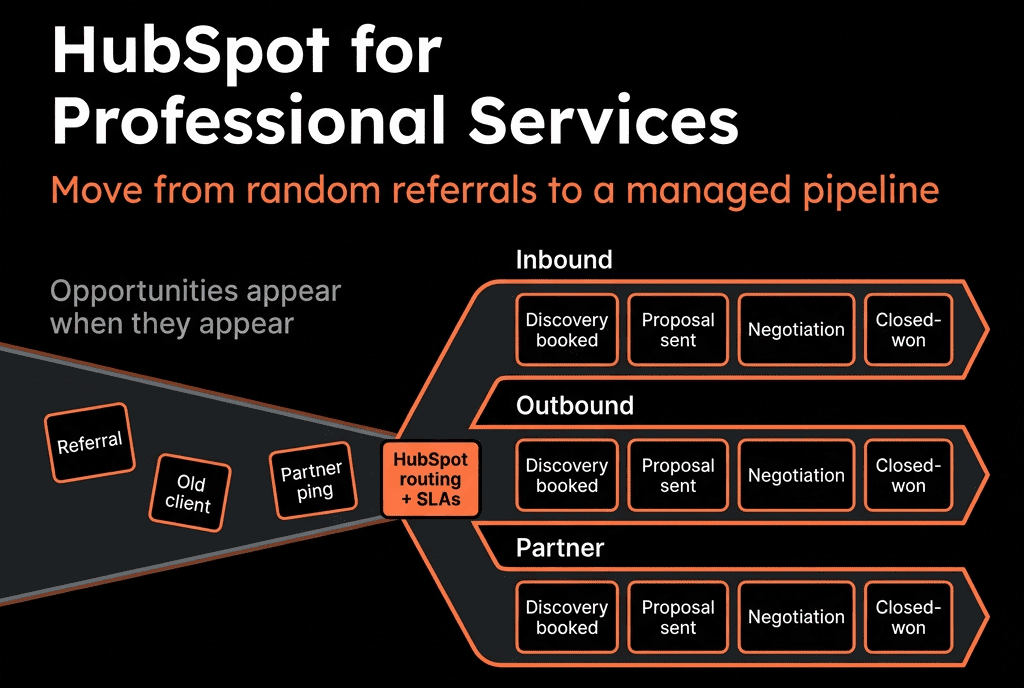
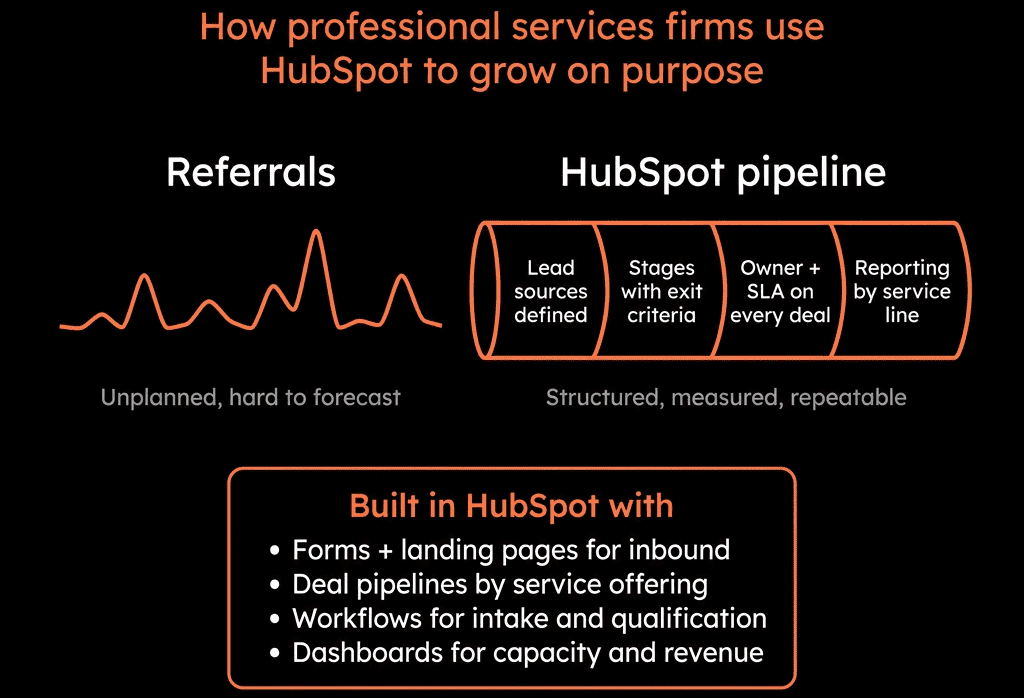
Referrals Are Great—Until They Aren’t
Most professional services firms (agencies, consultancies, IT services, etc.) grow like this:
- Founders’ network and word of mouth.
- Project extensions and upsells.
- Inbound “we heard about you” emails.
Then growth plateaus or becomes erratic:
- Great quarter → quiet quarter.
- No clear view of future work.
- Marketing feels vague and unmeasurable.
HubSpot can turn this from referrals-only to repeatable pipeline if you architect it around how services are sold and delivered.
Here’s the structure we use.
Step 1 – Define Your Services “Units” and Ideal Clients Clearly
Before touching HubSpot, you need:
Offer units
- Retainers (monthly).
- Projects (fixed scope).
- Audits/workshops (entry offers).
- Add-ons (e.g., training, maintenance).
Ideal client profile
- Industry.
- Company size.
- Geography.
- Common problems (why they come to you).
This will drive:
- Segmentation properties.
- Pipeline design.
- Lead qualification and routing.
Step 2 – Set Up the Core Data Model for Services
Companies
- Industry.
- Company size.
- Region.
- ICP fit (High/Med/Low).
- Customer status (Prospect, Active, Dormant, Churned).
Contacts
- Role (e.g., CEO, CMO, COO).
- Buyer vs user vs influencer.
- Lead source (Referral, Inbound content, Event, Partner, Outbound).
Deals
- Deal type (New Retainer, New Project, Upsell, Renewal).
- Service line (e.g., Strategy, Implementation, Managed Services).
- Value (one-off + recurring where applicable).
- Expected start date (important in services).
- Engagement model (Fixed fee, T&M, Retainer).
This lets you analyse revenue and pipeline in a services-specific way.
Step 3 – Design a Services-Friendly Pipeline
Pipeline stages should reflect real buying decisions, not internal admin.
Example New Business pipeline:
- Qualified – Problem and fit confirmed.
- Scoping – Workshops/discovery underway to define solution.
- Proposal Drafted – Scope and pricing aligned internally.
- Proposal Sent – Client has the proposal.
- Negotiation / Clarification – Feedback and adjustments in progress.
- Verbal Commit – Client agreed in principle.
- Closed Won / Closed Lost.
For retainers vs projects, you can either:
- Keep one pipeline and use Deal type/Service line to distinguish.
- Or run separate pipelines if sales motions differ significantly.
Key is to document entry/exit criteria so everyone uses stages consistently.
Step 4 – Turn Referrals and Inbound into Trackable Leads
Most services firms lose control at the very start:
- Referrals come in via email/WhatsApp/LinkedIn.
- They get handled ad hoc.
Standardise intake:
Use HubSpot forms (or simple “talk to sales” forms) with:
- How they heard about you (Referral, Event, Content, etc.).
- Basic project/need description.
Add a simple internal form or playbook for referrals logged by your team:
- Contact, Company, Referrer, Rough need.
Workflows then:
- Create/associate Company and Contact.
- Set Lifecycle to MQL/SQL as appropriate.
- Create a Deal for qualified inquiries or at least a task for qualification.
- Set source = Referral/Partner/etc.
Now referrals and inbound leads enter the same funnel, not live in inboxes.
Step 5 – Implement a Simple Lead Qualification & Routing Motion
Professional services often don’t need heavy scoring; they need clear qualification.
Define a few key fields:
- Project type / service needed.
- Budget range (if possible).
- Timeline (e.g., this quarter / next quarter / later).
- Decision maker identified (Yes/No).
- ICP fit (High/Med/Low based on size/industry).
Set up:
Basic rules:
- High/Med ICP + near-term timeline → treated as hot.
- Low ICP or long-term → nurture/monitor.
Routing:
- Assign to sales/partners/founder based on service line, region, deal size.
You can use contact-based or deal-based workflows to drive this.
Step 6 – Create Entry Offers and Nurture Flows
To move away from pure referrals, you want entry offers:
- Audits/reviews.
- Strategy workshops.
- Roadmaps/blueprints.
In HubSpot:
- Build landing pages and forms for these offers.
Use workflows to:
- Tag contacts with Offer interest.
- Move Lifecycle to MQL/SQL.
- Assign to the right owner.
- Create Deals when appropriate.
Also create:
- Nurture sequences for leads not ready yet (case studies, process explainers, ROI stories).
This starts building predictable top-of-funnel beyond referrals.
Step 7 – Operationalise Account Expansion and Referrals from Happy Clients
Professional services growth is heavily land-and-expand.
Use HubSpot to:
Track existing engagements:
- Deals by Service line and Customer status.
- Tickets/projects for active work.
Define expansion triggers:
- Successful project delivery.
- High NPS or positive feedback.
- New budget cycles.
Workflows:
- When a project is Closed Won and completed:
- Trigger a Playbook or task for the owner:
- “Expansion conversation for [adjacent service].”
- “Request referral” at the right moment.
Now upsell and referral requests are part of the process, not just “when we remember”.
Step 8 – Build a Services-Focused Reporting Stack
You need visibility that matches how services are sold and delivered.
Core dashboards:
New Business & Pipeline
- Deals by type (New Retainer, Project).
- Pipeline by stage and service line.
- Win rate and average deal size by service line and channel (Referral, Inbound, Outbound).
Capacity & Forecast Alignment
- Expected project start dates vs team capacity (this may integrate with a project tool, but HubSpot is the demand side).
- Retainer renewals/expansions in the next 3–6 months.
Source & Referrals
- Closed Won by source (Referral, Event, Website, Partner).
- Top referrers (individuals, partners, clients).
Client Health & Expansion (if you use Service Hub or integrate delivery tools)
- Active clients by health band or engagement score.
- Upsell pipeline from existing clients.
This gets you from “we feel busy” to “we know where revenue will come from.”
Step 9 – Align Marketing, Sales, and Delivery Around HubSpot
For professional services, alignment looks like:
Marketing
- Knows which content and offers drive real projects (not just clicks).
- Targets ICP segments informed by win rates and margins.
Sales
- Uses consistent pipeline and notes so delivery has context.
- Captures scope, expectations, and risks in HubSpot before handoff.
Delivery/CS
- Feeds back upsell opportunities and client satisfaction.
- Logs key milestones (onboarding complete, project completed).
Use:
- Playbooks for discovery and scope calls.
- Standard Deal properties for SOW-level detail.
- Tickets or integrated project tools for delivery.
HubSpot becomes the shared view of the client and pipeline, not just “sales’ thing”.
Step 10 – Use HubSpot to Move from Gut-Feel to Capacity-Aware Growth
As this matures, HubSpot helps you:
- Understand lead and deal volume needed per month/quarter to hit revenue targets.
- See where project starts will spike or dip vs available delivery capacity.
Decide:
- When to hire delivery vs when to dial back marketing/sales for certain services.
- Which service lines to grow, bundle, or sunset.
Professional services become less feast-or-famine and more like a predictable revenue machine.
Want Help Turning Your Services HubSpot Into a Real Pipeline Engine?
If your current HubSpot is basically a smart address book for referrals and projects, we can help you architect the predictable pipeline layer.
Through our HubSpot Implementation Blueprints, Portal Health Check, and Managed RevOps Retainer, we:
- Design a services-specific data model, pipelines, and fields.
- Implement inbound + referral capture, qualification, and routing.
- Build expansion and referral plays from existing clients.
- Stand up dashboards that show pipeline, demand by service line, and upcoming revenue vs capacity.
So you move from “we hope the next referral comes” to “we know what pipeline is coming, from where, and for which services.”