PLG Needs Product Data + Sales Process in One Place
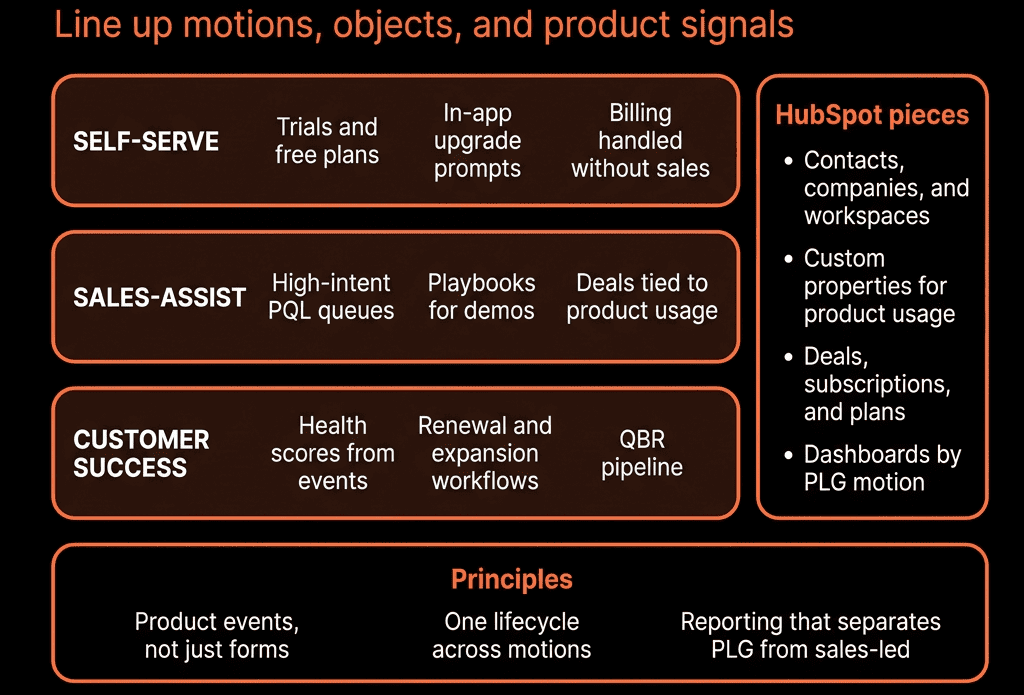
In product-led growth, revenue starts with:
- Free signups.
- Trials.
- Self-serve upgrades in-app.
But leadership also needs:
- Account-level view of usage.
- Sales-assist and enterprise motions.
- Clear expansion and renewal pipeline.
If HubSpot is only “marketing + deals” and your product lives somewhere else, PLG feels chaotic.
You want HubSpot to be:
- The GTM brain for PLG.
- Fed by product usage and billing.
- Used by sales, CS, marketing, and RevOps.
Here’s the structure we use.
1. Treat the Workspace/Account as the Primary Object
In PLG, a single person can sign up, but value happens at an account/workspace/team level.
In HubSpot:
- Use Companies to represent “accounts/workspaces”.
- Use Contacts for individual users.
On Companies, store:
- Account type (Free, Trial, Self-serve paid, Sales-led paid).
- Plan / Tier.
- MRR / ARR (from billing).
- Primary use case / vertical.
- Segment (SMB / Mid / Enterprise).
- Region.
- Product owner / CSM / AM.
- Health band (Green/Amber/Red).
On Contacts, store:
- Role (Admin, End user, Champion, Buyer).
- Signup source (Direct, Invite, SSO, Partner).
- Product role (e.g., Developer, Marketer, Sales rep).
This lets you see PLG accounts as “customers”, not just loose contacts.
2. Build a Clear Signup and Lifecycle Model
You need to track where a user/account is on the PLG journey.
On Contacts:
- Lifecycle stage:
- Subscriber → Lead → PQL (product-qualified lead) / SQL → Customer.
- Signup type: Free trial / Free plan / Invite / Sales-created.
On Companies:
- PLG lifecycle:
- Free account.
- Activated account.
- PQA (product-qualified account).
- Paying customer.
- Expansion candidate.
Use product + billing events (via integration) to:
- Create Companies/Contacts on signup (if not exist).
- Set lifecycle on Contacts based on product actions.
- Update PLG lifecycle on Companies based on aggregate usage + payment status.
You now have a shared language: PLG, sales, and CS talk about the same stages.
3. Define PQLs and PQAs Explicitly
PLG falls apart if “PQL” is a buzzword, not a property.
Decide your PQL/PQA criteria, for example:
- PQL (contact-level) when:
- Completed onboarding checklist.
- Invited X teammates.
- Used core features Y times in Z days.
PQA (account-level) when:
- Workspace has ≥ N active users.
- Hits a key usage threshold (e.g., projects created, docs sent, meetings held).
- Shows signals of team/department-level adoption.
Translate into HubSpot properties:
- On Contacts: PQL status (Not PQL / PQL – New / PQL – Working / PQL – Disqualified).
- On Companies: PQA status and a PQA score or band (Low/Med/High).
Use workflows fed by product events to:
- Set/unset PQL/PQA flags.
- Write scores/tiers from your scoring system.
Now you know which signups are worth a sales-assist or CS touch.
4. Connect Product and Billing Events Into HubSpot
You don’t need raw clickstream; you need curated signals.
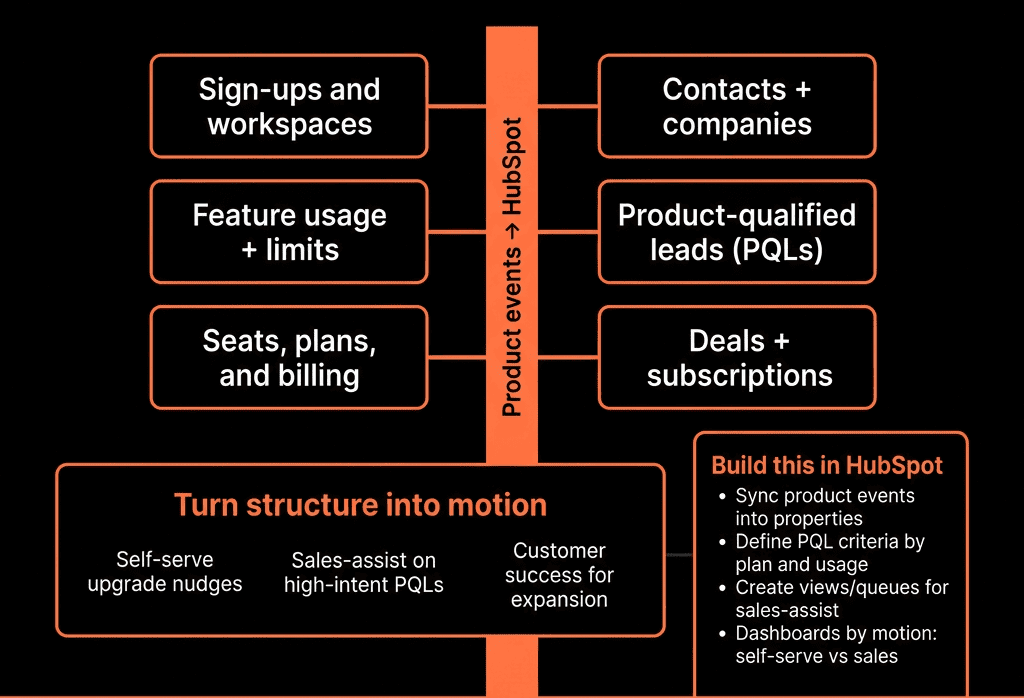
Use Segment, Rudderstack, direct API, or native integrations to push into HubSpot:
- On Contacts:
- Last login date.
- Last seen feature X/Y/Z usage.
- Invited teammates? (Yes/No).
On Companies:
- Active users last 7/30 days.
- Key feature adoption flags (e.g., Connected integration, Created API keys).
- Usage tier (Low/Med/High).
- MRR/ARR from billing.
- Plan and Billing status (Active / Delinquent / Canceled).
Use workflows or custom code to:
- Normalize signals into health and PQA status.
- Trigger alerts and tasks for sales/CS where relevant.
HubSpot becomes the human-facing view of product reality.
5. Use Separate Pipelines for New, Expansion, and Enterprise
PLG doesn’t mean “no sales pipeline”.
We usually configure:
- Self-serve motion – tracked via MRR fields, not Deals for every swipe.
- Sales-assist – pipeline for PQL/PQA opportunities.
- Enterprise/complex deals – full-blown sales pipeline.
Pipelines:
Sales-Assisted New Business
- Deals from PQLs/PQAs that need reps to convert to paid (or bigger plan).
- Stages: Qualified → Solution fit → Trial → Proposal → Commit → Closed Won/Lost.
Expansion pipeline
- For accounts moving from:
- Free → paid teams.
- Lower → higher tiers.
- Single team → multi-team or multi-geo.
Renewal pipeline (if contracts, not month-to-month).
- For annual/enterprise deals that actually renew on fixed terms.
Use Deal type (New/Expansion/Renewal) and Motion (Self-serve / Sales-assisted / Enterprise) to separate reporting.
6. Route and Work PQLs/PQAs Properly
Build a PQL play:
Contact-based workflow:
- Trigger: PQL status = New.
- Check: ICP fit (segment/region) and account context.
- Assign owner (PLG AE/Account Manager/CSM).
- Create tasks:
- “Review usage and decide: leave to self-serve vs sales-assist vs CS-led.”
- Send internal alert with:
- Usage summary.
- Plan.
- Key product actions.
Similarly, for PQAs (Companies):
Company-based workflow:
- Trigger: PQA status = New or PQA tier increases.
- Actions similar to above, but biased towards account-level outreach.
Sales and CS get usage-driven, in-context opportunities, not random lists.
7. Use Playbooks for PLG Sales-Assisted Conversations
Sales-assist calls look different from cold outbound.
Create PLG-specific Playbooks:
- PQL/PQA discovery:
- Who’s using the product?
- Which teams?
- What jobs are they getting done?
- Where are they hitting limits (seats, features, governance)?
Value & pricing:
- What would unlock more usage (SSO, admin controls, integrations)?
- When would they need Enterprise features?
Map to fields:
- Champion identified (Yes/No).
- Buying center (Team/Dept vs Org).
- Expansion potential (Low/Med/High).
- Key blockers.
This sets up both immediate upsell and future opportunities.
8. Dashboards: PLG + Sales + CS in One View
Build a PLG-focused set:
Acquisition & Activation
- Signups by source and segment.
- Activation rates (e.g., completed onboarding, key actions).
- PQL and PQA creation by cohort.
Self-Serve Revenue
- Self-serve MRR/ARR by plan and segment.
- Upgrades/downgrades per month.
- Churn (logo + MRR) on self-serve.
Sales-Assisted & Enterprise
- Pipeline from PQL/PQAs (sales-assisted deals).
- Closed Won by motion and segment.
- Win rate and cycle length vs PQL/PQA quality.
Expansion & NRR
- Expansion MRR by motion (PLG-led vs sales-led).
- NRR/GRR by segment and plan.
- Coverage: % of PQAs touched by sales/CS.
Leadership can now see PLG + sales motions in one frame.
9. Governance: Don’t Let Product Data Flood HubSpot
Common PLG mistake: dumping every event into HubSpot.
Guardrails:
- Decide up front:
- Which events matter for GTM (activation, value moments, account health, upgrade risk).
- Which should live only in the warehouse/product analytics.
Use aggregated fields:
- “# active users last 30 days” instead of every login event.
- “Core feature adoption = Yes/No” instead of full event logs.
Document:
- Which product fields exist in HubSpot.
- Their meaning and refresh cadence.
- Who uses them (sales, CS, marketing).
This keeps HubSpot usable, not a noisy data lake.
10. Evolve the Model With Your PLG Maturity
Early PLG:
- Focus on getting:
- Clean signups into HubSpot.
- A simple activation metric.
- Basic PQL rules and a small sales-assist team.
Scaling PLG:
- Add:
- PQA scoring.
- Multi-workspace/tenant modeling.
- Territory and segment rules for PLG AEs.
- CS/AM roles tied to usage and NRR.
Enterprise PLG:
- Deepen:
- Data warehouse + BI for cohort and retention.
- Push summarized insights into HubSpot.
- Hybrid PLG + outbound motion coordination.
HubSpot remains the frontline system for humans; the warehouse is for deep analytics.
Want Help Structuring HubSpot for Your PLG Motion?
If your PLG product is generating signups but HubSpot isn’t giving you a clear view of PQLs, PQAs, pipeline, and expansion, we can help.
Through our HubSpot Implementation Blueprints, Portal Health Check, and Managed RevOps Retainer, we:
- Design a PLG-ready HubSpot data model (accounts, users, PQL/PQA, health, billing).
- Connect the right product and billing signals into HubSpot.
- Implement PQL/PQA routing, sales-assist pipelines, and expansion plays.
- Build dashboards that show PLG + sales revenue in one place.