Real Estate CRMs Often Either Overkill or Underwhelming
Real estate teams (residential or commercial) usually end up with:
- Lead gen tools that don’t manage relationships well.
- Spreadsheets for deals and commissions.
- Individual agents hoarding contacts in phones.
HubSpot won’t replace your MLS or transaction management platforms.
It becomes the central place for:
- Leads and clients.
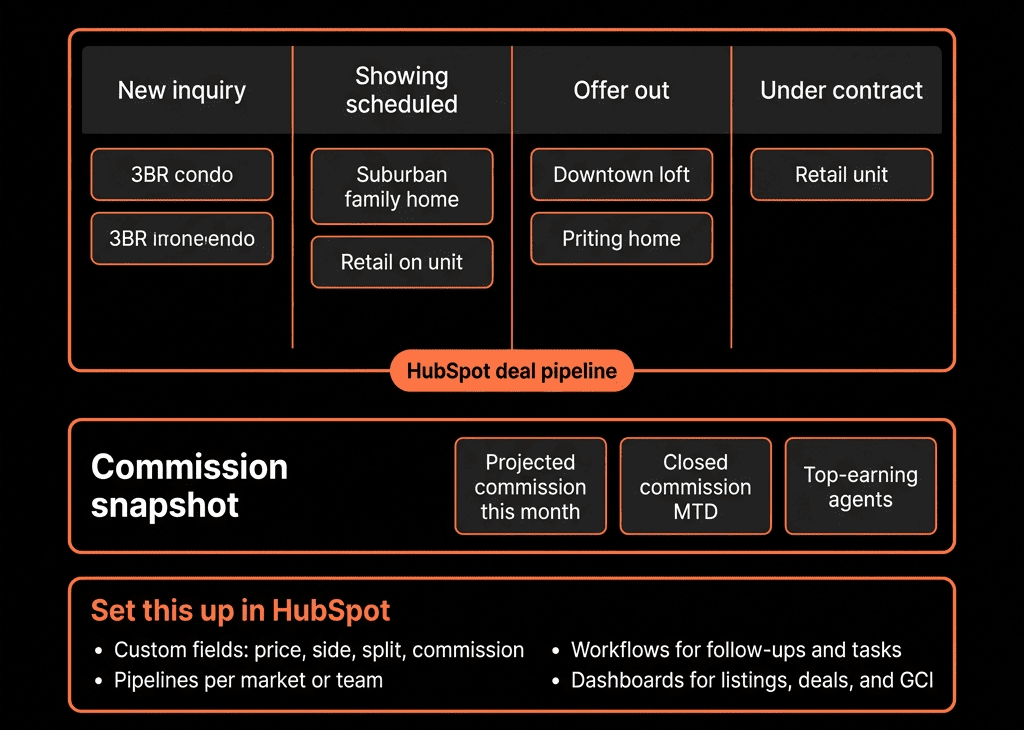
- Deals/pipeline.
- Commissions and performance tracking.
Here’s how we architect it.
Step 1 – Decide Your Real Estate Motion(s)
First, be clear on what you’re running:
- Residential buyers and sellers?
- Commercial leasing?
- Investment sales?
- Mixed?
And your structure:
- Solo agent, small team, or full brokerage?
- Single market vs multiple offices?
Your HubSpot design will reflect:
- How you split territories.
- How team/agent ownership works.
- How commissions are calculated.
Step 2 – Set Up the Core Data Model
Contacts
- Role/type: Buyer, Seller, Landlord, Tenant, Investor, Referral partner.
- Status: New lead, Nurture, Active client, Past client.
- Preferences: Property type, budget/rent range, location(s), timeline.
Companies (Optional, especially for commercial)
- Landlords/owners.
- Corporate tenants.
- Developers, investors.
Deals = Transactions / Opportunities
Each property transaction as a Deal:
- Deal type (Listing, Buyer rep, Landlord rep, Tenant rep, Referral, etc.).
- Property address (or link to a custom Property object if you want).
- Property type (Residential, Office, Retail, Industrial, Land, etc.).
- Side (Buy / Sell / Lease / Sub-lease).
- List price / Asking rent.
- Offer price / Final sale price / Annual rent.
- Commission rate (% or flat).
- Gross commission (calculated).
- Agent split % and Agent commission (for team/brokerage setups).
This lets you track both volume and income.
Step 3 – Design Pipelines That Reflect Your Process
Keep pipelines simple but specific.
Residential sales pipeline (example)
- New opportunity – Buyer/seller ready to engage.
- Discovery / Needs analysis.
- Actively searching / Preparing listing.
- Offer(s) made / Listing live.
- Offer accepted.
- Under contract / Due diligence.
- Closed Won / Closed Lost.
Leasing pipeline (example)
- Lead.
- Viewing / Tours.
- LOI / Application.
- Lease negotiation.
- Lease signed.
- Move-in / Closed.
Separate pipelines if motions differ strongly (e.g., residential vs commercial).
Define entry/exit criteria so agents update consistently.
Step 4 – Implement Lead Capture and Routing
Real estate leads come from:
- Portals (Zillow, Realtor.com, local portals).
- Website/contact forms.
- Sign calls, walk-ins, phone leads.
- Referrals and past clients.
Use HubSpot to:
- Capture all digital leads via forms, API, or email parsing.
- Log offline leads via simple Playbooks/forms internally.
Routing:
- Assign by territory/zip code.
- Or by team and rotation.
- Or by listing (listing agent owns inbound leads).
Use contact-based workflows to:
- Set Lead status = New.
- Assign owner (agent).
- Create tasks for quick follow-up (speed-to-lead SLA).
Step 5 – Standardize Lead and Client Statuses
To avoid chaos:
Use Lifecycle stage + Lead status:
- Lifecycle: Subscriber → Lead → MQL → SQL → Customer (adapted to your terminology).
- Lead status (for sales): New, Attempted to contact, Connected, Qualified, Unqualified, Nurture.
Rules:
- New portal/web leads start as Lead + New.
- When a client signs a buyer/seller agreement or engages seriously → SQL/Customer.
- Past clients remain as Customers, but Lead status can go back to Nurture for future opportunities.
This enables clean reporting on lead conversion and source performance.
Step 6 – Track Commission Data on Deals
You don’t need a full commission system; you need basic visibility.
On Deals:
- Commission % – your side’s commission rate.
- Gross commission = Final sale price × Commission %.
- Agent split % – split to agent (e.g., 70%).
- Agent commission = Gross commission × Agent split %.
- Brokerage share (if needed).
You can:
- Calculate via Operations Hub or manual input.
- Or use workflows to populate simple formulas.
Then build reports:
- Total GCI by agent.
- Net commission by agent and team.
- Production by property type/area.
Step 7 – Use Playbooks and Tasks for Consistent Follow-Up
Real estate is heavy on follow-up; HubSpot can systematize it.
Playbooks for:
- Buyer intake calls.
- Listing consultations.
- Investor discussions.
Map answers into fields:
- Property preferences.
- Timeframe.
- Financing status.
- Motivation (must-move vs exploratory).
Sequences or tasks for:
- New incoming leads (multi-touch follow-up).
- Open house follow-ups.
- Past-client check-ins (anniversaries, market updates).
This reduces dependency on each agent’s personal system.

Step 8 – Build a Real Estate Reporting Set
Dashboards to replace spreadsheets:
Pipeline & Closings
- Active deals by stage and agent.
- Closings this month/quarter by volume and GCI.
- Forecasted closings (Under contract, Offer accepted) by expected close date.
Lead & Source Performance
- Leads by source (Portal, Website, Sign call, Referral).
- Lead→Client conversion rates by source.
- Cost per closing (if you track ad spend per source).
Agent Productivity & Performance
- Calls/emails/meetings logged.
- New contacts added.
- Deals created and closed.
- GCI per agent, property type, and territory.
Past Clients & Sphere
- Active nurturing lists (e.g., homeowners by zipcode).
- Repeat/referral deals from past clients.
This gives team leaders and brokers visibility they rarely get from ad hoc tools.
Step 9 – Integrate Lightly With MLS / Transaction Tools
You generally won’t use HubSpot as:
- Listings database.
- Document repository for contracts.
Instead:
- Keep property/detail records in:
- MLS systems.
- Transaction management tools (Dotloop, Skyslope, etc.).
Within Deal records:
- Store links to those systems (URL fields).
- Basic property meta (type, area, key facts) enough for filtering and reporting.
Sync tasks and key dates if needed:
- Inspection dates.
- Contract deadlines.
- Closing dates.
But let specialized tools handle documents and compliance.
Step 10 – Roll Out in Phases and Make HubSpot the Meeting Ground
To avoid agent pushback:
Phase 1:
- Leadership + admins get pipeline and production dashboards working.
- Clean up data model and basic routing.
Phase 2:
- Train a pilot group of agents:
- Leads come in from X, Y sources.
- Here’s your daily view.
- Here’s how we track deals and commissions.
Phase 3:
- Expand to full team.
- Run weekly/monthly sales meetings from HubSpot dashboards (not PDFs).
Over time, HubSpot becomes:
- The first tab agents open for their day.
- The source of truth for broker/owner on deals, commissions, and performance.
Want Help Turning HubSpot Into a Real Estate Growth Platform?
If your real estate team is juggling portals, spreadsheets, and ad hoc lead lists, HubSpot can give you one coherent system for relationships, pipeline, and GCI.
Through our HubSpot Implementation Blueprints, Portal Health Check, and Managed RevOps Retainer, we:
- Design a real estate-specific data model and pipelines.
- Implement lead capture, routing, and follow-up.
- Configure commission tracking at the deal level.
- Build dashboards for agents, team leaders, and brokers.
So you can grow your team and your book without losing control of who’s doing what—and who’s getting paid what.