



ABM Fails in HubSpot When You Treat It Like “Fancier Lead Gen”
A lot of “ABM in HubSpot” looks like:
- A target account list in a spreadsheet.
- Some ad audiences synced from lists.
- Occasional personalized emails from Sales.
But, structurally, the portal still thinks in leads, not accounts:
- Contacts aren’t reliably tied to Companies.
- No concept of buying committees.
- No way to distinguish true target accounts from the rest of the database.
Real ABM in HubSpot requires architectural choices:
- How you model accounts and people.
- How you flag and segment target accounts.
- How you orchestrate coordinated plays across Marketing and Sales.
Here’s how we architect HubSpot for ABM in a way RevOps, Marketing, and Sales can all use.
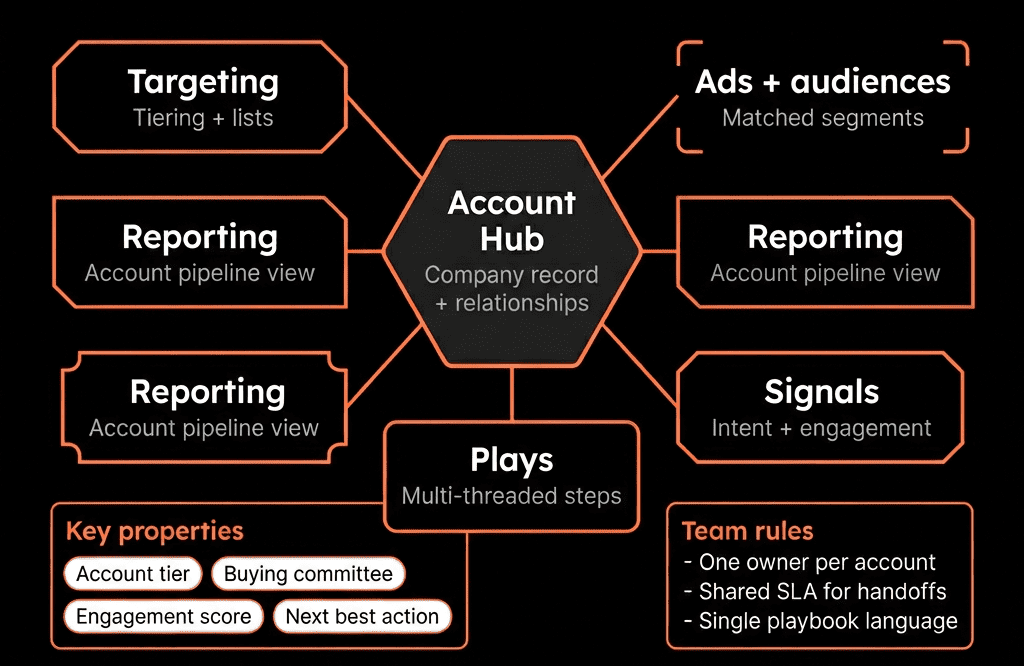
Step 1 – Get the ABM Concepts Clear First
ABM is about:
- Accounts, not just leads: Accounts (Companies) are the planning and reporting unit.
- Buying committees, not just single contacts: Multiple stakeholders (champions, economic buyers, users, blockers).
- Target accounts vs the broader market: A finite list of high‑value accounts you’ll treat differently.
- Coordinated plays: Ads, content, email, calls, social touches aligned on the same accounts.
Your HubSpot architecture needs to reflect those ideas explicitly.
Step 2 – Architect the Data Model Around Accounts and Buying Committees
Start with Companies as the center of the ABM universe.
Companies (Accounts)
Key properties:
- ICP tier (Tier 1 / Tier 2 / Tier 3).
- ABM target? (Yes/No).
- Segment (SMB/MM/ENT).
- Industry and region.
- ARR potential band or account value estimate.
- Account owner (AE/AM).
Contacts (Buying Committee Members)
Key properties:
- Role in deal (Economic buyer, Champion, User, Influencer, Blocker).
- Department and seniority.
- Engagement level (via intent metrics and scoring).
- Linked to the right Company (and Deals).
Deals (Opportunities at target accounts)
Key properties:
- Deal type (New logo / Expansion / Renewal).
- Primary Company.
- In ABM program? (Yes/No).
Every ABM design choice should start by asking: “Does this make the account + buying committee view cleaner or messier?”
Step 3 – Define and Mark Target Accounts in HubSpot
You can’t run ABM without a clear, agreed list of target accounts.
Steps:
Build an ICP definition
- Company size, industry, tech stack, geography, existing customer look‑alikes.
Score or tier accounts in HubSpot
- Use an ICP tier property or Account fit score to classify Companies.
Create an ABM target property on Companies
- Values: Not target, Target – Tier 1, Target – Tier 2, etc.
Create dynamic Target Account lists
- Tier 1 ABM accounts (global).
- Tier 1 ABM – North America.
- Tier 1 ABM – SaaS vertical.
You now have a “golden list” of target accounts directly in HubSpot, not in offline docs.
Step 4 – Align Ownership and Teams Around Target Accounts
ABM fails when ownership is fuzzy.
In HubSpot:
- Assign Account owners at the Company level (usually AEs or AMs).
- Associate SDR/BDR owners via a separate property (e.g., SDR owner) if needed.
- Use HubSpot teams to group users by ABM pod, region, or vertical.
Then create views and dashboards per owner and team for:
- “My ABM target accounts.”
- “My target accounts with no contacts.”
- “My target accounts with active opportunities.”
This gives Sales and CS a clear roster of accounts they are responsible for.
Step 5 – Build Buying Committee Visibility at the Company Level
ABM is about multi‑threading.
Make buying committees obvious on Company records:
- Ensure Contacts are properly associated to Companies (turn on HubSpot’s automatic create/associate setting where it fits your data model).
- Use Contact properties: Buying role, Primary decision‑maker (Yes/No).
- On the Company record, highlight the key Contacts and roles using associations + highlighted properties.
Use filters/lists to show:
- “Accounts with only one known stakeholder.”
- “Accounts without an identified economic buyer.”
This lets Sales quickly see if they are single‑threaded at an account.
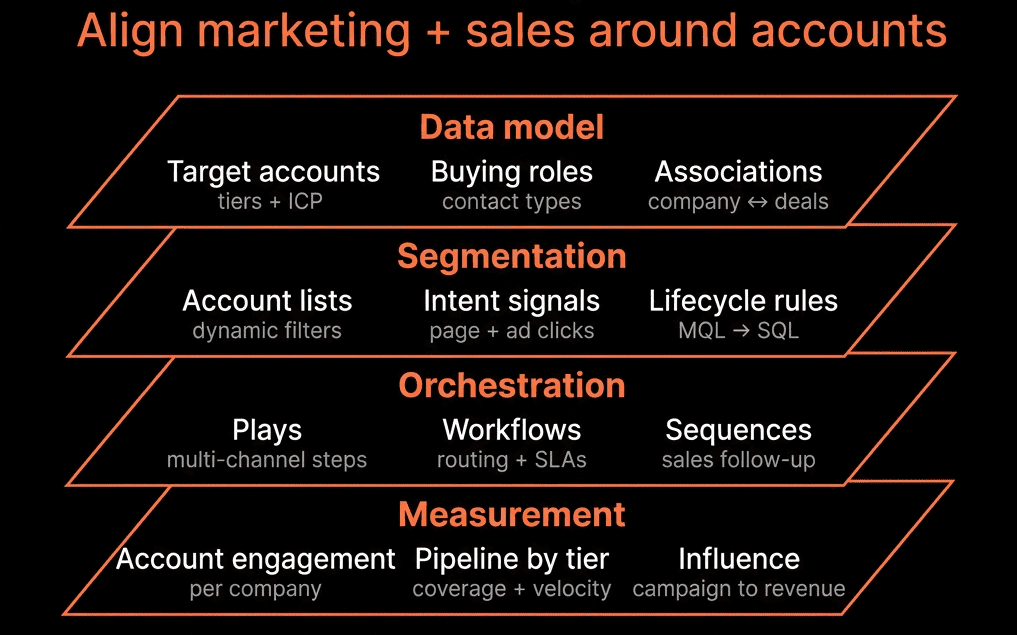
Step 6 – Orchestrate ABM Plays Across Marketing and Sales in HubSpot
Once you have target accounts and buying committees, you can run coordinated plays.
Use HubSpot to:
- Create ABM audiences for ads based on target account companies + contact roles.
- Coordinate SDR/AE outreach using role-specific sequences (champions vs economic buyers) and motion-specific messaging.
- Run account-level campaigns using HubSpot Campaigns to group ads, emails, landing pages, calls, and tasks for ABM segments.
- Trigger plays with workflows: notify owners, enroll contacts, create coordinated tasks when ABM engagement spikes.
The goal: target accounts receive orchestrated, multi-channel attention; non-targets get standard motions.
Step 7 – Configure ABM-Specific Reporting in HubSpot
You want to compare ABM vs non‑ABM performance and see account‑level impact.
Key reports/dashboards:
- Target Account Engagement: % of target accounts with at least 1 engaged contact; multiple engaged stakeholders; engagement by tier/segment.
- Pipeline & Revenue from ABM Accounts: opportunity count/value, win rates, and ACV for ABM vs non‑ABM; expansion/renewal metrics for ABM customers.
- ABM Funnel: target accounts with at least one contact → at least one engaged contact → opportunities → closed won.
These dashboards turn ABM into a measurable GTM motion rather than a buzzword.
Step 8 – Put Governance Around ABM in HubSpot
ABM depends on consistency. Governance keeps it from becoming “just another list.”
Establish:
- ABM steering group (RevOps + Marketing + Sales leadership) that owns ICP criteria and target account list.
- Rules for adding/removing target accounts: who can request additions and how often lists are reviewed.
- Documentation: what ABM target means; how to use ABM views/lists/campaigns.
- Review cadence: monthly performance checks; quarterly ICP and target list updates.
Pulling It Together: ABM Architecture, Not Just ABM Tactics
Architecting HubSpot for ABM is about more than syncing a target account list to ads.
You need:
- A Company‑centric data model with ICP tiers, ABM flags, and ownership.
- Clear target account lists and buying committee visibility.
- Coordinated plays between Marketing and Sales using workflows, Campaigns, and sequences.
- ABM‑specific reporting for engagement, pipeline, and revenue.
- Governance that keeps ABM clean and aligned as you grow.
Do this, and HubSpot becomes your account‑based operating system—not just a lead database with a few ABM add‑ons.
Want Help Architecting HubSpot for Real ABM?
If your ABM efforts are stuck in spreadsheets and ad accounts—and you want HubSpot to be the backbone of account‑based marketing and sales—this is where we can help.
Our HubSpot Portal Health Check and Migration & ROI Plan are designed to:
- Audit your current data model, ICP, and target account setup.
- Design an ABM‑ready HubSpot architecture (accounts, roles, plays, reporting).
- Provide a practical 60–90 day roadmap to implement it.






