“We’d Love to Use HubSpot… But Compliance”
Banks, lenders, wealth managers, fintechs—everyone wants:
- Better lead management.
- Coordinated outreach.
- Clear pipeline visibility.
But they’re nervous about:
- Regulated communications.
- Data privacy and retention.
- Audit trails and approvals.
The answer is not “no CRM” or “everything locked down so nobody uses it”.
It’s clear guardrails so teams can move fast inside a compliant framework.
Below is how we typically structure HubSpot for financial services.
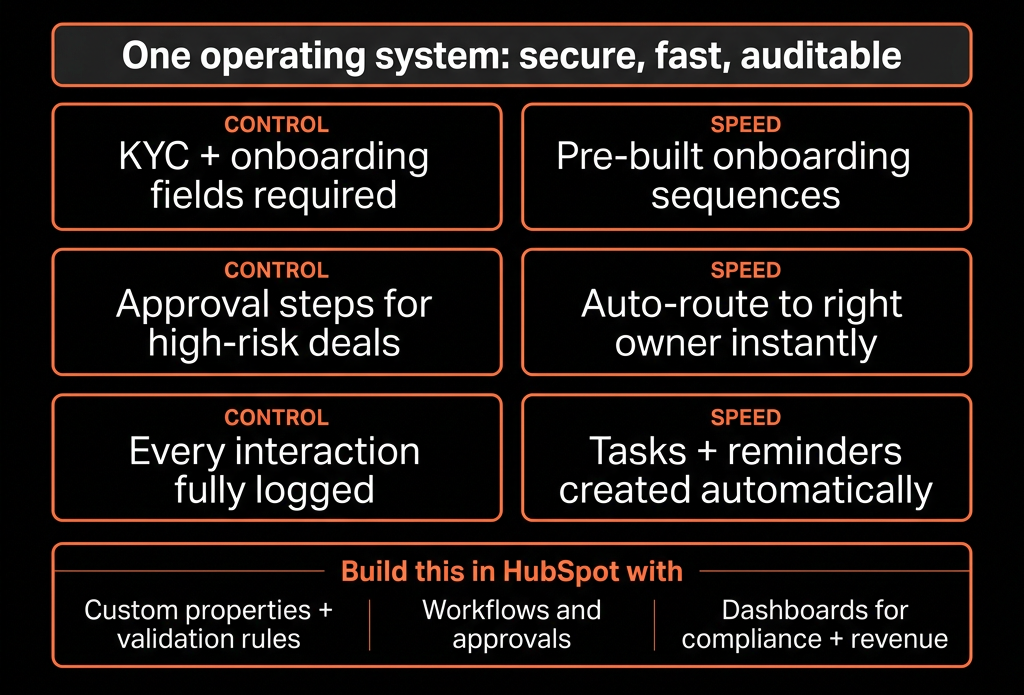
Step 1 – Be Explicit About What Must Not Live in HubSpot
Start by drawing hard lines.
Work with legal/compliance to define:
Prohibited data in HubSpot:
- Full account numbers.
- Sensitive PII beyond what’s necessary for sales/marketing (e.g., national IDs where not essential).
- Detailed financials subject to stricter regimes (depends on jurisdiction).
Allowed / required data:
- Business contact info.
- Role, firm, segment.
- High-level needs (e.g., “seeking SME loan”, “wealth planning interest”).
- Consent and communication preferences.
Then:
- Add warnings/notes to critical properties (“Do not store XYZ here”).
- Train users on “HubSpot is not your core banking system or document vault”.
HubSpot becomes the engagement layer, not the full record-of-truth for regulated data.
Step 2 – Design a Financial-Services-Specific Data Model
On Companies / Households / Firms:
- Client type (Corporate, SME, HNWI, Retail, Partner).
- Segment (Mass, Affluent, HNW, Institutional; or SME bands).
- Industry (for B2B).
- Region.
- Relationship status (Prospect, Onboarding, Active, Dormant).
On Contacts:
- Role (Beneficial owner, CFO, Founder, Relationship owner, Advisor).
- KYC status (Not started, In progress, Complete) – high-level only.
- Risk profile (Low/Med/High) – if appropriate.
- Consent/marketing preferences.
On Deals / Opportunities:
- Product type (Loan, Line of credit, Wealth mandate, Card, Insurance policy, etc.).
- Deal size (exposure band, AUM, etc.).
- Stage reflecting approval process (more below).
This gives you a clean CRM view without stepping into core system territory.
Step 3 – Build Pipelines That Reflect Approval and Onboarding Reality
Pipeline stages should mirror both sales and risk/approval gates.
Example for lending / credit:
- Qualified – basic need and eligibility discussed.
- Application in progress – docs requested/collected.
- Internal review – underwriting / risk evaluation.
- Approved – conditional or full approval granted.
- Offer accepted – client agreed to terms.
- Onboarding / documentation – final signing, KYC completion.
- Funded / Active facility.
- Declined / Withdrawn.
For wealth / investment:
- Prospecting → Needs analysis → Proposal → Compliance review → Mandate signed → Funded.
For each stage, define:
- Entry/exit criteria.
- Which system holds detail (HubSpot vs core).
- What’s logged in HubSpot vs your internal platforms.
This aligns sales expectations with compliance and ops.
Step 4 – Implement Strong Consent and Communication Preferences
Regulated comms require clarity on who you can contact, how, and about what.
In HubSpot:
- Store:
- Legal basis (where applicable: consent/legitimate interest).
- Email consent (Yes/No/Not asked).
- Phone consent (Yes/No/Do not call).
- Channel preferences (Email, Phone, SMS, In-app).
- Marketing vs transactional preferences.
Use:
- Subscription types to separate marketing vs service messages.
- Forms with explicit consent checkboxes and language signed off by compliance.
- Workflows to set/update consent fields based on form responses and unsubscribes.
Then:
- Lock down who can send what:
- Marketing emails only to consenting segments.
- Sales/relationship outreach still allowed under agreed frameworks (e.g., existing clients).
You move fast within a permission framework, not outside it.
Step 5 – Standardize and Control Templates, Sequences, and Campaigns
Big risk area: one-off or misworded emails in regulated markets.
Mitigation:
Email templates:
- Approved language for key journeys (welcome, application updates, generic outreach).
- Reviewed by compliance.
- Locked where needed (limited editing for certain roles).
Sequences:
- Only for permissible outreach (e.g., B2B prospecting or existing-client education).
- Clear opt-out language.
- Segmented lists that respect consent.
Marketing campaigns:
- Run off named, approved lists (e.g., “Clients opted into market updates”).
- Exclusion lists for PEPs, Do-Not-Contact, or specific restrictions.
Train teams:
- “These are the approved templates/flows for [scenario]. Stay inside them unless compliance approves new ones.”
Step 6 – Use Playbooks and Required Fields to Enforce Qualitative Discipline
To satisfy both risk and sales:
Build Playbooks for key calls:
- Initial discovery.
- Needs analysis.
- Risk profiling discussion (at an appropriate level).
- Product suitability checks.
Map answers to structured fields (without storing prohibited detail):
- Investment horizon category.
- Risk appetite (Low/Med/High).
- Income band instead of actual amount, if needed.
- Notes on suitability and rationale.
Use required fields at certain stages to ensure:
- Suitability has been considered.
- Key disclosures were mentioned (logged as “discussed”).
- No stage can be advanced without core compliance checkpoints.
This improves both service quality and audit readiness.
Step 7 – Leverage Permissions, Teams, and Field-Level Controls
HubSpot lets you limit who sees and edits what.
Configure:
Teams and ownership:
- Segment by geography, product line, or business unit.
- Restrict record visibility where needed (e.g., only team members see certain clients).
Permissions:
- Limit who can:
- Export data.
- Edit sensitive fields (KYC status, risk profile).
- Create/delete workflows and templates.
Audit-friendly behavior:
- Encourage logging all significant client interactions in HubSpot (calls, meetings, key emails).
- Use notes for context, not for raw PII or legal-doc detail.
This reduces accidental misuse and makes compliance more comfortable with HubSpot adoption.
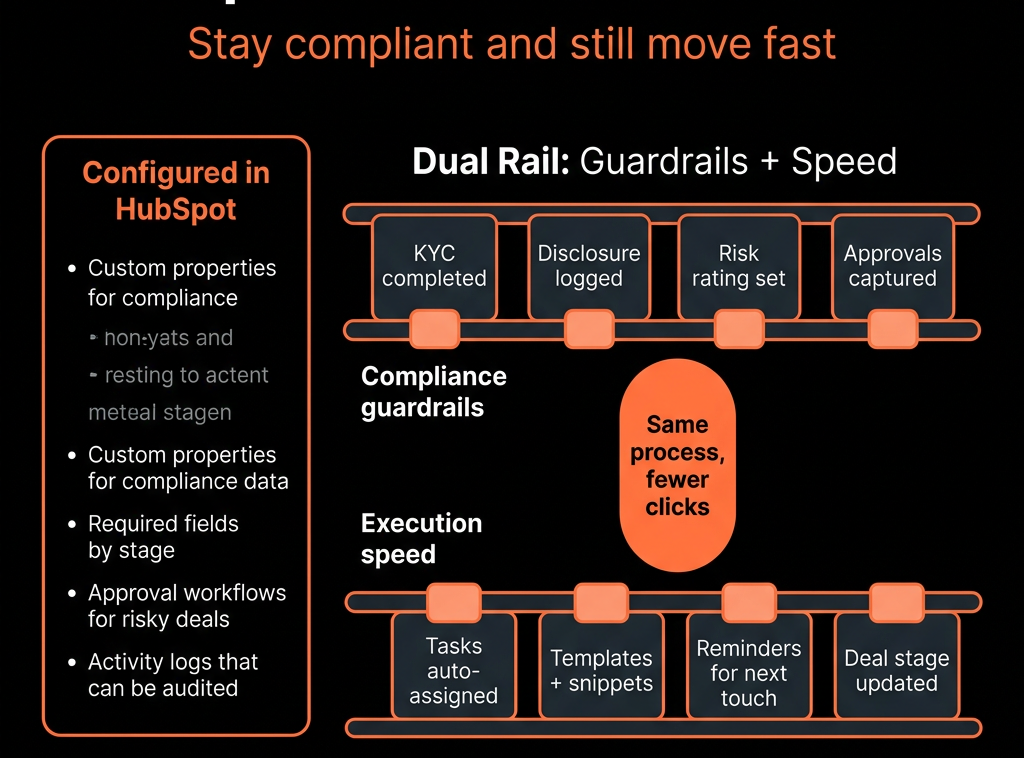
Step 8 – Integrate Carefully With Core Systems and Document Flow
Integrations are powerful—and risky if not thought through.
Principles:
HubSpot pulls non-sensitive summary fields from core systems:
- Account status (Active, Closed, In arrears).
- Product holdings summary (e.g., “3 products: Savings, Card, Loan”).
- Balance or exposure bands, not full statements (if you don’t need them in CRM).
HubSpot pushes only what’s needed:
- Contact updates.
- Relationship owner.
- Marketing engagement (for risk or relationship insights).
Document:
- Which system is the source of truth for each data class.
- Which fields are synchronized and in which direction.
- Who owns integration changes (IT vs RevOps).
This keeps HubSpot “safe” from overflow and drift.
Step 9 – Build Compliance-Friendly Reporting and Monitoring
Compliance and leadership both need oversight.
Dashboards to consider:
Contact governance:
- Count of contacts by consent status.
- Contacts missing required consent fields.
- Volume of marketing vs transactional comms.
Sales activity oversight:
- Calls/emails/meetings by team, with filters for:
- Role (adviser vs SDR).
- Products.
- Spot-check call logs and notes for suitability documentation.
Pipeline and product distribution:
- Deals by product, segment, and region.
- Cross-sell / concentration risks identified (for leadership, not in lieu of risk systems).
Exceptions:
- Deals where required compliance fields are missing at late stages.
- Contacts where KYC status is unknown but lifecycle = Customer.
These dashboards support internal reviews and give compliance comfort.
Step 10 – Test and Roll Out Changes With a Clear Governance Process
To “stay compliant and move fast”, you need controlled change.
Set up:
- A change advisory flow for:
- New workflows that touch consent, lifecycle, or product communications.
- New email templates/sequences used for regulated outreach.
- New integrations.
A sandbox or pilot group to test:
- Routing and automation.
- New journeys.
- New views and dashboards.
A minimal HubSpot governance council:
- RevOps + Compliance + one GTM lead.
- Meet monthly/quarterly to review changes, incidents, and priorities.
This lets you innovate within guardrails instead of freezing the system.
Want Help Designing a Compliant-But-Fast HubSpot for Financial Services?
If your financial services firm is either avoiding HubSpot, or using it in a way that makes compliance nervous, we can help redesign the architecture.
Through our HubSpot Implementation Blueprints, Portal Health Check, and Managed RevOps Retainer, we:
- Map your regulatory and risk constraints into a practical HubSpot data & process design.
- Implement consent handling, permissions, and approved templates/workflows.
- Connect HubSpot safely with your core/banking/portfolio systems where needed.
- Build dashboards that serve both revenue leaders and compliance.
So your teams can finally use HubSpot to grow relationships and pipeline—without stepping outside the lines.