



HubSpot Can Be a SaaS OS—or Just Another CRM
B2B SaaS needs:
- Clear view of MRR/ARR.
- New business + expansion + renewal motions.
- Product usage and health signals.
- NRR/GRR by segment and cohort.
Most HubSpot portals don’t expose this.
They’re set up like generic sales CRMs.
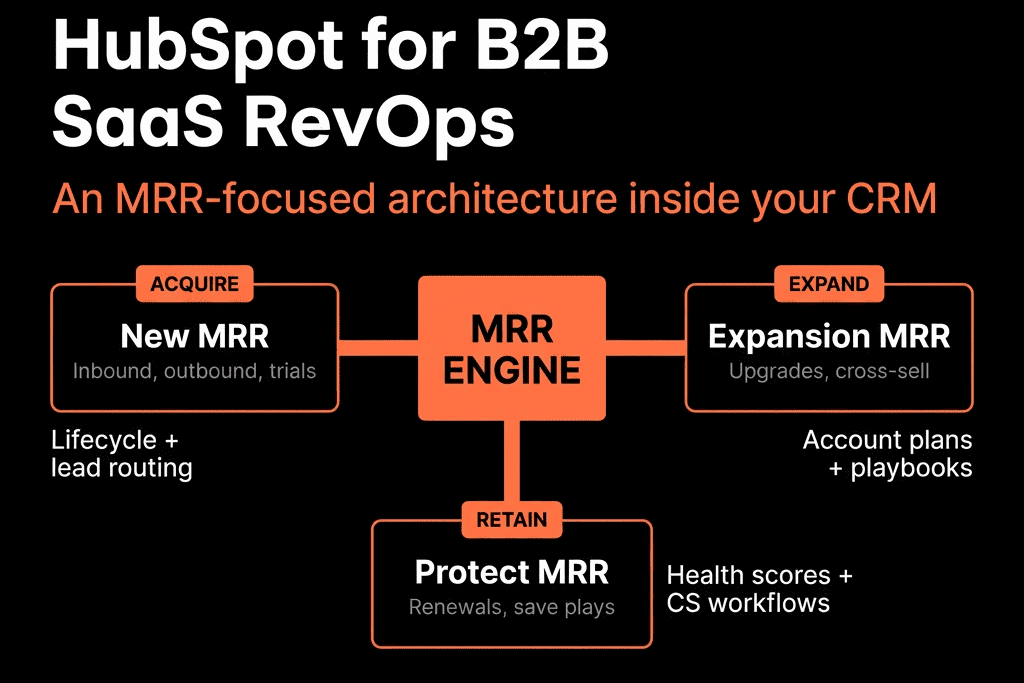
Below is the SaaS RevOps architecture we typically implement in HubSpot to actually drive MRR.
1. Core Object & Data Model for SaaS
Objects we standardize
- Contacts – people.
- Companies – customer accounts.
- Deals – commercial events (New, Renewal, Expansion).
- Tickets – onboarding and support.
- (Optional) Subscription/Plan custom object if you need contract-level detail inside HubSpot.
Key Company fields
- Lifecycle stage (Lead → MQL → SQL/Opportunity → Customer).
- Customer status (Prospect, Active, Churned, On hold).
- Segment (SMB / Mid / Enterprise, etc.).
- Region.
- Industry.
- Current MRR / Current ARR.
- Plan / Product tier.
- Contract start date, Contract end date.
- CSM owner / Account manager owner.
- Health band (Red/Amber/Green).
Key Deal fields
- Deal type (New, Renewal, Expansion).
- MRR / ARR (for this deal).
- Term length (months).
- Product/Plan.
- Segment / Region (synced from Company).
- Renewal outcome (for renewal deals).
This lets you see MRR at both account and deal level.
2. Separate Pipelines for New, Renewal, and Expansion
We never mix all SaaS revenue into one pipeline.
New Business pipeline
- New logo deals only.
- Stages reflect buyer commitments (Qualified → Solution Fit → Decision Process Mapped → Business Case Approved → Verbal Commit → Closed Won/Lost).
Renewals pipeline
- One renewal deal per contract/term.
- Stages:
- Renewal Identified → Discovery/Review → Proposal → In Review → Renewed / Churned / Downgraded.
Expansion pipeline
- Upsell/cross-sell within existing accounts.
- Stages similar to New Business but often shorter.
Each pipeline uses Deal type and MRR/ARR to roll into MRR views and NRR/GRR.
3. Lifecycle and Lead Flow for SaaS
Lifecycle on Contacts is aligned to SaaS reality:
- Lead – net new contact.
- MQL – ICP + intent.
- SQL – Sales-qualified (basic BANT/MEDDIC).
- Opportunity – when first Deal is created.
- Customer – when a New Business deal is Closed Won.
Key patterns:
- Contact/Company move to Customer when first New Business deal closes.
- Opportunities (Deals) always represent possible MRR.
- Lead status used for SDR/AE workflow, not for reporting.
This supports clean funnel reporting and CAC efficiency by segment.
4. MRR/ARR and Subscription Logic
MRR/ARR can be stored:
- Directly on Deals (per contract) → rolled up to Company.
- Or via an integrated billing system (Stripe, Chargebee, etc.) pushing into Company fields.
We typically:
On New Business Closed Won:
- Set Current MRR/ARR on Company = Deal MRR/ARR.
On Renewal/Expansion Closed Won:
- Adjust Current MRR/ARR on Company accordingly.
This supports:
- MRR/ARR trend reports.
- NRR/GRR calculations.
- Segment/region MRR views.
For more complex subscription data, we prefer a billing system + warehouse, with summary values synced to HubSpot.
5. Usage & Health Signals Feeding RevOps
From product/usage systems (Pendo, Segment, custom events), we sync to Company:
- Last active date.
- Login frequency or usage level (Low/Med/High).
- Key feature adoption flags.
- Seat utilization metrics.
Then we compute:
- Health band (R/A/G) via workflows.
- Risk flags (Low usage, Support risk, Detractor, Champion left, etc.).
These drive:
- At-risk alerts.
- Expansion triggers (e.g., high utilization).
- CS and renewal prioritization.
6. Automation Plays That Drive SaaS Revenue
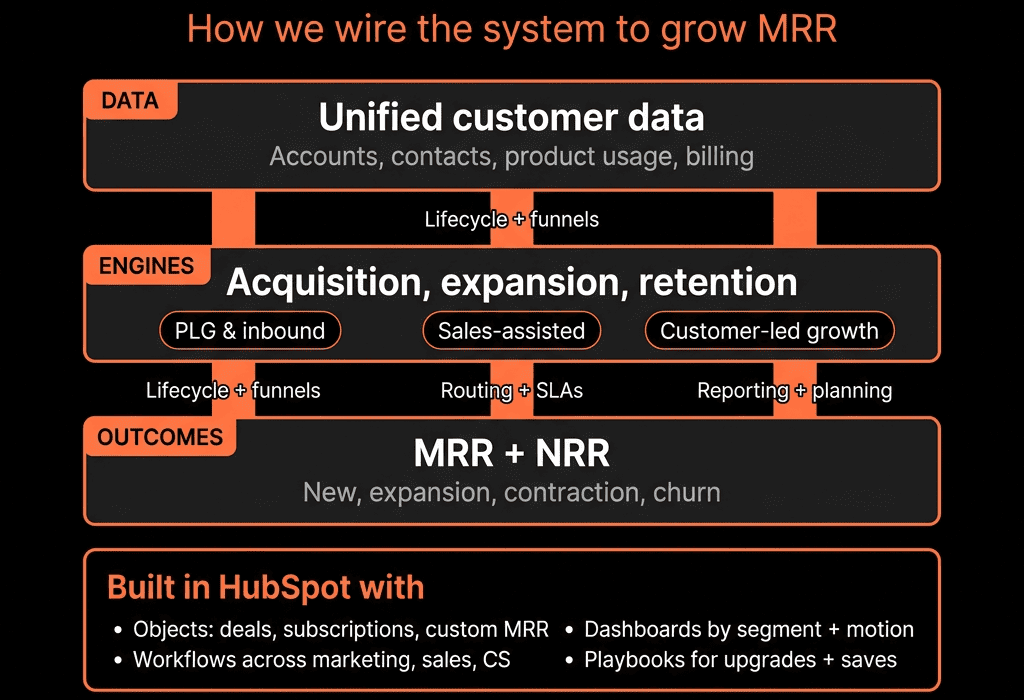
The architecture is enforced by a set of core automation plays:
Lead intake & routing (inbound/outbound)
- Assign by segment/region.
- Set lifecycle to MQL/SQL.
- Create SLA-driven tasks.
Opportunity creation & lifecycle sync
- Deal created → Contact/Company move to SQL/Opportunity.
Onboarding handoff
- New Business Closed Won → create onboarding tickets + tasks.
- Copy use case/expectations from Deal to Ticket/Company.
Renewal engine
- X days before Contract end date → auto-create Renewal deal.
- Assign to CSM/AM.
- Tasks for review + QBR/renewal call.
Expansion triggers
- High usage, new team, or product signal → create Expansion opportunity or task.
Churn risk alerts
- Health band = Red OR high-priority tickets near renewal → at-risk flag + play.
Each play is documented and tied to specific workflows, fields, and reports.
7. Core SaaS Dashboards We Install
We usually stand up:
Dashboard A – MRR & Growth
- New MRR, Expansion MRR, Churned MRR per period.
- NRR and GRR trends.
- MRR by segment/region.
Dashboard B – New Business Engine
- New Business pipeline and bookings.
- Funnel (Lead → MQL → SQL → Opportunity → Customer).
- CAC proxy: leads and opps per channel/segment.
Dashboard C – Retention & Expansion
- Renewal pipeline and performance.
- Expansion pipeline and performance.
- Health band distribution by MRR.
- Churn reasons by segment.
Dashboard D – GTM Ops & Risk
- Speed-to-lead for inbound.
- Stalled pipeline by stage.
- At-risk accounts list (health + renewal date).
This gives SaaS leadership a “RevOps cockpit” inside HubSpot.
8. Alignment with Finance and Product
We then define:
Finance as the source of truth for recognized revenue, with:
- Summaries (MRR/ARR, billing status) into HubSpot.
Product analytics as the source of truth for usage, with:
- Summarized health indicators into HubSpot.
HubSpot becomes:
- The GTM operating layer for pipeline, MRR motions, and health-based plays.
- The view used in:
- Weekly revenue standups.
- Monthly SaaS metrics reviews.
- Board prep (for bookings, pipeline, funnel, segment health).
9. Iterating the Architecture with SaaS Stage
Early-stage SaaS:
- Keep it simple:
- Basic MRR/ARR.
- New vs Renewal/Expansion deals.
- Simple health rules (usage + tickets + NPS).
Growth-stage:
- Add:
- Robust segment/region breakdowns.
- NRR/GRR by cohort.
- Deeper product usage flags and expansion logic.
Late-stage / scale:
- Consider:
- Data warehouse as primary analytics engine.
- Push curated insights into HubSpot for ops and field teams.
The core HubSpot architecture stays; the analytics depth grows around it.
Want This SaaS RevOps Architecture Implemented in Your HubSpot?
If you’re a B2B SaaS company using HubSpot “like a CRM” and not like a MRR engine, this is exactly the gap we help close.
Through our HubSpot Implementation Blueprints, Portal Health Check, and Managed RevOps Retainer, we:
- Design your SaaS RevOps architecture in HubSpot (data model, pipelines, lifecycle, automation).
- Implement the key plays for new MRR, expansion, and retention.
- Build SaaS-specific dashboards (MRR, NRR, cohort/segment views).
- Work with your finance and product teams so HubSpot sits cleanly in the wider stack.
So HubSpot stops being a place to log deals—and becomes the operating system for how you grow MRR.



