



A Book of Business You Can’t See, You Can’t Scale
Most brokers have:
- Carrier/agency management systems (AMS) for policies and commissions.
- Spreadsheets for pipelines and prospecting.
- Producers keeping renewal notes in email or notebooks.
The result:
- No central, real-time view of the book.
- Renewals handled reactively.
- Cross-sell and upsell mostly by accident.
- New producers struggle to ramp.
HubSpot won’t replace your AMS.
It becomes the growth and relationship layer on top of it.
Here’s the architecture we use.

Step 1 – Decide Who/What Lives in HubSpot vs the AMS
Draw clear lines:
HubSpot should own:
Prospects and clients as relationships
- Companies (business clients) / Households (for personal).
- Contacts (owners, HR, CFO, individuals).
Pipelines and sales activity
- New business opportunities.
- Renewal and remarketing deals.
- Cross-sell/upsell opportunities.
Renewal & producer workflows
- Tasks and follow-up sequences.
- Marketing and educational comms (where compliant).
AMS / policy system should own:
- Policy records.
- Detailed coverages, endorsements, premiums.
- Commissions and accounting.
You then sync summary policy info into HubSpot where needed (account-level view, renewal dates, premium bands).
Step 2 – Build a Broker-Friendly Data Model
Companies / Households
- Client type (Commercial, Personal, Group, Association).
- Segment (Small commercial, Mid-market, Large, Personal high net worth, etc.).
- Industry (for commercial).
- Region.
- Client status (Prospect, Active, Lapsed).
- Primary producer / account manager.
Contacts
- Role (Owner, CFO, HR, Benefits admin, Individual insured).
- Decision-maker vs influencer vs insured-only.
- Preferred contact method.
Deals (Opportunities)
Each opportunity (new or renewal/remarket) as a Deal:
- Deal type (New business, Renewal, Remarketing, Cross-sell).
- Line of business (P&C, GL, WC, Benefits, Life, etc.).
- Estimated annual premium (or band).
- Carrier (if known / in play).
- Effective date.
- Renewal date (for renewals).
This underpins your pipeline and renewal views.
Step 3 – Set Up Pipelines for New Business and Renewals
Use at least two distinct pipelines:
New Business pipeline
Stages might look like:
- Prospecting / Lead – Identified account, early contact.
- Discovery / Fact-Finding – Current coverage and needs reviewed.
- Marketing / Submissions – Apps and loss runs submitted to markets.
- Quoted – Quotes received from carriers.
- Presented – Options presented to client.
- Selected / Binding – Binding in progress.
- Closed Won / Closed Lost.
Renewal / Remarketing pipeline
- Renewal Identified – Renewal opp created with dates and current carrier/premium.
- Pre-Renewal Review – Losses, exposures, and options reviewed.
- Marketing / Remarket (if needed).
- Quoted.
- Presented.
- Bound / Renewed / Moved / Lapsed (Closed Won/Lost states with specific outcomes).
This structure gives producers and leadership clear, stage-based visibility.
Step 4 – Standardize Intake for Leads and Referrals
Brokers live on:
- Referrals from clients, centers of influence, and carriers.
- Marketing partners.
- Website and inbound.
- Outbound prospecting lists.
Use HubSpot to capture all consistently:
- Forms for website and partner/referral submissions:
- Basic business info, line(s) of interest, current broker, renewal date.
- Internal process or Playbook for producers/CSRs to log referrals they receive.
Workflows:
- Create/associate Company and Contact.
- Set Client status = Prospect.
- Assign producer/BD based on segment/region/line of business.
- Create a New Business Deal when ready (or a task for qualification).
This gets prospects out of inboxes and notebooks into one pipeline.
Step 5 – Build a Renewal Engine Instead of “Oh, That’s Renewing Soon”
Renewals are your book. Treat them systematically.
On each active client (Company):
- Sync or store:
- Primary renewal date per line of business (or a custom object for multiple policies).
- Current annual premium band.
Use workflows:
- X days before renewal (e.g., 120/90/60 days):
- Auto-create a Renewal Deal in the Renewals pipeline.
- Set Deal type = Renewal and link to Company.
- Assign to the right producer/renewal team member.
- Create tasks:
- “Pre-renewal review” (loss runs, exposures, options).
- “Book renewal strategy call”.
Now, the upcoming renewals live in HubSpot as visible, trackable deals, not just AMS lists.
Step 6 – Systematize Cross-Sell and Upsell Opportunities
Your book likely has:
- Monoline accounts (just WC, just GL, etc.).
- Clients with obvious gaps (e.g., cyber, EPLI, umbrella).
In HubSpot:
- Store a simple coverage summary on the Company:
- Has GL, Has WC, Has Property, Has Cyber, etc. (checkboxes).
Then:
- Build lists and reports:
- “Active GL clients without Cyber, by industry/size.”
- “Personal lines clients without umbrella or life.”
Use workflows and tasks:
- Create periodic cross-sell tasks/deals for producers on selected segments.
- Enroll contacts in educational nurture about relevant coverages (where compliant).
Now cross-sell is a repeatable motion, not luck.
Step 7 – Use Sequences and Playbooks for Producer Consistency
To scale producers:
Sequences (where allowed by compliance):
- New business prospecting sequences by segment/LOB.
- Light-touch renewal check-in sequences (e.g., 120 days pre-renewal).
Playbooks for calls and meetings:
- Commercial risk discovery (operations, fleet, premises, contracts).
- Benefits/health discovery.
- Personal risk profile (home, auto, umbrella, life) at a high level.
Map Playbook answers into properties like:
- Key exposures.
- Current broker.
- Pain points (premium, service, coverage concerns).
- Buying timeline (by renewal date).
This improves both conversation quality and reporting.
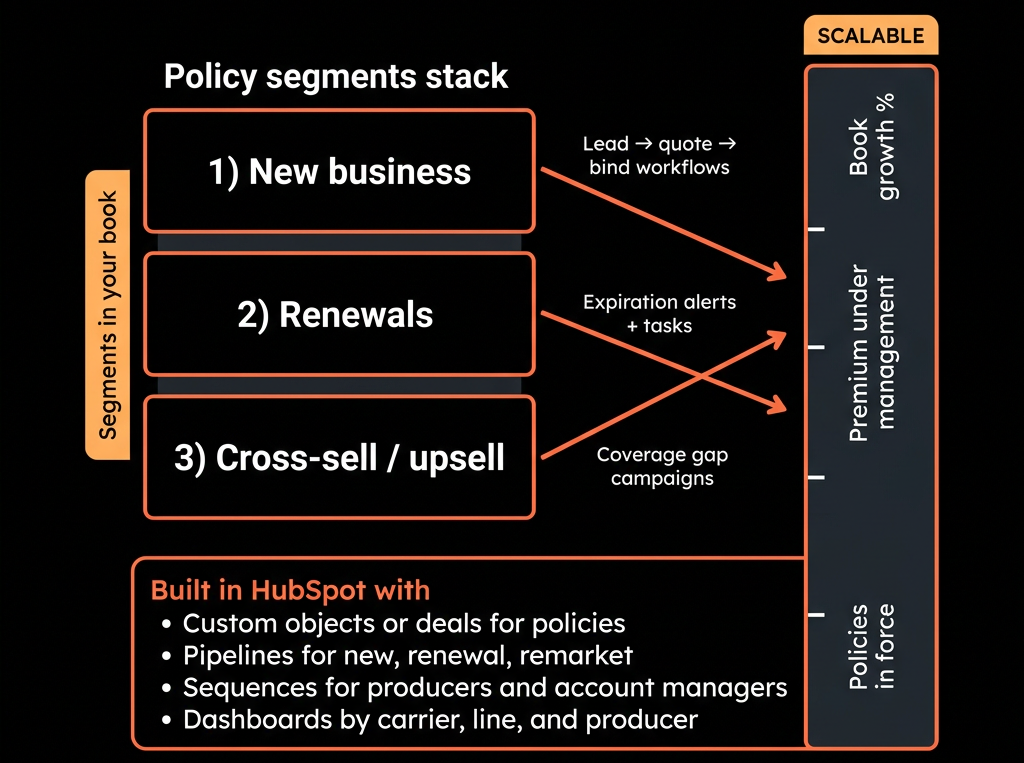
Step 8 – Build an Insurance Broker Reporting Pack
Replace ad hoc reports and gut-feel with:
Production & Pipeline dashboard
- New business pipeline by stage and producer.
- New business Written Premium (Closed Won) by LOB, segment, region.
- Hit ratio (quotes → bound) by carrier/LOB.
Renewals & Retention dashboard
- Renewal deals by stage and effective date.
- Retention rate by segment/LOB (Renewed vs Moved/Lapsed).
- Book value (approx. premium) by producer and segment.
Cross-sell & book development dashboard
- Coverage penetration (e.g., % of commercial accounts with cyber).
- Cross-sell pipeline and success rates.
Activity & follow-up dashboard
- Calls/emails/meetings per producer.
- Overdue renewal and prospecting tasks.
This makes your book of business growth and protection clearly visible.
Step 9 – Integrate Safely With Your AMS/Policy Systems
You do not need (and often should not attempt) a full-blown two-way integration.
Practical approach:
From AMS to HubSpot:
- Active accounts and policy summaries → Company & summary fields.
- Renewal dates and premium bands.
- Policy count and LOB mix.
From HubSpot to AMS:
- New client/prospect info once a deal binds.
- Key contact details.
Rules:
- Use AMS for policy and accounting detail.
- Use HubSpot for pipeline, relationship, and growth plays.
- Avoid duplicating sensitive policy data where not needed in CRM.
- Document flow so producers and ops know which system to use for what.
Step 10 – Phase Adoption Across Producers and CSRs
Brokers are time-poor; adoption must be phased and value-led.
Phase 1 – Leadership + ops:
- Get management and ops using dashboards for:
- Pipeline.
- Renewals.
- Producer performance.
Phase 2 – Producers:
- Train on:
- “Your day in HubSpot” (views, tasks, pipelines).
- Basic note logging and follow-ups.
- Using Playbooks, not just free-form notes.
Phase 3 – CSRs/Account managers:
- Use HubSpot for:
- Logging client interactions.
- Identifying cross-sell/remarket opportunities.
- Feeding producers with warm opportunities.
Keep friction low; tie usage to making/hitting book goals, not admin.
Want Help Turning Your Book of Business Into a HubSpot-Guided Growth Engine?
If your brokerage is still running on AMS + spreadsheets + producer memory, HubSpot can give you a scalable, inspectable growth layer.
Through our HubSpot Implementation Blueprints, Portal Health Check, and Managed RevOps Retainer, we:
- Design an insurance-specific CRM model for prospects, clients, deals, and renewals.
- Implement pipelines, renewal engines, and cross-sell workflows.
- Connect high-level policy info from your AMS into HubSpot safely.
- Build producer and leadership dashboards so you can grow and protect your book with data, not guesswork.
So your book of business becomes something you can see, manage, and scale—not just something you hope doesn’t walk out the door.





