



Everyone Wants “Better Data.” No One Agrees on Which Data.
Ask any team what they need from HubSpot and you’ll hear:
- Marketing: “We need more firmographic data for targeting.”
- Sales: “We just need fewer fields; nobody has time for this.”
- CS: “We never see the context we need when accounts close.”
Without alignment, you get:
- Endless new properties to satisfy one team at a time.
- Long, confusing forms and record layouts.
- Handoffs where each team complains the previous one didn’t give them enough.
The fix is not “more fields” or “stricter rules.”
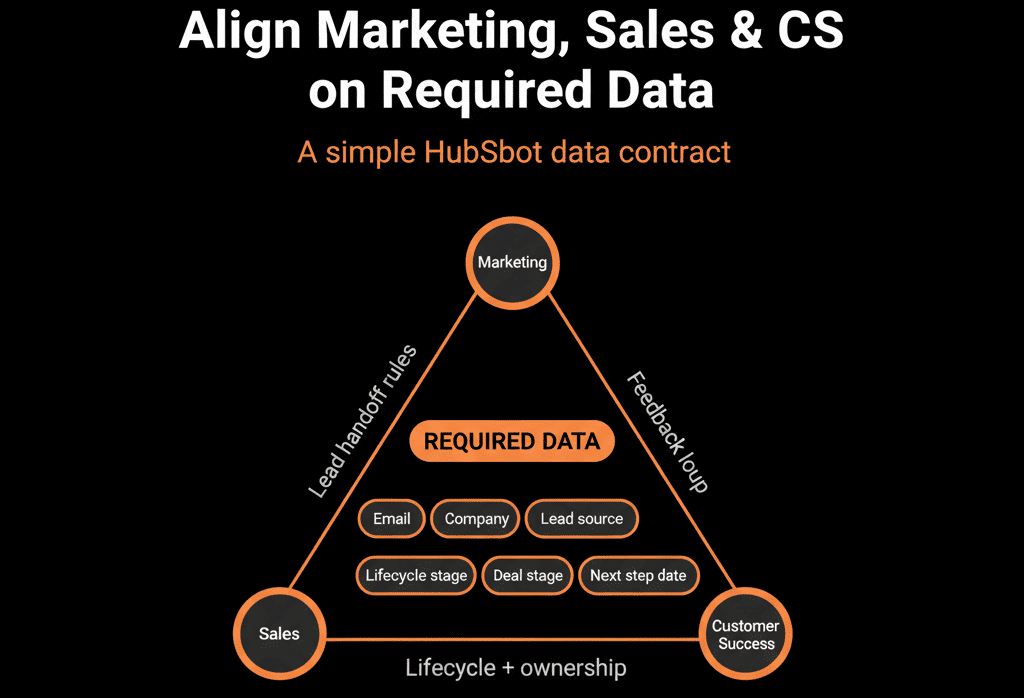
It’s a shared definition of what data is required, where, and for whom—inside HubSpot.
In this article, we’ll walk through a practical way to align Marketing, Sales, and CS on required data in HubSpot, so everyone pulls from the same playbook.
Step 1 – Start with the Customer Journey, Not the Property List
Instead of asking, “What fields do you need?”, start with:
“What must be true at each stage for you to do your job well?”
Map out your high‑level journey:
Anonymous → Lead → MQL → SQL / Opportunity → Customer → Onboarding → Live / Renewing.
For each stage, ask each team:
Marketing
What do you need to:
- Qualify leads effectively (fit + intent)?
- Nurture and personalize?
Sales
What do you need to:
- Understand context before a first call?
- Progress from discovery to proposal?
- Hand off smoothly to CS on close‑won?
CS
What do you need to:
- Onboard successfully?
- Manage expectations and deliver outcomes?
- Monitor and grow the account?
Capture answers as information needs, not yet as fields.
Step 2 – Run a Cross‑Functional “Data Requirements” Workshop
Bring Marketing, Sales, CS, and RevOps into the same (virtual) room.
Workshop goals:
Agree on a small set of shared truths:
- What we must know about a person (Contact).
- What we must know about an account (Company).
- What we must know about an opportunity (Deal).
- What we must know about a customer engagement (Ticket/CS object).
Structure the discussion:
- Present the customer journey.
- For each key stage, ask:
- What do you absolutely need at this point?
- What is “nice to have” but not essential?
- Capture requirements by object and stage, not by department alone.
Outcome:
A draft list of “required at stage X” data points that all teams can see.
Step 3 – Translate Information Needs into HubSpot Properties (Without Bloat)
Now, convert the agreed information needs into actual properties in HubSpot.
For each need, decide:
- Which object?
- Contact, Company, Deal, Ticket, or custom object.
- Which property (existing or new)?
- Use existing standard properties where possible (e.g., lifecycle, industry, country).
- Only create new custom properties when genuinely needed.
- Which field type?
- Dropdown, number, date, checkbox, etc.
Use these guidelines:
- If multiple teams need the same concept → one shared property, not one per team.
- If the information is stable and account‑level → Company property.
- If it’s deal‑specific → Deal property.
- If it’s about people → Contact property.
This is where RevOps should act as a referee to prevent duplication.
Step 4 – Agree on “Required at Stage” Rules per Object
Instead of making fields globally required, tie requirements to moments in the process.
Examples:
Contacts
At creation (form or manual):
Email, first name (minimal friction).
Before becoming MQL:
Country/region, basic role/seniority, key consent fields.
Companies
Before opp creation or assignment to Sales:
Industry, company size, key ICP flags.
Deals
At deal creation:
Company, amount (rough), pipeline.
Before moving to “Qualified”:
Confirmed pain/need, segment, decision‑maker identified.
Before “Proposal/Contract Sent”:
Realistic amount and close date, key products/services.
Before “Closed Won”:
Commercial terms, handoff notes for CS, implementation start date.
Tickets (CS)
At creation:
Priority, category/type, associated contact/company.
Before closure:
Resolution summary, root cause (if relevant).
Get explicit agreement:
“If we can’t get this field filled by this stage, do we really consider this stage complete?”
Then, implement stage‑based required fields in HubSpot to enforce the rules.
Step 5 – Document the Shared Model in a Simple Data Dictionary
Alignment will drift unless it’s written down and accessible.
Create a simple data dictionary that includes:
For each object (Contact, Company, Deal, Ticket):
- Key properties.
- Plain‑language definitions.
- Who uses them (Marketing, Sales, CS).
- Where they are required (form, creation, stage X).
Example entry:
Property: Industry
Object: Company
Definition: Primary industry of the customer/prospect. Used for segmentation, ICP mapping, and reporting.
Used by: Marketing (targeting), Sales (context), CS (playbooks), Leadership (reporting).
Required: Before moving any deal with this company into “Qualified” stage.
Share this dictionary widely. Update it when you add or deprecate properties.
Step 6 – Implement Guardrails and UX That Respect All Three Teams
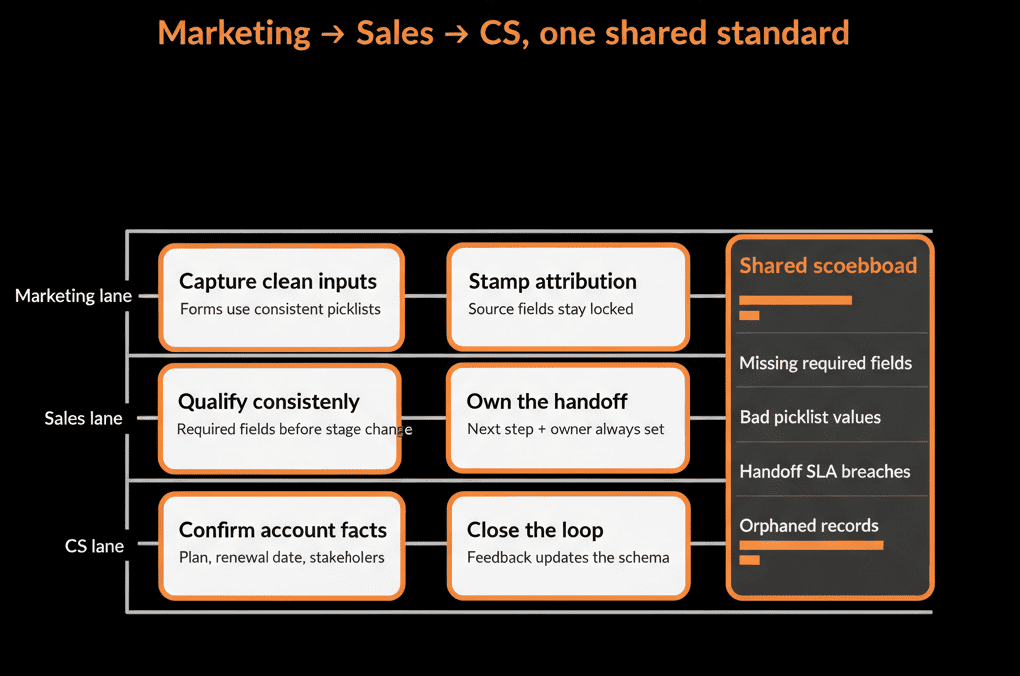
After defining shared required data, you need to make it painless to collect.
Guardrails:
- Use dropdowns for shared fields (industry, region, segment).
- Limit options to meaningful choices, not endless lists.
- Use progressive disclosure (dependent fields) on forms to ask more only when it’s relevant.
UX patterns:
Configure record layouts so each team sees their key fields prominently:
- Sales: stage‑relevant fields, decision‑maker info, deal context.
- Marketing: lifecycle, source, campaign, ICP indicators.
- CS: contract details, expectations, health indicators.
The goal is to make “doing the right thing” (filling agreed fields) the easiest path.
Step 7 – Add Light‑Touch Validation and Automation to Enforce Agreements
Use HubSpot features to back up the alignment:
Stage‑based required fields
Enforce what must be filled before moving a deal or ticket forward.
Workflows for gap filling and alerts
- Notify owners when high‑value records are missing critical fields.
- Auto‑copy Company‑level data (industry, region) to Contacts and Deals where appropriate.
Lists and dashboards for data health
Create lists of:
- “MQLs missing required data X.”
- “Deals in stage Y missing field Z.”
Use dashboards to track improvement over time.
This moves you from “we agreed on this in a meeting” to “the system reflects our agreement.”
Step 8 – Establish a Simple Governance and Feedback Loop
Things will change—new products, new segments, new processes.
You need a way to:
- Request new required data.
- Update definitions.
- Retire fields that no longer serve.
Lightweight governance model:
A cross‑functional “data council” (RevOps + reps from Marketing, Sales, CS) that meets quarterly.
Agenda:
- Review data dictionary changes.
- Review data health metrics.
- Approve or reject new property/required field requests.
Feedback loop:
Provide a simple way for frontline users to say:
- “This required field is not useful.”
- “We need a new field for X.”
Route this feedback through RevOps, not direct property creation in the wild.
Pulling It Together: One Shared Definition of “Good Enough Data”
Aligning Marketing, Sales, and CS on required data in HubSpot is not about getting everyone everything they want.
It’s about:
- Agreeing on what’s truly required to move a contact, account, deal, or ticket forward.
- Putting those requirements into HubSpot in a way that supports, not hinders, work.
The playbook:
- Start with the journey and information needs, not fields.
- Run a cross‑functional workshop to define shared requirements.
- Map those requirements into a lean set of HubSpot properties.
- Tie requirements to stages and lifecycles, not everywhere.
- Document it all in a data dictionary.
- Use UX, validation, and automation to enforce gently.
- Maintain alignment with a simple governance loop.
Do this, and HubSpot becomes a shared system of record—not three separate CRMs under one login.
Want Help Aligning Your Teams on HubSpot Data Requirements?
If Marketing, Sales, and CS are all asking for different fields and dashboards—and your portal is starting to show it—this is exactly where we can help.
Our HubSpot Portal Health Check and Migration & ROI Plan are designed to:
- Audit your current property sprawl and usage.
- Facilitate a structured, cross‑team alignment on required data.
- Design a clean, shared data model and validation approach in HubSpot.






