



If You Only Report Leads, You’ll Always Be a Cost Center
Most marketing reports in HubSpot stop at:
- Traffic.
- Leads.
- MQLs.
Sales and leadership care about:
- Pipeline.
- Closed Won revenue.
- Retention and expansion.
To prove true impact, we need HubSpot to show:
“This channel/campaign generated X opportunities and Y revenue, at Z efficiency.”
Below is a practical way to get there without overbuilding.
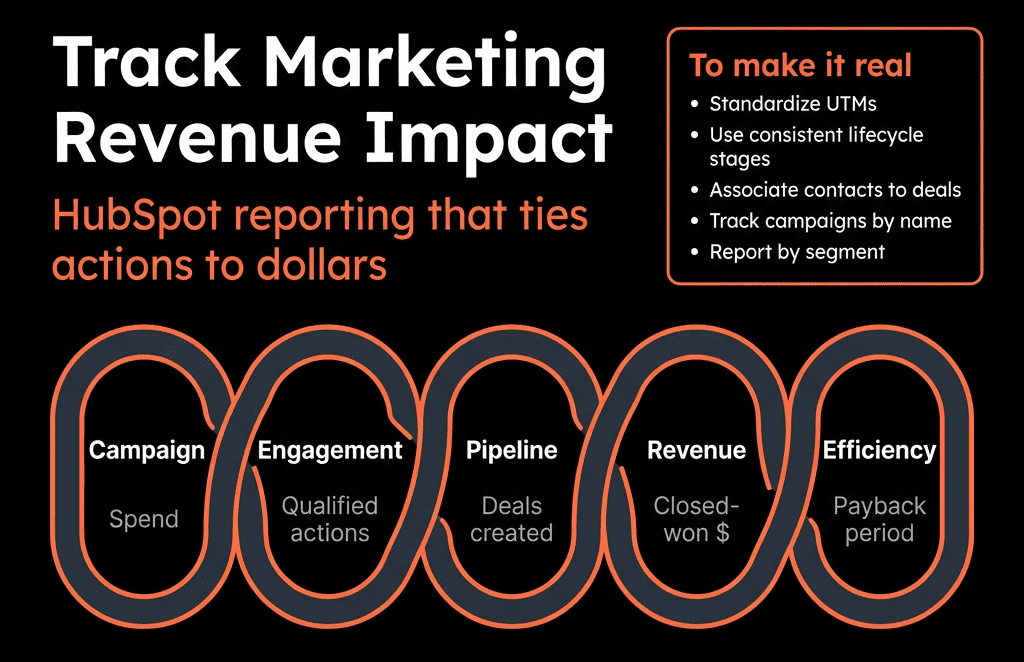
Step 1 – Fix the Basics: Lifecycle, Lead Status, and Deals
You cannot measure revenue impact if:
- Lifecycle stages are inconsistent.
- MQL/SQL definitions are unclear.
- Deals aren’t created or associated properly.
Minimum standards:
- Lifecycle stages: Lead → MQL → SQL/Opportunity → Customer.
- Lead status: New, Open, In progress, Connected, Qualified, Disqualified.
- Deals:
- Created for every real opportunity.
- Associated with the right primary Contact and Company.
- Move to Closed Won/Lost reliably.
Marketing revenue attribution sits on top of this.
Step 2 – Standardize Sources and Campaigns
Next, make sure source data is trustworthy.
Use Original source and drill-downs consistently.
Implement clean UTM conventions:
- utm_source = platform (google, linkedin, etc.).
- utm_medium = channel (paid_search, paid_social, email, organic_social…).
- utm_campaign = clear campaign name that mirrors HubSpot Campaigns.
Connect key assets to HubSpot Campaigns:
- Emails, forms, LPs, ads, CTAs.
So you can use Campaign reports for influence and attribution.
This is non-negotiable for credible revenue reporting.
Step 3 – Add Attribution Properties on Contacts and Deals
We recommend a light, practical model.
On Contacts:
- FT Channel (first-touch channel).
- FT Campaign (first-touch campaign).
- Lead Creation Channel.
- Lead Creation Campaign.
On Deals:
- Opportunity Source Channel.
- Opportunity Source Campaign.
- Revenue Attribution Channel.
- Revenue Attribution Campaign.
These properties “pin” key touches that workflows can write once and then reuse for reporting.
Step 4 – Use Workflows to Stamp Attribution at Key Moments
Now automate the mapping from raw source data to your attribution fields.
Examples:
On contact creation (first-touch)
- If FT Channel is blank: Map from Original source / UTMs.
- If FT Campaign is blank and latest UTM exists → copy.
On lead creation / first conversion
- When Lifecycle becomes Lead and Lead Creation Channel is blank: Set from current source/UTM values.
- Same for Lead Creation Campaign.
On MQL
- When Lifecycle moves to MQL: Optionally stamp MQL Attribution Channel/Campaign if you want that resolution.
On deal creation
- From primary associated contact: Copy Lead Creation Channel (or MQL field) → Opportunity Source Channel.
- Same for Campaign.
On Closed Won
- If Revenue Attribution Channel/Campaign is blank: Set equal to Opportunity Source Channel/Campaign.
Now every Closed Won deal carries channel/campaign tags traceable back to marketing efforts.
Step 5 – Build Channel-Level Revenue and Pipeline Reports
Start with channel views that both marketing and sales can understand.
Key reports:
Deals created by channel
- Filter: Deal type = New Business, date = this quarter.
- Group by Opportunity Source Channel.
Closed Won revenue by channel
- Sum of amount by Revenue Attribution Channel.
Funnel per channel
- Contacts → MQLs → Opportunities → Customers by channel.
- Show conversion rates and volumes.
These answer:
- Which channels generate real opportunities, not just leads?
- Which channels actually close into revenue?
Step 6 – Build Campaign-Level Revenue Impact Dashboards
Next, drill into specific campaigns.
Two approaches:
HubSpot Campaigns (if properly set up):
- Use built-in views for: New contacts, Influenced contacts and deals, Attributed revenue (depending on your HubSpot edition).
Custom attribution properties:
- Reports based on Lead Creation Campaign, Opportunity Source Campaign, Revenue Attribution Campaign.
Useful views:
- Closed Won revenue by campaign.
- Pipeline (deals created) by campaign.
- Funnel: contacts → MQLs → deals → customers by campaign.
Now you can rank campaigns by pipeline and revenue, not just clicks.
Step 7 – Add Segment and Deal-Type Filters
True impact is rarely one-dimensional.
Refine your reports by:
Segment:
- Industry.
- Company size.
- Region.
Deal type:
- New vs Renewal vs Expansion.
Questions you can now answer:
- Which campaigns work best for Enterprise vs SMB?
- Which channels drive expansion pipeline from existing customers?
- Where should we focus outbound/ABM vs inbound?
This moves marketing conversations from “MQL count” to “revenue by ICP segment”.
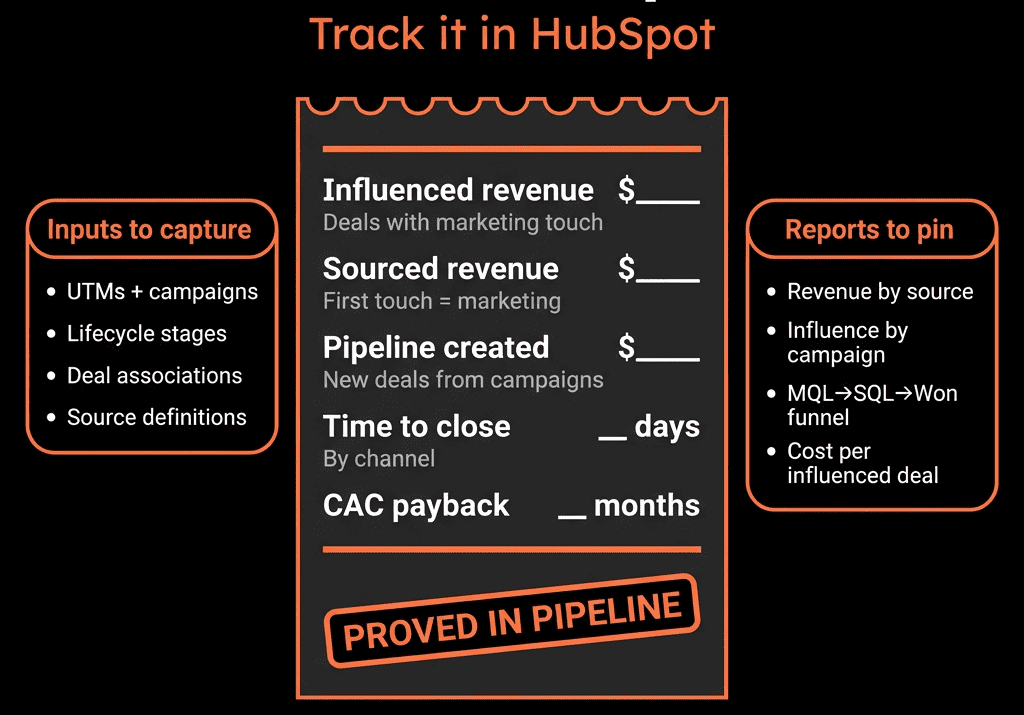
Step 8 – Include Marketing in Pipeline and Forecast Views
To make impact visible day-to-day:
Give marketing access to pipeline dashboards:
- Deals by source/channel/campaign.
- Win rate and deal size by source.
- Forecast views with channel filters.
Create a shared “Marketing-Sourced Pipeline” dashboard:
- Deals where Opportunity Source Channel ≠ Outbound/Partner/Other.
- Filtered to periods and segments.
This lets marketing see:
- How their work is showing up in sales’ world.
- Where pipeline is strong/weak before the quarter ends.
Step 9 – Tie Spend to Revenue (Even if Roughly)
Where you have channel/campaign spend (ad platforms, sponsorships, etc.):
Options:
- Add monthly spend properties on: Channel-level custom object or properties, key campaigns in HubSpot.
- Or maintain a simple external sheet and align naming with HubSpot campaigns.
Then build basic efficiency reports:
- Revenue / Spend by channel.
- Pipeline / Spend by campaign.
- Customer acquisition cost approximations for major motions.
The goal is directional clarity, not perfect finance-grade CAC.
Step 10 – Use Revenue Insight to Change Marketing Behavior
Finally, use these insights to reshape marketing, not just report.
Examples:
- Reduce or refine channels that generate many MQLs but low win-rate opportunities.
- Double down on campaigns that create high-ACV, high-win-rate deals.
- Adjust ICP targeting where churn is high from certain sources.
- Partner with sales to design content and plays for stages where deals die.
Review this quarterly in a joint Marketing + Sales + RevOps session, using HubSpot dashboards only.
Turning Marketing Into a Revenue Function in HubSpot
When this is in place, HubSpot becomes the system where:
- Marketing sees their contribution in deals and revenue.
- Sales sees which marketing motions create good pipeline.
- Leadership sees where to invest and where to cut.
Marketing stops defending lead numbers.
Instead, they point to pipeline, revenue, and NRR that started with their work.
Want Help Proving Marketing’s Revenue Impact in Your HubSpot?
If your current story stops at MQLs and “influenced contacts”, we can help you go the last mile to revenue.
Through our HubSpot Portal Health Check and Migration & ROI Plan, we:
- Audit your lifecycle, source tracking, and Campaign setup.
- Design a practical attribution and reporting model that fits your GTM.
- Implement properties, workflows, and dashboards that tie marketing to pipeline and revenue.
- Coach your team to use these views in planning and performance reviews.
- So marketing can walk into leadership meetings with a clear, defensible answer to:
- “How much revenue did we help create and keep this quarter?”






