



The SDR→AE Gap Is Where a Lot of Revenue Leaks
Typical symptoms:
- SDR books a meeting; AE joins cold.
- AEs don’t trust SDR notes and re-qualify from scratch.
- Nobody can see how many qualified meetings actually convert to pipeline.
HubSpot can fix this—but only if you design one clear handoff pattern and make it visible.
Below is how we structure it.
Step 1 – Define What “Sales-Ready” Means in Fields, Not Opinions
Before building anything, define qualification clearly.
On the Contact and/or Deal, standardize fields like:
- Fit grade (A/B/C or High/Medium/Low).
- Primary pain / use case (dropdown).
- Estimated deal size band (if known).
- Decision maker identified (Yes/No).
- Timeline (This quarter / Next quarter / >90 days).
- Lead source / Channel.
Then document:
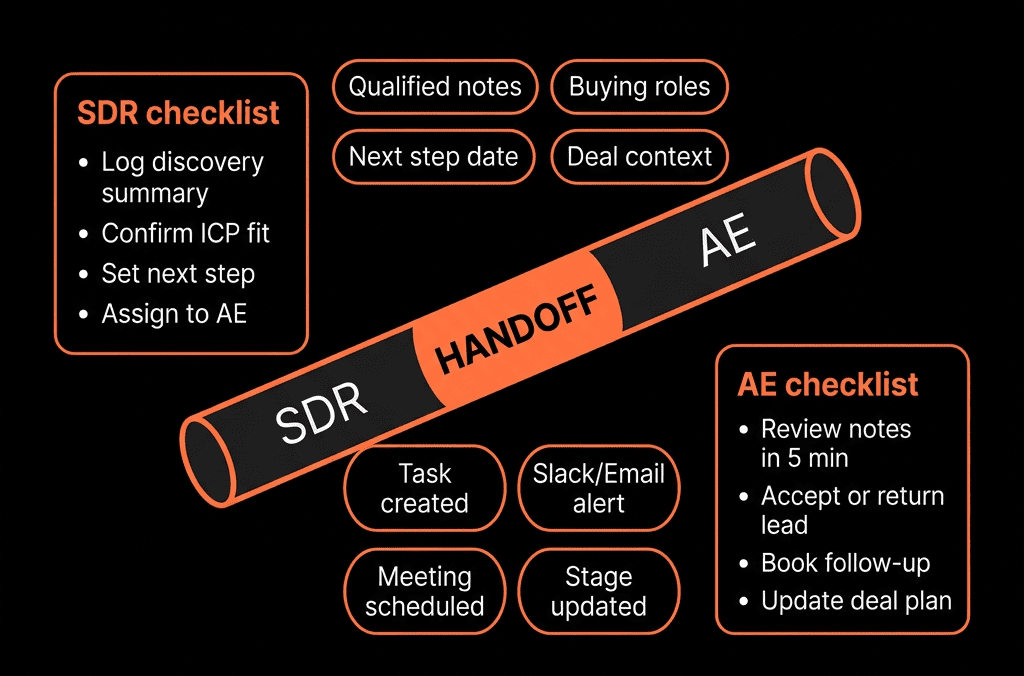
- SDR responsibility: fill these before handoff.
- AE responsibility: confirm/refine once they take over.
This becomes your “sales-ready” checklist.
Step 2 – Use Lead Status to Reflect SDR Progress, Not Just “Open”
Make Lead status work for you.
A simple pattern:
- New – just created, not yet touched by SDR.
- Working – SDR actively engaging.
- Connected – SDR had live contact (call, email reply, meeting).
- Qualified – Meeting Booked – handoff moment.
- Qualified – In Pipeline – AE accepted (deal created).
- Disqualified – not a fit.
- Nurture – future potential, not active.
SDR → AE handoff is the transition from “Qualified – Meeting Booked” to “Qualified – In Pipeline” (or equivalent).
Step 3 – Decide: Handoff on Contact Only, or Contact + Deal?
We recommend:
Always hand off with a Deal once there’s a committed next step beyond first meeting.
Patterns:
For high-intent or outbound motions where booked meetings almost always create pipeline:
- SDR creates the Deal and assigns it to AE when they book the meeting (or when AE accepts).
For lighter qualification:
- Handoff is first to Contact (Lead status + ownership), then AE creates the Deal if truly qualified after first call.
Pick one primary model per motion and write it down. Mixed patterns kill visibility.
Step 4 – Build a Simple SDR Handoff Playbook
On the Contact/Deal, create a Playbook for SDR qualification.
Include:
Context:
- Source/campaign.
- Why they agreed to talk NOW.
Fit:
- Industry, company size, tech stack (if relevant).
- Role/title of the contact.
Problem & urgency:
- Primary challenge.
- Impact and “why now”.
Buying process:
- Involvement of decision makers.
- Budget status (Yes/No/Unknown).
Map key answers to properties from Step 1.
This ensures every handoff has consistent, structured notes.
Step 5 – Use Ownership Fields to Make Handoff Explicit
Leverage two owner properties:
- SDR owner (or BDR owner).
- Deal/Contact owner (AE).
Process:
- SDR “owns” the lead (SDR owner) while working it.
- Once qualified: Change Contact owner to the AE (without losing SDR owner).
- Or: assign only the Deal owner as AE, leaving Contact owner as SDR if your model prefers that.
This creates clear reporting on:
- SDR activity and conversion.
- AE pipeline and outcomes.
Step 6 – Automate the Handoff With Workflows and Tasks
Use workflows to standardize the mechanics.
Contact-based workflow: SDR → AE handoff
Trigger:
- Lead status = Qualified – Meeting Booked
- AND Contact owner (AE) is known
- AND qualification fields complete.
Actions:
- Create a Deal (if your model uses SDR-created deals):
- Pipeline = New Business.
- Stage = “Qualified” or equivalent.
- Owner = AE.
- Associate to Contact + Company.
- Update Lead status to “Qualified – In Pipeline”.
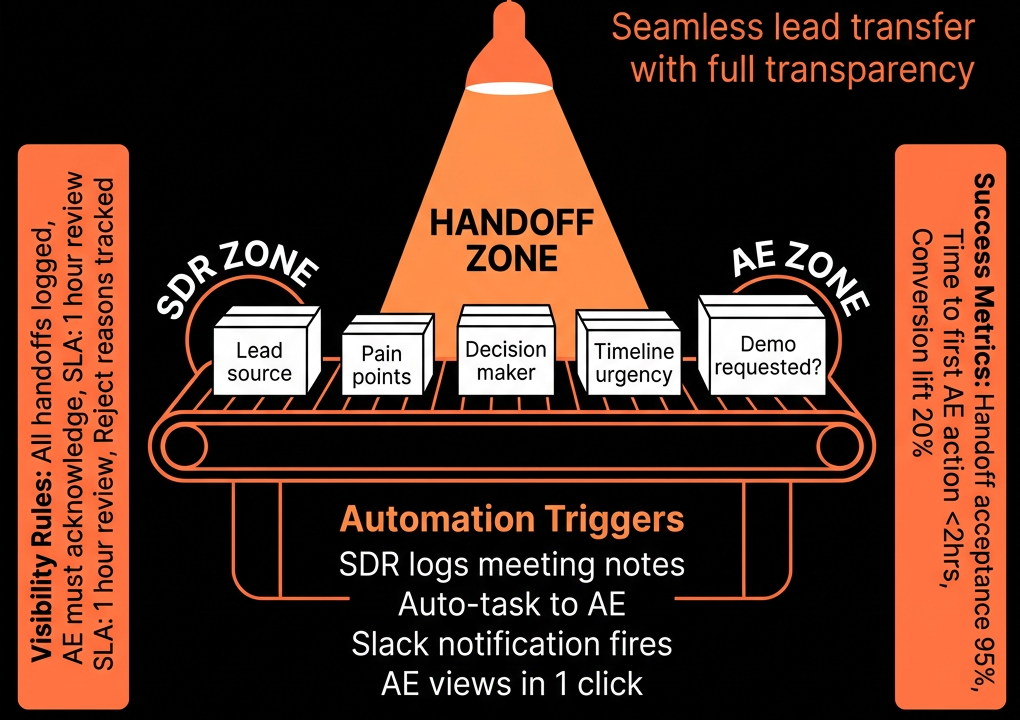
- Send internal email to AE with: Summary of Playbook fields, Meeting date/time and link, Source and any special context.
- Task for AE: “Review SDR notes before meeting with [Company].”
Now every handoff is logged, visible, and consistent.
Step 7 – Make the Meeting Handoff Visible on the Timeline
When SDRs book meetings:
- Use HubSpot Meetings or properly logged meetings.
- Associate meetings with: Contact, Company, Deal (if it exists).
Teach SDRs to include in the meeting description:
- Agenda.
- SDR’s understanding of the problem.
- Any key constraints or expectations.
AE can then see Playbook + Meeting + Timeline in one place.
Step 8 – Build High-Visibility Handoff Dashboards
Now make it inspectable for managers and RevOps.
Create an SDR→AE Handoff dashboard with:
Handoffs this period
- Count of Contacts where Lead status moved to “Qualified – Meeting Booked”.
- By SDR, segment, and source.
Accepted vs rejected handoffs
- Contacts/Deals where AE created/kept a Deal within X days after handoff.
- “Acceptance rate” by SDR and by AE.
Time from handoff to AE first activity
- How quickly AEs: Log notes, Update Deal stage, Confirm or reschedule meetings.
Pipeline and revenue from SDR-sourced deals
- Deals created from SDR handoff by SDR.
- Closed Won revenue per SDR.
Missed/ignored handoffs
- Leads at “Qualified – Meeting Booked” with no AE activity past a threshold.
This makes quality (and follow-through) very visible.
Step 9 – Add SLA and Quality Guardrails
Use workflows to protect the handoff:
AE SLA:
- If no AE activity (note/call/email/meeting) within X hours of handoff → alert AE and manager.
Missing notes:
- If Lead status = Qualified – Meeting Booked but Playbook fields are incomplete → alert SDR, do not trigger full handoff.
Meeting outcomes:
- After AE-led first meeting, require Meeting outcome + update of Deal stage and key fields (e.g., still qualified vs disqualified).
This keeps both sides honest on quality and speed.
Step 10 – Train Around One Clear Handoff Path and Tune Quarterly
Finally, align expectations:
With SDRs:
- “You own getting us to sales-ready. That means these fields are filled, this Playbook is used, and this Lead status is set.”
With AEs:
- “You own the opportunity from the minute it’s accepted. That means updating the Deal, stage, and next steps in HubSpot immediately.”
Quarterly, review:
- Handoff volume, acceptance, conversion to pipeline, and Closed Won.
- Where handoffs are breaking (fields missing, AEs not following up, meetings low quality).
- Adjust qualification criteria, Playbooks, and SLAs accordingly.
Want a Clean SDR→AE Handoff Blueprint Inside Your HubSpot?
If your SDR→AE motion currently runs on Slack messages, calendar invites, and opinions, HubSpot can be your shared handoff cockpit.
Through our HubSpot Portal Health Check and Managed RevOps Retainer / Migration & ROI Plan, we:
- Map your actual SDR/AE process into HubSpot objects, stages, and properties.
- Design and implement the handoff workflows, Playbooks, and dashboards.
- Add SLAs and visibility so dropped or low-quality handoffs become the exception, not the norm.
- So SDRs know exactly what “qualified” means—and AEs never have to walk into a meeting blind again.






