



You Don’t Have a “Data Entry” Problem. You Have a System Problem.
Most teams try to solve data quality issues by:
- Asking reps to fill more fields.
- Running periodic clean‑ups.
- Adding more properties “for context.”
It rarely works. Reps stay focused on deals, not data. Clean‑ups are sporadic. Fields drift out of sync.
The real solution is to:
- Enrich data automatically from reliable sources.
- Validate and normalize that data as it enters or changes.
HubSpot gives you the pieces—properties, workflows, integrations, Ops Hub—to do this. You just need a structured approach.
In this article, we’ll walk through how to automate data enrichment and validation in HubSpot so your CRM improves itself week by week.
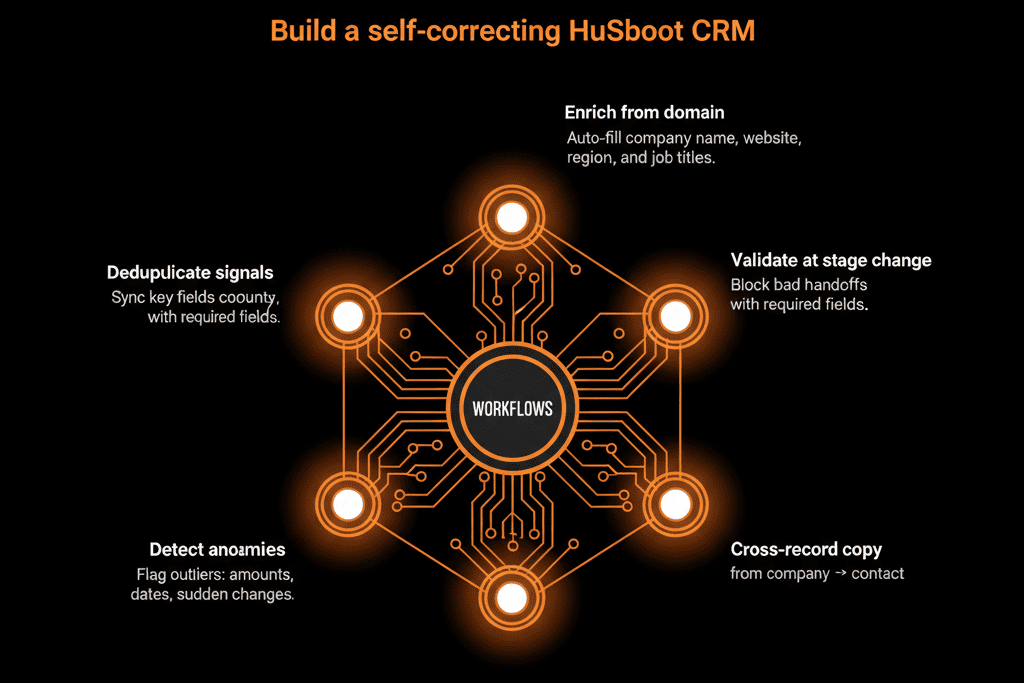
Step 1 – Decide What “Good Enough” Data Looks Like
Before automating anything, define the minimum viable dataset you need to run GTM.
For each object, list the fields that must be:
- Present.
- Accurate.
- Standardized.
Examples:
Contacts
- Email, name.
- Role/seniority/persona.
- Country/region or territory.
- Lifecycle stage.
- Owner.
Companies
- Name, domain.
- Industry.
- Employee size or revenue band.
- Region/territory.
- ICP tier (if used).
- Account owner.
Deals
- Amount and close date.
- Stage and pipeline.
- Deal type (new, expansion, renewal).
- Primary company and contact.
Tickets / CS objects
- Status, priority, type.
- Associated company/contact.
These are your targets for enrichment and validation, not all 300+ fields in the portal.
Step 2 – Identify Your Enrichment Sources
Automated enrichment can come from three main sources:
First‑party behavior and forms
- Web forms, chat, meeting bookings.
- Email engagement, page views, content downloads.
You can derive:
- Intent and engagement scores.
- Product interest.
- Stage readiness.
Third‑party enrichment tools
- Built‑in HubSpot enrichment (e.g., Company insights).
- Data providers (Clearbit, ZoomInfo, Apollo, etc.).
They can provide:
- Firmographics: industry, size, location.
- Technographics: tech stack.
- Contact demographics: title, seniority.
Internal systems (product, billing, support)
- Product usage events.
- Billing and subscription status.
- Support history.
These can signal:
- Customer health.
- Expansion potential.
- Churn risk.
Make a simple map:
- For each needed field, what’s the best source?
- How will it reach HubSpot (native integration, Operations Hub, API, import)?
Step 3 – Use Workflows to Orchestrate Enrichment
Workflows are your orchestration engine—deciding when and how to enrich.
Common patterns:
On new record creation (Contact/Company)
Trigger:
Contact created OR form submitted.
Actions:
- Standardize email/domain.
- Call enrichment tool (if integrated) or set flags to be picked up by Ops Hub/custom code.
- Sync country/region where obvious (from IP or form answer).
On key field updates
Trigger:
Company domain updated.
Actions:
- Re‑run company enrichment on key fields (size, industry, tech stack).
On lifecycle or stage transitions
Trigger:
Contact becomes MQL, or Deal enters “Qualified.”
Actions:
- Enrich missing firmographics/demographics.
- Classify ICP tier based on enriched data.
Use workflows to:
- Request or trigger enrichment.
- Copy data from external integration properties to your standardized internal properties.
- Avoid re‑enriching unchanged records endlessly.
Step 4 – Combine Enrichment with Validation and Normalization
Enrichment will add data. Validation ensures it’s usable and consistent.
Examples:
Normalize country/region
Workflow:
- If Country = “US” or “USA” → set to “United States”.
- If Country not in your list, map to “Unknown” and flag for review.
Normalize industry
Workflow:
- If vendor’s industry field contains certain terms → map to your standardized industry list.
Validate numeric fields
Workflow:
- If Number of employees is null but enrichment gives a range → map to your size band.
- If enriched values are obviously wrong (e.g., 0 or negative), ignore and flag.
Keep ownership and lifecycle safe
Rules:
- External systems can propose changes via properties or events.
- Only HubSpot workflows (under RevOps control) can modify owner and lifecycle_stage.
Enrichment feeds in raw data. Validation and normalization workflows turn it into trusted properties.
Step 5 – Use Operations Hub and Custom Code for Advanced Logic (If Needed)
For more complex enrichment/validation logic, Ops Hub and custom code workflows can help.
Use cases:
Complex mapping and lookups
E.g., map domains or IDs against internal systems or lookup tables.
Transforming raw product/billing data
Summarize usage events into “Usage score,” “Plan type,” or “Last active” metrics.
Field‑level conflict resolution
Decide:
- If HubSpot value is non‑blank, keep it.
- Else, use external enriched value.
Ops Hub can:
- Reduce reliance on brittle Zapier flows.
- Keep your enrichment and validation logic centralized inside HubSpot.
Step 6 – Implement a Phased Rollout (Don’t Enrich Everything at Once)
Enrichment and validation should be staged:
Phase 1 – High‑Impact Fields
Focus on:
- Ownership, region, industry, ICP tier.
- Basic product/customer status.
Goals:
- Improve routing and segmentation.
- Make core reports more accurate.
Phase 2 – Scoring and prioritization
Use enriched data to:
- Refine lead scoring and account scoring.
- Build better target lists and ABM segments.
Phase 3 – Advanced signals and health metrics
Incorporate product usage, support signals, and billing data.
Create health scores and expansion propensity scores.
At each phase:
- Monitor impact and data quality.
- Adjust rules and mappings.
- Expand gradually to avoid over‑engineering.
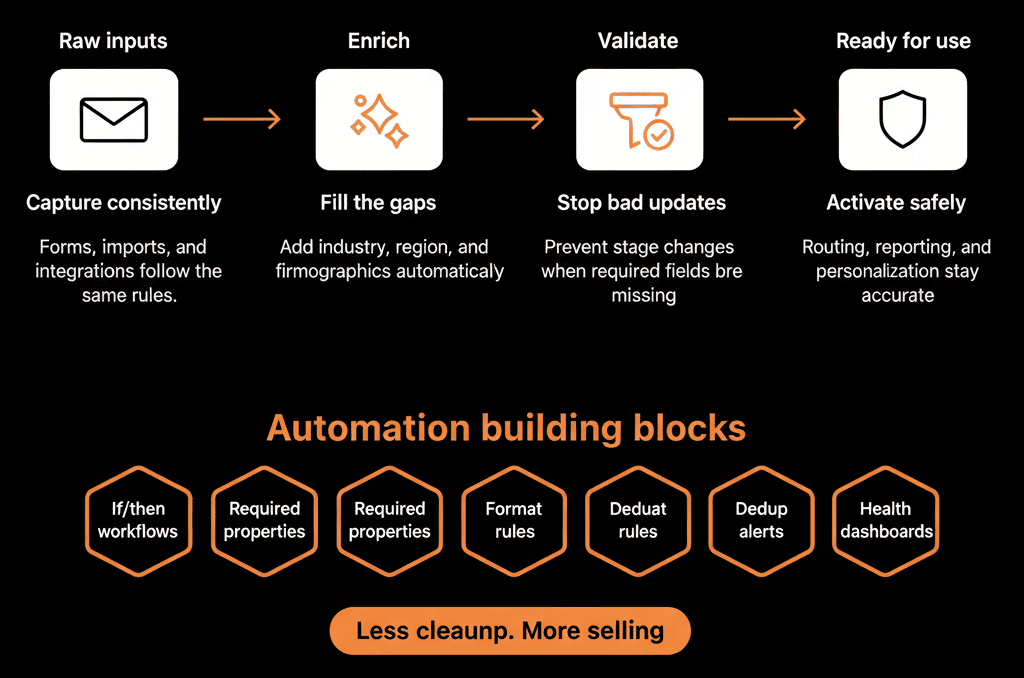
Step 7 – Add Guardrails So Enrichment Doesn’t Break Your CRM
Automated enrichment can backfire if not controlled.
Guardrails to enforce:
Source of truth rules
Document:
- Which fields external providers can write.
- Which fields HubSpot owns.
Overwrite policies
In many cases:
“If value exists in HubSpot, don’t overwrite with enrichment unless explicitly allowed.”
Frequency and scope limits
Only enrich:
- New records.
- Records crossing key lifecycle/stage thresholds.
- Records missing essential data.
Logging and monitoring
Track:
- How many records are enriched.
- Error rates from enrichment tools.
- Any spikes in unexpected values.
This keeps enrichment from becoming another source of bad data.
Step 8 – Monitor Data Quality and Enrichment Performance
You should be able to answer:
“Is our automated enrichment and validation actually improving data quality?”
Create simple dashboards showing:
% of Contacts with:
- Owner.
- Country/region.
- Role/seniority.
% of Companies with:
- Industry.
- Size band.
- Region.
- ICP tier.
Enrichment coverage:
- #/day or week of records enriched.
- Success vs failure or partial success.
Data quality trends:
- Before vs after enrichment for key properties.
Use these insights to:
- Adjust enrichment priorities.
- Identify where manual input is still needed.
- Evaluate vendors and integrations.
Pulling It Together: Make HubSpot Smarter About Data on Its Own
Automating enrichment and validation in HubSpot is not about chasing “perfect” data.
It’s about:
- Getting to “good enough” automatically for most records.
- Reducing manual work and human error.
- Making routing, segmentation, and reporting more reliable.
The approach:
- Define your minimum viable dataset for each object.
- Map which sources can enrich each field.
- Use workflows (and Ops Hub when needed) to orchestrate enrichment and validation.
- Normalize and protect key fields with clear rules.
- Roll out in phases and monitor impact.
Done right, HubSpot starts improving its own data every day—and your teams can focus on conversations, not clean‑ups.
Want Help Automating Enrichment and Validation in Your HubSpot Portal?
If your HubSpot data feels incomplete and inconsistent—and you want the system to do more of the work—this is where we can help.
Our HubSpot Portal Health Check and Migration & ROI Plan are designed to:
- Identify your most important data gaps and inconsistencies.
- Design an enrichment and validation architecture that fits your stack.
- Implement or blueprint key workflows and integrations so data quality starts compounding.






