



You Don’t Have a CRM Problem—You Have a Fragmentation Problem
Many scaling companies don’t run “a CRM”. They run:
- Salesforce in one business unit.
- Pipedrive or Zoho in another.
- Spreadsheets and inboxes in new teams or regions.
When leadership decides to consolidate into a single HubSpot portal, the intent is good:
- One system of record.
- One set of numbers.
- Less license and integration overhead.
But without a clear consolidation plan, you risk:
- Duplicates and conflicting records from different CRMs.
- Pipelines and lifecycles that don’t make sense across teams.
- Local teams feeling like HubSpot was “forced on them” and reverting to old tools.
In this article, we’ll walk through how to consolidate multiple CRMs into a single HubSpot portal in a controlled, staged way—so you gain alignment without losing what each team needs to operate.
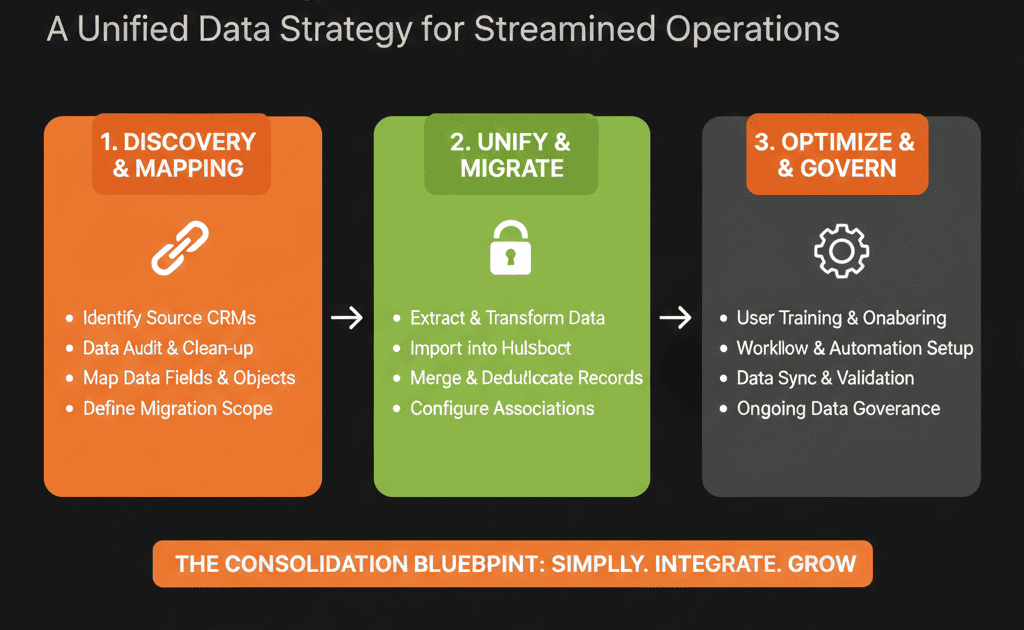
Step 1 – Inventory Your Existing CRMs and How They’re Really Used
Start by understanding your current landscape. You’re not just migrating data—you’re consolidating behaviors and processes.
For each CRM or system (Salesforce, Zoho, Pipedrive, Excel, etc.), capture:
- Who uses it (team, region, business unit).
- For what (new business, account management, support, partner deals, etc.).
- What objects matter (leads/contacts, accounts/companies, opportunities/deals, cases/tickets).
- What’s special (custom objects, critical workflows, reporting dependencies).
Also note:
- Which system is currently treated as “the truth” for revenue reporting.
- Where duplicate or overlapping data exists between systems.
This inventory keeps your consolidation grounded in reality—not in assumptions.
Step 2 – Define HubSpot as the Single System of Record (and What That Means)
Consolidation only works if you commit: HubSpot will be the system of record for go‑to‑market data.
Clarify with leadership:
- HubSpot will own: contacts, companies/accounts, deals/opportunities, tickets (or at least case summaries), and core engagement history.
- Finance/ERP will own: invoices, collections, detailed financials.
- Product/app will own: detailed usage logs (with key signals synced into HubSpot).
Write this down and align all teams: after consolidation, no team should maintain a parallel CRM as their primary source of truth.
This decision shapes your data model and migration sequence.
Step 3 – Design a Unified Data Model Before Moving Any Data
With multiple CRMs, you’ll see multiple definitions of the same thing. Before importing, you need a single HubSpot‑native model built on objects, properties, and associations.
Key design areas:
Contacts and Companies
- One contact per person, even if they exist in many legacy systems.
- One company/account per real account, with clear naming conventions and merged attributes from different CRMs.
Deals and Pipelines
- Shared core pipelines wherever the sales motion is similar.
- Region/BU/segment tracked via properties (not always separate pipelines).
Custom Objects (if needed)
- For shared entities like subscriptions, contracts, projects—used across former CRMs, designed around lifecycle and reporting (not “matching tables”).
Key properties and lifecycles
- Standard lifecycle stages across all teams.
- Shared definitions for lead, MQL, SQL, opportunity, customer; open, won, lost.
This data model becomes the target that all CRMs map into.
Step 4 – Plan Consolidation in Waves, Not All at Once
Trying to turn off every CRM and turn on HubSpot for everyone at once is risky.
Better approach: consolidate in waves by region, business unit, or source system.
For each wave, define:
- Scope: which teams and data are included.
- Cutover approach: freeze period in old CRM, final export/import, go‑live date in HubSpot.
- Success criteria: data accuracy checks and basic process functionality (lead routing, deal creation, reporting).
While one wave goes through migration and hypercare, other teams continue using their existing systems—with clear timelines for when they move.
Step 5 – Deduplicate and Merge Records Across CRMs Thoughtfully
When multiple CRMs are involved, duplicate contacts and companies are guaranteed.
You need a strategy for:
- Identifying duplicates across systems.
- Deciding which record “wins” in case of conflict.
Practical steps:
Standardize matching keys
- Contacts: primary = email address; secondary = name + company + country for non‑email records.
- Companies: primary = domain; secondary = company name + country.
Score and merge
- Prioritize systems that are more up‑to‑date and fields that are more reliable per system.
- Use conflict rules like: “Prefer owner and lifecycle from primary CRM; enrich with missing details from others.”
Use a staging environment or test imports
- Import samples from multiple CRMs into a test environment and validate how dedupe behaves before full load.
Step 6 – Align Pipelines and Lifecycles Across Teams
Consolidation forces you to answer: what does an “opportunity” mean across BUs and regions, and what are our common stages from interest to closed‑won?
From each CRM, capture:
- Current stages and pipelines.
- Entry and exit criteria (even if informal).
Then design unified HubSpot pipelines:
- Define standard stages with clear definitions.
- Add regional/BU nuance via additional fields (region, entity, product line).
- Use separate pipelines only where processes truly differ.
During migration, map old stages → new HubSpot stages and old lifecycles → new lifecycle stages, avoiding generic dumping into “In Progress/Unknown”.
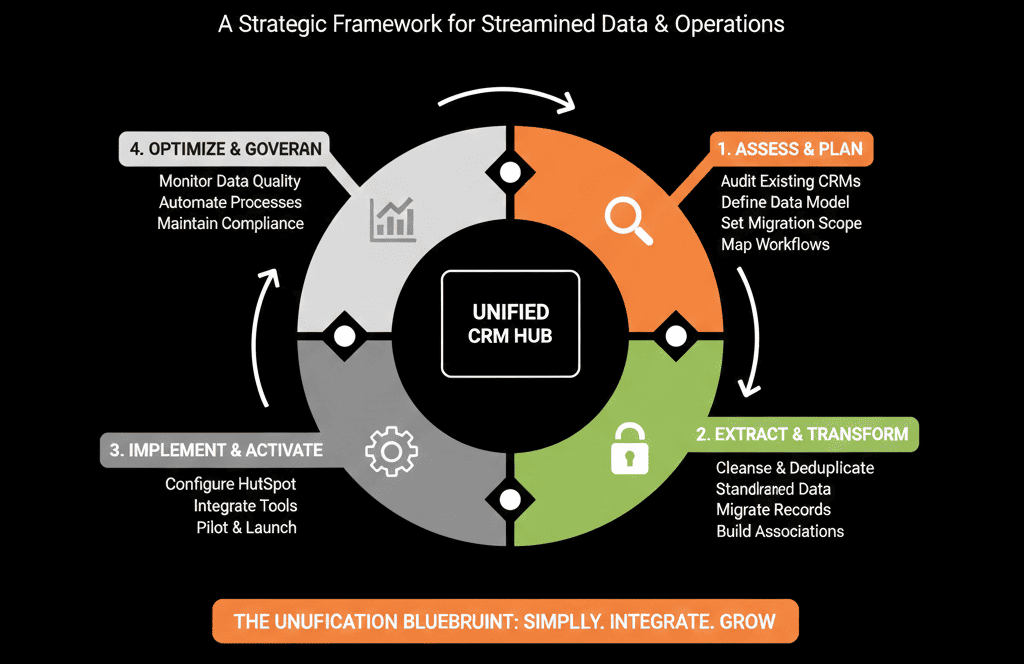
Step 7 – Handle Integrations and Automations One Domain at a Time
Each legacy CRM probably has its own ecosystem of integrations, webhooks, and automations/workflows.
Do not replicate everything. For each domain (sales, marketing, service):
- List automations that must survive (lead routing, SLA alerts, renewal reminders).
- Decide which to rebuild in HubSpot, retire, or rebuild differently using HubSpot-native features.
As each wave migrates, sunset automations in the old CRM and enable the mapped versions in HubSpot to prevent double‑firing and conflicts.
Step 8 – Communicate and Train by Team (Not Just “Global Training”)
Consolidation is change management. Each team is coming from a different system.
For each wave/team:
- Explain why consolidation is happening and what HubSpot enables.
- Deliver role-specific training (reps, managers, marketing, CS).
- Provide quick-reference guides: “In Salesforce we did X → In HubSpot you do Y.”
- Plan a 2–4 week hypercare window for fast triage and feedback loops.
Step 9 – Build Unified Reporting with Clear Transitional Rules
One key reason to consolidate is one set of numbers, but you’ll have a transition period where data lives in both legacy CRMs and HubSpot.
Plan reporting across three phases:
- Pre‑consolidation: legacy CRMs drive official numbers; HubSpot used for staging/testing.
- Transition: HubSpot is official for teams live in HubSpot; legacy CRMs remain official for teams not yet migrated (explicitly documented).
- Post‑consolidation: HubSpot becomes the single source of truth; legacy CRMs are archive-only or decommissioned.
Throughout, validate pipeline/revenue vs finance and team metrics vs what teams previously saw.
Step 10 – Retire Old CRMs Safely and Intentionally
Consolidation isn’t done when data is in HubSpot. It’s done when old CRMs are no longer used operationally and are archived or decommissioned intentionally.
Work with IT and compliance to:
- Define decommissioning timelines per system.
- Archive historical data appropriately (still accessible for audits if needed) without keeping it as a live system.
Communicate clearly: HubSpot is the new source of truth; old CRMs are read-only or offline—no new records there.
Pulling It Together: One HubSpot Portal, Many Realities
Consolidating multiple CRMs into HubSpot is not just “more of the same migration”. You’re unifying data definitions, aligning processes, and standardizing how you measure revenue.
Success depends on:
- A clear, HubSpot‑native data model.
- Wave-based migration with dedupe and mapping logic.
- Thoughtful pipeline and automation alignment.
- Strong communication and training per team.
Do this, and you’ll end up with one HubSpot portal that genuinely replaces multiple CRMs—not one more tool teams work around.
Want Help Designing and Executing a Multi‑CRM Consolidation into HubSpot?
If you’re staring at multiple CRMs and wondering how to get to “one clean HubSpot portal” without breaking everything, this is exactly where we can help.
Our HubSpot Portal Health Check and Migration & ROI Plan are designed to:
- Audit each existing CRM and the processes they support.
- Design a unified HubSpot data model and consolidation roadmap.
- De‑risk each migration wave with proper mapping, dedupe, and testing.






