



If You Can’t Explain Your Lead Flow, You Can’t Improve It
Ask five people how a lead becomes a customer in your business and you’ll hear:
- “Marketing hands MQLs to Sales.”
- “SDRs qualify and pass to AEs.”
- “It depends on the channel or segment.”
Ask HubSpot the same question—via your data—and often it has no clear answer:
- Lifecycles are inconsistent.
- Deals aren’t always created.
- Some leads skip straight from form fill to “Customer.”
Lead management isn’t just a process doc. It’s a design decision inside HubSpot.
In this article, we’ll walk through how to design lead management in HubSpot from first touch to closed won in a way that Marketing, Sales, and RevOps can all stand behind.
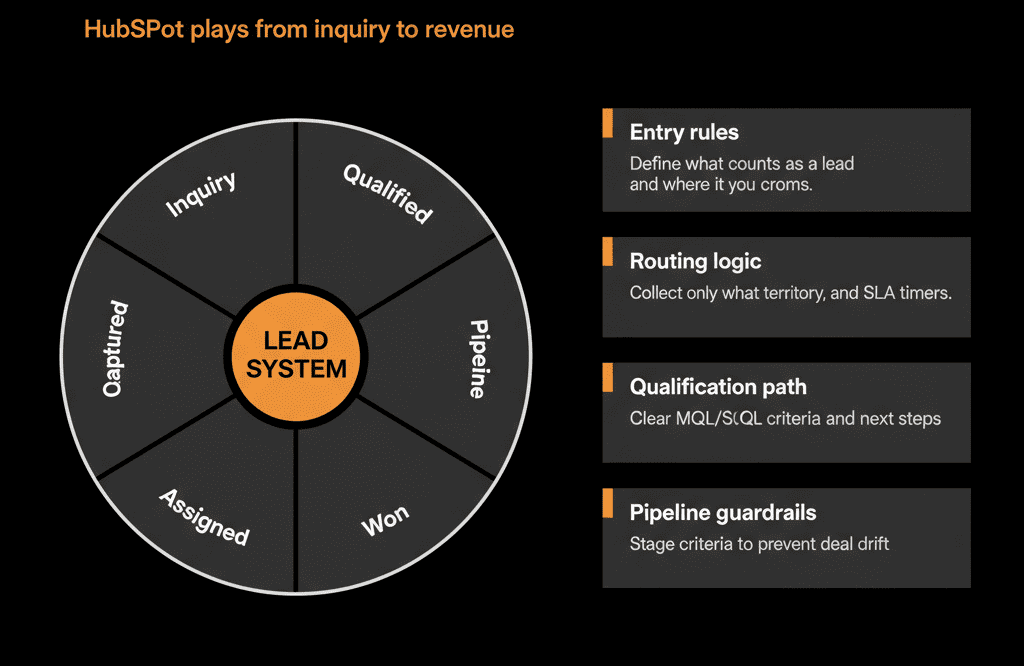
Step 1 – Define the Stages of Your Lead Journey (Plain Language First)
Before touching HubSpot, define the journey in business terms.
A common B2B flow:
- Anonymous – Unknown visitors, ad impressions, etc.
- Lead – Identified person (form fill, list import, event scan).
- Marketing Qualified Lead (MQL) – Lead that meets fit + intent thresholds.
- Sales Qualified Lead (SQL) / Accepted – Sales has validated and agreed to work the lead.
- Opportunity – A real chance to win revenue (deal created).
- Closed Won / Lost – Opportunity outcome decided.
Write down:
- What must be true to move from one stage to the next.
- Who is responsible for that transition (Marketing, SDR, AE).
These definitions become your master reference.
Step 2 – Map Stages to HubSpot Objects and Properties
Now, translate the business journey into HubSpot’s building blocks.
Core mapping:
Contacts
- Represent people at all early stages (Lead, MQL, SQL).
- Store lifecycle stage and behavioral data.
Companies (for B2B)
- Represent accounts linked to Contacts and Deals.
Deals
- Represent Opportunities.
- Owned by Sales.
- Move through pipeline stages until Closed Won/Lost.
Lifecycle Stage (Contact/Company property)
Use HubSpot’s lifecycle_stage to track:
Lead → MQL → SQL → Opportunity → Customer.
Standard mapping:
- Anonymous → not yet in HubSpot.
- Lead → lifecycle_stage = Lead.
- MQL → lifecycle_stage = Marketing Qualified Lead.
- SQL → lifecycle_stage = Sales Qualified Lead.
- Opportunity → associated Deal created; also often lifecycle_stage = Opportunity.
- Closed Won → lifecycle_stage = Customer and associated Deal Closed Won.
This alignment lets HubSpot represent both person‑level and pipeline‑level reality.
Step 3 – Design Lead Capture and Creation Flows
Decide how leads enter HubSpot and what data they must bring.
Sources:
- Website forms.
- Chat and meeting scheduling.
- Events and webinars.
- List imports and partner feeds.
- Product signups or trials.
For each source, define:
What object(s) to create
- Always a Contact.
- Usually a Company (B2B) if domain exists.
What fields are required
- Email, name.
- Country/region.
- Basic role or persona fields when possible.
Implement:
- Standardized forms: use the same core fields for routing and segmentation.
- Creation workflows: auto‑create Companies and associate Contacts.
- Set initial lifecycle to Lead, unless you have a strong reason to set differently.
Goal: every identified person lands in HubSpot with enough consistent data to be routed and nurtured.
Step 4 – Define and Implement MQL Criteria
MQL is where Marketing → Sales alignment lives or dies.
Define MQL using a combination of:
Fit (who they are)
- Company size, industry, ICP tier.
- Geography or segment.
Intent (what they did)
- Form types (demo/contact vs ebook).
- Product behavior (if you have it).
- Engagement level (opens, clicks, visits to key pages).
Implementation options:
Simple rules
E.g., “If: job title contains ‘VP’ or ‘Director’ AND requested demo → set lifecycle to MQL.”
Scoring model
Use HubSpot lead scoring properties for fit + intent.
Trigger MQL when score crosses a threshold.
Workflows:
When MQL criteria are met:
- Set lifecycle_stage = MQL.
- Assign owner (SDR/AE) based on routing rules.
- Create a follow‑up task or enroll in a sales‑owned sequence.
Document MQL so both Marketing and Sales agree on what “qualified” means.
Step 5 – Design SQL/Accepted and Opportunity Creation Logic
SQL (or Sales Accepted) is Sales’ confirmation that the lead is worth real effort.
Define:
What qualifies SQL
SDR/AE has:
- Confirmed a real need.
- Verified fit.
- Either booked a meeting or confirmed some buying intent.
Implementation:
Manual + workflow combo
- Sales moves a custom property Lead status or Lifecycle decision → “Accepted.”
- Workflow sets lifecycle_stage = SQL.
Opportunity creation:
When Sales decides there is a real revenue opportunity:
- Create a Deal in the appropriate pipeline.
- Associate primary Company and Contact.
- Set basic fields: amount (even if rough), close date, stage.
Workflow:
- When a new Deal is created, if Contact/Company lifecycle is earlier than Opportunity, set to Opportunity.
This ensures SQL and Opportunity are reflected clearly in both Contacts and Deals.
Step 6 – Implement Routing, Ownership, and SLAs
Good lead management in HubSpot depends on consistent routing and follow‑up.
Routing:
Rules may consider:
- Region/country.
- Segment (SMB/mid‑market/enterprise).
- Product or solution interest.
- Channel (inbound/outbound/partner).
Implementation:
Workflows that:
- Assign hubspot_owner_id based on routing criteria.
- Optionally rotate leads among a pool of reps.
SLAs:
Define SLAs by lead type:
- High‑intent (demo/contact sales): respond within X hours.
- Lower‑intent (content downloads): respond within Y hours or days.
Implementation:
Workflows that:
- Create tasks with due dates based on SLA.
- Escalate (task or notification) if a lead is untouched after SLA.
Monitoring:
Dashboards showing:
- Time‑to‑first‑touch.
- % of leads touched within SLA.
- Unassigned/new leads backlog.
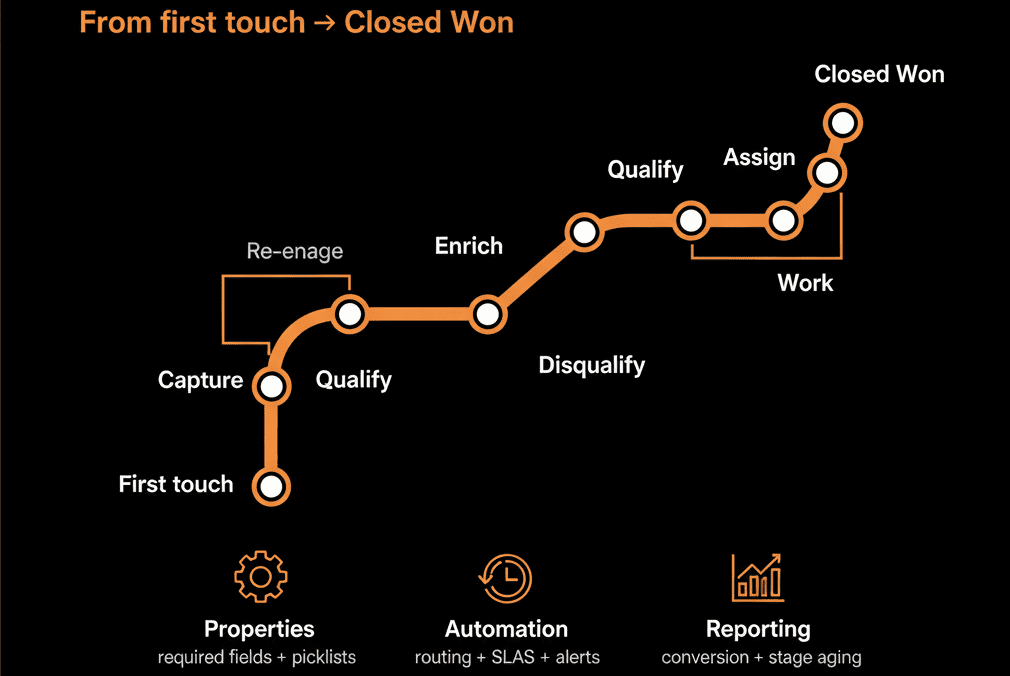
Step 7 – Use Validation and Guardrails to Keep the Flow Honest
Without guardrails, your lead management will slowly unravel.
Implement:
- Required fields on key stage moves (Deals) and lifecycle transitions (where you allow manual changes).
- Dropdowns for lifecycle, lead status, country, industry.
- Validation workflows to prevent lifecycle regression (e.g., Customer → Lead) without review.
- Flag opportunities without close date or owner.
Also:
- Limit who can manually change lifecycle stage.
- Limit who can move deal stages beyond certain points.
Goal: ensure your funnel and pipeline metrics mean something.
Step 8 – Build Reporting That Mirrors the Lead Journey
Great lead management design shows up in clean, intuitive reports.
Core reports to build:
Volume and conversion
- Lead → MQL → SQL → Opportunity → Closed Won counts and conversion rates.
- Breakdown by channel, segment, and region.
SLA performance
- Average time‑to‑first‑touch by lead type.
- % of high‑intent leads responded to within SLA.
Pipeline outcomes
- Opportunities and revenue generated per lead source and campaign.
- Win rate and cycle time by segment and channel.
Use these to:
- Tune MQL criteria.
- Adjust routing and resourcing.
- Allocate budget to channels and plays that generate real revenue.
Step 9 – Review and Refine Regularly with Marketing, Sales, and RevOps
Lead management is not “set and forget.”
Run a quarterly review with Marketing, Sales, and RevOps to ask:
- Are we happy with MQL → SQL acceptance rates?
- Do reps trust lead scores and lifecycle stages?
- Where are leads or opportunities stalling?
- Are SLAs realistic and being met?
- Do dashboards reflect the questions leaders actually ask?
Then adjust:
- MQL/SQL definitions and triggers.
- Routing rules and owner assignments.
- Pipeline stages and required fields.
HubSpot is flexible enough to evolve as your GTM motion changes—use that flexibility deliberately.
Pulling It Together: Lead Management as a System, Not a Spreadsheet
Designing lead management in HubSpot from first touch to closed won means:
- Clear stage definitions that everyone agrees on.
- A mapped journey into Contacts, Companies, Deals, and lifecycles.
- Routing, SLAs, and automation to remove guesswork and delays.
- Guardrails to keep data and processes honest.
- Reporting that shows where to optimize next.
Do this right, and your teams stop debating the funnel—and start improving it.
Want Help Designing Lead Management in HubSpot That Actually Works?
If your current lead flow in HubSpot feels inconsistent, opaque, or fragile, this is exactly where we can help.
Our HubSpot Portal Health Check and Migration & ROI Plan are designed to:
- Audit your current lead lifecycle, routing, and pipeline usage.
- Design a clear, RevOps‑ready lead management model in HubSpot.
- Give you a 60–90 day plan to implement it with automation, guardrails, and reporting.






