



Not Every Lead Is Ready for Sales—But Many Are Too Good to Ignore
Most teams have two buckets:
- “Hot” leads that go straight to Sales.
- Everyone else dumped into a generic newsletter.
The problem:
- Some leads are clearly high‑intent but not ready to talk to Sales today.
- Others are high‑fit but early in their buying journey.
If you don’t treat these as a distinct group, you:
- Waste expensive demand gen.
- Force Sales to chase low‑readiness leads.
- Miss chances to mature intent into real pipeline.
A high‑intent nurture system in HubSpot is how you bridge the gap:
- Keep qualified but not‑yet‑ready leads engaged.
- Signal Sales when intent spikes.
- Use content that moves them closer to a buying conversation.
Here’s how we design it.
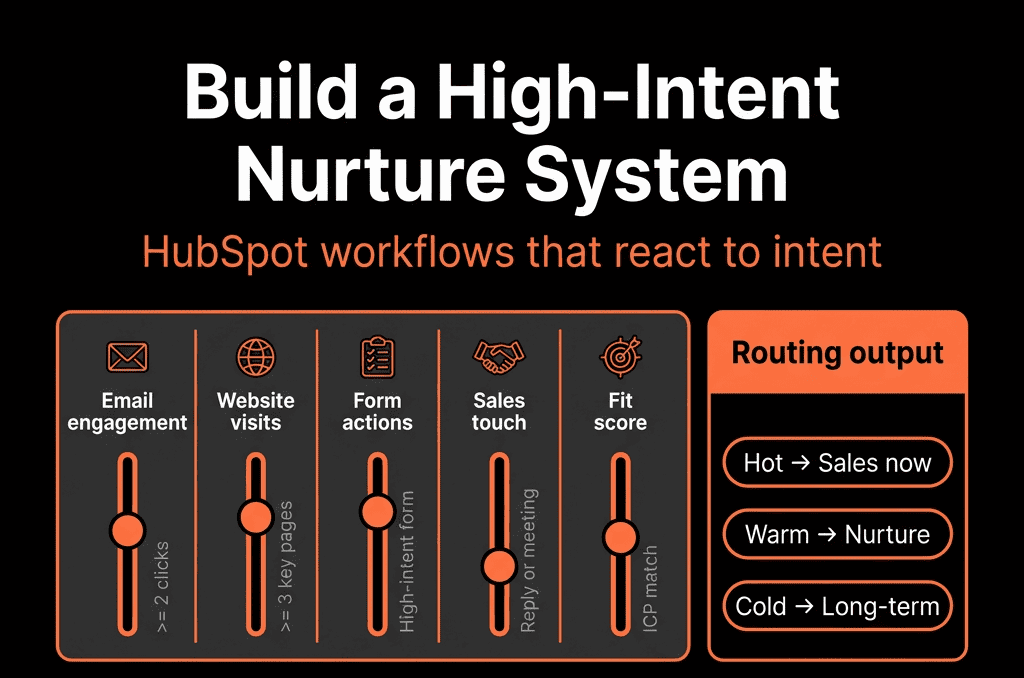
Step 1 – Define What “High‑Intent” Means for Your Business
High‑intent doesn’t always mean “ready for a sales call”—but it should be more than a casual click.
Common high‑intent signals:
- Demo / “contact sales” requests.
- Pricing page visits (repeated or combined with other actions).
- Product trial or POC signups.
- Deep BOFU content: case studies, ROI calculators, technical implementation guides.
Behavior patterns:
- Multiple visits in a short time.
- Multiple stakeholders from the same domain engaging.
Your job:
- Define the specific events or patterns in HubSpot that will classify a lead as high‑intent.
- Separate from low‑intent (top‑funnel) and low‑fit leads.
In HubSpot, capture these via:
- Form submissions (form names/types).
- Page views and events.
- Product or external signals integrated into HubSpot.
Step 2 – Segment High‑Intent Leads by Fit and Readiness
Not all high‑intent leads are equal.
Use your fit + intent model:
Fit (Contact/Company properties)
- ICP tier, industry, company size.
- Role/seniority.
- Region/segment.
Intent (scoring or events)
- Specific high‑intent actions.
- Recency and frequency of engagement.
Create key HubSpot lists:
- High‑fit + high‑intent, Sales now: route directly to Sales with strong SLAs.
- High‑fit + high‑intent, not ready yet: e.g., indicated “3–6 months” timeline or early conversations.
- High‑fit + medium intent: show potential but need education and nurturing.
This article focuses on the last two segments: high‑fit but not yet ready for a serious sales motion.
Step 3 – Design Nurture Tracks Based on Buying Stage, Not Just Persona
High‑intent nurture is not generic “keep us top of mind” content.
Think in terms of buying stages:
Problem & urgency
- Problem framing, cost of inaction, benchmark data.
Solution shaping
- Comparisons of approaches.
- Frameworks for evaluating solutions.
- Use‑case and architecture examples.
Vendor evaluation
- Case studies, ROI stories.
- Implementation and migration guides.
- Proof‑of‑concept/assessment offerings.
For each segment (e.g., ICP x stage), define:
- A 4–8 touch content arc: emails, resources, invitations to webinars, short videos.
- Optional: “Soft CTA” for people not ready (e.g., assessments, calculators).
- “Hard CTA” for those who want to talk sooner (demo links, meeting links).
This is your nurture playbook before you ever build workflows.
Step 4 – Implement High‑Intent Nurture with HubSpot Workflows
Use HubSpot workflows to enroll, nurture, and re‑score leads based on behavior.
Key workflow components:
Enrollment triggers
- Contacts meet high‑fit criteria AND submit specific BOFU forms (not routed directly to Sales).
- Reach certain intent score thresholds.
- Are marked by Sales as “Future opportunity / Nurture.”
Branching by segment
- Split on segment (SMB / mid‑market / enterprise).
- Industry or vertical.
- Role (economic buyer vs user champion).
Nurture steps
- Send a sequence of 3–8 emails over 2–8 weeks.
- Include tasks for marketing/sales when appropriate (e.g., manual check‑ins).
- Use if/then branches for engagement: if they click certain CTAs or visit pricing → escalate.
Exit rules
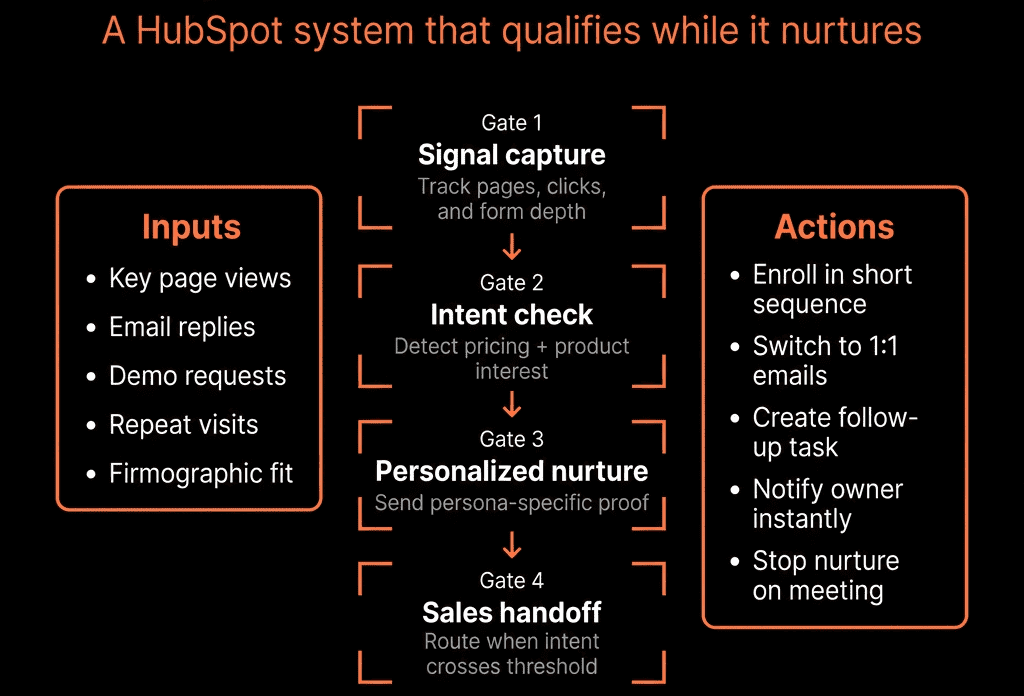
- Exit nurture when they request a demo or contact sales.
- Exit when Sales creates a Deal and marks them as in active cycle.
- Avoid overlapping them with inbound sales sequences at the same time.
Result: high‑intent, not‑yet‑ready leads are in structured, measurable journeys, not just lost in lists.
Step 5 – Create “Sales‑Ready” Triggers from Nurture Behavior
High‑intent nurture should feed Sales when readiness increases.
Use HubSpot to:
Watch for key engagement thresholds
Example triggers:
- Multiple pricing page visits.
- Specific CTA clicks (e.g., “See implementation plan”).
- Replying to nurture emails.
Convert triggers into Sales signals
Workflows that:
- Notify the owner (or SDR queue) to review and potentially call.
- Create tasks: “Lead re‑engaged from nurture—review activity and consider outreach.”
- Optionally auto‑create Deals in early‑stage pipeline (depending on your process).
Update lifecycle and scores
- If a nurtured lead crosses a higher intent threshold: promote lifecycle (e.g., Lead → MQL or SQL) and boost intent score.
This closes the loop: nurture builds heat, and HubSpot signals when it’s time to act.
Step 6 – Involve Sales in Nurture Design and Exception Handling
High‑intent nurture only works if Sales trusts it.
Involve Sales by:
- Collaborating on the definition of “not ready yet.”
- Collaborating on nurture arcs for future opportunities (what content helps them later?).
- Giving reps views of “My nurtured leads” and “Re‑engaged nurtures.”
- Allowing reps to override nurture (pull someone into active cycles sooner) or flag nurtures as low potential.
- Agreeing on rules of engagement so nurture and active outreach don’t collide.
Step 7 – Monitor Nurture Performance and Optimize
Your high‑intent nurture system should evolve based on data.
Track in HubSpot:
- Engagement metrics: open, click, and reply rates by track; web behavior after sends.
- Pipeline outcomes: how many nurtured leads become MQL/SQL, Opportunities, and Closed Won.
- Time to opportunity: average time from enrollment to Opportunity creation.
Optimize by:
- Promoting best‑performing content and subject lines.
- Retiring or revising low‑performing emails.
- Adjusting timing and branching logic.
- Testing different offers (consultation, assessment, workshop).
Step 8 – Keep High‑Intent Nurture Clean and Focused
Avoid these common pitfalls:
- Overcomplicating branching: start with a few high‑value segments and refine.
- Mixing nurture with generic newsletters: keep high‑intent nurtures purposeful and time‑bound.
- Forgetting lifecycle and CRM alignment: ensure accurate lifecycle/owners and avoid conflicting sequences/workflows.
Pulling It Together: Nurture as a Revenue Engine, Not a Drip Afterthought
A high‑intent lead nurture system in HubSpot:
- Treats “not yet ready” leads as a strategic asset.
- Uses fit + intent data to segment meaningfully.
- Delivers stage‑appropriate content and CTAs.
- Signals Sales when readiness increases.
- Is co‑designed and trusted by Sales and Marketing.
- Evolves based on conversion, not just opens and clicks.
Done right, nurture becomes a pipeline incubator—turning expensive demand into future revenue.
Want Help Building a High‑Intent Nurture System in Your HubSpot Portal?
If your current nurture is just a generic email drip—or you have high‑intent leads getting cold—this is where we can help.
Our HubSpot Portal Health Check and Migration & ROI Plan are designed to:
- Audit your lead types, scoring, and current nurtures.
- Design high‑intent nurture tracks aligned to your GTM and Sales needs.
- Implement workflows and reporting so you see nurture’s real impact on pipeline and revenue.






