🧮 The “Shadow Accounting” Nightmare
It’s the last day of the month. Your sales team just closed a record number of deals. High fives all around.
But for Finance — and your VP of Sales — the nightmare is just beginning.
- A massive spreadsheet named FINAL_Commissions_v3_UPDATED.xlsx
- Manual exports from HubSpot
- Broken formulas, formatting fixes, and split-deal logic
- 48 hours of stress and prayer
Meanwhile, your reps are blind.
- No visibility into commissions until payday
- Personal “shadow spreadsheets” to double-check your math
- Arguments, mistrust, and distractions

This is Shadow Accounting. It’s slow, error-prone, and demotivating.
Why are you doing math in 1990s software when you run a 2025 Revenue Operating System?
🔬 What Are Calculated Properties?
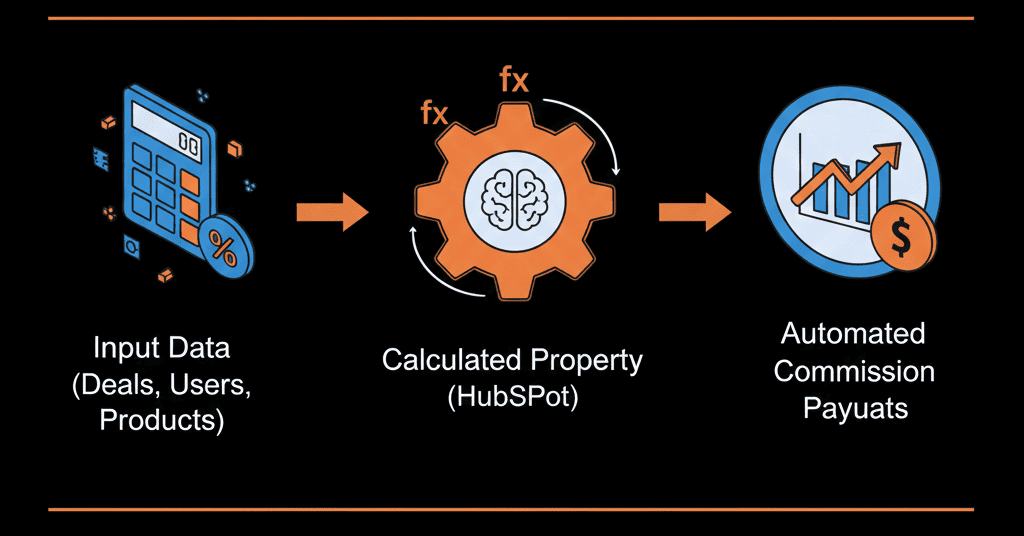
A Calculated Property is an Excel formula that lives inside HubSpot.
- Users don’t type numbers — the system calculates them
- Updates instantly when source data changes
- Creates a Single Source of Truth
Equation: [Field A] × [Field B] = [Calculated Field]
🛠️ How to Build a Simple Commission Calculator
Scenario: You pay a flat 10% commission on the Total Contract Value (TCV) of a deal.
Step 1: Create the Property
- Settings → Properties → Create Property
- Object: Deal
- Group: Deal Revenue (or “Commissions”)
- Label: Estimated Commission
Step 2: Select Calculation
- Field Type: Calculation
- Click “Build Calculation”
Step 3: Build the Formula
- Calculation Type: Custom Equation
- Select Amount Click the dropdown and select the property Amount (this is your deal value)
- Click the multiplication symbol (*).
- Type 0.10 (for 10%)
- (Note: You can also create a separate property called "Commission Rate" if it varies by deal, and multiply Amount * Commission Rate).
Step 4: Format and Save
- Number Format: Currency
- Create
Step 5: The Reveal
- Go to your Deal view. Add Estimated Commission to your sidebar.
- Open a deal worth $50,000. You will see $5,000 in the commission box. Change the deal to $100,000. It instantly changes to $10,000.
- Instant updates, zero spreadsheets
🚀 Advanced Use Case: Weighted Forecast
- Create Rep Confidence Score (10%, 50%, 90%)
- Formula: Amount × Confidence Score
- Forecast based on rep sentiment
🚀 Advanced Use Case: Days to Close
- Calculation Type: Time Between
- Start Date: Create Date
- End Date: Close Date
Result: Reports showing average sales velocity by rep.
⚠️ When You Need Operations Hub
- Standard calculations handle linear math only
- No native conditional logic (if / then)
Example problems:
- 10% on software, 5% on services
- 15% commission only if deal > $100k
The fix: Operations Hub Professional.
This is where "Programmable Automation" comes in. With Ops Hub, you don't use a simple formula builder. You use Custom Code (JavaScript/Python) in a workflow.
The Script: Operations Hub Professional.
- If Product = 'Software', Rate = 0.10
- If Product = 'Service', Rate = 0.05
- Commission = Amount * Rate
- Update Property: 'Final Commission'
Stop Doing Math in Public
- Every time you export data to Excel to calculate a number, you create a "data silo." You create a delay. You create a lack of trust.
- Calculated Properties are the "Excel Killer."
- But configuring them—especially if you have complex, tiered logic—requires a "Data Architect," not just a user.
A self-driven system does the math for you. Reps see earnings in real time. Finance gets two days of their life back.
Stop the Shadow Math
We don't just check your email templates. A HubSpot Gold Partner will audit your "Shadow Spreadsheets." We will look at your commission plans, your forecast models, and your "manual math," and we will build a "Configuration Plan" to automate that logic inside HubSpot.
Get Your Free HubSpot Health Check