



Why Multi‑Brand B2B Service Companies Struggle with HubSpot Data Models
Multi‑brand B2B service companies rarely have a simple “one brand, one pipeline” reality.
You have multiple brands, business units, and service lines often selling into the same accounts.
When this is not reflected in your HubSpot data model, you see the symptoms quickly:
- Duplicate companies per brand or region.
- No clean view of account value across all brands.
- Pipelines that blend different offerings with different margins.
- Reporting that cannot answer “Which brand is driving profitable growth?”
Our team treats this as a data architecture problem, not a “HubSpot settings” issue. In this blueprint, we walk through the data model we use when designing HubSpot Implementation Blueprints for multi‑brand B2B service companies, and how a structured HubSpot Health Check feeds into it.
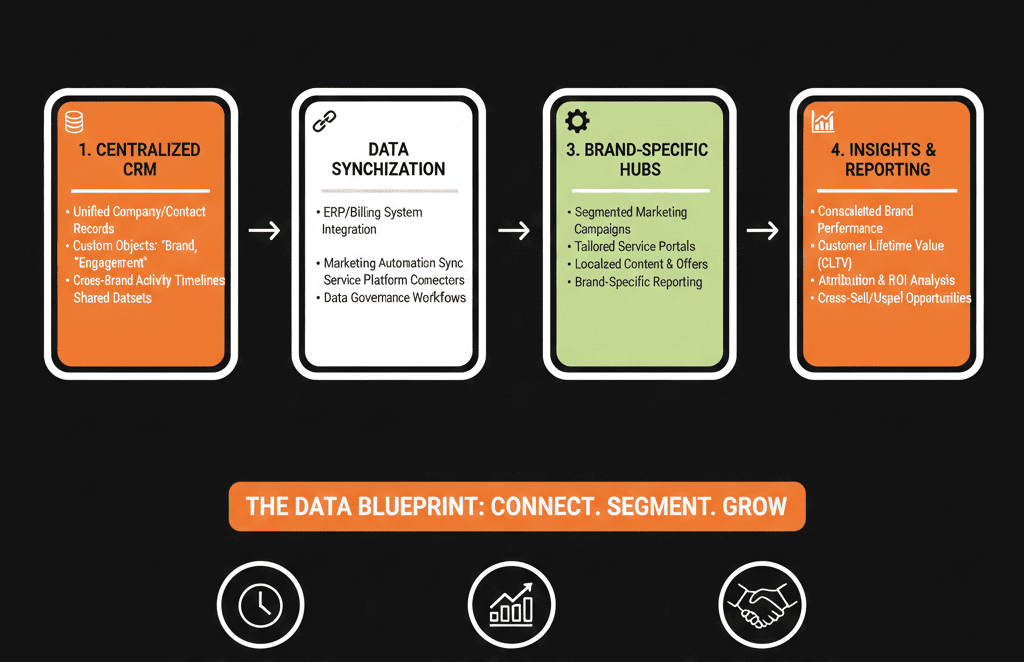
Principle 1: One Account, Many Brands – Design at the Company Level
Use Companies as the shared account backbone
For multi‑brand environments, Companies must be the single source of truth for accounts.
Contacts and Deals then express how different brands interact with that account.
Start by standardizing:
- What counts as an “account” in your world (legal entity vs. operating unit vs. site).
- How you name accounts (to avoid brand‑specific duplicates).
- Which properties live on Companies vs. Contacts vs. Deals.
Every brand needs to see the same factual account record. Brand‑specific nuance should live on associations and deals, not as separate copies of the same company.
Separate account identity from brand engagement
On the Company object, store:
Core identity and segment
- Legal name, website, industry, HQ country/region.
- Strategic segment (ICP tier, size band, vertical).
Account‑level ownership
- Global Account Owner.
- Success / CS owner (if centralized).
“Global truth” fields
- Total revenue potential.
- Global status (Target / Active / At Risk / Churned).
Do not store brand‑specific deal details here.
Instead, use:
- Custom properties like “Primary brand relationship” only where it reflects a strategic reality (e.g., Brand A is the lead relationship owner).
- Deals, tickets, and custom objects to reflect each brand’s pipeline, projects, and contracts.
Principle 2: Model Brands and Business Units Explicitly
Create brand / business unit properties and teams
You need a clear, consistent way to tag brand and business unit involvement across the CRM.
Introduce:
- A “Brand” property (picklist) on: Deals (mandatory). Tickets / projects. Optionally Contacts, where brand affinity matters (e.g., marketing lists).
- A “Business unit / BU” or “Service Line” property where needed to go beyond brand (e.g., Consulting vs Managed Services).
Then align HubSpot Teams to these brands/BUs:
- Sales and Service teams mapped to each brand.
- Permissions and default ownership scoped by team.
During a HubSpot Health Check, we usually find brand confusion baked into inconsistent properties. Standardizing these is one of the highest‑ROI clean‑up moves.
Decide when to split vs. share pipelines
Multi‑brand firms often over‑split pipelines (“one pipeline per brand per region per motion”).
Use these rules of thumb:
Separate pipelines when:
- Sales processes are materially different by brand (e.g., SOW‑driven consulting vs productized support).
- Stages have different definitions and SLAs.
Shared pipelines with brand/BU properties when:
- The sales motion is fundamentally the same across brands.
- You want easy cross‑brand reporting and consistent stage definitions.
In most cases, you end up with:
- A small number of well‑designed pipelines (e.g., New Business, Expansion, Renewals).
- Brand and BU stored as properties on the Deal.
This simplifies both adoption and reporting.
Principle 3: Treat Contacts as People, Not Brand Silos
One person, many brand relationships
A contact may buy from multiple brands.
Creating separate contact records per brand kills relationship context and email deliverability.
Your blueprint should enforce:
One Contact per person, with:
- Global persona, seniority, role.
- Relationship properties (Champion, Economic Buyer, Influencer, Blocker).
Brand‑specific preferences stored as:
- Subscription types per brand (using multiple subscription types/lists).
- Engagement through lists and workflows, not duplicate contacts.
Associations then express which Deals (for which brands) that person is involved in.
Clarify contact ownership vs. account ownership
Decide how you assign owners:
Account‑centric model:
- Company owner is primary; contacts inherit by default.
- Brand teams may use deal tickets or additional properties for brand‑level reps.
Brand‑centric model:
- Each deal has a brand‑specific owner.
- Company owner is more of a global coordination role.
In multi‑brand B2B service companies, we often recommend account‑centric ownership with brand‑specific deal owners. This respects strategic account management while allowing brands to execute independently.
Principle 4: Use Deals to Capture Brand, Motion, and Value
Capture brand, motion, and entity on every deal
Deals are where you see how brands actually sell.
Make your Deal schema do real work:
Mandatory properties on Deals should include:
- Brand.
- Business unit / service line.
- Motion (New Business / Expansion / Cross‑sell / Renewal).
- Region or market.
- Entity or P&L (if multiple legal entities exist).
- Primary product or offer (from a governed picklist).
All reporting for “Brand performance” and “BU performance” should ultimately roll up from this deal‑level tagging, not from guessed fields.
Separate new business, expansion, and renewals
Many multi‑brand firms conflate all value into one pipeline.
That hides where each brand is really winning.
We typically recommend either:
- Separate pipelines for New Business, Expansion, and Renewals, or
- A single pipeline with a clear Motion property and specialized stages for each motion.
The goal is to answer:
- Which brands are winning net‑new accounts?
- Which brands are strongest at expanding existing accounts?
- Where is churn or downgrade concentrated?
Your HubSpot Health Check should explicitly test whether current deal data can support these questions before you build dashboards.
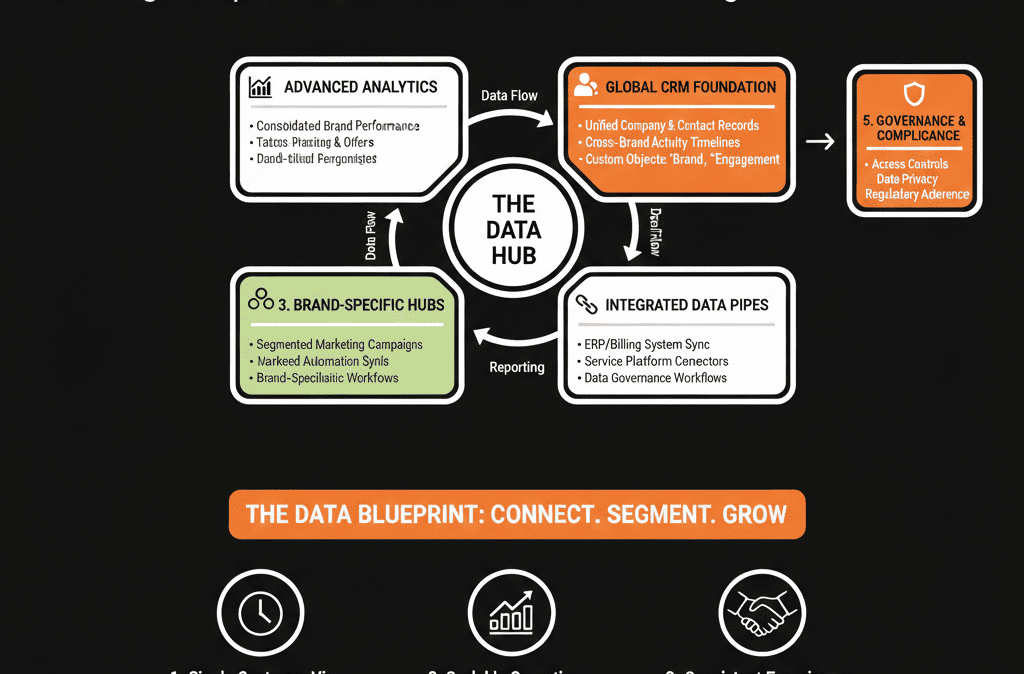
Principle 5: Keep Custom Objects Focused and Governed
Only introduce custom objects when native objects break
Custom objects are powerful, but overused in messy portals.
For multi‑brand B2B service companies, custom objects make sense when:
- You have recurring engagements that span brands (e.g., “Contracts”, “Engagements”, “Programs”).
- You need to model multi‑year frameworks or MSAs separate from individual deals.
Examples:
A Contract custom object associated with:
- Company (account).
- One or more Deals (per brand or service line).
- Contacts (key stakeholders).
A Project or Engagement object for delivery, associated with:
- Company.
- Deal.
- Tickets or tasks.
The blueprint must define:
- When to create a new custom object vs. reuse Deals or Tickets.
- Ownership, lifecycle stages, and reporting use cases for each custom object.
Govern properties across objects
Once you add custom objects, property sprawl grows faster.
Avoid three versions of “Brand” across objects with different options.
Enforce:
- Shared naming conventions (Brand, Business Unit, Entity, Region).
- Alignment of picklist options across Contacts, Companies, Deals, and key custom objects.
- A simple governance rule: no new “Brand‑like” property is created without reviewing the existing schema.
We surface property conflicts and redundancies during our HubSpot Health Check so the data model blueprint starts from a clean base, not layered confusion.
Principle 6: Design Reporting Backwards from Leadership Questions
Start from brand and BU reporting needs
Before finalizing the data model, confirm leadership questions:
- Revenue and pipeline by brand, BU, and region.
- Win rate and cycle time by brand and motion.
- Cross‑brand penetration per account (how many brands are active?).
- Contribution of each brand to specific ICPs or verticals.
Then verify the data model supports each question:
- Do Deals reliably capture brand, BU, motion, and region?
- Do Companies reliably capture account segment and vertical?
- Can we aggregate across pipelines without losing brand context?
If you cannot answer these on sample data, fix the model first, then build dashboards.
Install a feedback loop via Health Checks
A data model is not static.
Multi‑brand strategies change; so must the schema.
We recommend:
- An initial, deep HubSpot Health Check to map current vs. target state.
- A formal HubSpot Implementation Blueprint to define the data model, pipelines, and reporting.
- Quarterly light‑touch Health Checks to: Retire unused properties and pipelines. Align new brands or offerings into the existing structure.
This keeps your data model Blueprint alive instead of becoming a forgotten diagram.
Start with a Data‑Focused Health Check
If you are a multi‑brand B2B service company, your biggest HubSpot risk is not “missing features”.
It is a data model that does not reflect how your brands and business units actually sell and deliver.
A structured HubSpot Health Check focused on data models gives you:
- Clear visibility into how accounts, contacts, and deals are really structured today.
- A brand and BU taxonomy that everyone can agree on.
- A blueprint for pipelines, custom objects, and reporting that scales as you add brands.
- A prioritized 60–90 day plan to clean and re‑align the portal.
If you want this mapped for your own multi‑brand setup, request a Free HubSpot Health Check and we will translate your operating model into a practical HubSpot data model blueprint.






