



If HubSpot Only Shows New Logos, You’re Missing Half the Revenue Story
Most portals have:
- One “New Business” pipeline.
- Closed Won = the end of the story.
- Renewals tracked in spreadsheets or finance.
- CS running from inboxes and ticket queues with no revenue view.
That’s how you end up with:
- Surprises at renewal time.
- No clear expansion pipeline.
- NRR as a finance metric, not a GTM metric.
We treat HubSpot as the full revenue engine:
- New Business.
- Renewals.
- Expansion/Upsell.
- CS motions that protect and grow accounts.
Here’s how we set that up.
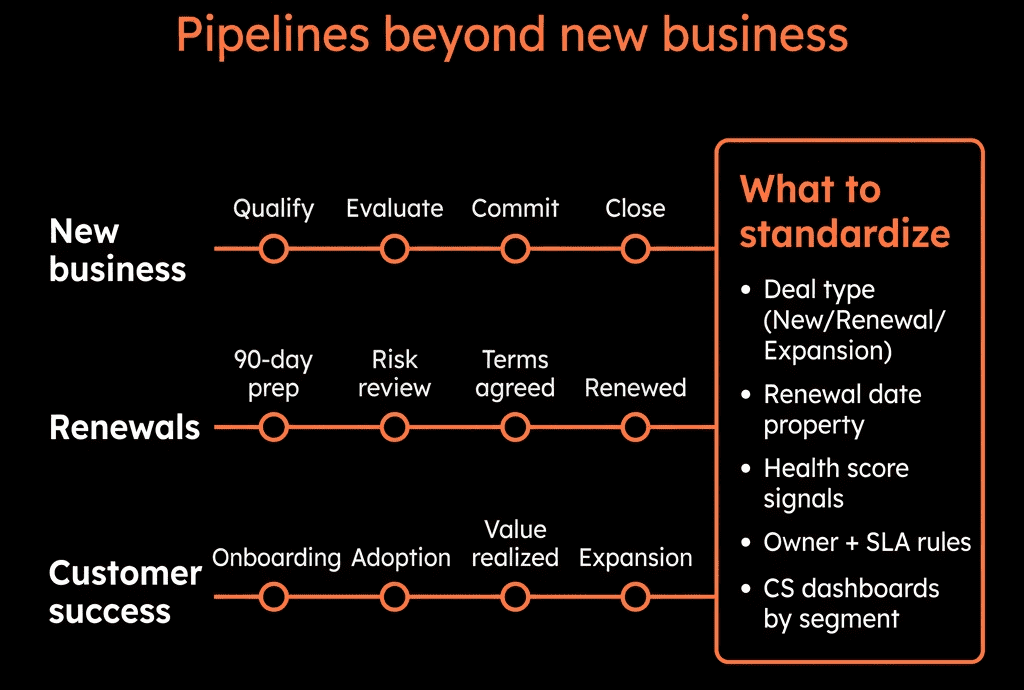
Step 1 – Create Separate Pipelines for New, Renewal, and Expansion
Stop mixing all revenue motions into one pipeline.
In HubSpot:
New Business pipeline
- For first-time deals only.
- Standard sales stages.
Renewals pipeline
- One deal per contract/term.
- Tracks retention and churn.
Expansion / Upsell pipeline
- Additional products/teams/usage for existing customers.
- Owned by CS/AM or Sales, depending on your model.
Benefits:
Clear views of:
- Net-new ARR.
- Renewal performance.
- Expansion pipeline.
Cleaner reporting on NRR/GRR and CS impact.
Step 2 – Standardize Customer & Contract Properties
On Company:
- Customer status (Prospect, Active, At risk, Churned).
- Customer tier (e.g., SMB / Mid / Enterprise).
- CSM owner / Account manager owner.
- Current MRR / Current ARR.
- Contract start date, Contract end date.
- Primary product / plan.
On Deals:
- Deal type (New, Renewal, Expansion).
- Renewal of (link back to original New Business deal via text or association pattern).
- Churn reason (for lost renewals).
- Expansion driver (Usage growth, new team, new product, etc.).
This is the backbone for CS + revenue reporting.
Step 3 – Design Renewal Pipeline Stages Around Real Renewal Milestones
Renewal stages should reflect customer decisions, not admin tasks.
Example Renewal pipeline:
Renewal Identified
- Renewal deal created with value and date.
- Contract end date known.
Review & Discovery
- CSM/AM has engaged customer about value, goals, and risks.
- Health and usage reviewed.
Proposal Shared
- Renewal (and any expansion) terms presented.
In Customer Review
- Commercial terms under internal review, legal, or procurement.
Verbal Commit
- Customer has verbally agreed to proceed.
Renewed / Churned / Downgraded
- Outcomes clearly separated via Renewal outcome property.
Define entry/exit criteria for each stage and train CS/AM teams accordingly.
Step 4 – Design Expansion Pipeline Stages for Land-and-Expand
Expansion follows a different motion to new logos:
Example Expansion pipeline:
Opportunity Identified
- Usage/need indicates potential expansion.
- Champion interest confirmed.
Solution & Scope Defined
- Use cases and additional value agreed.
Proposal Sent
- Expansion terms and pricing shared.
In Review
- Stakeholders evaluating.
Verbal Commit
Closed Won / Closed Lost.
Key properties:
- Expansion type (New product, More seats, Higher plan, Cross-sell).
- Expansion trigger (Usage threshold, New team, Exec sponsorship, etc.).
This gives CS and Sales a visible expansion pipeline.
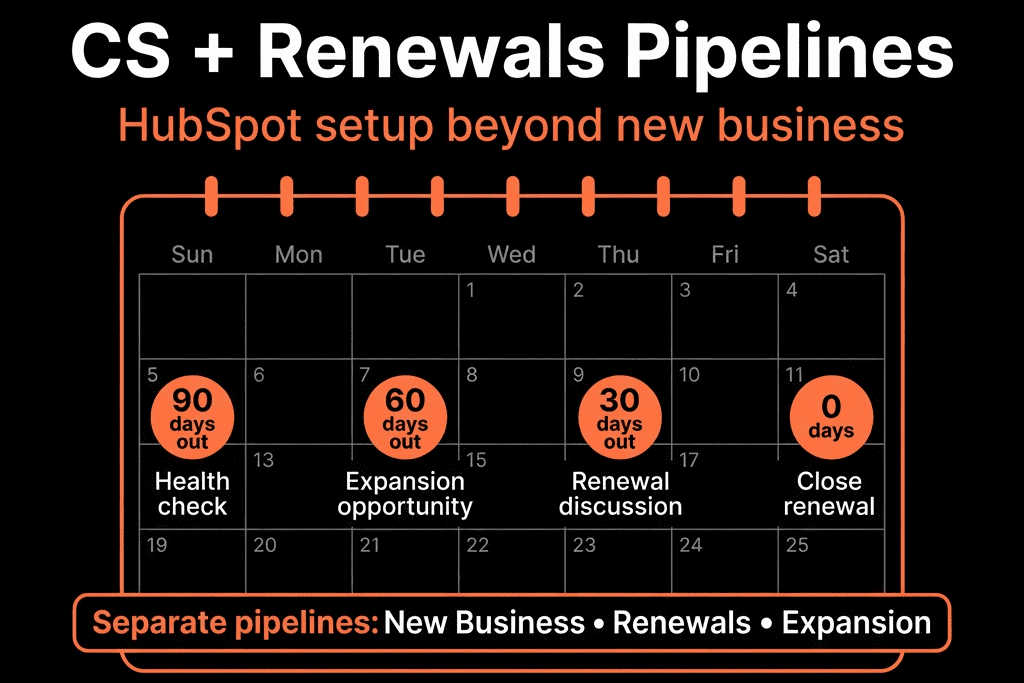
Step 5 – Automate Renewal Deal Creation and Tasks
Use workflows to make renewals systematic, not manual.
Company- or Deal-based workflow:
Trigger:
- X days before Contract end date (e.g., 90 days).
Actions:
- If no open Renewal deal exists → create one:
- Pipeline = Renewals.
- Deal type = Renewal.
- Amount = Current MRR/ARR * term.
- Close date = Contract end date.
- Owner = CSM/AM.
- Create tasks:
- “Review account health and usage.”
- “Schedule renewal discovery call with [Account].”
Result: every renewing account appears in HubSpot as a deal with clear owners and dates.
Step 6 – Bring CS Work Into HubSpot With Tickets and Health Signals
If you’re using Service Hub (or integrating another CS tool):
Tickets for support and onboarding
- On Closed Won new business:
- Create onboarding ticket(s) for implementation.
- Normal support tickets via inbox, chat, forms.
Health scoring basics
- Company properties for:
- Health band (Red/Amber/Green).
- Risk flags (e.g., High ticket volume, Low usage, Detractor, No exec sponsor).
Use workflows to set Health band based on:
- Number of open tickets.
- NPS/CSAT scores.
- Last meeting date.
- Product usage (from integration).
At-risk alerts
- If Health band = Red OR Customer status = At risk:
- Notify CSM + manager.
- Create “Save play” tasks (check-in call, exec sponsor outreach, etc.).
Now CS is operating in HubSpot with a clear view of risk and revenue.
Step 7 – Link CS Activity to Renewal and Expansion Deals
Make sure CS work touches the right deals:
- Associate key tickets, meetings, and notes to Renewal/Expansion deals.
- Use Playbooks for QBRs/renewal meetings that:
- Capture value achieved.
- Log risk factors.
- Identify expansion opportunities.
Map to properties like:
- Renewal risk (Low/Medium/High).
- Expansion potential (Low/Medium/High).
- QBR date / Last QBR outcome.
This connects day-to-day CS work to pipeline and NRR.
Step 8 – Build Dashboards for CS, Renewals, and NRR
We usually create a Customer & Revenue Retention dashboard with:
Renewal forecast
- Renewal pipeline by stage and amount (this quarter, next quarter).
- Renewal forecast vs target.
Churn and retention
- Renewal deals Closed Won vs Closed Lost (amount and count).
- GRR and NRR, if you maintain basics (MRR/ARR, churn, expansion).
Expansion pipeline
- Expansion deals by stage, owner, and segment.
- Expansion Closed Won amount per period.
Health and risk
- Accounts by Health band and MRR.
- At-risk accounts list with renewal dates.
CS activity
- QBRs completed.
- Tickets by priority and age, especially for accounts in renewal windows.
This makes CS and renewal performance visible to leadership—not just finance.
Step 9 – Align Sales, CS, and Finance Around the Same Renewal Data
To avoid three different views of “revenue”:
Finance:
- Remains the source of truth for recognised revenue and invoices.
- Syncs subscription and payment status into HubSpot fields (e.g., Billing status, MRR).
CS / Sales in HubSpot:
- Own Renewal and Expansion deals and stages.
- Use HubSpot as the operational view for NRR/GRR and pipeline.
RevOps:
- Maintains the property model.
- Keeps integrations and metrics aligned.
The rule:
If it’s about customer revenue motion, it should show up in HubSpot.
If it’s about accounting, it lives in finance (and feeds summary data to HubSpot).
Step 10 – Make CS and Renewals Part of Your Regular Revenue Reviews
Finally, bring CS and renewal pipelines into your existing rhythms:
Weekly:
- CSM/AM pipeline review for renewals and expansions.
Monthly:
- Revenue review including:
- New business.
- Renewals.
- Expansion.
- Key at-risk accounts and save plans.
Quarterly:
- NRR/GRR trends by segment.
- Churn reasons and expansion drivers.
- Process updates in HubSpot (health logic, stages, playbooks).
All driven from HubSpot dashboards—not separate CS slides.
Want Help Turning HubSpot Into a Full Revenue Platform, Not Just New Business?
If your HubSpot stops at Closed Won and everything after that lives in spreadsheets or other tools, we can help.
Through our HubSpot Portal Health Check and Implementation Blueprints / Migration & ROI Plan, we:
- Design renewal and expansion pipelines that fit your model.
- Configure customer/contract properties and health signals.
- Build workflows for renewal creation, risk alerts, and save plays.
- Create dashboards so leadership can see NRR, GRR, and CS impact directly in HubSpot.
- So HubSpot shows—and helps drive—the full revenue journey, not just the first deal.






