



Multi-Brand on HubSpot: Powerful if Architected, Chaotic if Not
Multi-brand realities are common:
- A parent company with several product brands.
- A group holding companies across industries.
- A SaaS platform with sub-brands or acquired products.
Many teams try to make HubSpot work for this by:
- Spinning up one portal per brand, or
- Throwing everything into one portal with no architectural plan.
The result is usually:
- Fragmented customer data.
- Messy segmentation.
- Confusing dashboards.
- Overlapping email and sales outreach.
This article walks through architecture options for multi-brand companies in HubSpot that actually scale—and how we decide which one fits your situation.
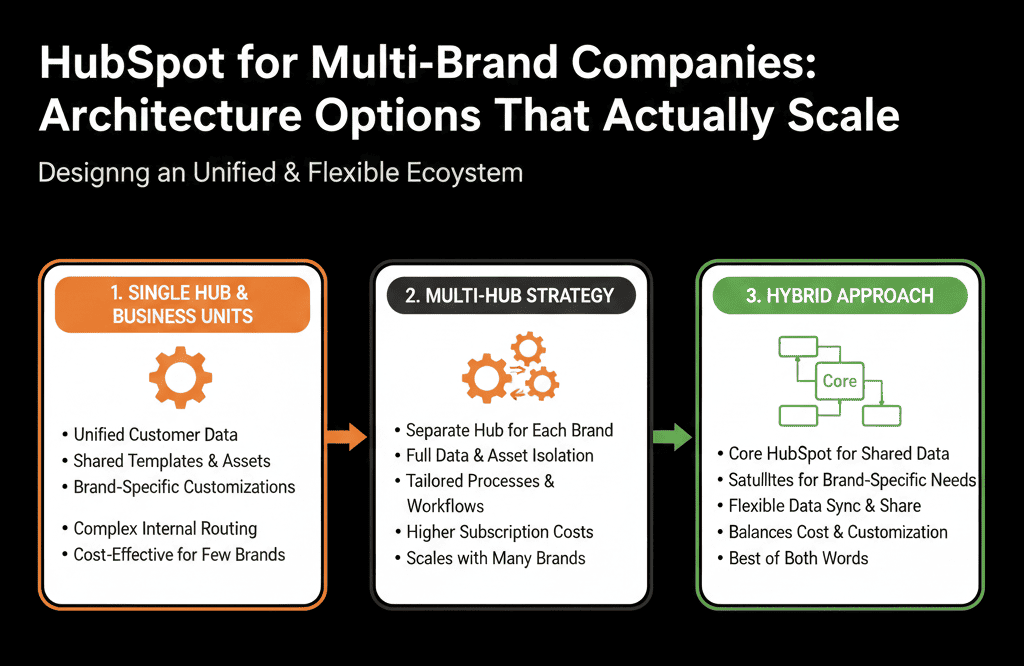
Step 1 – Clarify Your Multi-Brand Reality and Constraints
First, we need to understand how your brands relate across four dimensions:
Customers
- Do brands share customers/accounts, or are they mostly separate?
- Can the same contact buy from multiple brands?
Teams
- Are sales/marketing teams brand-specific or shared across brands?
- Are quotas and targets set per brand, per team, per region?
Processes
- Are funnels and sales motions similar across brands or totally different?
- Do you need separate pipelines or just separate views/segments?
Reporting
- Do you need a unified revenue view for the group?
- Do brand leaders own separate P&Ls and metrics?
Your answers determine whether we:
- Use one HubSpot portal with strong brand architecture, or
- Maintain multiple portals with a clear consolidation and reporting strategy.
In most scaling B2B cases, we aim for one portal with robust multi-brand design.
Option A – One Portal, Brands Distinguished by Properties and Segmentation
This is our default recommendation for many B2B multi-brand setups.
Core idea
Use:
- A single set of Contacts and Companies.
- Carefully designed brand properties and segmentation.
- One or a small number of pipelines with brand fields instead of per-brand pipelines (unless motions differ massively).
Key design elements
Brand-level properties
On key objects, define:
On Contacts:
- Primary brand (dropdown).
- Interested brands (multi-checkbox if needed).
On Companies:
- Brand ownership or Primary brand.
- Cross-sell eligible brands.
On Deals:
- Brand (the brand this particular deal belongs to).
- Optionally, Product line if you have multiple within a brand.
Brand-based views and lists
Create:
- Brand-specific views for Sales, Marketing, CS teams.
- Brand-specific active lists for automation and campaigns.
Brand-aware lifecycle and routing
Ensure:
- Lead routing can use brand as a dimension (e.g., Route Brand A leads to Team A).
- Lifecycle logic works consistently, regardless of brand.
Brand-aware reporting
Build dashboards:
- Revenue and pipeline per brand.
- Funnel and source performance per brand.
- A group-level view aggregating all brands.
When Option A works best
- Brands share a lot of customers and accounts.
- Salespeople may sell across multiple brands.
- Leadership wants a single view of customer and group revenue.
- Processes are similar enough to share architecture.
Option B – One Portal, Separate Pipelines Per Brand
Sometimes brand motions are different enough that they need their own pipelines.
Core idea
Use:
- Shared Contacts and Companies.
- Separate deal pipelines per brand:
- Brand A – New Business
- Brand B – New Business
- Brand C – New Business
Optionally, shared or brand-specific renewal pipelines.
Pros
- Clear visibility into each brand’s sales process.
- Brand-specific stage definitions and metrics.
- Easier quota and pipeline review per brand.
Cons
- More complex for reps if they sell multiple brands.
- Reporting requires careful filtering by pipeline.
When Option B makes sense
- Brands have significantly different sales cycles or product types.
- Brand leaders need distinct pipeline and forecast views.
- Reps are mostly dedicated by brand (less cross-selling day-to-day).
Key architecture practices
- Keep stage naming patterns similar across brand pipelines to ease cross-brand reporting.
- Use a shared Brand field on deals as well, not only the pipeline name, to enable group-level reporting.
- Document and align lifecycle and lead management across brands to keep fundamentals consistent.
Option C – Multiple Portals with Clearly Defined Boundaries (and a Plan)
In some edge cases, multiple portals can make sense:
- Completely different businesses under one corporate group (e.g., a SaaS platform and an unrelated services company).
- Strong regulatory or data isolation requirements.
- Temporarily, during post-acquisition integration.
Even then, we recommend:
- Being explicit about why multiple portals exist.
- Deciding how group leadership will get consolidated reporting (e.g., via BI, exports, or future consolidation).
- Having a timeline or triggers for consolidation into a single instance.
This is the exception, not the rule, for most scaling B2B use cases.
Step 3 – Design Domains, Assets, and Brand Identities in HubSpot
Multi-brand means multiple domains and brand experiences.
In a one-portal approach, we:
Configure brand domains
- Add primary and secondary domains for each brand in HubSpot (website, landing page, email sending domains).
- Map brand-specific domains to brand-specific content and templates.
Use brand settings and themes
- Define brand colors, logos, and typography per brand using themes or design tools.
- Create separate sets of email and landing page templates for each brand.
Separate forms and CTAs by brand
- Use naming conventions, e.g., BA – Demo Form, BB – Contact Us.
- Map each form to: Correct brand properties; correct lists and workflows for that brand.
This keeps brand experiences distinct while still leveraging one HubSpot instance.
Step 4 – Handle Brand-Specific Lead Routing and Ownership
Lead management gets trickier when multiple brands exist.
We design routing to consider:
- Brand
- Region
- Segment
- Existing account ownership
Typical patterns:
Brand-first routing:
- Brand A leads → Brand A SDRs/AEs.
- Brand B leads → Brand B SDRs/AEs.
Account-first routing:
- If the account already exists with an owner, route new brand leads to the same owner/team.
- Flag as potential cross-sell opportunity.
We implement:
- Central intake workflows that set brand fields properly.
- Routing workflows that branch by brand and region.
- SLA and notification logic per brand where necessary.
This prevents:
- Brand teams fighting over the same accounts.
- Leads going to the wrong team because only region/segment was considered.
Step 5 – Build Brand-Level and Group-Level Reporting
The power of a well-architected multi-brand setup in one portal is reporting.
We usually implement:
Brand dashboards
For each brand:
- Pipeline and revenue by stage.
- Funnel conversion.
- Source and campaign performance.
- Brand-specific MQL/SQL/Opportunity metrics.
These are owned by brand leaders and marketing/sales leads.
Group dashboards
For the group/parent:
- Total pipeline and revenue across all brands.
- Revenue and growth by brand.
- Segment and region performance across brands.
- Combined funnel metrics to see how the entire portfolio is doing.
Filters:
- Always filter by Brand and/or pipelines where appropriate.
- Use consistent naming and shared definitions for easy comparisons.
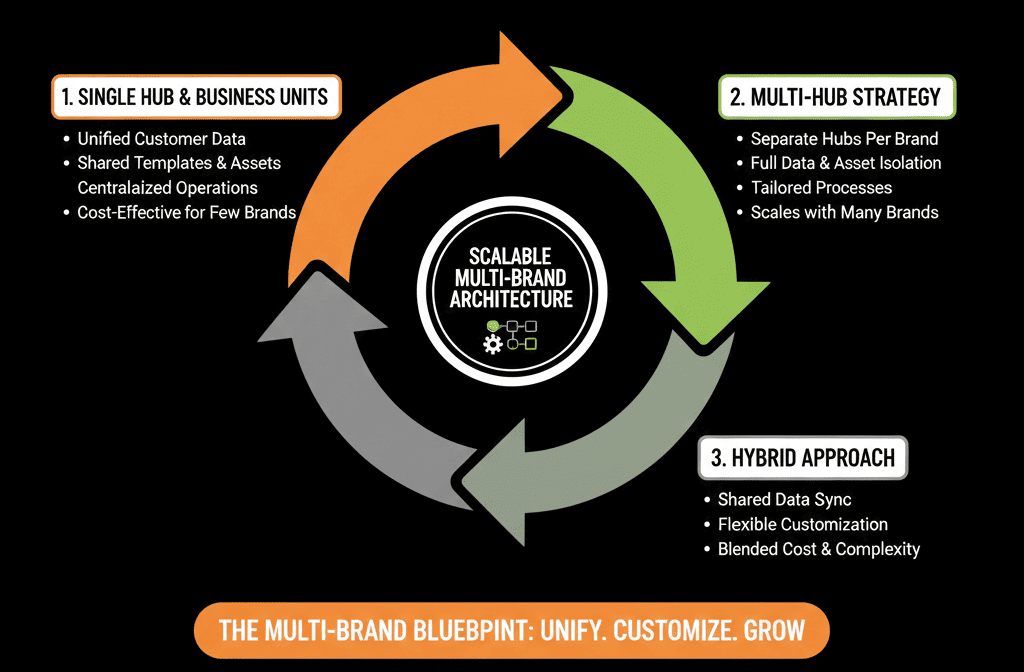
Step 6 – Keep Governance Tight in a Multi-Brand HubSpot
Multi-brand setups multiply complexity if you allow:
- Each brand to create its own random properties and workflows.
- No global standards for lifecycle, lead source, or key fields.
- No central owner for the shared environment.
We recommend:
A central RevOps / HubSpot Architect function that:
- Owns cross-brand architecture (objects, lifecycle, lead source, routing patterns).
- Reviews and approves new properties, pipelines, and global workflows.
- Supports brand teams with requests.
Brand-specific ops champions who:
- Understand brand nuances.
- Work with central RevOps to implement brand-specific logic within global standards.
This gives each brand flexibility without breaking the shared system.
What You Can Do in the Next 30–60 Days
If you’re running multiple brands on HubSpot and not sure if your architecture will scale:
Document your current state:
- How many portals?
- How many pipelines?
- Which properties, lists, and workflows are brand-specific vs shared?
Decide which multi-brand option you want to lean toward:
- One portal, brand by properties.
- One portal, brand by pipelines + properties.
- Multiple portals (only if truly necessary), with a long-term consolidation plan.
Define:
- A standard Brand field on Deals (and possibly Contacts/Companies). [web:85]
- A basic routing and reporting strategy by brand.
Pilot with one or two brands:
- Clean up their data and workflows to fit the desired architecture.
- Build brand and group dashboards.
- Learn and iterate before applying to all brands.
Want Help Architecting HubSpot for Multiple Brands?
Multi-brand HubSpot setups are some of the trickiest to get right:
- Too much separation → data silos and overhead.
- Too much mixing → muddled reporting and brand confusion.
Our HubSpot Portal Health Check / HubSpot Audit is designed to handle exactly this kind of challenge:
- We audit your current multi-brand setup (one or multiple portals).
- Recommend a scalable architecture option based on your team, customers, and reporting needs.
- Provide a clear migration and design plan to get there without derailing day-to-day operations.






