📧 “Hi JOHN,” “Hi jane,” “Hi ,”
It happens every day. Your marketing team builds a beautiful email campaign. The copy is perfect. The design is stunning.
And then, the send goes out.
- “Hi JOHN,” (Because the prospect typed their name in ALL CAPS)
- “Hi jane,” (Because they were lazy)
- “Hi ,” (Because the field was blank)
In one second, you’ve proven to the prospect that this is a robot. The “personalization” backfired. It didn’t build trust — it destroyed it.
Data hygiene isn’t just about clean databases. It’s about Brand Perception.
Historically, fixing this required exporting to Excel, running PROPER() formulas, and re-importing the data. It was a nightmare.
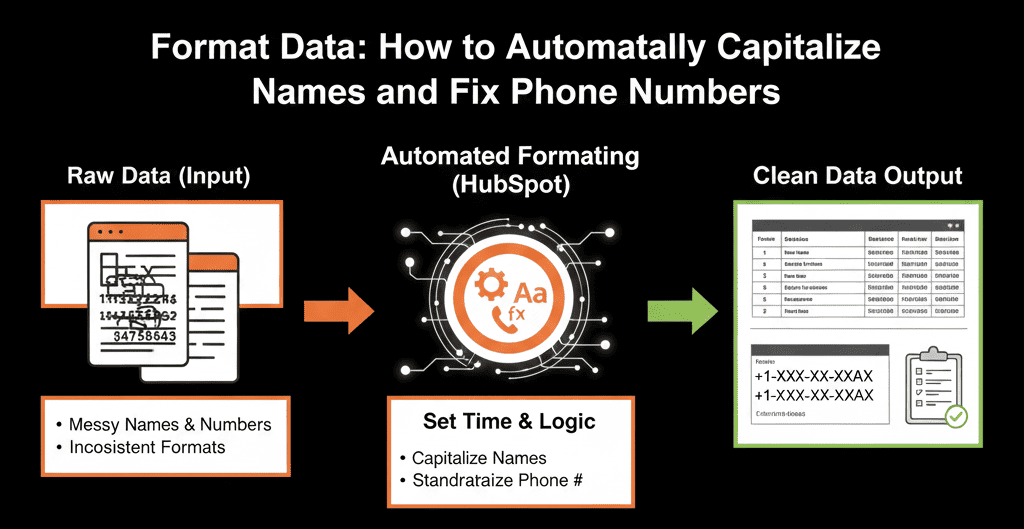
Enter the “Format Data” action in HubSpot Operations Hub (Starter / Pro).

This turns HubSpot into a self-cleaning washing machine for your CRM. Any time a contact enters your system — via form, import, or API — you scrub the data before you ever email them.
🧼 Use Case 1: The “Capitalization” Fix (Names)
The Problem: JOHN, john, JoHn.
The Fix: Use Capitalize First Letter (or Title Case).
- Workflow Type: Contact-Based
- Trigger: First Name is known
- Action: Format Data
- Property: First Name
- Format Mode: Capitalize First Letter / Title Case
- Save Result: Temporary value
- Action: Copy Property Value back to First Name
Result: No matter how they type it, your email always says: “Hi John,”
🧼 Use Case 2: The “Phone Number” Standardizer
The Problem: 555-555-5555, (555) 555-5555, 555.555.5555. Your sales dialer breaks if the format isn’t perfect.
- Workflow: Clean Phone Numbers
- Trigger: Phone Number is known
- Action: Format Data
- Property: Phone Number
- Format Mode: Format US Phone Number
- Action: Copy back to Phone Number
Result: Every number becomes (555) 555-5555. Your dialer works every time.
🧼 Use Case 3: The “Website” Cleaner (For Enrichment)
The Problem: You use Clearbit or ZoomInfo to enrich data based on Company Domain. But your leads type in www.google.com, https://google.com, or google.com/contact. The enrichment tool gets confused.
The Fix: Strip the junk.
- Workflow: Clean Domains
- Action: Format Data
- Property: Website URL
- Format Mode: Cut (remove https://, www.)
- Format Mode: Trim (remove trailing spaces)
Result: You get a clean root domain (google.com), maximizing enrichment match rates.
⚠️ The “Loop” Warning (Technical Note)
These workflows are powerful — but they can create infinite loops.
If your trigger is “First Name is known” and your action updates the First Name… HubSpot sees a “new value” and re-enrolls forever.
- Add a trigger condition: Data Quality Status is not “Clean”
- At the end of the workflow, set Data Quality Status = “Clean”
- Or tightly control re-enrollment rules
Clean data is confidence.
- Marketing trusts their emails.
- Sales trusts that their phone numbers will dial.
- Or tightly control re-enrollment rules
Operations Hub Starter costs about $50/month. It pays for itself the first time you don’t send an embarrassing “Hi JOHN” email to a CEO.
Scrub Your Data Automatically
We will run a "Hygiene Audit." We'll scan your database for formatting errors, duplicates, and "junk" fields. Then, we'll build the "Format Data" workflows to scrub it clean automatically.
Scrub Your Data. Get Your Free Health Check