



Many teams treat a HubSpot migration as a technical checklist:
Export from old CRM.
Map fields.
Import into HubSpot.
Rebuild some automations.
You end up with:
- A “working” portal.
- The same data problems and misalignments you had before.
- No real improvement in how Marketing, Sales, and CS operate together.
A proper HubSpot migration does something different:
- It uses the move as an opportunity to design a RevOps‑ready system of record.
- It aligns data, processes, and reporting around how you want to grow.
In this article, we’ll walk through how a well‑designed HubSpot migration becomes the foundation for scalable RevOps—not just a new CRM.
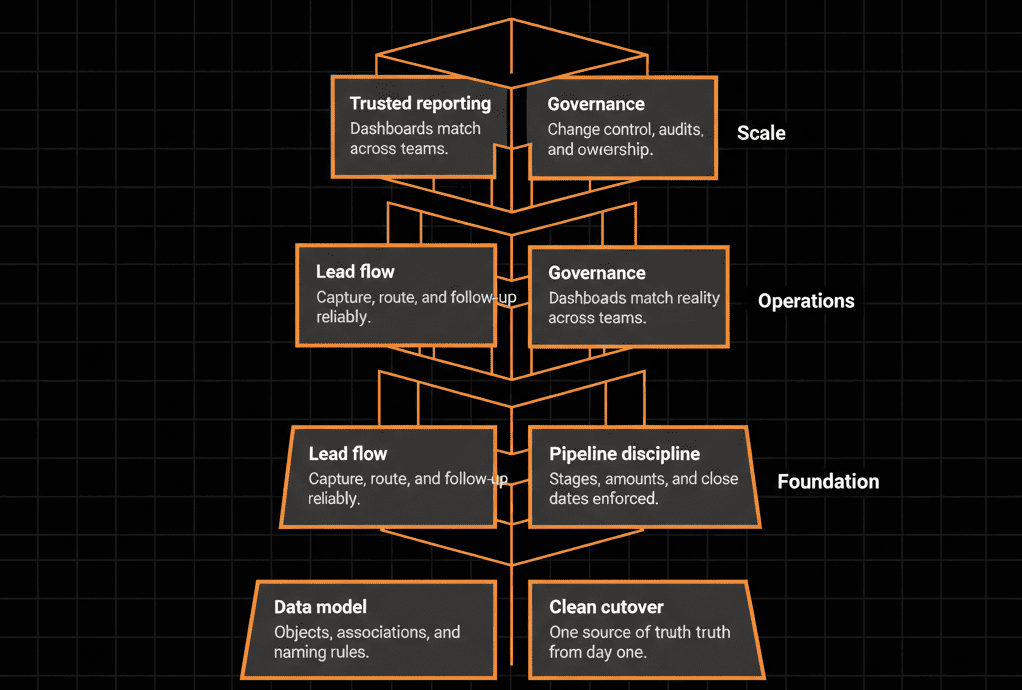
Step 1 – Start with a RevOps‑First Data Model, Not a Field Mapping
Most failed migrations start by copying the old data model into HubSpot.
A RevOps‑oriented migration starts with:
What are our core revenue entities?
- People (Contacts).
- Accounts (Companies).
- Opportunities (Deals).
- Post‑sale work (Tickets/CS objects).
- Recurring revenue structures (Subscriptions/contracts, if needed).
How do they relate across the lifecycle?
- Leads → Opportunities → Customers → Renewals/Expansions.
Which properties matter for:
- ICP definition and segmentation.
- Routing and territory logic.
- Lifecycle and funnel tracking.
- Forecasting and attribution.
This results in a HubSpot data model blueprint that RevOps can build on for years, instead of a one‑time import map.
Why it matters for scalable RevOps
- You avoid property bloat and conflicting fields.
- You have one structure for all teams to align around.
- Future initiatives (scoring, ABM, health scoring) have a solid base.
Step 2 – Align Processes and Pipelines Around the Real Buyer Journey
A migration is the perfect time to fix pipelines and lifecycles that no longer match reality.
Instead of:
- Lifting old stages with vague meanings (“Working,” “In Progress,” “Pending”).
Use the migration to:
- Redesign pipelines and stages with clear entry/exit criteria:
- Marketing → Sales handoffs (MQL, SQL definitions).
- Sales stages that map to real buying milestones.
- CS stages for onboarding, adoption, renewal.
- Clarify ownership and handoffs:
- Who owns a record at each stage?
- What data and actions are required before passing it on?
Why it matters for scalable RevOps
- Cleaner handoffs between Marketing, Sales, and CS.
- Better stage‑based reporting and funnel analysis.
- Clearer coaching and accountability for teams.
Step 3 – Design Integrations and Data Flows with Governance in Mind
Many migrations treat integrations as “connect later” add‑ons.
RevOps needs them to be intentional.
During migration planning, define:
- Which systems HubSpot will integrate with (billing, product, support, data warehouse).
- For each integration:
- What data should flow into HubSpot (and why).
- What data, if any, HubSpot should send back.
- Which system is the source of truth for each field.
Then implement integrations with:
- Clear read/write rules for key properties (owner, lifecycle, ARR, status).
- Limited scope at first, expanding as trust grows.
Why it matters for scalable RevOps
- Prevents integration‑driven data pollution.
- Keeps one coherent system of record instead of multiple half‑truths.
- Makes it easier to add new tools without breaking the core.
Step 4 – Build Reporting and Analytics to Answer Real Revenue Questions
A migration is the time to reset not just how you report, but what you report.
Instead of:
- Recreating every legacy report “just in case.”
Focus on the questions RevOps and leadership need answered:
Pipeline and forecast
- What is our pipeline by segment, region, and product?
- How accurate is our forecast vs actual?
Funnel performance
- Where are we losing leads or deals (MQL → SQL → Opportunity → Closed Won)?
- Which channels and campaigns produce real revenue, not just leads?
Customer lifecycle and retention
- How many new, expanding, and churning customers do we have?
- Which segments and products retain and grow best?
Design HubSpot dashboards and data structures to answer these, then:
- Use the migration to enforce consistent field usage and lifecycles that support them.
Why it matters for scalable RevOps
- You stop guessing from fragmented spreadsheets.
- Leadership sees the same numbers as RevOps and frontline teams.
- Future optimization work is anchored in dependable data.
Step 5 – Embed Data Hygiene and Validation from Day One
If you migrate messy data into HubSpot with no guardrails, your RevOps foundation will crumble fast.
Use the migration to:
- Clean and standardize key fields before import:
- Country, industry, titles, lifecycles, stages.
- Set property types and options the right way:
- Dropdowns instead of free‑text.
- Correct numeric and date fields.
- Add validation where it matters:
- Required fields on forms and key stage transitions.
- Workflows that normalize values and prevent regressions.
Why it matters for scalable RevOps
- Routing, scoring, and reporting rely on these fields.
- Data stays cleaner as you scale users, regions, and processes.
- RevOps can introduce more sophisticated logic without fighting bad input.
Step 6 – Plan Adoption, Training, and Governance as Part of the Migration
RevOps fails if teams don’t use the system consistently.
A proper migration plan includes:
Role‑based training
- Sales: leads, deals, activities, and tasks.
- Marketing: lists, campaigns, and attribution.
- CS: tickets, customers, and handoffs.
- Leadership: dashboards and self‑serve insights.
Clear “ways of working” in HubSpot
- How to create/update records.
- What to log (notes, calls, emails).
- Which views and dashboards to use.
Governance structures
- Property creation rules and approvals.
- Workflow and integration change management.
- Regular health checks and data reviews.
Why it matters for scalable RevOps
- Ensures that processes designed in the migration are actually followed.
- Prevents the portal from drifting into chaos as new needs emerge.
- Gives RevOps a platform people trust and rely on.
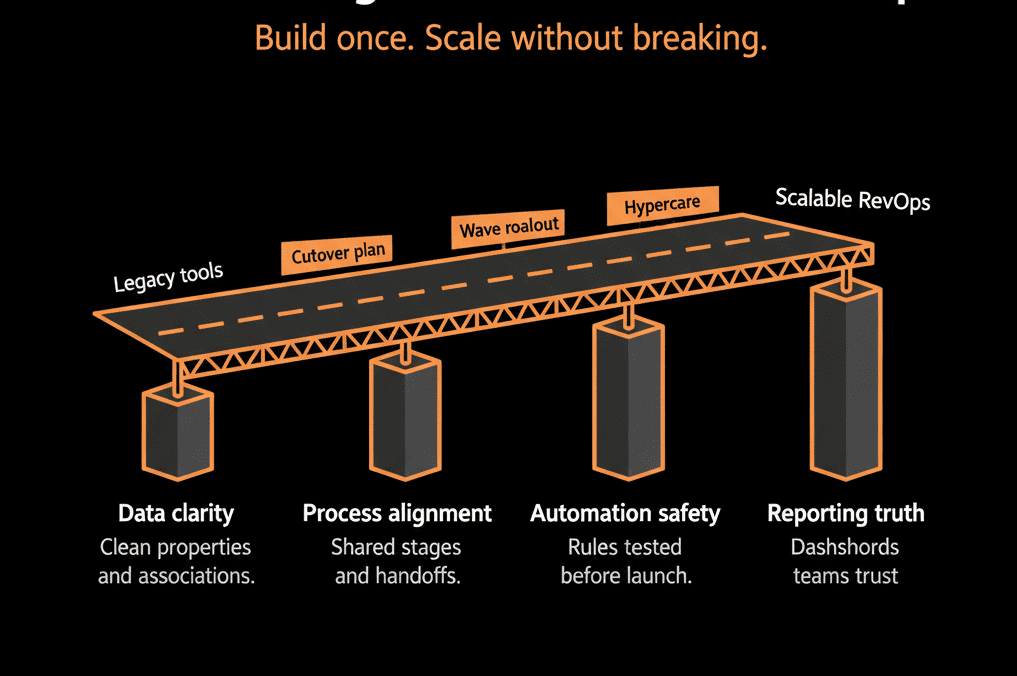
Step 7 – Treat the Migration as Phase 0 of Your RevOps Roadmap
A HubSpot migration should not be “the project.” It should be Phase 0 of a longer RevOps journey.
After go‑live, your roadmap might include:
Phase 1 (0–90 days):
- Stabilize routing, pipeline, and reporting.
- Fix any post‑migration data issues.
Phase 2 (90–180 days):
- Implement refined lead/account scoring.
- Launch ABM or more advanced segmentation.
- Integrate deeper product or billing signals.
Phase 3 (180–365 days):
- Build advanced revenue analytics and cohort views.
- Implement scaled CS motions with health scoring.
- Optimize processes based on data (shorter cycles, better conversion).
The migration gives you:
- A clean, aligned system.
- A RevOps‑ready data model.
- The confidence to iterate without rebuilding from scratch.
Pulling It Together: Migration as a Strategic RevOps Lever
A proper HubSpot migration is not just an IT task. It is:
- The moment you choose your revenue system of record.
- The chance to align data, processes, and reporting to your growth strategy.
- The foundation for every future RevOps initiative.
Done well, it gives you:
- Clean, well‑modeled data.
- Pipelines and lifecycles that reflect reality.
- Integrations that support, not sabotage, your system.
- Reporting that leadership and frontline teams can trust.
- Governance and hygiene practices that keep it all scaling.
Done poorly, you’ll simply move old problems into a new UI.
Want Your HubSpot Migration to Be the Start of RevOps—Not Just a Tool Switch?
If you’re planning a HubSpot migration and want it to set up a scalable RevOps function—not just move data—this is exactly where we can help.
Our HubSpot Portal Health Check and Migration & ROI Plan are designed to:
- Blueprint a HubSpot data model and configuration aligned to your RevOps goals.
- Plan and execute a migration that prioritizes routing, forecasting, and reporting.
- Build a post‑migration roadmap so you keep compounding value from your new system.






