💥 “I Just Broke the Workflow.”
It’s 2:00 PM on a Tuesday. Your RevOps manager makes a “small tweak” to the MQL Handoff workflow. They add one filter.
Suddenly, 5,000 leads are rotated to your VP of Sales. Slack explodes. Your sales team panics. Your data is polluted.
You just committed the cardinal sin of RevOps: Testing in Production.
In the software world, no engineer would ever push code live without testing. Yet in HubSpot, we treat our Revenue Operating System like a playground.
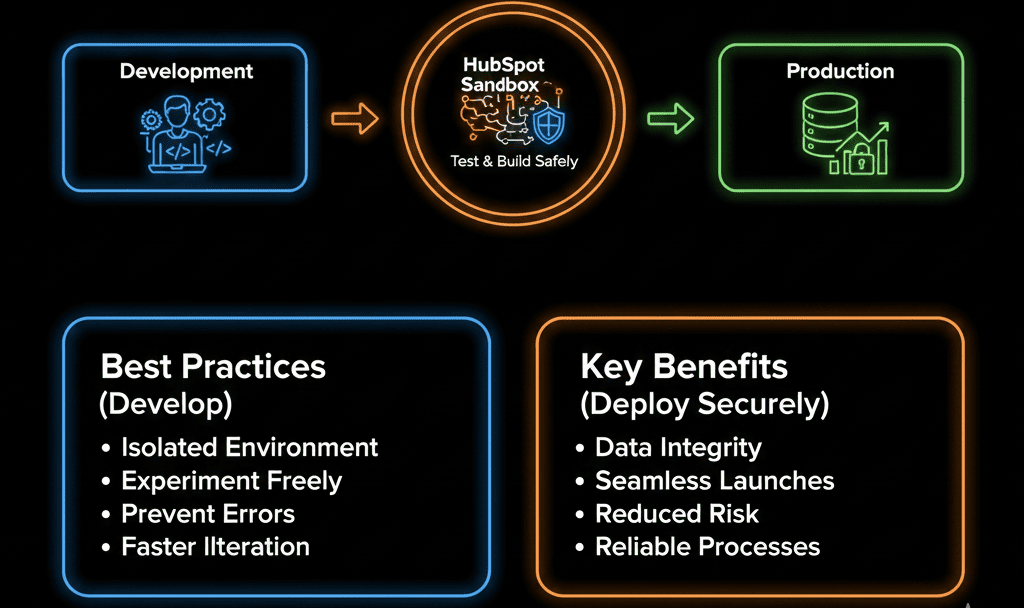
As your portal grows, cowboy coding becomes dangerous. One wrong move can cost millions.
🧪 You Need a Sandbox
HubSpot Sandboxes create a safe, isolated replica of your portal. You can break things, test integrations, and train new hires without touching live data.
🏜️ Standard Sandbox vs. Enterprise Sandbox
1. Standard Sandbox (Pro & Enterprise)
- What it is: A copy of your structure (properties, pipelines, workflows, forms).
- What it isn't: It does NOT copy your contacts or deals. It is empty.
- Best For: Testing a new workflow logic, building a new pipeline, or testing a simple integration. You have to manually create "test contacts."
2. Development Sandbox (Enterprise Only)
- What it is: A true developer environment for building themes, modules, and apps.
- Best For: Your web developers building a new website theme.
- Note: As of late 2024, HubSpot has improved Sandbox syncing capabilities (Beta), allowing better data syncing. Always check your portal's specific beta access.
🛡️ The 3-Step Change Management Protocol
Step 1: Build (In Sandbox)
You have a new idea: "Let's change the Lead Scoring model."
- Sync your Sandbox to match Production.
- Build the new Score properties and Workflows in the Sandbox.
- The Benefit: If you accidentally give everyone +100 points, no one sees it. It’s a simulation.
Step 2: Test (UAT)
You think it works. Now, prove it.
- Create 5 "Test Contacts" in the Sandbox that represent different scenarios (e.g., "The perfect lead," "The junk lead").
- Run them through the workflow.
- The "Peer Review": Have a different admin review your logic. Fresh eyes catch stupid mistakes.
Step 3: Deploy (To Production)
- The "Sync" Feature: HubSpot Enterprise allows you to "Sync" changes from Sandbox to Production. This is safer than rebuilding manually.
- The "Manual Rebuild": If you are on Pro, you have to manually rebuild the flow in Production. Dual Monitors are your friend here. Open Sandbox on Left, Production on Right. Copy exactly.
🧪 Real-World Use Cases
Use Case 1: New Hire Training Ground
- The Risk: You hire a new Sales Rep. You let them practice in your live pipeline. They accidentally email a real prospect "Test Email."
- The Fix: Give them Sandbox access.
- Let them run wild. Let them create deals, move stages, and send emails to "dummy" contacts. They get muscle memory without the risk.
Use Case 2: Integration Lab
- The Risk: You connect a new app (e.g., Salesforce). It overwrites 10,000 records.
- The Fix: Connect the Sandbox first.
- Most Enterprise apps (Salesforce, NetSuite) have their own Sandboxes. Connect HubSpot Sandbox <-> Salesforce Sandbox. Test the data flow. Verify the mappings. Only when it’s perfect do you connect the Production environments.

🏁 Governance Is Maturity
If you are a 5-person startup, you can probably get away with "cowboy coding."
Using a Sandbox isn't just about "safety." It's about Confidence. It allows your RevOps team to innovate faster because they aren't afraid of breaking the machine.
Stop guessing. Start testing.
We audit your "Change Management" process. We look at your "Permission Holes" (Pillar 1) and your "Development Habits." We’ll help you set up your Sandbox strategy so you never have to say "I just broke the workflow" again. again.
Safe Development Starts Here. Get Your Free Health Check.