If Everything Is a Workflow or Everything Is a Sequence, Something’s Wrong
In most portals we see:
- Teams using sequences for things that should be automated in the background.
- Or, everything is a workflow and reps never send real, 1:1 outreach.
Result:
- Confused reps.
- Overlapping automations.
- Leads getting double-touched or ignored.
We use a simple rule:
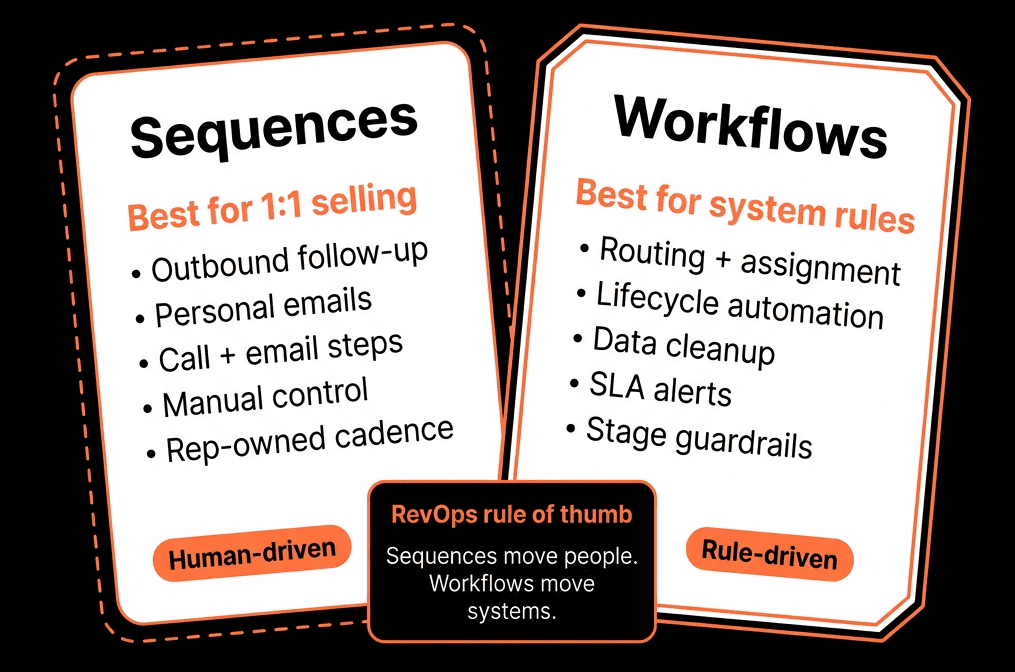
Sequences = 1:1, rep-driven communications.
Workflows = System logic, routing, and orchestration.
Here’s how we separate (and connect) them for RevOps.
Step 1 – Think in “Plays”, Not Tools
Before deciding “sequence or workflow?”, we define the play:
Examples:
- “Respond to a new demo request within 2 hours, then 5 follow-ups if no reply.”
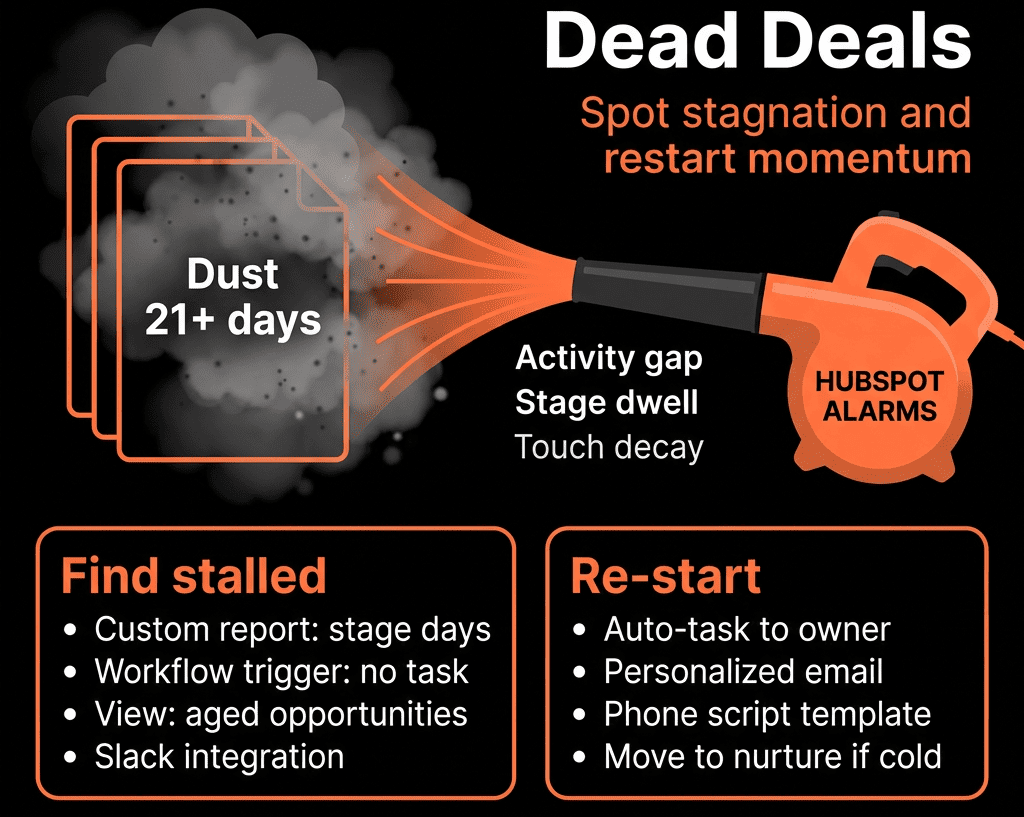
- “Re-engage stalled opportunities with a structured nudge.”
- “Auto-route MQLs to the right rep and enforce follow-up SLAs.”
- “Renewal warning 90 days before contract end + CSM touch plan.”
Then we ask:
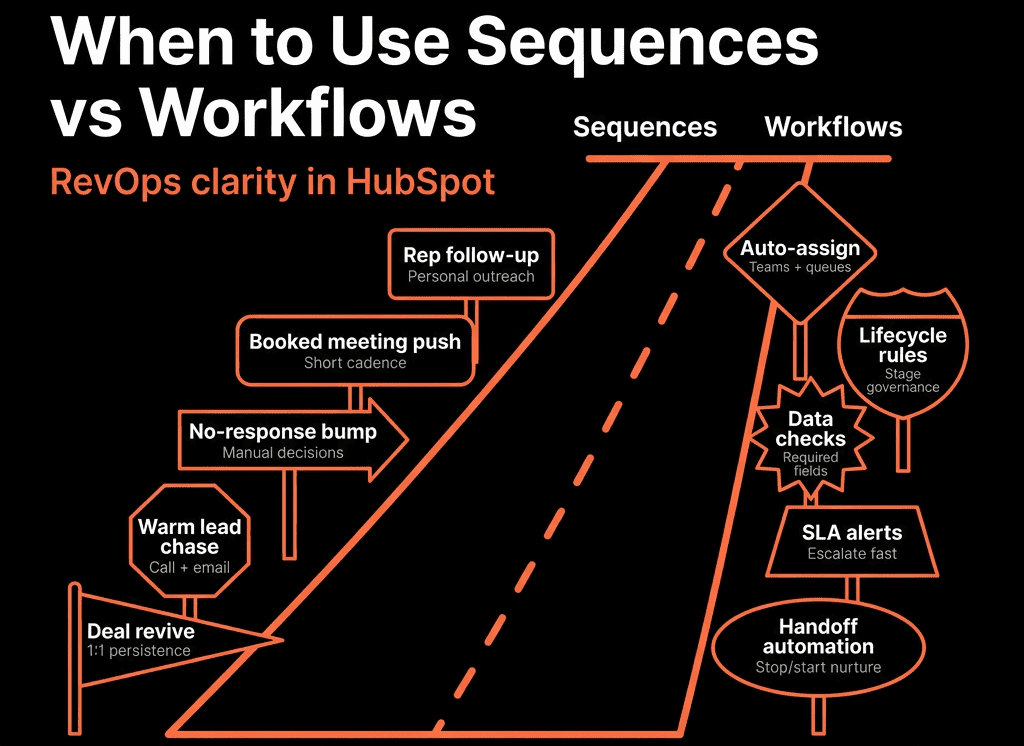
- Does this require personal, rep-owned touches? → Sequences.
- Does this require systemic routing, scoring, data updates, or task creation? → Workflows.
- Does it require both? → Workflow triggers the right sequence at the right moment.
This mindset prevents tool misuse.
Step 2 – What We Use Sequences For (RevOps Lens)
Sequences are for sales-owned, 1:1 outreach where a human is on the hook.
We typically use sequences for:
New high-intent leads
- SDR or AE-led sequences:
- Call tasks + personalised emails.
- Social touch reminders.
No-shows and reschedules
- Follow-up sequence from the AE:
- “Sorry we missed you” → reschedule CTA → case study follow-up.
Opportunity follow-up
- After sending a proposal or quote.
- “Light-touch” deal nurture when stakeholders go quiet.
Account-based outreach
- Multi-contact, multi-channel plays driven by a rep list.
Expansion and upsell conversations
- CSM/AM sequences targeting specific usage patterns or milestones.
Characteristics:
- Enrolled manually by reps (sometimes via workflow triggers, but still 1:1).
- Emails come from the owner’s inbox.
- Tasks (calls, LinkedIn steps) sit in the rep’s task queues.
- Reps can personalise before sending.
We do not use sequences for:
- Generic newsletters or one-to-many nurture.
- System alerts.
- Lifecycle progression.
Step 3 – What We Use Workflows For (RevOps Lens)
Workflows run the revenue system logic behind the scenes.
We use workflows for:
Routing and ownership
- Assigning owners for new leads based on region, ICP, product.
- Round-robin assignment for SDRs.
Lifecycle and status management
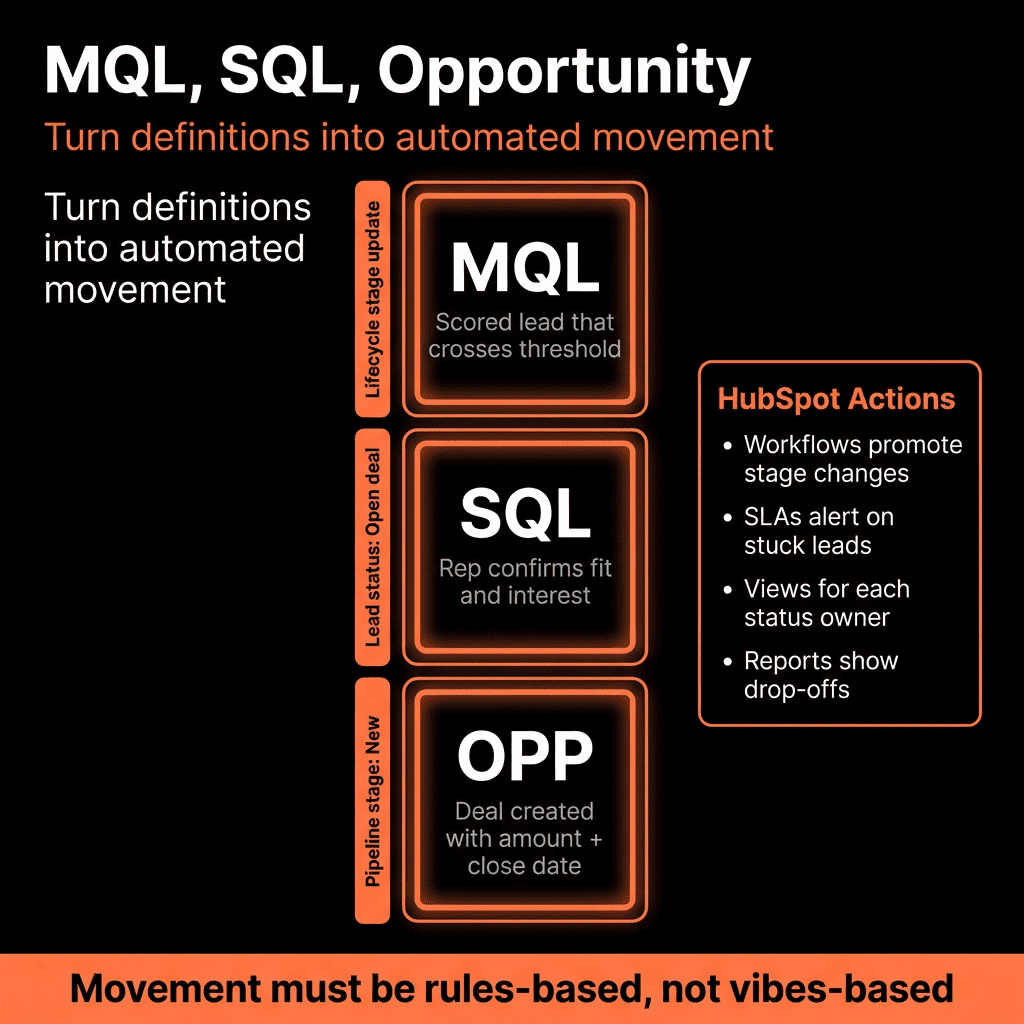
- Moving contacts from Lead → MQL → SQL/Opportunity → Customer.
- Auto-updating lifecycle when deals are created or closed.
SLA enforcement
- If MQL not contacted in X hours → alert/manager escalation.
- If no activity on an opportunity in Y days → task + notification.
Data hygiene
- Normalising sources and UTM fields.
- Ensuring key properties are filled before stage changes.
Renewal and expansion orchestration
- Auto-create renewal deals.
- Reminder tasks for CSMs.
- Risk-flag handling.
Marketing nurture (one-to-many)
- Automated email nurture for leads not in 1:1 sales motion yet.
- Event follow-up at scale.
Characteristics:
- Run automatically based on triggers and conditions.
- Can create tasks, update fields, start/stop other workflows.
- Can enrol/unenrol contacts from sequences or lists (if configured carefully).
We do not use workflows for:
- Replacing genuine 1:1 sales touches where a rep should own timing and content.
- Anything that sends too many system emails on top of sales conversations.
Step 4 – 5 RevOps Plays Where We Combine Sequences + Workflows
Play 1 – High-Intent Lead Response
Goal: Fast, consistent follow-up to demo/contact sales forms.
Workflow:
- Trigger: High-intent form submission.
- Actions:
- Set lifecycle to MQL/SQL.
- Assign owner.
- Create immediate call task.
- Optionally: Enrol in a short, owner-based sequence if no call within X minutes/hours.
Sequence:
- 3–5 touch pattern:
- Day 0: Personalised intro email.
- Day 1: Call task.
- Day 3 & 5: Follow-up emails with value points and a clear CTA.
RevOps benefit: SLA-backed, structured follow-up, clear attribution to channel and owner.
Play 2 – Recycling and Re-Engagement of Stale Leads
Goal: Recover value from leads that went quiet without overwhelming reps.
Workflow:
- Trigger: Lead with no activity for X days and not in active deal.
- Actions:
- Update lead status to “Re-engage”.
- Add to a nurture list or
- Create a task for rep to review and decide.
Sequence:
- For reps who choose to work the lead:
- Re-engagement sequence targeted to persona and last interest area.
- Light, value-driven touches (content, case studies).
RevOps benefit: System keeps the database alive; reps use sequences only where there’s a real shot.
Play 3 – Post-Meeting Follow-Up and No-Show Recovery
Goal: Standardise post-meeting follow-up, increase next-meeting set rates.
Workflow:
- Trigger: Meeting outcome logged as “Completed” or “No show”.
- Actions:
- For “Completed”: Create task for AE to send recap within 24 hours.
- For “No show”: Enrol contact into a short, tactful no-show sequence (optional, owner-based).
Sequences:
- Recap sequence template for AEs to personalise.
- No-show recovery sequence with reschedule links and social proof.
RevOps benefit: Less variance by rep; better deal momentum tracked in HubSpot.
Play 4 – Renewal Motion
Goal: Reduce churn and standardise renewal outreach.
Workflow:
- Trigger: X days before renewal date or renewal deal close date.
- Actions:
- Create/advance renewal deal.
- Create tasks for CSM/AM: review usage, book renewal call.
- Optional: Enrol key contacts into low-touch pre-renewal education workflow (emails from marketing).
Sequences:
- CSM/AM-run 1:1 renewal sequence:
- Personalised check-in.
- Value recap.
- Pricing/expansion discussion.
RevOps benefit: Predictable renewal process with clear owner actions and systematic comms.
Play 5 – Outbound Prospecting
Goal: Efficient, scalable outbound that is still personal.
Workflow:
- Trigger:
- Contact added to an “Outbound Target” list OR
- Intent/ICP conditions met.
- Actions:
- Assign SDR owner.
- Create tasks for SDR to review before enrolment.
- Update lead source / status properties.
Sequences:
- Highly structured outbound sequences by persona and use case.
- Include manual “research” steps for higher tiers.
RevOps benefit: Outbound is measurable in HubSpot, with clear boundaries between system logic and rep work.
Step 5 – Governance: Preventing Conflicts Between Workflows and Sequences
When sequences and workflows clash, people lose trust.
We put in guardrails:
- Do not enrol contacts in multiple overlapping sequences
- Use lists or properties like In active sales sequence = Yes/No.
- Workflows check this before auto-enrolling.
- Pause nurture emails when in 1:1 sequences
- Workflow logic:
- If contact enrols in sales sequence → pause/remove from marketing nurture workflow.
- When sequence ends without opportunity → optionally re-enter nurture.
- Centralised playbook of active workflows and sequences
- One internal doc or dashboard that shows:
- Live workflows with owners.
- Live sequence templates with intended use.
- Test in a sandbox or pilot group first
- Especially for plays that mix auto-enrolment and sequences.
- Watch activity timelines to avoid double-sends.
This keeps the automation layer from becoming a black box.
Step 6 – Reporting: Measuring Impact of Sequences vs Workflows
RevOps needs to know what’s working.
For sequences, we track:
- Reply rate and meeting rate per sequence.
- Deals and revenue associated with sequence enrolments.
- Performance by rep vs template.
For workflows, we track:
- Volume of leads routed and accepted.
- SLA breaches reduced.
- Lifecycle progression improvements (Lead → MQL → SQL).
- Reduction in data gaps and errors.
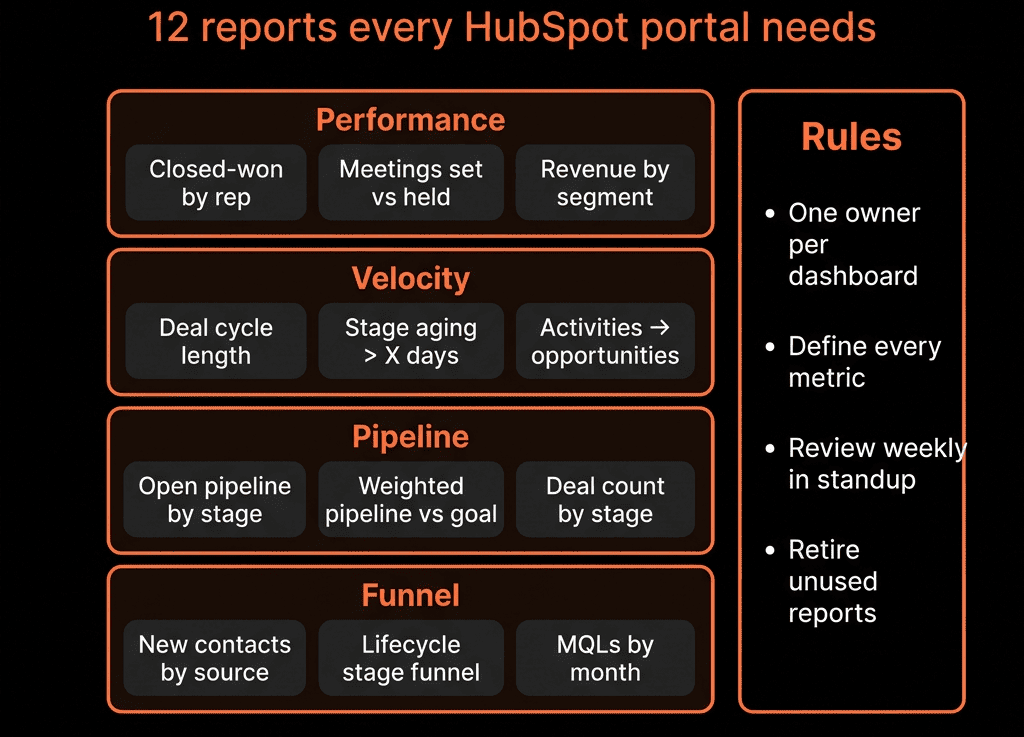
Use HubSpot custom reports and dashboards to see:
- Which plays create the most opportunities and revenue.
- Where you’re over-automated or under-automated.
Putting It Together: One System, Two Tools, Clear Roles
In a RevOps-healthy portal:
- Sequences handle 1:1, rep-led outreach (prospecting, follow-up, renewals, save plays).
- Workflows handle routing, data, SLAs, nurture, and orchestration behind the scenes.
- Both are documented as part of a shared GTM playbook, not random experiments.
- Reporting shows their combined impact on pipeline and revenue.
That’s how HubSpot stops being a mixed bag of automations—and becomes a coherent revenue machine.
Want Help Untangling Your Sequences and Workflows?
If your portal is full of half-used sequences and mystery workflows, this is exactly the kind of cleanup we love.
Through our HubSpot Portal Health Check and Managed RevOps Retainer / Migration & ROI Plan, we:
- Audit existing workflows and sequences.
- Map them to clear RevOps plays (or retire them).
- Redesign routing, SLAs, and outreach around how your team actually sells.
- Build reporting so you can see which plays move pipeline and revenue.
- So every automation in HubSpot has a purpose—and every rep knows when to use sequences vs when to let workflows do the work.
- Now update this make sure dont miss any word