



If Everyone Has a Different Funnel, You Don’t Have a Funnel
Common symptoms:
- Marketing announces “record MQLs.”
- Sales says “we don’t see real opportunities.”
- Nobody can agree how many SQLs or Opportunities happened last quarter.
The problem isn’t just definitions on a slide.
It’s that MQL → SQL → Opportunity is not wired into HubSpot objects, fields, and workflows.
We’ll walk through how to fix that.
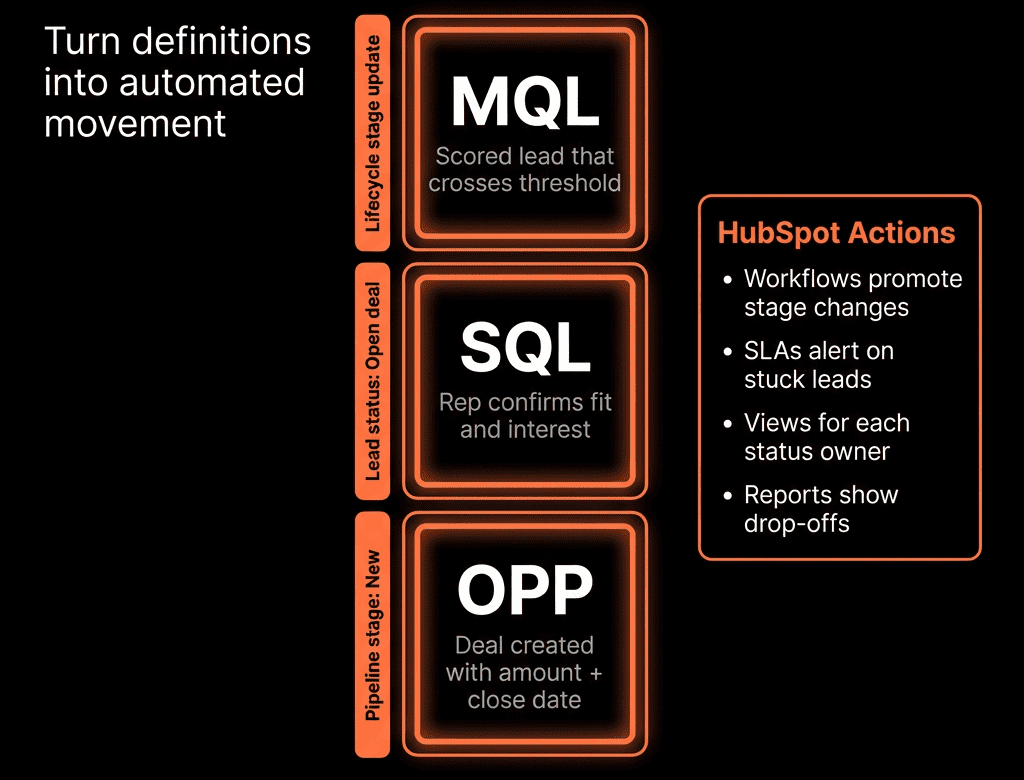
Step 1 – Agree What MQL, SQL, and Opportunity Actually Mean
Do this once with marketing, sales, and RevOps in the room.
Suggested baseline:
- Lead – Known contact with minimal engagement (form fill, event list, etc.).
- MQL – Marketing-qualified lead: fits ICP + shows intent that deserves sales attention.
- SQL – Sales-qualified lead: a person Sales has engaged with and believes is a real sales opportunity.
- Opportunity – A Deal exists in the appropriate pipeline with a real chance to close.
Document in plain language:
- Criteria for MQL (fit + intent).
- How SQL is determined (what Sales needs to confirm).
- When an Opportunity (Deal) must be created.
Everything else hangs off this.
Step 2 – Use Lifecycle Stage for MQL/SQL, Deals for Opportunities
In HubSpot:
- MQL / SQL live on the Contact (Lifecycle stage).
- Opportunity lives as a Deal in a pipeline.
Standard lifecycle flow:
- Lead → MQL → SQL → Opportunity → Customer.
Implementation:
- Keep the native Lifecycle stage property.
- Decide whether you’ll use “SQL” or jump from “MQL” to “Opportunity” (naming is flexible; the concept is not).
- Reserve Deals for true Opportunities, not every demo or call.
Step 3 – Define MQL Criteria in Properties
MQL must be automated and inspectable.
Common ingredients:
Fit:
- Job title / seniority.
- Industry.
- Company size / revenue.
- ICP fit score (High/Med/Low).
Intent / behavior:
- High-intent forms (demo, pricing, contact sales).
- Lead score above a threshold.
- Key page views (pricing, product, comparison).
- Engagement with key campaigns.
Implementation:
- Standardize fit fields on Contact/Company.
- Set up a simple lead scoring model (or rules) that push qualified leads above a threshold.
- Use lists or workflow enrollment criteria that match your MQL definition.
Once criteria are clear, the rest is plumbing.
Step 4 – Automate Lead → MQL in HubSpot
Create contact-based workflows for MQL:
Trigger (any one of):
- Submits high-intent form.
- Lead score crosses threshold.
- Meets ICP fit AND engages in defined ways.
Checks:
- Not already SQL/Opportunity/Customer.
Actions:
- Set Lifecycle stage to MQL (move forward only).
- Set Lead status to “New” or “MQL – New”.
- Assign owner (SDR/AE) based on routing rules.
- Create a follow-up task with SLA.
- Send contextual internal notification with key details.
Now MQLs are not just numbers—they’re routed, visible work.
Step 5 – Define How a MQL Becomes a SQL
SQL is where Sales accepts or rejects MQLs.
You can do this two ways:
- Explicit SQL Lifecycle Stage
- Implicit SQL through Deal Creation
You treat “Opportunity created” as SQL for reporting.
We prefer explicit SQL for clarity.
Define:
- What must be true for SQL:
- Basic qualification (need/use case, rough timeline).
- Reached the right person (or at least a viable champion).
How SQL is set:
- Manually by SDR/AE changing Lifecycle stage to SQL.
- Via workflow when they create a Deal (see next step).
Also define:
Recycle path (e.g., “MQL rejected”):
- Lead status = Disqualified or Nurture.
- Lifecycle stays at Lead or moves back from MQL according to your rules.
Step 6 – Make Opportunity Creation the Moment of Truth
An Opportunity isn’t a feeling—it’s a Deal in a pipeline.
Decisions:
- Who can create Deals? SDR, AE, both?
- At which exact moment?
- E.g., after a successful discovery call; when clear project + timeline + stakeholder interest exist.
Implementation pattern:
When a rep creates a Deal:
- Make sure:
- Associated Contact and Company are set.
- Pipeline and first stage are correct.
Use a deal-based workflow:
- When a new Deal is created and primary associated Contact’s lifecycle is MQL or earlier:
- Set that Contact’s Lifecycle stage to SQL or Opportunity (depending on your naming).
- Optionally, update associated Company lifecycle as well.
This links Contact lifecycle and Deals automatically.
Step 7 – Use Lead Status for SDR/AE Workflow, Not Lifecycle
Lifecycle is for funnel reporting.
Lead status is for day-to-day sales handling.
Example Lead status for Sales-owned contacts:
- New.
- Open.
- In progress.
- Connected.
- Qualified – Meeting booked.
- Qualified – Opportunity created.
- Disqualified.
- Nurture.
Patterns:
- MQLs appear as Lead status = New for the assigned rep.
- As SDR/AE works, they update Lead status based on progression.
- When they create an Opportunity (Deal), Lead status moves to “Qualified – Opportunity created”.
This gives you granular operational reporting without breaking Lifecycle.
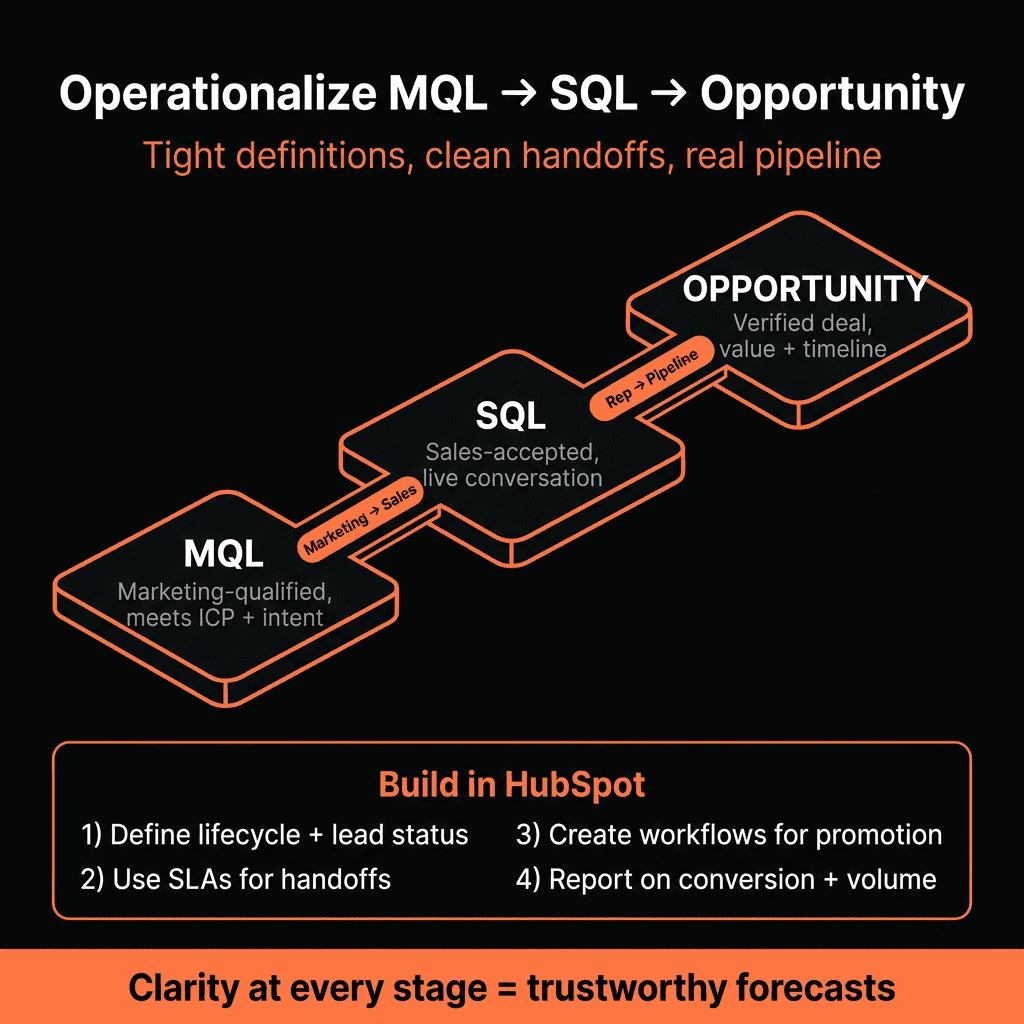
Step 8 – Build Clear Reporting Across MQL → SQL → Opportunity
Now that flow is wired, create dashboards.
Key reports:
Volume & conversion funnel
- Contacts by Lifecycle stage: Lead → MQL → SQL → Customer.
- Add “Deals created” (Opportunities) to see:
- MQL → SQL → Opportunity → Closed Won.
MQL-to-SQL conversion by owner
- How well reps accept/qualify MQLs.
MQL-to-Opportunity conversion by source/campaign
- Marketing quality per channel/campaign.
SQL/Opportunity-to-Customer conversion
- Sales execution side.
These become your core Marketing + Sales alignment views.
Step 9 – Add SLAs and Feedback Loops at Each Transition
To “operationalize” the funnel, add expectations.
SLA examples:
MQL → First Sales touch
- MQL should be contacted within X hours.
- Use workflows to:
- Create tasks.
- Alert managers on breaches.
MQL → SQL/Recycle decision
- SDR/AE should accept, create Opportunity, or recycle within Y days.
- Track MQLs “in limbo” with no status update.
Feedback loops:
- Regular reviews of:
- MQL rejection reasons (for marketing).
- SQL → Opportunity drop-offs (for sales).
- Source/campaign quality differences.
This keeps the funnel honest.
Step 10 – Keep the Model Tight, Not Over-Engineered
Common mistakes to avoid:
- Too many lifecycle stages (MQL-SDR, MQL-AE, SAL, SQL, etc.) with no behavioral difference.
- Allowing workflows to move lifecycle backwards in uncontrolled ways.
- Letting everyone create Deals for every conversation.
Guidelines:
- Limit funnel to the stages you actually inspect in leadership meetings.
- Let RevOps own lifecycle and deal-creation rules.
- Review definitions and workflows quarterly based on data, not opinions.
Want Help Cleaning Up MQL → SQL → Opportunity in Your HubSpot?
If your current funnel metrics don’t match what sales and marketing feel on the ground, we can help align the model and the system.
Through our HubSpot Portal Health Check and Managed RevOps Retainer / Migration & ROI Plan, we:
- Audit your lifecycle, lead status, and deal setup.
- Redesign MQL → SQL → Opportunity definitions with your GTM leaders.
- Implement the right properties, workflows, and dashboards in HubSpot.
- Train your SDRs, AEs, and marketers on how to work—and inspect—the new funnel.



