



HubSpot Is the Hub, Not the Whole Machine
For B2B SaaS, you’re juggling:
- Inbound and outbound motions.
- Trials, freemium, or demos.
- Product usage and in-app behavior.
- Billing, subscriptions, and renewals.
- CS and support operations.
- Revenue reporting for the board.
HubSpot is strong as your:
- CRM + RevOps engine.
- Marketing and sales execution layer.
- Single pane of glass for GTM teams.
But it’s most powerful when it’s the center of a deliberate stack, not an isolated tool.
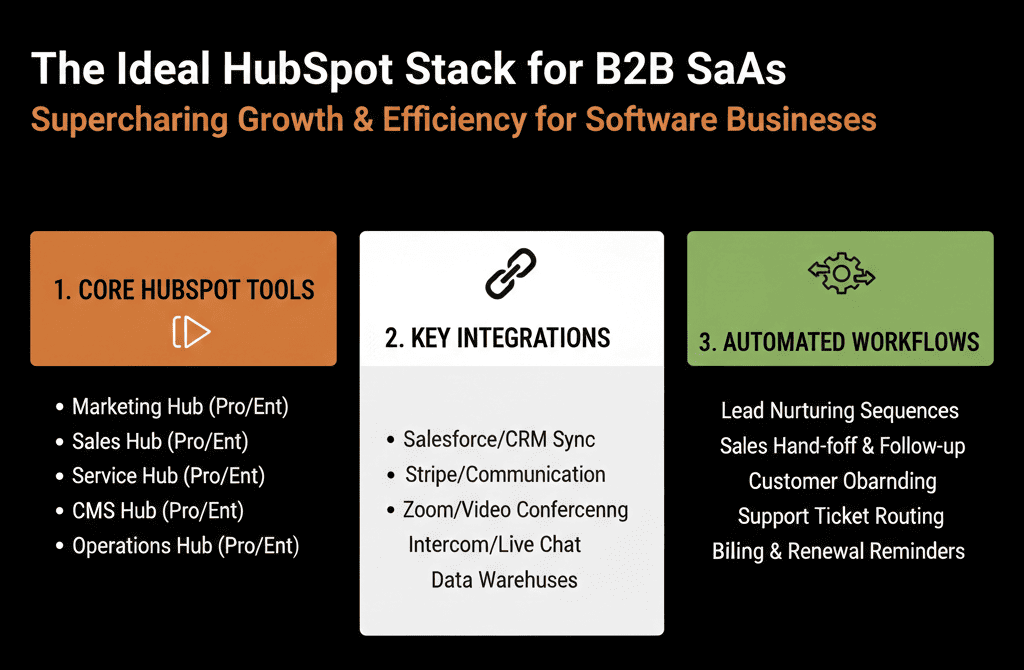
This article outlines an ideal HubSpot stack for B2B SaaS:
- Core tools around HubSpot.
- Key integrations.
- Critical workflows you should consider.
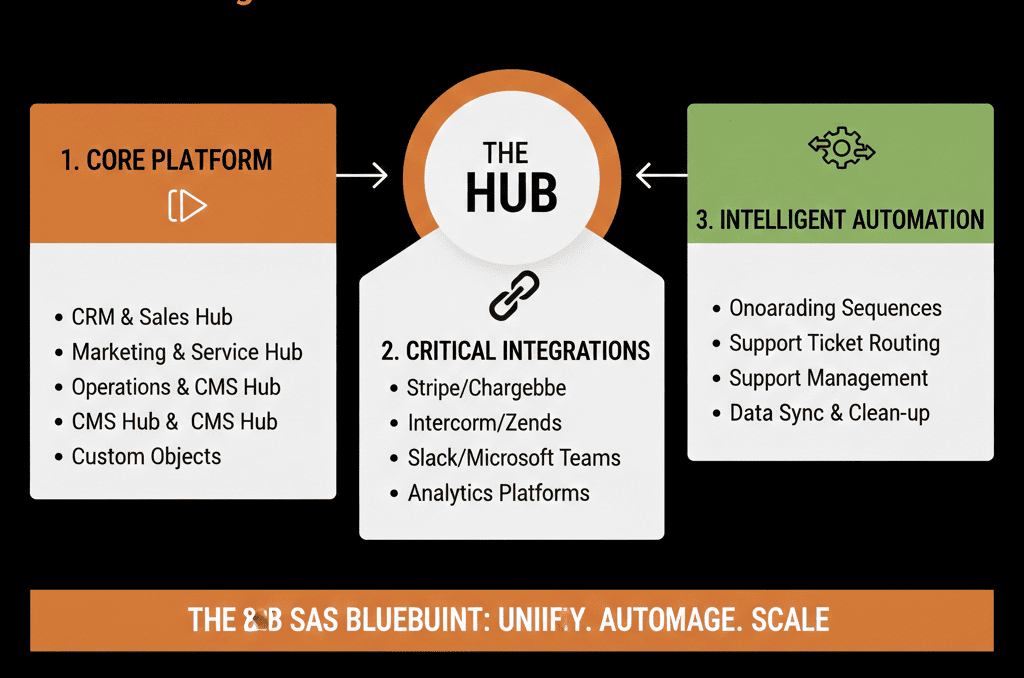
1. HubSpot as the RevOps Core: What It Should Own
In an ideal B2B SaaS setup, HubSpot is the system of record for:
- Contacts and accounts (Contacts + Companies).
- Opportunities and deals (new business + expansion/renewals).
- GTM activity (emails, calls, meetings, tasks).
- Lifecycle and lead/PQL management.
- Marketing campaigns and nurture automation.
- Sales sequences and basic enablement.
- Top-level reporting on pipeline, revenue, and funnel.
Everything else should integrate to or from HubSpot, not compete with it for GTM ownership.
2. Product Analytics & PLG Integration
Purpose: bring product usage signals into HubSpot without flooding it.
Typical tools:
- Product analytics: Amplitude, Mixpanel, Heap, PostHog, etc.
- Custom PLG event tracking via Segment, RudderStack, or direct APIs.
Integration goals:
Summary-level signals in HubSpot
For Contacts/Companies:
- Last login / last active date.
- Plan/tier in product.
- Usage level (Low/Med/High).
- PQL flags (met certain usage milestones).
Workflows leveraging product data
PQL workflows:
- Mark contacts as PQL = Yes.
- Create tasks/deals for AEs when thresholds are hit.
Churn-risk workflows:
- Flag/alert when usage drops below a threshold.
Principle:
HubSpot stores key signals and drives GTM actions; the product tool keeps full event history.
3. Billing and Subscription Management Integration
Purpose: tie ARR/MRR and subscription status into your GTM view.
Typical tools:
- Stripe, Chargebee, Recurly, Paddle, Zuora, etc.
Integration goals:
Expose subscription data in HubSpot
On Companies/Deals (or a custom “Subscription” object):
- Current MRR/ARR.
- Plan/edition.
- Billing frequency (monthly/annual).
- Subscription start and renewal dates.
- Status (Active, Trialing, Churned).
Support key workflows
Renewal workflows:
- Create renewal deals before renewal date.
- Notify AEs/CSMs.
Upsell workflows:
- Identify accounts hitting plan thresholds (seats/usage).
- Trigger upgrade conversations and campaigns.
Revenue reporting in HubSpot
- New vs expansion vs churned revenue.
- MRR/ARR movements over time.
Principle:
The billing tool is the system of record for transactions; HubSpot mirrors what GTM teams need to act and report.
4. CS and Support Tool Integration
Purpose: bring customer health and support context into HubSpot.
Typical tools:
- Zendesk, Intercom, Freshdesk, Help Scout, HubSpot Service Hub, etc.
Integration goals:
Make key support data visible in HubSpot
On Contacts/Companies:
- of open tickets.
- Recent CSAT/NPS scores.
- Last ticket date.
- Health score (if defined elsewhere).
Enable workflows
Churn risk:
- Create tasks / deals when:
- Health score drops.
- Too many high-priority tickets.
Expansion qualification:
- Prioritize upsell/cross-sell only for stable/happy customers.
Align ownership
Clear who owns what:
- CSM vs AM vs AE.
HubSpot used as the cross-functional view for GTM, not as the ticket system (unless you use Service Hub for that too).
Principle:
Support systems handle tickets; HubSpot ties support into the broader revenue story and playbook.
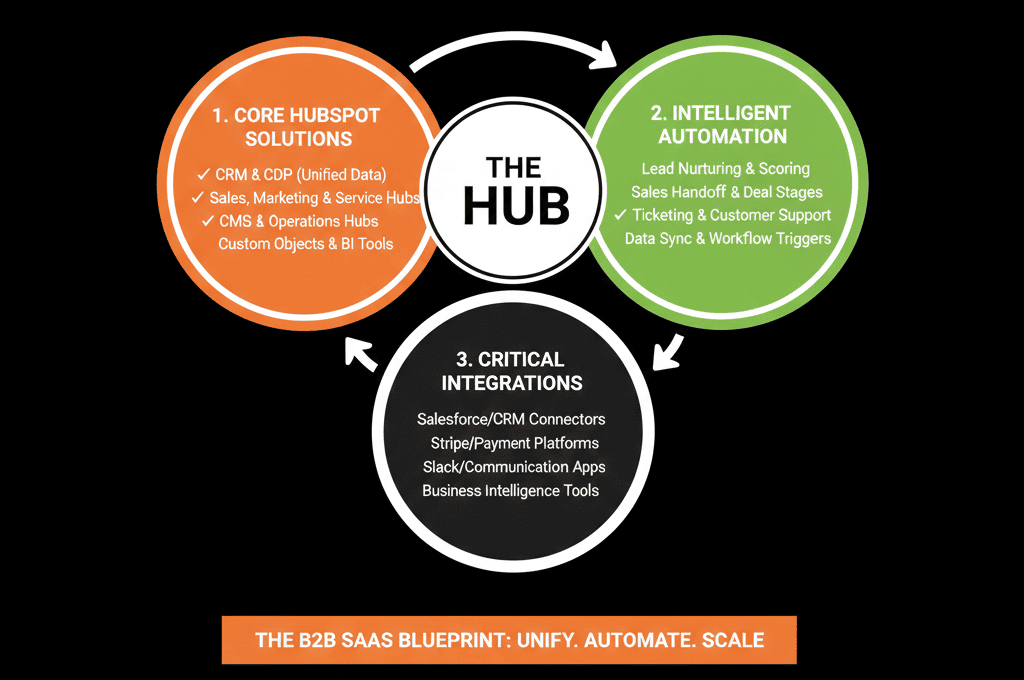
5. Data Integration / CDP / Warehouse Connection
Purpose: ensure data consistency and advanced analytics without breaking HubSpot.
Typical tools:
- Segment / RudderStack (CDP).
- Fivetran / Stitch / Airbyte (ETL).
- Snowflake / BigQuery / Redshift (warehouse).
- dbt / BI tools (Looker, Tableau, Power BI, Mode, etc.).
Integration goals:
Clean, controlled flow into HubSpot
Use CDP/ETL to:
- Transform and normalize data before writing to HubSpot.
- Avoid direct, messy writes from many tools.
Example:
- Product events → CDP → aggregated usage metrics → HubSpot.
HubSpot → Warehouse sync
- Push CRM data (contacts, companies, deals, activities) to the warehouse.
- Combine with: product usage, billing, CS/support.
Advanced analytics outside HubSpot
- Use BI for: cohort retention, LTV, CAC, payback.
- Multi-touch attribution beyond what’s practical in HubSpot alone.
Principle:
HubSpot is the operational RevOps layer; the warehouse/BI stack is the deep analytics layer. They should sync but not duplicate roles.
6. Sales Engagement and Enablement
Purpose: coordinate outbound and follow-up at scale.
Options:
- Native HubSpot sequences + templates.
- Specialist tools (Salesloft, Outreach, Apollo) integrated into HubSpot.
Integration goals (if using external):
Sync people and account context
- Contacts and Companies sync bi-directionally.
- Stages and statuses stay in sync: e.g., Contacted, Working, Replied, No Response.
Log activities in HubSpot
- Emails, calls, and sequence steps are visible in HubSpot timelines.
- AEs and SDRs (and leadership) can see: What outreach happened. How it performed.
Avoid duplicate logic
Decide:
- Which tool owns routing?
- Which tool handles sequences?
- Where scoring and qualification logic live (ideally in HubSpot).
Principle:
Use one place for truth (HubSpot) even if execution (sequences) happens in a specialized tool.
7. Marketing Execution & Website
Purpose: drive and capture demand while attributing back to pipeline and revenue.
Tools:
- Native HubSpot Marketing Hub (emails, forms, LPs, ads).
- HubSpot CMS or external CMS (WordPress, Webflow, etc.).
Integration goals:
Forms and tracking
- All key conversion points (demo, trial, pricing, content) feed into HubSpot.
- UTMs and channels are recorded in a consistent way.
- Cookie and consent handling are compliant.
Campaign-level attribution
Use HubSpot Campaigns to group:
- Ads.
- Emails.
- LPs.
Track:
- Leads and contacts.
- Deals and revenue influenced.
Segmentation and nurture
- Lead and PQL segments are built in HubSpot.
- Nurture workflows run there, using: Fit and behavior scores. Product usage tags. Lifecycle and deal context.
Principle:
HubSpot should be the central marketing brain, even if you use other tools for content or website.
8. Core HubSpot Workflows Every B2B SaaS Should Consider
Beyond tools, an “ideal stack” includes core workflows:
Lead & PQL intake workflow
- Normalizes source data.
- Sets lifecycle and lead/PQL status.
- Routes leads/PQLs to the right owners/queues.
Routing & SLA enforcement
- Assigns leads by region/segment/motion.
- Creates tasks and monitors speed-to-lead.
- Escalates when SLAs are breached.
Lifecycle management
- Manages movement from Lead → MQL/PQL → SQL → Opportunity → Customer.
- Locks down when manual edits are allowed.
Renewal & expansion automation
- Creates renewal deals in advance.
- Triggers expansion tasks from usage/billing signals.
- Keeps CS and Sales aligned on upcoming motions.
Data hygiene workflows
- Normalize country/industry/segment fields.
- Clear obvious junk data.
- Assign owners for unowned active records.
These workflows tie the stack together and make sure HubSpot can reliably orchestrate your GTM.
What You Can Do in the Next 30–60 Days
To move toward an ideal HubSpot + SaaS stack:
Map your current stack against the categories above:
- Where is HubSpot underused?
- Where do tools overlap?
- Where are critical signals (usage, billing, support) missing in HubSpot?
Pick one or two integration priorities:
- Product usage → PQL signals in HubSpot.
- Billing → ARR/MRR and renewal data in HubSpot.
- Support → health/risk signals visible in HubSpot.
Implement or refine core workflows:
- Unified lead/PQL intake.
- Simple routing + SLA.
- Basic renewal pipeline and automation.
Align with:
Product, CS, Finance, and Marketing on:
- Definitions (PQL, MQL, new vs expansion).
- Which system is the source of truth for what.
Want a Custom “Ideal Stack” Blueprint for Your B2B SaaS?
Every SaaS company has a different mix of:
- Motions (sales-led, PLG, partner-led).
- Complexity (single product vs suite, SMB vs enterprise).
- Tools already in place.
Our HubSpot Portal Health Check / HubSpot Audit can:
- Assess how well your current stack is centered on HubSpot.
- Identify which integrations and workflows will deliver the biggest RevOps gains.
- Provide a tailored blueprint for your ideal HubSpot-centric SaaS stack over the next 60–90 days.






