



Most Lead Scoring Models Are Popular With Marketing, Ignored by Sales
In many HubSpot portals, lead scoring looks like this:
- +5 points for email opens.
- +10 for form submissions.
- +3 for web visits.
The result:
- Lots of “hot” leads.
- Sales quickly learns they aren’t actually ready or valuable.
- Lead score becomes background noise.
A revenue‑focused lead scoring model is different:
- It separates fit from intent.
- It’s mapped to real opportunity and won revenue.
- Sales understands and trusts what “high score” means.
In this article, we’ll walk through how to design and implement that kind of model in HubSpot.
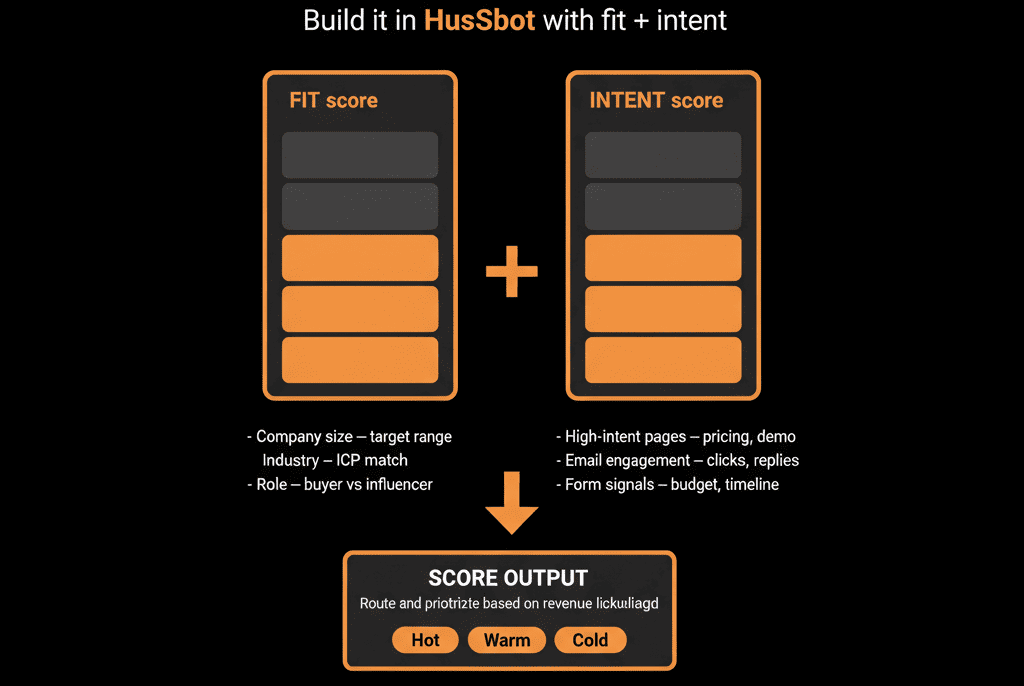
Step 1 – Separate Fit (Who They Are) from Intent (What They Do)
First, stop thinking in terms of a single “score.”
Define two distinct dimensions:
Fit Score – Are they the right type of company/contact?
- Company size, industry, region.
- Role and seniority.
- ICP tier and strategic importance.
Intent Score – Are they showing buying behavior now?
- High‑intent form fills (demo, “contact sales”).
- Product or trial behaviors.
- Engagement with key assets (pricing, case studies, webinars).
Why this matters:
- Fit tells you who you’d like to sell to.
- Intent tells you who’s ready to talk now.
- Sales can prioritize high‑fit + high‑intent, but still nurture high‑fit + low‑intent.
Step 2 – Ground Your Model in Revenue Outcomes
Before assigning points, look at historical data:
Closed‑won vs closed‑lost analysis:
- Which attributes (size, industry, region, role) correlate with higher win rates and ACV?
- Which behaviors (demo vs content form, specific page views, events attended) show up more often in won deals?
Even high‑level analysis helps.
Use these insights to:
- Decide which fit and intent signals are worth including.
- Weight them in proportion to their impact.
If you don’t have enough history, lean on your best Sales/CS operators for qualitative input—then refine with data over time.
Step 3 – Choose Fit Signals and Scoring Rules
Fit signals usually change slowly and can often be set from enrichment or first‑touch data.
Common fit inputs:
- Company size (employees or revenue band).
- Industry / vertical.
- Region or market.
- ICP tier.
- Role/seniority (C‑level, VP, Director, Manager, Individual contributor).
- Tech stack, if relevant to your offer.
Example fit scoring scheme (simplified):
Company size:
- 51–250 employees: +20.
- 11–50 employees: +10.
- 1–10 employees: +0.
Industry:
- Target verticals: +15.
- Secondary verticals: +5.
- Non‑target: +0.
Role/seniority:
- C‑level/VP: +20.
- Director/Head: +15.
- Manager: +10.
- Other: +0.
ICP tier:
- Tier 1: +30.
- Tier 2: +15.
- Tier 3: +5.
Use ranges (e.g., 0–100 or 0–200) and avoid over‑complexity.
You want Sales to understand the key drivers at a glance.
Step 4 – Choose Intent Signals and Scoring Rules
Intent signals change frequently and decay over time.
Common intent inputs:
Form submissions
- Demo/contact sales: high weight.
- Pricing request/trial: high weight.
- BOFU content (case studies, ROI calculators): medium‑high.
- TOFU/MOFU content (ebooks, blog subs): low‑medium.
Website behavior
- Pricing page views.
- Product/feature pages.
- Repeat visits within short time windows.
Engagement
- Webinar registrations/attendance.
- Replies to outbound or nurture emails.
Product signals (if you have them)
- Trial activations.
- Key feature usage.
Example intent scoring scheme:
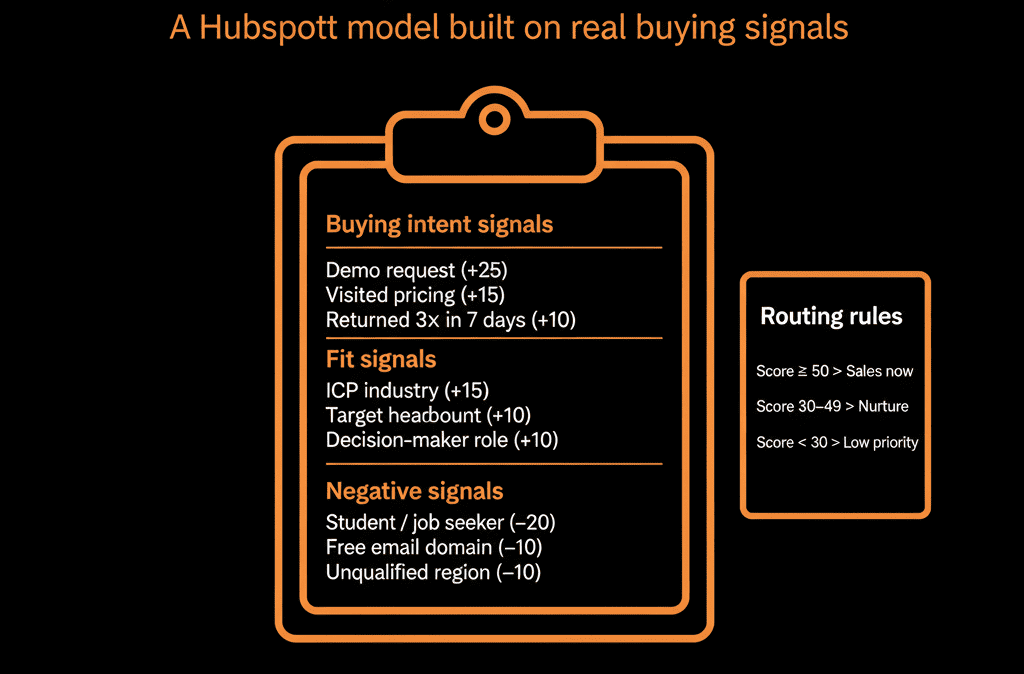
- Demo request: +50.
- Pricing page view: +15.
- Case study download: +10.
- Generic ebook: +5.
- Attended a product webinar: +20.
- Multiple high‑intent events in 7 days: extra +10.
Include decay:
Reduce or remove points over time if no new engagement occurs.
Step 5 – Implement Fit & Intent Scoring in HubSpot
HubSpot supports multiple scoring properties.
Implementation pattern:
Create two scoring properties
- Fit score (Contact and/or Company).
- Intent score (Contact).
Configure scoring rules
In each scoring property’s settings:
- Add positive criteria (e.g., industry = target vertical).
- Add negative criteria (e.g., non‑ICP industries, student roles, competitor domains).
Use workflows to support scoring where needed
For more complex signals:
- Use workflows to set intermediate flags (e.g., “High‑intent activity in last 7 days”).
- Reference those flags in scoring rules.
Ensure enrichment feeds into the right fields
Company size, industry, and region should be populated (manually, via forms, or via enrichment tools) so scoring has inputs.
Result: each Contact (and potentially Company) has two clear numbers: fit and intent.
Step 6 – Define Thresholds and Routing Based on Combined Scores
Decide how you’ll act on the scores.
Examples:
High fit + high intent
- Immediate SDR/AE follow‑up.
- Auto‑creation of Deals in specific pipelines.
- Enrollment into high‑touch sequences.
High fit + low/moderate intent
- Longer‑term nurture.
- Occasional outbound touch from SDR/AE.
Low fit + high intent
- Assign to inside/SMB team or deprioritized queue.
- Possibly test different messaging.
Low fit + low intent
- Automated nurture only or exclusion from Sales queues.
In HubSpot, use workflows to:
- If Fit score ≥ X AND Intent score ≥ Y → set lead status, assign owner, create tasks/deals.
- If only one dimension is high → route differently or add to specific nurture tracks.
Keep these thresholds visible and documented; review them quarterly based on performance.
Step 7 – Involve Sales in Design and Calibration
A revenue‑focused model must be co‑owned by Sales, not just Marketing/RevOps.
Do this by:
- Sharing the initial design with Sales leadership and a small rep group.
- Showing examples: which recent opportunities/customers would have been scored highly; which noisy leads would have been filtered out.
- Asking: “Would this prioritization match your experience?” and “What are we missing in fit or intent?”
Commit to:
- Gathering feedback after 4–8 weeks in production.
- Adjusting weights and thresholds based on real‑world results.
This builds trust and ensures the score reflects how Sales actually wins.
Step 8 – Validate and Iterate Using Real Outcomes
Once your model is live, treat it like a product, not a one‑off config.
Validation steps:
Slice your pipeline by fit and intent bands
- High‑fit/high‑intent vs others: compare conversion rates and ACV.
- Are high‑scoring leads converting disproportionately better?
Analyze false positives/negatives
- High scores that went nowhere: why?
- Low scores that became great customers: what signals did we miss?
Tune accordingly
- Increase weight on signals that show strong correlation with revenue.
- Decrease or drop signals that create noise.
- Adjust thresholds for MQL/SQL triggers if volumes are too high/low.
Schedule a review:
- 60–90 days after go‑live.
- Then at least quarterly.
Step 9 – Make the Model Transparent to Users
If reps and marketers don’t understand the score, they won’t trust it.
Make it transparent by:
Documenting the model
- Simple one‑pager: main signals for fit and intent, plus their approximate weights.
Building views & dashboards
Views:
- “High‑fit, high‑intent leads.”
- “High‑fit, low‑intent leads (nurture candidates).”
Dashboards:
- Volume of leads by fit/intent bands.
- Conversion and revenue by band.
Training
- Short sessions explaining how scores are built and how reps should prioritize leads with different profiles.
Transparency turns the model from a black box into a shared tool.
Pulling It Together: Scoring That Follows Revenue, Not Just Activity
A revenue‑focused lead scoring model in HubSpot:
- Separates fit (are they right for us?) from intent (are they ready now?).
- Is grounded in what has actually led to revenue.
- Is implemented in a way that drives routing, SLAs, nurture tracks, and Sales plays.
- Is understood and trusted by Sales.
- Is regularly tuned based on real performance.
Done right, scoring becomes a signal your revenue engine can rely on—not a vanity number in the corner of a record.
Want Help Designing a Lead Scoring Model in HubSpot That Sales Actually Uses?
If your current scoring in HubSpot is ignored—or you don’t have one yet and want to start with a revenue‑focused approach—this is where we can help.
Our HubSpot Portal Health Check and Migration & ROI Plan are designed to:
- Analyze your historical data for high‑value fit and intent signals.
- Design a clear fit + intent scoring model in HubSpot.
- Implement, document, and iterate it with your Sales and Marketing teams.






