



If Lifecycle and Deal Stages Don’t Line Up, Your Funnel Is Lying to You
In many HubSpot portals, we see this pattern:
- Contacts with lifecycle_stage = Customer but no Closed Won deals.
- Deals moved to late stages while contacts still show as simple “Leads.”
- Marketing’s funnel metrics and Sales’ pipeline metrics disagree.
The root cause:
Lifecycle stages (contacts/companies) and deal stages (pipelines) are treated as separate, uncoordinated systems.
Done right, they should:
- Represent the same underlying journey at different resolutions.
- Move in sync so funnel and pipeline reports align.
In this article, we’ll show you how to align lifecycle and deal stages in HubSpot without confusing users.
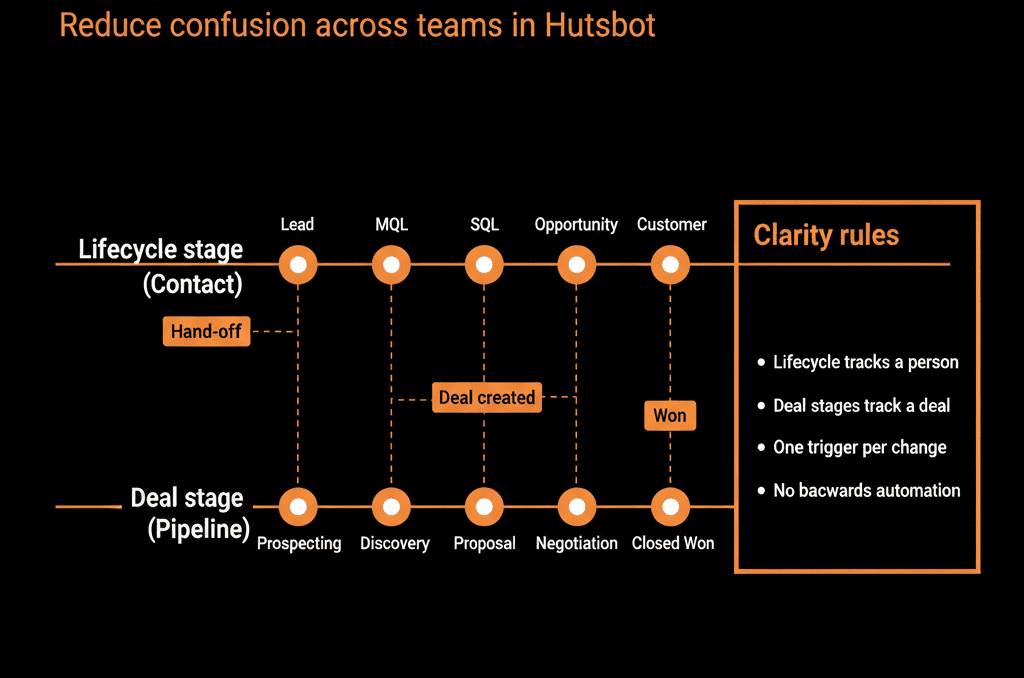
Step 1 – Clarify the Purpose of Lifecycle vs Deal Stages
First, distinguish what each is for.
Lifecycle stages (Contact/Company)
Answer: “Where is this person/account in our overall relationship with them?”
Span Marketing → Sales → CS.
Typical values: Subscriber, Lead, MQL, SQL, Opportunity, Customer, Evangelist.
Used for:
- Funnel reporting.
- Marketing automation.
- High‑level GTM alignment.
Deal stages (Deals in Pipelines)
Answer: “Where is this specific opportunity in the sales process?”
Span Sales process (and sometimes renewals/expansions).
Typical values: New, Qualified, Proposal, Negotiation, Closed Won/Lost.
Used for:
- Pipeline management.
- Forecasting.
- Sales performance tracking.
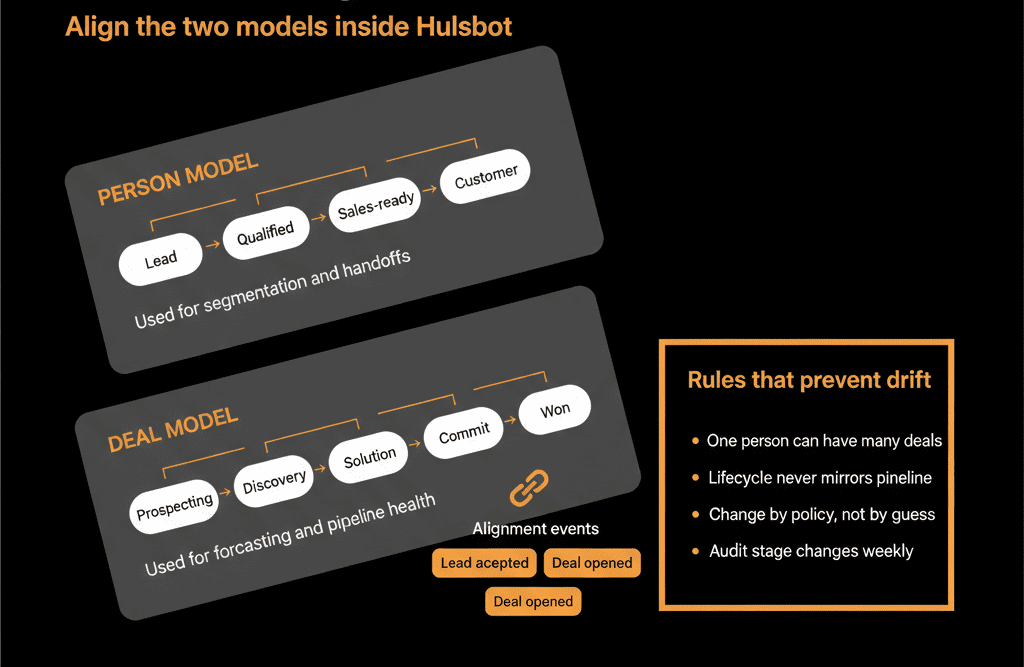
Think of lifecycle as the account/person journey and deals as individual opportunities along the way.
Step 2 – Decide Your Canonical Lifecycle Model
You need a clear, shared lifecycle before mapping to deals.
A common, practical model:
- Subscriber – Opted into content, not yet a lead.
- Lead – Identified contact. Little/no qualification.
- MQL – Marketing believes they’re good enough for Sales review (fit + intent).
- SQL / Sales Accepted – Sales has accepted and is engaging.
- Opportunity – A deal exists; active selling is underway.
- Customer – At least one Closed Won deal (or equivalent contract).
- Evangelist/Other – Optional, for advocates or special cases.
Get Marketing, Sales, and CS to sign off on what each means.
Step 3 – Map Lifecycle Stages to Deal Stage Milestones
Now, define how lifecycle should behave in response to deal movements.
Example mapping (simplified):
- Lifecycle = Lead/MQL: before any meaningful Sales engagement or deal exists.
- Lifecycle = SQL: when Sales has accepted the lead (e.g., discovery scheduled), might correspond to “Discovery” or “Qualified.”
- Lifecycle = Opportunity: when a Deal is created in a sales pipeline beyond initial qualification.
- Lifecycle = Customer: when at least one associated Deal is Closed Won.
Key rule:
Lifecycle should never be ahead of the furthest deal stage reality, but it can lag slightly based on acceptance.
Step 4 – Implement Lifecycle–Deal Alignment with Workflows
Use workflows to keep lifecycle in sync with important deal events.
Core automations:
When a new Deal is created
Enrollment:
- Deal stage moves from “Pre‑opportunity” (if used) into true sales stages (e.g., “Qualified”).
Actions:
- Set associated Contacts/Companies lifecycle_stage to Opportunity if their current lifecycle is earlier (Lead, MQL, SQL).
When a Deal is Closed Won
Enrollment:
- Deal stage becomes Closed Won.
Actions:
- Set associated Contacts/Companies lifecycle_stage to Customer (if not already).
- Optionally, record Customer metrics (e.g., first closed date, ACV).
When Sales accepts an MQL (SQL transition)
Mechanism:
- Sales sets a field like Sales accepted or Lead status = Accepted.
Workflow:
- If lifecycle is MQL or earlier and Sales accepts → set to SQL.
Preventing regression
Workflow:
- If lifecycle is Customer and a manual or integration change tries to set it back to an earlier stage → revert or flag for RevOps.
These keep lifecycle and deals from drifting out of sync.
Step 5 – Handle Multiple Deals and Complex Journeys
What if there are multiple deals for the same account/contact?
Guidelines:
- Lifecycle usually reflects the highest historical milestone: once Customer, typically remain Customer (even if a follow‑on deal is lost).
- For new business vs expansion: use additional properties (e.g., Customer type, Has expansion potential, Last deal type) rather than trying to force lifecycle back and forth.
- For re‑engagement after churn: consider a secondary property like Customer status (Active / Churned) or a special lifecycle value like “Former Customer” if needed.
Avoid constantly flipping lifecycle purely based on deal outcomes; treat it as relationship state, not a single deal’s status.
Step 6 – Keep Lifecycle and Deal Stage Responsibilities Clear
Avoid confusion by defining who controls what:
Marketing / RevOps
- Own lifecycle rules up to MQL.
- Own automation for lifecycle updates based on form fills, scoring, and basic actions.
Sales
- Own deal creation and deal stages.
- Signal acceptance and progression through deals and lead status fields.
RevOps
- Own workflows that bridge deals ↔ lifecycle.
- Ensure any process changes are reflected in both.
And:
- Limit direct manual edits of lifecycle_stage where possible.
- Encourage users to work with Deals and designated fields, not tweak lifecycle ad hoc.
Step 7 – Build Reporting That Uses Both Lifecycle and Deals Correctly
With alignment in place, you can build reliable:
Funnel reports (lifecycle‑based)
- Lead → MQL → SQL → Opportunity → Customer conversion.
- Focused on people/accounts progressing through journey.
Pipeline and forecast reports (deal‑based)
- Opportunities by stage, segment, and value.
- Win rates and cycle time.
Combined views
- Compare lifecycle movement with deal creation and progression.
Example questions:
- “How many MQLs become Opportunities within 30 days?”
- “How many SQLs never see a Deal created?”
This lets you diagnose issues like:
- Strong top‑of‑funnel but weak qualification.
- Good qualification but poor deal progression.
All without lifecycle and deal stages telling different stories.
Step 8 – Avoid Common Alignment Mistakes
Some pitfalls we see—and how we avoid them:
Using lifecycle as a duplicate deal pipeline
Mistake: adding superfine lifecycle stages like “Proposal Sent,” “Contract Sent.”
Fix: keep those as deal stages, lifecycle at a higher level.
Letting every user manually change lifecycle freely
Mistake: reps set lifecycle based on personal preferences.
Fix: control via workflows tied to clear triggers.
Not updating lifecycle when deals close
Mistake: customers never move from Opportunity to Customer in lifecycle.
Fix: workflows on Closed Won deals that update lifecycle for associated records.
Forgetting Companies
Mistake: only Contacts get lifecycle updates.
Fix: mirror important lifecycle changes at the Company level for account‑based reporting.
Pulling It Together: One Journey, Two Lenses
Done properly, aligning lifecycle and deal stages in HubSpot gives you:
- Lifecycle: a customer journey lens across Marketing, Sales, and CS.
- Deal stages: a sales process lens focused on active revenue opportunities.
They work together when:
- Lifecycle transitions are clearly defined and driven by lead qualification, deal creation, and deal closure.
- Workflows keep them synchronized, not competing.
- Reporting uses each where it makes sense.
That’s how you get funnel and pipeline views that match—and can drive better decisions.
Want Help Aligning Lifecycle and Deal Stages in Your HubSpot Portal?
If your lifecycle and pipeline reports don’t line up—or if teams are confused about what each stage means—this is exactly where we can help.
Our HubSpot Portal Health Check and Migration & ROI Plan are designed to:
- Audit your current lifecycle and pipeline configuration.
- Design a clear alignment model tailored to your GTM motion.
- Implement workflows and guardrails so lifecycle and deal stages stay in sync.






