



If Your Lifecycle Stages Are Fuzzy, Your Funnel Metrics Are Fiction
Lifecycle stages in HubSpot should answer a simple question:
“Where is this contact or company in our journey from anonymous to customer (and beyond)?”
In many portals, though:
- Most records are just “Lead” or “Other.”
- “Customer” is set manually and inconsistently.
- Reporting on MQLs, SQLs, and Opportunities doesn’t match how teams actually work.
The result:
- Marketing, Sales, and CS all use different mental models.
- Funnel reports look impressive but don’t drive decisions.
We use a practical lifecycle design in HubSpot that:
- Mirrors real GTM stages.
- Powers clean funnel reporting.
- Plays nicely with Deals and handoffs.
This article walks through that setup and how to implement it.
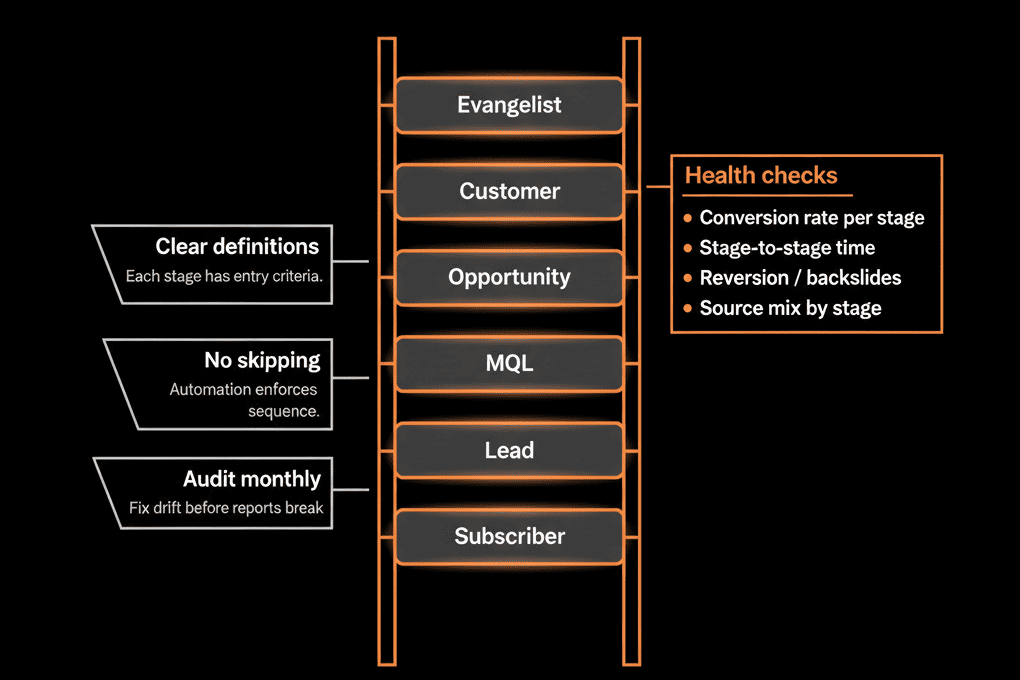
Step 1 – The Lifecycle Stages We Use (and What They Mean)
We typically work with a streamlined set of stages (based on HubSpot defaults, with clear definitions):
Subscriber
Someone who has opted into content but is not yet a lead.
E.g., newsletter signups, blog subscribers.
Lead
Identified contact with basic info but not yet qualified.
E.g., generic content downloads, event scans, list imports.
Marketing Qualified Lead (MQL)
Lead that meets fit + intent criteria and is ready for Sales review.
Sales Qualified Lead (SQL) / Sales Accepted
Sales has accepted the MQL as worth pursuing.
Often corresponds to initial discovery or meeting scheduled.
Opportunity
A Deal exists in the pipeline and is being actively worked.
Customer
A Deal has been Closed Won.
Or equivalent subscription/contract event is confirmed.
Evangelist / Other (optional, used more sparingly)
Promoters or partners.
Records that don’t fit the main funnel but still matter.
These stages are applied at the Contact (and often Company) level.
Step 2 – Map Lifecycle Stages to Marketing, Sales, and CS Responsibilities
To make the lifecycle useful, tie each stage to team responsibilities:
Subscriber → Lead
- Owned by Marketing.
- Triggered when a subscriber takes an action that makes them a lead (e.g., fills a richer form).
Lead → MQL
- Owned by Marketing/RevOps.
- Triggered by lead scoring or defined rules (fit + intent).
- Marketing promises: “This lead is worth human review by Sales.”
MQL → SQL
- Owned by Sales (SDR/AE).
- Triggered when Sales accepts and engages.
- Sales promises: “We acknowledge this is in our working queue.”
SQL → Opportunity
- Owned by Sales.
- Triggered by Deal creation with real potential.
Opportunity → Customer
- Owned by Sales → CS handoff.
- Triggered by Closed Won and onboarding kickoff.
Customer → Evangelist/Other
- Owned by CS/Marketing.
- For advocates, partners, or non‑standard paths.
This shared map becomes your alignment document.
Step 3 – Implement Lifecycle Stages in HubSpot (Contacts & Companies)
We implement lifecycle at both the Contact and Company levels, with rules to keep them in sync.
Implementation steps:
Use HubSpot’s lifecycle_stage property
- On Contacts: required and central.
- On Companies: used as account‑level lifecycle (often mirroring the highest‑stage contact or deal).
Create supporting properties
For clarity and control:
- MQL reason or MQL source.
- SQL accepted by and SQL date.
- Opportunity created date.
Synchronize between Contacts, Companies, and Deals
Workflows to:
- Promote Company lifecycle when a Contact or Deal reaches a higher stage.
- Ensure a Contact tied to a Closed Won Deal becomes Customer (unless there’s a good reason not to).
Goal: your lifecycle stages feel coherent across all objects.
Step 4 – Use Workflows to Control Stage Transitions
To keep lifecycle honest, you need controlled transitions—ideally via workflows with clear triggers.
Patterns we use:
Lead → MQL
Workflow:
- If Contact meets MQL criteria (score or rules) AND not already a later stage → set to MQL.
MQL → SQL
Triggered by Sales:
- Sales sets a “Sales accepted” field or moves a custom Lead status to “Accepted.”
Workflow:
- When accepted flag is set → set lifecycle to SQL (if not already later).
SQL → Opportunity
Workflow:
- When a new Deal is created and associated with the Contact/Company → set lifecycle to Opportunity (only if current stage is earlier).
Opportunity → Customer
Workflow:
- When an associated Deal is Closed Won → set lifecycle to Customer.
- Apply to all relevant Contacts at that account (or at least key ones).
Regression prevention
Lifecycle is usually allowed to move forward only (Lead → MQL → SQL → Opportunity → Customer).
If a change tries to push it backwards:
- Revert or flag for review via workflows.
This approach ensures lifecycle moves reflect real changes, not ad hoc manual edits.
Step 5 – Tie Lead Management and SLAs into Lifecycle
Lifecycle is not just for reporting; it should drive daily work.
Examples:
MQL handling
When lifecycle becomes MQL:
- Assign to SDR/AE (based on routing rules).
- Create a task to follow up within SLA.
- Optionally, enroll in a sales sequence.
SQL follow‑up
When lifecycle becomes SQL:
- Track: time from MQL → SQL.
- Expect discovery and deal creation within a defined window.
Opportunity management
Use Deal pipelines + lifecycle to:
- Ensure every Opportunity has an owner, amount, and close date.
- Enforce stage‑based required fields.
Lifecycle stages become the skeleton on which SLAs and operational expectations hang.
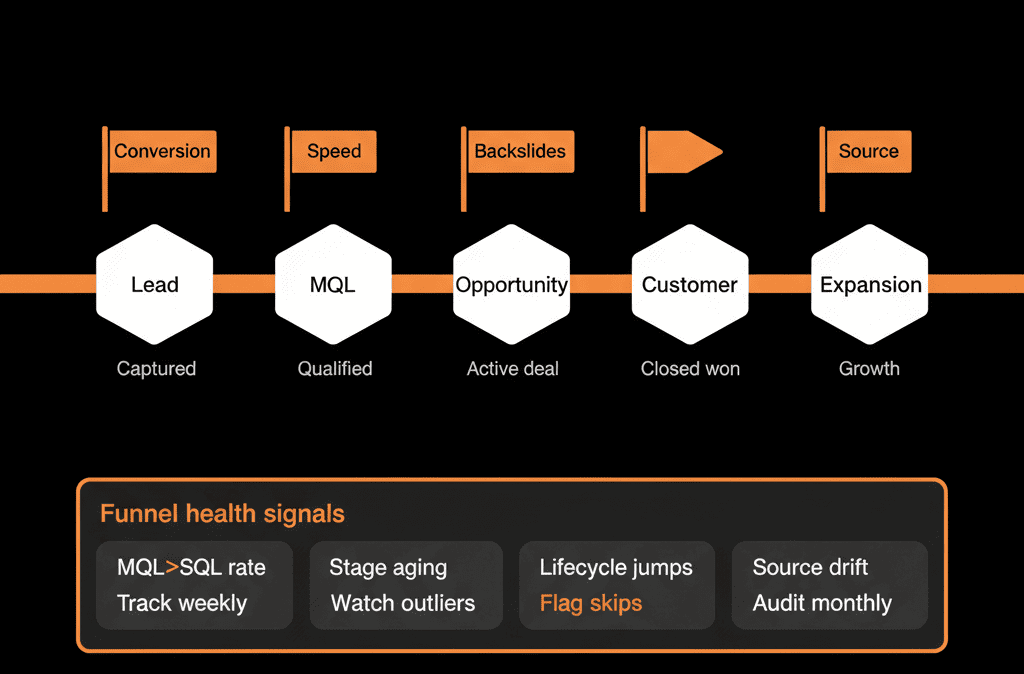
Step 6 – Use Lifecycle for Funnel Health Reporting
Once lifecycle is correctly implemented, it unlocks clear funnel reporting.
Key reports:
Volume by lifecycle stage
- How many records sit in each stage (Lead, MQL, SQL, Opportunity, Customer)?
Conversion rates
- Lead → MQL → SQL → Opportunity → Customer.
- By channel, segment, and region.
Stage duration
- Average time spent in each lifecycle stage.
- Where do leads stall?
MQL and SQL quality
- MQL → Opportunity and MQL → Customer conversion.
- SQL → Opportunity and SQL → Customer conversion.
These become the core funnel KPIs you review with Marketing and Sales.
Step 7 – Establish Governance Around Lifecycle Changes
Without governance, lifecycle definitions drift and credibility erodes.
Governance practices:
Owners and change control
- Assign shared ownership of lifecycle design to RevOps + Marketing + Sales leadership.
- Changes to definitions or rules go through a review, not ad hoc field edits.
Documentation
Maintain a short, clear document:
- Exact definition of each lifecycle stage.
- Who can change it and how.
- What triggers transitions.
Review cadence
Quarterly:
- Compare definitions vs actual practice.
- Adjust criteria and workflows based on funnel data and GTM changes.
This keeps the lifecycle model aligned with the real business as it evolves.
Step 8 – Common Pitfalls and How We Avoid Them
A few lifecycle mistakes we see often—and our counter‑moves:
Everything is a “Lead”
Fix: implement clear rules to promote MQL and SQL; don’t leave lifecycle untouched.
Manual, inconsistent updates by reps
Fix: restrict direct editing of lifecycle_stage where possible; rely on workflows triggered by actions (forms, statuses, deal creation).
Lifecycle and Deals telling different stories
Fix: enforce workflows that keep lifecycle and deal pipelines in sync.
Overcomplicating stages
Fix: keep to a compact, meaningful set of stages; use supporting properties for nuance.
Pulling It Together: Lifecycle as the Backbone of Funnel Health
The lifecycle stage setup we use in HubSpot does three things:
Aligns GTM teams
- Everyone uses the same language for where a record is in the journey.
Powers operations
- Drives routing, SLAs, and handoffs.
- Anchors automation and playbooks.
Enables trustworthy funnel reporting
- Shows exactly where volume and conversion break down.
- Informs GTM strategy and optimization.
Done well, lifecycle is not “just a property.” It’s the backbone of how you measure and improve your funnel.
Want This Lifecycle Setup Applied to Your HubSpot Portal?
If your current lifecycle usage in HubSpot doesn’t reflect how you actually sell—and your funnel metrics feel unreliable—this is where we can help.
Our HubSpot Portal Health Check and Migration & ROI Plan are designed to:
- Audit your existing lifecycle implementation and funnel reports.
- Redesign lifecycle stages, transitions, and workflows for your GTM motion.
- Deliver a 60–90 day plan to implement a funnel health model your teams can trust.






