



A CRM Migration Shouldn’t Mean “We’ll Miss This Quarter”
When leadership says, “We’re moving into HubSpot,” sales hears:
- “My deals will get lost.”
- “My reports will be wrong.”
- “I’ll spend weeks learning a new tool instead of selling.”
If you treat a HubSpot migration as a pure IT project, those fears come true:
- Pipelines freeze during cutover.
- New leads fall into gaps between old and new systems.
- Reps get stuck navigating an unfinished portal.
The goal is not just a successful migration.
The goal is a migration where sales momentum never breaks.
In this article, we’ll walk through how to structure your HubSpot migration so reps can keep selling, leaders can still trust numbers, and the project doesn’t become the reason you miss your quarter.
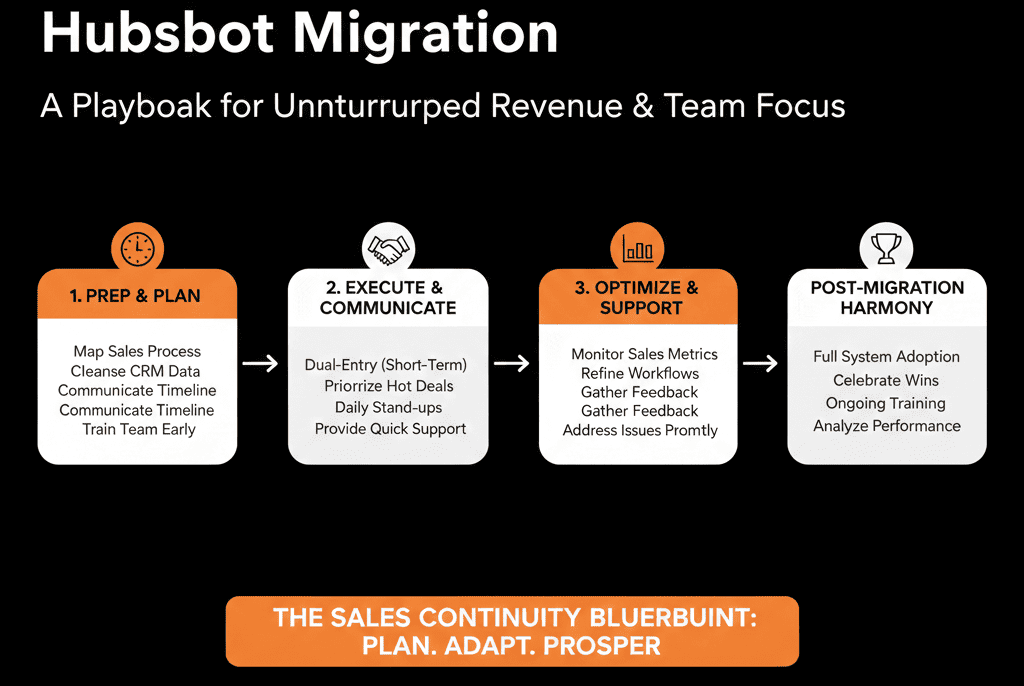
Step 1 – Commit to “Sales First, Migration Second” as a Principle
Before you talk about exports and integrations, align leadership on one simple priority:
Sales must be able to sell every single day of the migration.
That means:
- No “dark periods” where neither system is fully usable.
- No surprises where key views, pipelines, or lead flows suddenly change overnight.
- No requirement for reps to double‑enter everything for weeks on end.
This principle should inform every decision: timeline, cutover strategy, and scope.
Step 2 – Define What “Sales Momentum” Actually Means for You
You can’t protect what you haven’t defined.
With Sales leadership, agree on a few concrete indicators of momentum:
- Lead flow
- New inbound leads are captured, routed, and followed up.
- Pipeline health
- Deals are being created, moved, and updated daily.
- Activity
- Reps are still making calls, sending emails, booking meetings.
- Forecast
- Leaders can see a believable pipeline and forecast every week.
During migration, these become the metrics you monitor to confirm nothing has broken.
Step 3 – Choose a Cutover Strategy That Minimizes Disruption
There are three broad approaches to CRM migration. For sales momentum, one is safer than the others.
Big bang (hard switch on a single date)
- Old CRM off → HubSpot on.
- Highest risk to momentum.
Parallel run (short overlap)
- Old CRM remains primary while HubSpot is populated and tested.
- Then a clean cutover once HubSpot is ready.
Phased by team/region
- One team or region moves first.
- Others follow once patterns and issues are ironed out.
For most sales teams, the best combo is:
- Parallel run for a defined, short window (2–4 weeks).
- Phased rollout by team/region if you’re large or multi‑region.
The key is clarity:
- Reps always know which system is the “source of truth” today.
- There is a well‑communicated date when HubSpot becomes primary.
Step 4 – Protect Lead Capture and Routing Above Everything Else
The fastest way to kill momentum is to lose or delay new leads.
Before you flip anything over:
Map all your lead sources today:
- Website forms.
- Demo/trial signups.
- Events/webinars.
- Partner or marketplace leads.
- Manual imports.
Then, for each migration phase:
- Decide where new leads will land (old CRM vs HubSpot).
- Ensure routing and notifications are in place in that system.
During parallel run:
Either:
- Keep lead capture and routing in the old CRM while mirroring data into HubSpot for testing.
- Or:
- Shift capture to HubSpot only after routing, owners, and follow‑up tasks have been fully tested.
Never run a period where:
- Leads split unpredictably between systems.
- Reps have to check two places “just in case”.
Step 5 – Lock a “Minimum Viable” Sales Setup in HubSpot Before Anyone Uses It
Don’t put reps into a half‑configured portal.
Before any team goes live in HubSpot, ensure they have:
- Pipelines and stages they recognize (with clear definitions). HubSpot pipelines are configurable for objects (including deals), and deal stages can have probabilities used for weighted amounts in board view.
- Views they can actually work from (“My open deals”, “My new leads”, “My tasks today”). HubSpot supports saving and managing CRM record views to reuse filters/columns.
- Ownership, territories, and teams correctly set up.
- Basic workflows running for lead assignment and task creation. HubSpot workflows support enrollment triggers and actions to create tasks and update CRM data.
- Simple deal creation from key forms or triggers.
This is your MVP Sales Hub. Migrate more features later; day one HubSpot should already feel usable.
Step 6 – Avoid Double Data Entry with Smart Bridging, Not Heroic Effort
Nothing kills morale like “log it in both systems until we’re done”.
Instead, use bridging where it makes sense:
During parallel run, consider:
- One‑way syncs from old CRM → HubSpot for testing (not for ops decisions).
- Or, if HubSpot is receiving new leads, sync those leads back into the old system only for reporting continuity—if truly necessary.
If you must do any double‑entry, make it:
- Time‑bound (e.g., one week).
- Narrow (e.g., only for deals above a certain size).
- Explicitly acknowledged as temporary, with a clear end date.
Your default aim should be: each record is actively worked in only one CRM at a time.
Step 7 – Sequence Training Around Real Workflows, Not Feature Tours
Sales doesn’t need a product demo. They need to know:
- How do I find my leads?
- How do I update my deals?
- How do I send email and log calls?
- Where do I see my tasks and my quota progress?
Plan training in three layers:
Pre‑migration “what’s coming”
- Short overview: why HubSpot, how it will help, rough timeline.
Go‑live enablement (role‑based)
Hands‑on sessions:
- SDRs: working new leads, sequences, tasks.
- AEs: managing pipeline, updating stages, logging activities.
- Managers: using reports, views, and dashboards.
Post‑go‑live coaching
- Office hours and quick Looms.
- Fixing friction in views, workflows, and fields based on rep feedback.
Tie training back to their old system:
“In Salesforce/Zoho, you did X here → in HubSpot, you do Y here.”
Step 8 – Monitor Momentum Metrics Weekly During Migration
Go back to the metrics you defined in Step 2 and track them closely.
At minimum, monitor per team:
- # of new leads created per week.
- Time‑to‑first‑touch on new leads.
- # of new deals created.
- Stage movement (are deals progressing?).
- Activities logged (emails, calls, meetings).
- Forecast accuracy vs prior quarters.
Watch for dips around:
- Training dates.
- Cutover dates.
- Major configuration changes.
If you see negative trends:
Diagnose quickly:
- Is it a data issue (leads not assigned)?
- A UX issue (reps can’t find what they need)?
- A process issue (unclear definitions)?
Fix the system or process—not just tell reps to “try harder”.
Step 9 – Keep the Old CRM Read‑Only (and Clearly “Old”) After Cutover
Once HubSpot becomes the system of record:
- Freeze write access in the old CRM where possible.
- Label it clearly as “read‑only archive”.
Explain to reps:
- All new work happens in HubSpot.
- Old CRM is only for historical lookup (if needed).
- There is a plan and date to decommission the old system entirely.
This helps prevent a subtle, dangerous behavior:
Reps slipping back into the old CRM because “it feels more comfortable”
Leading to fragmentation and lost data in HubSpot.
Step 10 – Use Early Wins to Reinforce Adoption and Confidence
Maintaining momentum isn’t just about avoiding problems.
It’s also about highlighting wins that HubSpot unlocks.
Within the first 30–60 days, look for and share:
- Faster lead response thanks to better routing.
- Simplified day‑to‑day routines (fewer tabs, fewer manual updates).
- New visibility: managers seeing clear team performance, reps seeing their own progress and pipeline health.
Use these as concrete stories:
- “Because of HubSpot, we picked up X opportunity we would have missed.”
- “This dashboard replaced three weekly manual reports.”
These stories turn HubSpot from a “project” into a sales enablement tool.
Pulling It Together: Migrate as If the Quarter Still Matters (Because It Does)
Migrating into HubSpot is often positioned as a long‑term investment.
But your quarter doesn’t pause just because you’re implementing a new CRM.
To maintain sales momentum, you need to:
- Make “no loss of selling days” a top‑level principle.
- Choose a migration strategy (parallel + phased) that minimizes disruption.
- Protect lead capture, routing, and basic sales workflows above all else.
- Give reps a usable, tested HubSpot setup at go‑live.
- Monitor and react quickly to any dip in lead flow, activity, or pipeline.
Done well, HubSpot becomes a force multiplier for sales even during migration—not a drag on performance.
Want Help Designing a HubSpot Migration That Doesn’t Kill Your Quarter?
If you’re planning a move into HubSpot and worried about what it will do to your pipeline and quotas, this is where we can help.
Our HubSpot Portal Health Check and Migration & ROI Plan are designed to:
- Map your current sales motion and tooling.
- Design a migration and cutover plan that protects lead flow and pipeline.
- Sequence configuration, training, and rollout so reps stay selling throughout.






