



If Inbound and Outbound Live in Different Realities, You Can’t See the Whole Funnel
Many GTM teams split inbound and outbound like this:
- Inbound: marketing forms, ads, content.
- Outbound: SDR/AE prospecting, sequences, cold outreach.
In HubSpot, that often turns into:
- Separate lists and reports.
- Different owner practices.
- Confusing or conflicting attribution.
Leadership then asks simple questions like:
- “What’s the blended funnel from first touch to revenue?”
- “What’s the ROI on paid vs outbound?”
- “Which motion is working better by segment?”
But teams can’t answer without exporting and merging data manually.
The fix is not to collapse the motions. It’s to track them coherently inside one HubSpot view.
This article shows how.
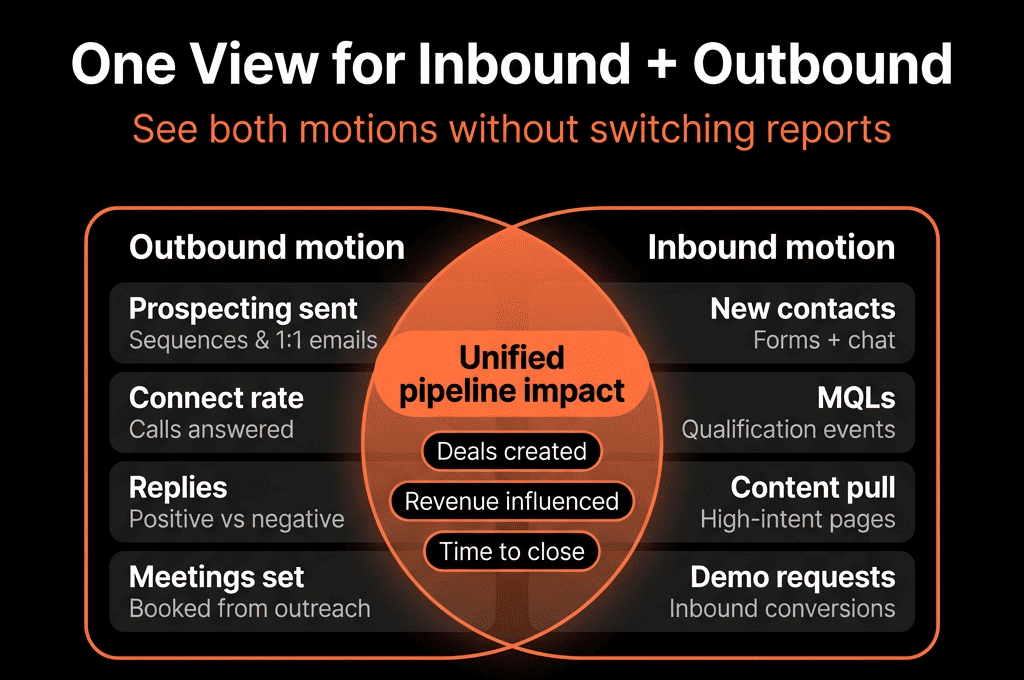
Step 1 – Define What “Inbound” and “Outbound” Mean in Your Context
Before configuring HubSpot, agree on definitions.
Example:
Inbound
Any contact whose first touch is:
- A form submission (content, demo, webinar).
- A live chat or bot conversation.
- Direct response to a marketing campaign.
Outbound
Any contact whose first touch is:
- Created by an SDR/AE.
- Imported from a list for proactive outreach.
- Sourced from partners or prospecting tools.
You may also have Hybrid/Blended:
E.g., a prospect who engaged with content, then was prospected by outbound later.
Write these down—your HubSpot rules will match these definitions.
Step 2 – Set Up Source and Motion Properties in HubSpot
You need consistent properties to track motion type.
Use or create:
A high‑level channel property
E.g., Acquisition motion or Source motion.
Values: Inbound / Outbound / Partner / Other.
A detailed source property
Use HubSpot’s Original source and Latest source plus UTM parameters.
Optionally add a custom Acquisition detail field for clarity (e.g., “Paid search,” “SDR outbound”).
A created by signal
Distinguish:
- hs_analytics_source + form names = inbound.
- Manual creation or specific import naming conventions = outbound.
Then:
Create workflows to set Acquisition motion on Contact (and optionally Company) based on:
- First conversion event (submissions).
- Creation source (manual/import).
- Known outbound sequences or SDR actions.
This becomes the backbone of your inbound/outbound segmentation.
Step 3 – Standardize How You Log Outbound in HubSpot
Outbound is often the messy one.
Make outbound clear and consistent by:
Having a specific process for SDR/AE‑created Contacts:
- Use standardized lists or import templates with fields that indicate origin.
- Require SDRs/AEs to set Acquisition motion = Outbound or use workflows that infer it from creation method.
Tagging outbound sequences and tasks
- Naming conventions: Sequences: [OUTBOUND] ICP – Persona – Motion.
- Optionally use a custom property like Outbound campaign for key programs.
Avoiding “manual” one‑off patterns
- Educate reps to work inside defined sequences and cadences when possible.
The less ad hoc outbound is, the easier it will be to track alongside inbound.
Step 4 – Unify Lifecycle and Deal Process Across Motions
Inbound and outbound often share the same buying journey, even if discovery differs.
Use one lifecycle model for both:
Lead → MQL → SQL → Opportunity → Customer.
Just make sure:
- For inbound: MQL triggers may be based more on form intent and scoring.
- For outbound: MQL/SQL triggers may be based more on SDR/AE actions and talk time.
Implementation tips:
- Use separate criteria for inbound vs outbound to mark MQL, but a shared lifecycle property (lifecycle_stage).
- Use consistent deal stages for both motions in the same pipeline(s), with “source motion” tracked on the Deal: Deal motion = Inbound / Outbound / Blended.
Result: you can compare inbound vs outbound along the same funnel and pipeline, not apples to oranges.
Step 5 – Build a Single “Combined Motion” Dashboard with Filters
With motion properties and shared lifecycle/pipelines in place, build one core dashboard that shows:
- Total pipeline and revenue by Deal motion.
- Funnel metrics by motion: Lead → MQL → SQL → Opportunity → Customer.
- Average deal size and cycle time by motion.
- Win rates by motion and segment.
In HubSpot:
- Use one set of reports with Deal motion or Acquisition motion as a filter.
- Create one funnel report, then show it twice—once filtered for Inbound, once for Outbound.
You now have one dashboard with two slices and easy comparison.
Step 6 – Create Views That Let Teams See Their Side and the Whole
For operational teams, provide both:
Motion‑specific views
- SDRs: “My outbound prospects,” “My inbound MQLs.”
- AEs: “My inbound deals,” “My outbound deals.”
Blended views
- “All my active opportunities (any motion).”
- “All accounts with both inbound and outbound touches.”
Use filters like:
- Contact/Deal owner = Me.
- Acquisition motion or Deal motion = Inbound/Outbound/Any.
- Lifecycle or Deal stage thresholds.
This gives each role clarity without recreating two parallel CRMs.
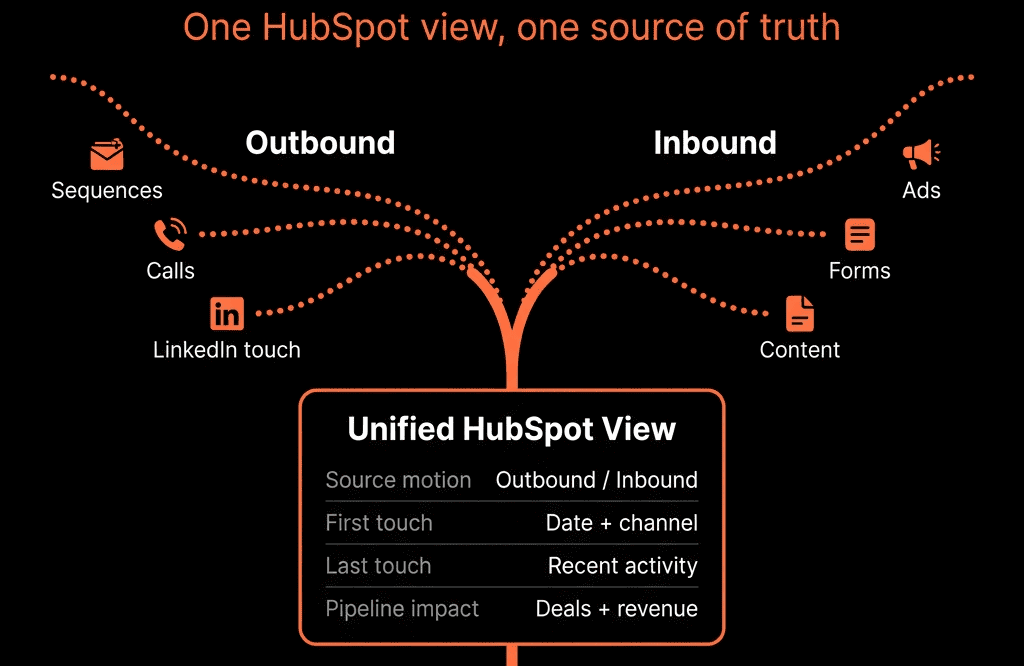
Step 7 – Handle Blended Journeys (Inbound + Outbound Touches)
Reality: many accounts see both inbound and outbound activity.
To handle this:
At the Contact level:
- Preserve Original source (e.g., inbound) and still log outbound outreach.
At the Deal level:
Decide how to set Deal motion:
- If the Deal started from an inbound request → mark as Inbound, even if outbound happened later.
- If the Deal started from proactive outreach → mark as Outbound, even if they had earlier content touches.
- Optionally create a “Blended” category for complex journeys, but don’t overuse it.
Attribution:
- Use campaigns and interactions to inform Marketing.
- Use Deal motion to keep Sales and exec conversations clean.
The goal is not perfect purity—just consistent and explainable rules.
Step 8 – Align KPIs and Targets Across Inbound and Outbound
Use your combined HubSpot view to define and monitor targets like:
- Volume and conversion: Leads, MQLs, SQLs, Opps, and Customers by motion.
- Efficiency: win rate and cycle time by motion and segment; average deal size by motion.
- Economics (if cost data is integrated): CAC/cost per Opp and payback by motion.
This lets leadership set informed targets and make resourcing/budget decisions by motion.
Step 9 – Review and Refine Motion Definitions as GTM Evolves
As your GTM motion matures, channels and journeys blur.
Review at least annually whether your Acquisition motion still matches reality and whether you need more categories (but keep the “single view” philosophy).
Pulling It Together: One System, Multiple Motions, Coherent View
Tracking outbound and inbound together in HubSpot is about:
- A shared lifecycle and pipeline model.
- Clear motion properties (Contact and Deal level).
- Consistent logging of outbound activity.
- Unified dashboards and views with filters by motion.
Done right, you get one funnel and one pipeline that you can slice by motion—without manual exports.
Want Help Building a Unified Inbound + Outbound View in HubSpot?
If your inbound and outbound motions are tracked in separate systems or ad‑hoc reports—and you want a single, reliable view in HubSpot—this is where we can help.
Our HubSpot Portal Health Check and Migration & ROI Plan are designed to:
- Audit your current tracking of inbound and outbound.
- Design motion properties, workflows, and dashboards for a unified view.
- Implement a structure where both motions live in one RevOps‑ready HubSpot portal.






