



A HubSpot Migration Is Also a Compliance Event
Most teams treat a HubSpot migration as a technical project.
Compliance often hears about it late, or only in passing:
- “We’re just moving our CRM to HubSpot.”
- “No new data, just a lift‑and‑shift.”
- “Legal doesn’t need to be heavily involved; it’s the same contacts.”
But under GDPR and similar regulations, a migration can trigger:
- New data processors and sub‑processors.
- New locations and systems where personal data is stored.
- New ways of handling consent, profiling, and communication.
If you ignore that, you risk:
- Inconsistent consents and marketing permissions.
- Lost or mis‑applied suppression lists.
- No clear process for data subject rights (DSR) requests in the new system.
This article is not legal advice. It’s a practical checklist to help you protect GDPR/compliance standards as you move into HubSpot—so Legal and RevOps are on the same page.
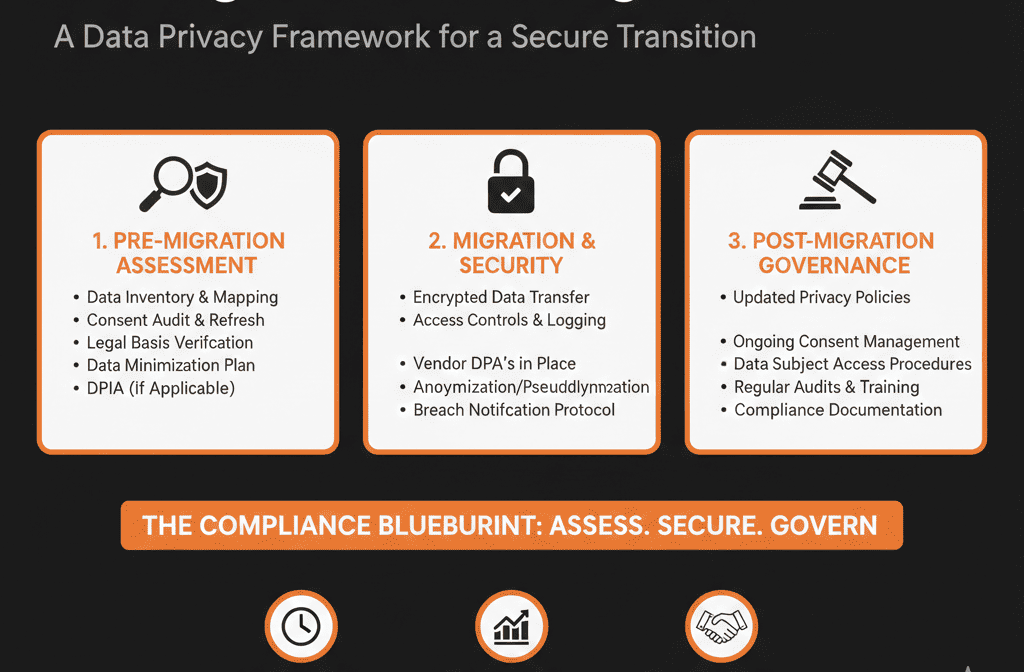
Step 1 – Involve Compliance Early and Map the Scope
First, treat your migration as a change in processing activity, not just a new tool.
Align with your DPO / legal / compliance lead on:
- What personal data will live in HubSpot (contacts, activity history, tickets, etc.).
- Which regions are in scope (EU, UK, others with similar regimes).
- How HubSpot will be used: marketing automation, sales engagement, customer support.
Create or update:
- Your Record of Processing Activities (RoPA) to include HubSpot.
- An internal summary of the migration project: what is changing, what remains the same, where additional risk or controls may be required.
This alignment makes later steps (DPAs, consents, DSR processes) much smoother.
Step 2 – Review HubSpot’s Role, DPA, and Sub‑Processors
Under GDPR, HubSpot is usually a data processor; you are the data controller.
Before or as part of the migration:
- Review and sign HubSpot’s Data Processing Agreement (DPA).
- Review HubSpot’s list of sub‑processors and hosting locations.
- Confirm how HubSpot supports data subject rights (access, deletion, rectification), data retention and export, and security measures (encryption, access controls).
Internally, document that HubSpot is an approved processor and which hubs/features you’re enabling (Marketing, Sales, Service, Operations).
If you use additional third‑party integrations, they may also be processors—review their DPAs and sub‑processors too.
Step 3 – Map and Minimize Personal Data Before You Move It
A migration is a perfect time to apply data minimization: only move what you actually need.
From your legacy system, inventory:
- Types of personal data currently stored: identification (names/emails/phones), demographics (location/role), behavioral (website activity/email history/events).
- Special categories (if any—usually should not be in CRM).
- Fields that are no longer used, sensitive, or unnecessary for your stated purposes.
Decide with compliance and business owners which fields/history to migrate and which to drop or anonymize before import.
Less data = lower risk and easier governance in HubSpot.
Step 4 – Preserve and Normalize Consent and Legal Bases
One of the highest‑risk mistakes in migration is breaking or losing consent state.
You must preserve:
- Who you can email (and for what purpose).
- Who has opted out or unsubscribed.
- Any clear records of how/when consent was given.
Practical steps:
Export and map existing consent fields
- Current system: marketing permissions (opt‑in/opt‑out), channel preferences, timestamps and source where available.
- Map into HubSpot using subscription types, email opt‑out fields, and custom properties where needed.
Normalize values
- Standardize “Yes/No”, “Opted in/out”, “Subscribed/Unsubscribed”.
- Be conservative: treat uncertain contacts as opted‑out until clarified.
Test with a sample
- After a test migration, verify contacts with different consent states and confirm marketing emails cannot be sent to those who opted out.
You want to be able to show that consent state was not “reset” or weakened by the migration.
Step 5 – Align Legal Bases and Communication Practices
GDPR requires a legal basis for processing and contacting individuals (e.g., consent, legitimate interests, contract).
During migration:
- Work with Legal to confirm legal bases for marketing to prospects and communicating with customers.
- Where appropriate, capture this in HubSpot properties (e.g., Legal basis for processing, Source of consent).
Then ensure HubSpot usage aligns: marketing workflows respect consent/legal basis, and sales sequences are used appropriately for your context.
This doesn’t have to be perfect on day one—but the structure should be in place so you can refine over time.
Step 6 – Plan How You’ll Handle Data Subject Rights in HubSpot
You must still be able to find, correct, export, and delete personal data when required.
During migration design:
- Decide which systems hold personal data (HubSpot + others).
- Define how DSRs will be handled post‑migration: who receives requests, how they’re logged, how HubSpot is searched/updated.
In HubSpot, ensure you can:
- Manage privacy requests using HubSpot’s data privacy request tooling (export/delete options).
- Export an individual contact’s data when required.
- Permanently delete contacts when required (with proof of deletion where needed).
Document this process so anyone handling a DSR request knows exactly what to do in the new setup.
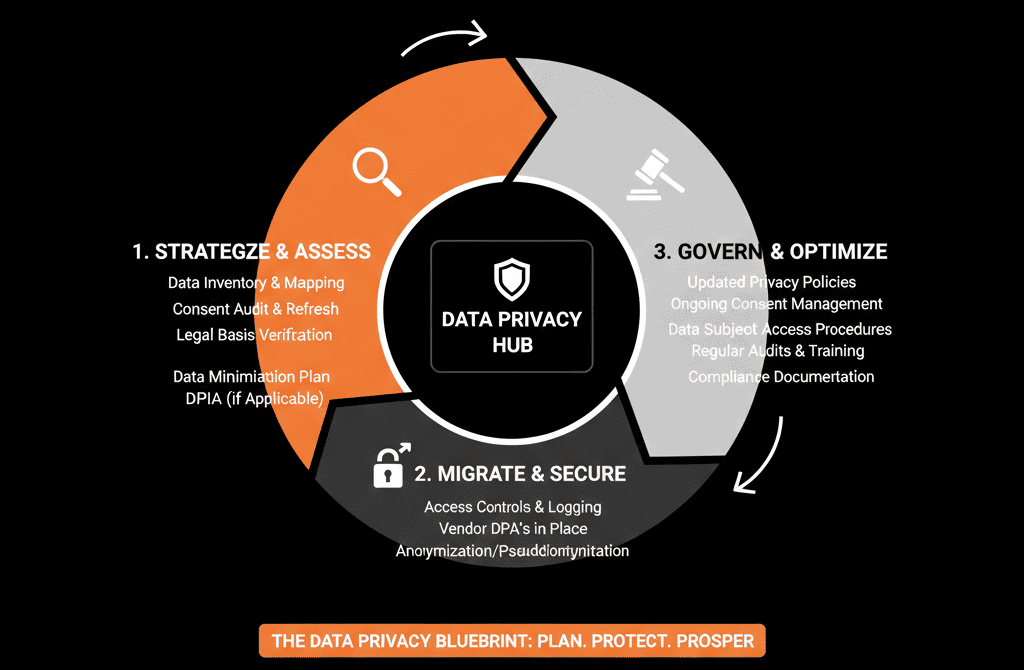
Step 7 – Set Permissions, Roles, and Access Controls from Day One
A migration is a chance to tighten—not loosen—access to personal data.
Use HubSpot’s permissions to limit who can:
- View all contacts vs owned contacts.
- Export data.
- Delete records (including permanent delete permissions where relevant).
Use teams and roles to group users by function (Sales, Marketing, CS, Ops) and restrict sensitive properties where appropriate.
Before go‑live, have compliance sign off that access is need‑to‑know and high‑risk actions are limited and auditable.
Step 8 – Document Retention Policies and Implement Them in HubSpot
You should know how long you keep personal data and when/how you delete or anonymize it.
Work with Legal/Compliance to clarify retention periods for prospects, former customers, and support data.
Decide how to operationalize those in HubSpot using lists to identify records beyond retention windows and workflows or periodic review processes to delete/anonymize over time.
Step 9 – Test Compliance Scenarios Before You Call the Migration “Done”
Before you declare success, run a few realistic scenarios:
Scenario A – Existing opted‑out contact
- Confirm they remain unsubscribed and do not receive marketing emails or sequences.
Scenario B – New EU lead via HubSpot form
- Check the form captures consent correctly for your legal basis and the lead is enrolled in the right subscription type/lists.
Scenario C – Data subject access request
- Simulate exporting all data, correcting it, and deleting/anonymizing on request.
If these scenarios work cleanly, you’re far closer to a compliant HubSpot rollout.
Pulling It Together: Compliance Is a Design Constraint, Not a Project Blocker
You don’t need to “perfect” GDPR in order to migrate to HubSpot.
You do need to:
- Involve compliance early.
- Be intentional about what data you move and why.
- Preserve consent, legal bases, and rights handling.
- Use HubSpot’s security and governance features properly.
Done well, a HubSpot migration can improve your compliance posture: cleaner data, clearer consents, better access controls, and more auditable processes.
Want Help Running a GDPR‑Aware HubSpot Migration?
If you’re planning a HubSpot migration and you’re not fully confident how it impacts GDPR or similar regulations, this is exactly where we can help.
Our HubSpot Portal Health Check and Migration & ROI Plan are designed to:
- Audit your current data, consents, and processing flows.
- Design a HubSpot data model and migration approach that respects GDPR principles.
- Work alongside your legal/compliance team so the new portal supports—not undermines—your obligations.






