



If HubSpot Is “Just for Marketing,” You’re Leaving Money on the Table
In many companies, HubSpot starts in Marketing:
- Forms, emails, and landing pages.
- Basic lead scoring and nurture.
- Top‑of‑funnel dashboards.
Sales and CS live somewhere else:
- Another CRM for deals.
- Spreadsheets and ticketing tools for customers and renewals.
Result:
- Fragmented data.
- Messy handoffs.
- Leadership stitching numbers together from multiple systems.
HubSpot can do much more.
Used properly, it can be your Revenue Operations engine—one system of record and execution across the entire customer lifecycle.
In this article, we’ll walk through how to evolve HubSpot from a “marketing tool” into a RevOps platform that aligns and powers Marketing, Sales, and CS.
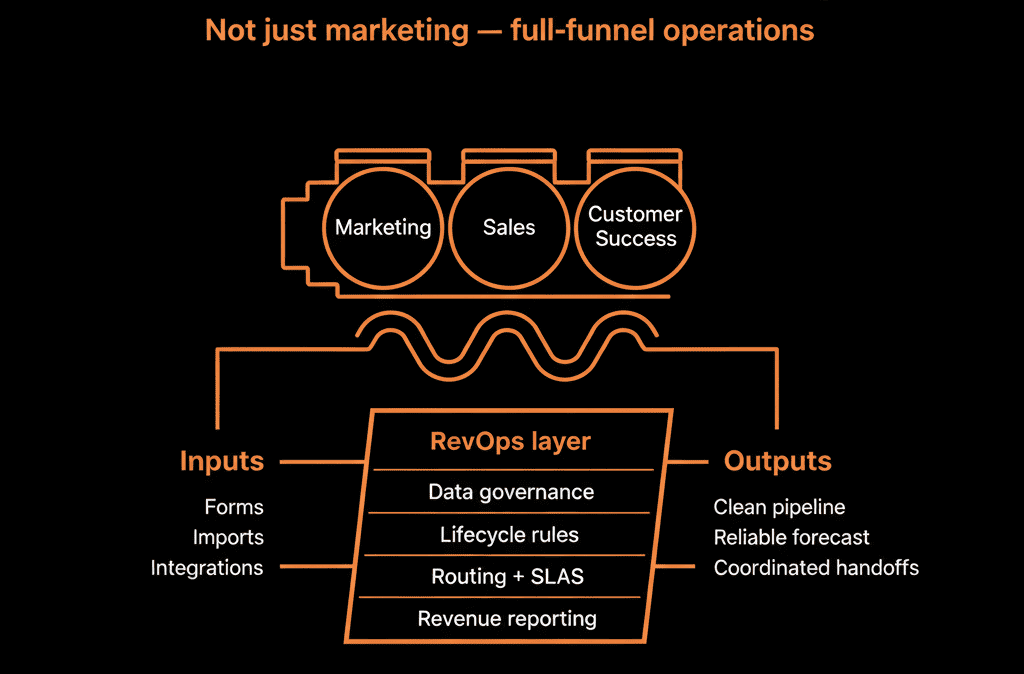
Step 1 – Redefine HubSpot’s Role: System of Record for the Revenue Team
First, make a conscious decision:
HubSpot will be the system of record for:
- Contacts (people).
- Companies (accounts).
- Deals (pipeline).
- Tickets/CS objects (post‑sale work).
- Lifecycle and engagement history.
Other systems (finance, product, niche tools) support it, but:
- HubSpot is where GTM teams go to see the truth about a customer or prospect.
- New leads and opportunities originate in HubSpot, not in scattered spreadsheets or legacy CRMs.
Without this decision, HubSpot will always be a “marketing layer” bolted to something else.
Step 2 – Build a RevOps‑Ready HubSpot Data Model
To support the full revenue lifecycle, your data model must reflect it.
Key principles:
Use the core objects intentionally
- Contacts: individuals (leads, prospects, users, champions, buyers).
- Companies: accounts (your ICP unit of value in B2B).
- Deals: commercial opportunities (new, expansion, renewal).
- Tickets: post‑sale issues and onboarding items.
- Custom objects (if needed): subscriptions, contracts, projects, etc.
Define key properties per object
- Contacts: role/seniority, persona, lifecycle stage, owner, region.
- Companies: ICP tier, industry, size, region, account owner.
- Deals: pipeline, stage, amount, close date, motion (new/expansion/renewal).
- Tickets: status, type, priority, associated ARR or customer tier.
Standardize lifecycles and stages
- Shared lifecycle definitions across Marketing, Sales, CS.
- Deal stages that map to actual buying milestones.
- CS stages for onboarding, live/healthy, and renewal.
This gives every team a common language to talk about the customer journey.
Step 3 – Design Cross‑Functional Processes Inside HubSpot
To turn HubSpot into a RevOps engine, map cross‑team processes directly into the platform.
Core flows to design:
Lead qualification and handoff (Marketing → Sales)
Forms and inbound sources feed Contacts with:
- Basic profile fields.
- Clear lead source and channel.
Lifecycle transitions:
- Lead → MQL: based on fit and intent.
- MQL → SQL/Opportunity: based on SDR/AE acceptance and/or deal creation.
Handoff mechanics:
- Workflows create deals and assign owners.
- Tasks/sequences ensure follow‑up within SLAs.
New business to onboarding (Sales → CS)
On Closed Won:
- Workflows create an onboarding Ticket or Project (custom object) in HubSpot.
- Required handoff fields: scope, products, timing, expectations, risks.
- CS gets a clear, structured view of what was sold.
Onboarding to ongoing CS and expansion (CS ↔ Sales)
Tickets and health measures in HubSpot:
- Track onboarding completion.
- Track support volume and satisfaction.
Workflows surface:
- Renewal dates and expansion triggers as new Deals.
- Sales and CS see the same account view.
When these flows live in HubSpot, RevOps can measure and optimize them end‑to‑end.
Step 4 – Use Automation to Coordinate Revenue Work, Not Just Emails
Most teams start using HubSpot automation for emails and basic nurture.
Turning it into a RevOps engine means using workflows to coordinate work across teams.
Examples:
Routing and assignments
- Assign leads based on region, segment, or channel.
- Assign accounts and tickets based on ICP tier or product.
SLA monitoring
Create and escalate tasks when:
- New leads aren’t touched within X hours.
- High‑priority tickets breach response or resolution windows.
Lifecycle and stage management
- Automatically set lifecycle when deals are created or closed.
- Move companies/contacts through “Customer → At‑Risk → Churned” based on signals.
Play and sequence triggers
Trigger sales sequences when:
- Product usage spikes or drops.
- Contracts approach renewal.
Trigger CS plays when:
- Health scores fall.
- NPS detractors appear.
Automation becomes the “orchestration layer” for your RevOps strategy.
Step 5 – Connect HubSpot to Product, Billing, and Support Data Intentionally
A revenue operations engine needs context from beyond CRM fields.
Plan your integrations such that:
Product
HubSpot receives:
- Key usage metrics (active/inactive, events, feature adoption).
You use that to:
- Power health scores.
- Trigger expansion or churn‑risk plays.
Billing/Finance
HubSpot receives:
- ARR/MRR.
- Plan types.
- Billing status.
You use that to:
- Align pipeline with booked revenue.
- Segment customers by contract value and potential.
Support/Service
HubSpot receives:
- Ticket volume, status, and satisfaction scores.
You use that to:
- Factor support load into health and retention decisions.
Critically:
Define field‑level ownership rules:
- Who can write what (HubSpot vs external systems).
- How conflicts are resolved.
This turns HubSpot into a single view of the customer for GTM—not a silo.
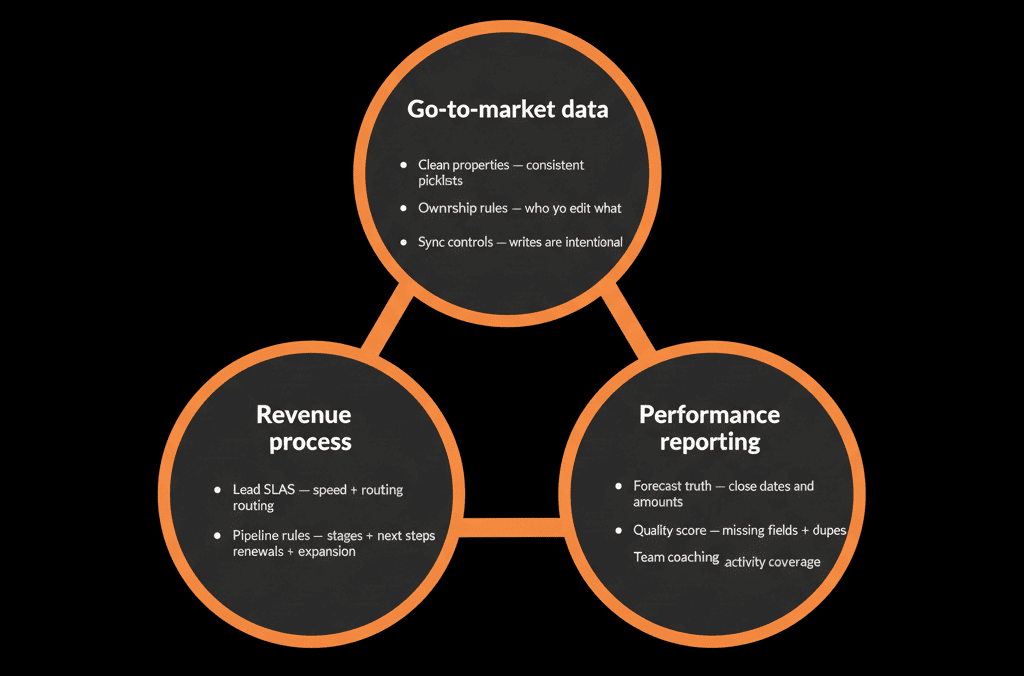
Step 6 – Build Revenue‑Grade Reporting and Dashboards
A marketing‑only HubSpot instance has marketing dashboards.
A RevOps engine has revenue‑grade dashboards across teams.
Key dashboards to build:
Executive Revenue Dashboard
- Pipeline by segment, region, and product.
- Forecast vs actual.
- New business, expansion, and churn.
Funnel & Conversion Dashboard
- Conversion rates from Lead → MQL → SQL → Opportunity → Closed Won.
- Breakdown by channel, segment, and product.
Account & Customer Health Dashboard
- Active customers by health score and ARR.
- Renewal pipeline and risk.
- Expansion opportunities and realized expansion.
GTM Operations Dashboard
- Lead routing and SLA performance.
- Data health metrics (owners, lifecycles, key fields).
- Workflow performance and integration status.
When everyone uses these dashboards, conversations shift from “my numbers vs yours” to “what is HubSpot telling us?”
Step 7 – Establish RevOps Governance Around HubSpot
To keep HubSpot functioning as a RevOps engine, you need light but real governance.
Key elements:
Data governance
- Data dictionary: definitions and owners for key properties.
- Rules for creating new properties.
- Regular reviews and cleanup of unused fields.
Process governance
- Documented lifecycle and stage definitions.
- Clear ownership at every stage of the customer journey.
- Guidelines for creating or changing workflows and automations.
Tool and integration governance
- Approval process for connecting new tools to HubSpot.
- Integration rules (what can read/write where).
Review cadence
- Monthly: data health and routing/SLAs.
- Quarterly: lifecycle, pipeline, and workflow effectiveness.
- Annually (or after major GTM changes): data model and process review.
This governance keeps HubSpot from devolving back into a “marketing toy” or a messy CRM.
Pulling It Together: HubSpot as a RevOps Operating System
Turning HubSpot into a revenue operations engine is not about turning on more features.
It’s about:
- Promoting HubSpot to the role of system of record for the revenue team.
- Designing your data model, processes, automation, and integrations around that reality.
- Governing it so it stays aligned with how you grow.
In practice, the journey looks like:
- Redefine HubSpot’s role beyond Marketing.
- Build a RevOps‑ready data model and lifecycle.
- Map cross‑functional processes directly into HubSpot.
- Use automation to orchestrate revenue work, not just send emails.
- Integrate product, billing, and support intentionally.
- Build revenue‑grade reporting for shared truth.
- Put governance in place so it scales with you.
Do this, and HubSpot becomes the operating system for Marketing, Sales, and CS—not just the place where campaigns go to die.
Want Help Turning Your HubSpot Portal into a Real RevOps Engine?
If your HubSpot instance is still seen as “just a marketing tool” and you want it to power the whole revenue operation, this is exactly where we can help.
Our HubSpot Portal Health Check and Migration & ROI Plan are designed to:
- Assess how your current HubSpot setup supports (or blocks) RevOps.
- Design a RevOps‑first data model, processes, and reporting structure.
- Provide a phased roadmap to evolve your portal into a true revenue operations engine.






