



If You Don’t Track Expansion Separately, You Can’t Scale It
Most teams start by using HubSpot to track new business.
Over time, more revenue comes from existing customers:
- Seat increases.
- Plan upgrades.
- Add‑on products.
- Cross‑sells into new divisions.
But in HubSpot, these often get muddled:
- Expansion logged on the original new‑business deal.
- Renewals and upsells combined into one pipeline.
- No easy way to see how much growth is coming from your base.
To build a serious expansion motion, you need to model and track expansion separately.
In this article, we’ll walk through how to track expansion and upsell revenue in HubSpot with a clear data model, workflows, and reporting.
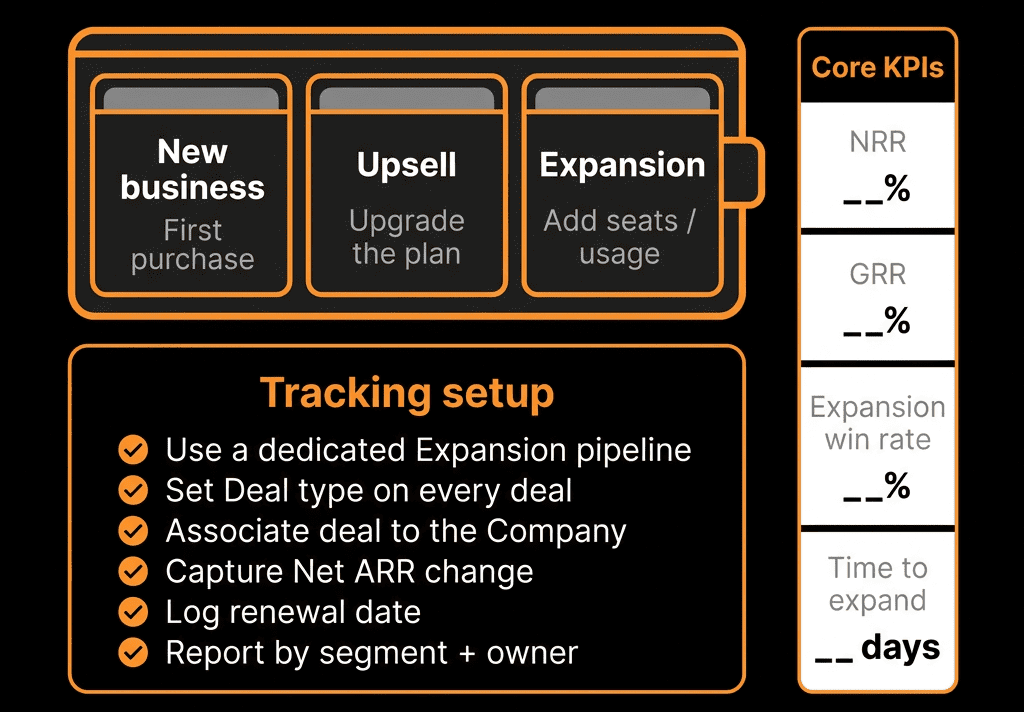
Step 1 – Define New, Expansion, and Renewal in Business Terms
Start with simple, agreed definitions:
New Business
First deal that turns a prospect into a customer (net new logo).
Expansion / Upsell
Additional recurring or one‑time revenue from an existing customer:
- Seat/license increases.
- Higher plans.
- Additional products or services.
Renewal
Continuation of existing contract/ARR at the same baseline (no material change) or with minor uplift.
Optional
- Cross‑sell (new product line to existing customer).
- Downsell / Contraction (reduced ARR at renewal).
Write these down. Your HubSpot model will implement them.
Step 2 – Choose How You’ll Represent Expansion in HubSpot
You have two main modeling options:
Deal‑based tracking (most common)
- Use Deals for new business, renewals, and expansions.
- Distinguish them via a Deal type or Revenue type property.
Custom object tracking (for more complex setups)
- Use a custom object like Subscriptions or Contracts for the “truth” of recurring revenue.
- Use Deals to log changes to those subscriptions (new, expand, renew, downgrade).
For most teams, starting with Deal‑based tracking is sufficient and easier to implement.
We’ll focus on that, and mention when a custom object might be needed.
Step 3 – Configure Deal Properties to Distinguish Revenue Types
Create or standardize a property on Deals to classify them.
Key properties:
Deal type (or Revenue type)
Values:
- New business.
- Expansion.
- Renewal.
- (Optional) Cross‑sell / Contraction.
Is expansion? (Yes/No) – optional helper
Base ARR / Previous ARR (for renewals/expansions)
The ARR before this deal.
ARR change / Expansion ARR
The net ARR added by this deal.
- For expansions: positive.
- For downsells: negative.
These let you see new vs expanded vs renewed value without confusion.
Step 4 – Decide on Pipelines for New vs Expansion vs Renewals
There are two common patterns:
Option A – Separate Pipelines
- New Business pipeline.
- Expansion pipeline.
- Renewal pipeline.
Pros:
- Clear ownership and process differences.
- Easier to focus teams on their motion.
Cons:
- More pipelines to manage and report across.
Option B – Single pipeline with Deal type
- One main pipeline.
- Deal type distinguishes motion.
Pros:
- Simpler stage management.
- Single place to look for all opportunities.
Cons:
- Requires disciplined use of Deal type for reporting.
We often recommend:
- Separate pipelines when teams and motions are distinct (e.g., new business team vs CS/AM for renewals/expansion).
- Single pipeline with good properties for smaller teams or earlier‑stage setups.
Step 5 – Establish Workflows to Create Expansion Deals from Signals
You don’t want to rely entirely on humans to remember to create expansion deals.
Use HubSpot workflows (and integrations where needed) to:
Create expansion deals based on:
- Product usage signals (e.g., maxed out seats, high feature adoption).
- CS/Support signals (e.g., consistent value feedback, feature requests).
- Manual triggers from CS/AM (e.g., property set: “Expansion opportunity = Yes”).
Automatically set Deal type and related fields
- When a Deal is created via an “expansion” trigger: set Deal type = Expansion.
- Set Base ARR to current ARR at the account.
Associate with correct Companies and Contacts
- Ensure expansion Deals are tied to the right Company (existing customer).
- Include key Contacts from the buying committee.
This ensures expansion opportunities are captured consistently in your pipeline.
Step 6 – Track Net New vs Expansion on Closed Deals
Once your Deals close, you need to calculate and store the right revenue numbers.
Implementation ideas:
For New Business Deals:
- Base ARR: 0.
- Expansion ARR: equal to full new ARR.
For Expansion Deals:
- Base ARR: existing ARR before deal.
- Expansion ARR: incremental ARR added by this deal.
For Renewal Deals:
- Base ARR: ARR before renewal.
- Expansion ARR: difference (positive if uplift, negative if downgrade, zero if flat).
Use workflows to set Expansion ARR at Close Won based on inputs:
- If you track recurring revenue using line items, compute the difference (or enforce a consistent entry method).
- Or require reps to input Expansion ARR manually and validate before Close Won.
This gives you reliable numbers for new vs expansion vs churn.
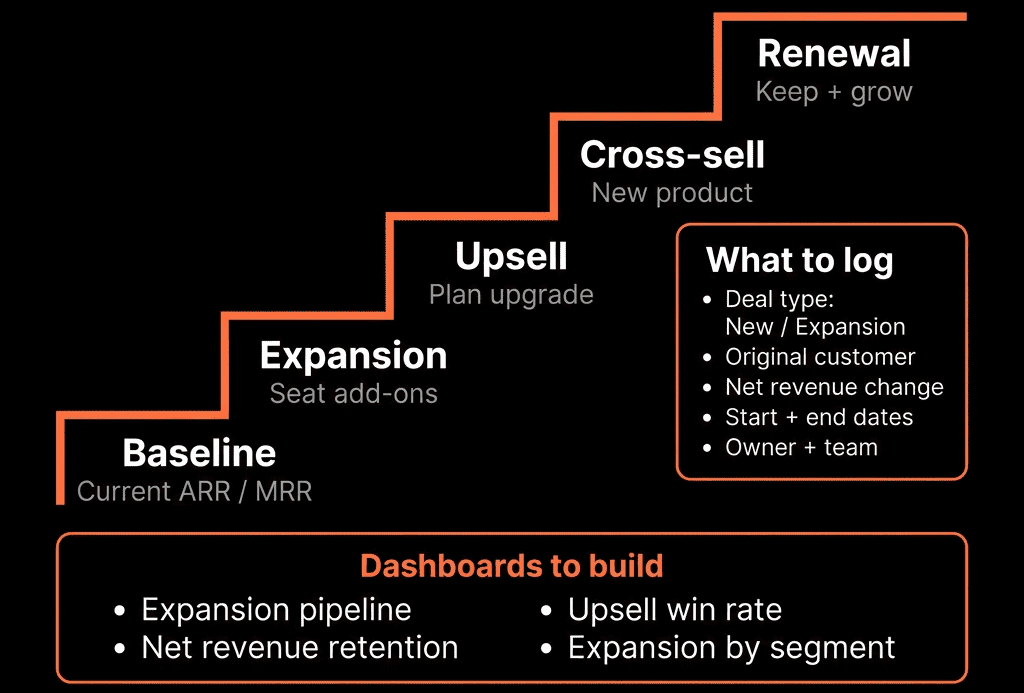
Step 7 – Build Expansion and NRR Dashboards in HubSpot
Now you can surface meaningful expansion metrics.
Key dashboards:
Expansion Revenue Dashboard
- Expansion ARR by quarter, segment (SMB/MM/ENT), product line, and owner/CSM/AE.
- # of expansion deals and average expansion size.
New vs Expansion vs Renewal Mix
- Stacked bar: New ARR, Expansion ARR, churn/contraction.
- NRR and GRR calculations (if you bring in base ARR).
Expansion Funnel
- Accounts with expansion indicators → expansion Deals created → expansion Deals Closed Won.
CSM/Account Manager Expansion Performance
- Expansion ARR and # of expansion wins per CSM/AM (helps comp and coaching).
These dashboards help leadership see how much growth is coming from the base and where to invest.
Step 8 – Embed Expansion Tracking in CS and Sales Workflows
Tracking only works if the teams doing expansion see value.
For CS/Account Management:
- Views: “My accounts with expansion Deals in progress,” “My accounts with high usage but no expansion Deal.”
- Tasks/workflows: reminders at milestones (renewal‑X days, usage spikes).
For Sales:
- Clear ownership and visibility into quota impact.
- Show CS/product signals on Company/Deal sidebars.
RevOps:
- Own the rules for when expansion deals are created, who owns them, and how they roll into reporting.
Step 9 – Consider When to Introduce a Subscription/Contract Custom Object
As your recurring revenue model becomes more complex, consider a dedicated object.
Use a Subscriptions or Contracts custom object when:
- You need to track multiple concurrent subscriptions per account.
- You want a full history of ARR changes over time beyond Deals.
- You have complex billing/product structures that Deals alone can’t handle.
In this model:
- Subscription holds current ARR, start/end dates, and plan/product details.
- Deals represent changes to subscriptions: new, expand, renew, downgrade.
This requires more design work but gives you a more accurate revenue picture for advanced RevOps.
Pulling It Together: Make Expansion a First‑Class Citizen in HubSpot
To track expansion and upsell revenue in HubSpot effectively:
- Agree on what “new,” “expansion,” and “renewal” mean.
- Model these motions via Deal properties (and pipelines where needed).
- Use workflows to create expansion Deals from meaningful signals.
- Capture incremental ARR and distinguish it from base/renewal ARR.
- Build dashboards that highlight expansion by segment, product, and owner.
- Embed expansion into CS and Sales workflows—not just reporting.
- Introduce a subscription/contract object when your complexity demands it.
Do this, and expansion stops being “some deals in the pipeline” and becomes a managed, measurable growth motion.
Want Help Setting Up Expansion Tracking in Your HubSpot Portal?
If your current HubSpot setup can’t cleanly answer “How much of our growth is from expansion?” this is where we can help.
Our HubSpot Portal Health Check and Migration & ROI Plan are designed to:
- Audit your current deal structure and recurring revenue tracking.
- Design a clear model for new, renewal, and expansion Deals (or subscriptions).
- Implement the properties, workflows, and dashboards you need to manage NRR and expansion like a pro.






