



Stop Running “Story Time” Pipeline Meetings
Most weekly revenue meetings drift into:
- Anecdotes about deals.
- Debates about numbers.
- No clear follow-up actions.
HubSpot can fix that if you:
- Agree what the meeting is for.
- Build the right views and dashboards.
- Enforce a simple structure every week.
Here’s how we design a 30–45 minute weekly revenue standup that runs fully inside HubSpot.
Step 1 – Clarify the Purpose of the Weekly Revenue Standup
The meeting is not for:
- Deep coaching on individual deals.
- Rewriting strategy.
- Reviewing every metric possible.
The meeting is for:
- Aligning on this and next month’s revenue.
- Identifying pipeline gaps and risks early.
- Committing to specific actions to close the gap.
Write this at the top of your agenda so everyone knows why they are there.
Step 2 – Decide Who’s in the Room (and What They Bring)
Typical attendees:
- Sales leadership (CRO/Head of Sales).
- RevOps.
- Marketing leader (or demand gen) for top-of-funnel insight.
- CS/Account Management lead if renewals/expansion are meaningful.
- Team leads / frontline managers.
Each should come prepared:
- With their HubSpot views up to date (stages, amounts, close dates, forecast category).
- Ready to answer “What changed this week?” for their area.
- No side spreadsheets.
Step 3 – Build a Simple “Revenue Standup” Dashboard Pack
Create a folder: Dashboards – Revenue Standup.
Include 2–3 dashboards max:
This + Next Month Snapshot
- Closed Won vs target (this month).
- Forecast vs target (this and next month).
- Pipeline coverage by stage (this and next month).
Pipeline Risk & Movement
- Deals pushed (close date changed to > current month).
- Deals with no activity in X days by stage.
- New deals created this week (by segment/source).
New, Renewal, Expansion (optional)
- Closed Won and pipeline split by deal type.
- Renewal pipeline for the next 90 days.
- Expansion pipeline for the next 90 days.
You’ll use these for the first 10–15 minutes.
Step 4 – Set Up Manager and Rep Deal Views
Managers and reps need quick filters to drive the discussion.
Key HubSpot views:
“My team – this month Commit”
- Filters: Owner team, Close date this month, Forecast category = Commit.
“My team – this month Best case”
- Same, with Best case deals.
“Deals at risk – this month”
- Close date this month AND (No activity in X days OR Next step date in the past).
“New opportunities – last 7 days”
- Deals created in last 7 days.
These power the second half of the meeting when you drill down.
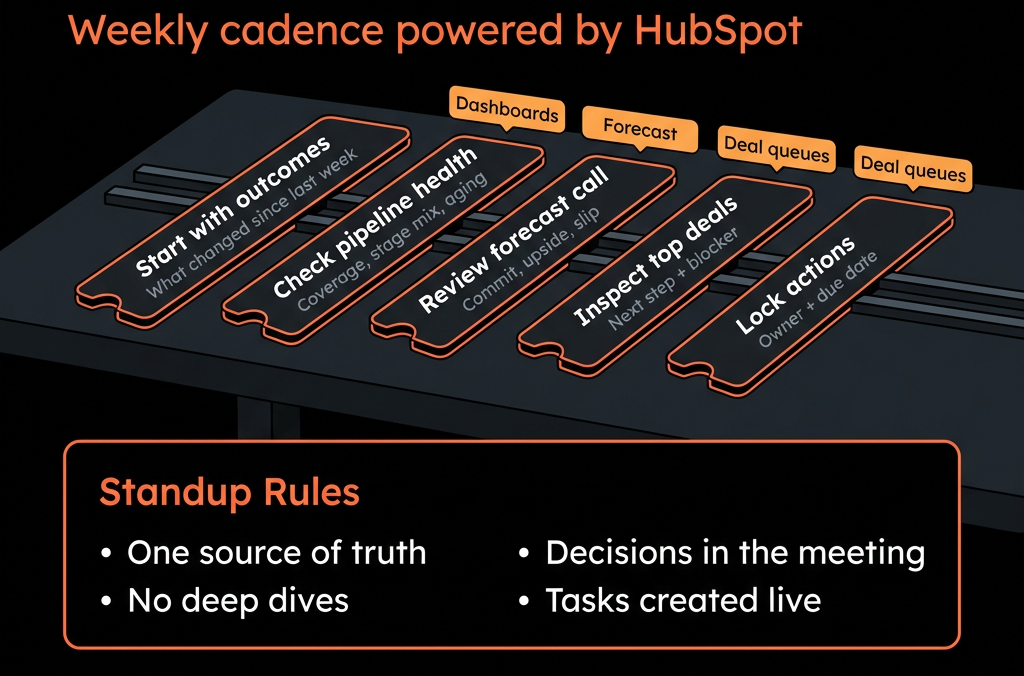
Step 5 – Design a 30–45 Minute Agenda Using HubSpot Only
A simple structure:
5–10 min – High-level status (Dashboards)
- Look at Closed Won vs target (this month).
- Look at Forecast vs target (this and next month).
- Confirm: on track / at risk / off track.
10–15 min – Pipeline health and movement (Dashboards)
- Review: Pipeline by stage (coverage).
- Deals pushed out of this month.
- Stale deals (no activity).
- Ask: “What changed since last week?”
10–15 min – Team-specific drill-down (Views)
- For each manager/team: open “My team – this month Commit” view.
- Discuss only: New Commit deals this week, Removed or downgraded Commit deals.
- Identify 3–5 at-risk deals and agree next steps.
5 min – Actions and owners
- RevOps notes: Changes to process/automation needed.
- Sales/CS leaders note: Specific follow-ups on deals or segments.
- Everything happens in HubSpot; no external slides.
Step 6 – Use Forecast Categories and Stage Criteria to Avoid “Happy Ears”
The standup depends on quality inputs.
Before you start:
Define Forecast category clearly:
- Pipeline – early, not counted.
- Best case – possible, but with known risks.
- Commit – strong, meets your criteria.
- Omitted – not this period.
Tie Commit to stage + fields, for example:
- Must be in late stage.
- Decision maker identified.
- Next step & date set.
- No major unresolved blockers.
During the meeting, challenge deals that don’t meet this but are marked as Commit.
Step 7 – Include Renewals and Expansion (Not Just New Business)
If you have meaningful recurring revenue:
Add views/dashboards for:
- Renewal deals closing in next 90 days.
- Expansion pipeline by stage.
In the standup:
- Include a short section (5–10 min):
- “Top at-risk renewals this month/next.”
- “Top expansion plays this month/next.”
This prevents net revenue surprises.
Step 8 – Make Marketing Part of the Conversation
In 5–10 minutes:
- Show “New opportunities – last 7 days” by channel/campaign.
- Call out: Surges or drops from specific channels, Early performance of new campaigns.
Ask marketing to:
- Comment on what’s coming next (upcoming campaigns, expected pipe).
- Listen to feedback from sales on early lead quality.
This keeps demand and pipeline aligned.
Step 9 – Capture Decisions and Follow-Ups in HubSpot
Avoid a separate “notes doc” if possible.
Options:
- Use HubSpot notes on: Deals (for deal-specific actions), Companies (for account strategies).
- Use tasks assigned to owners with due dates.
- For bigger process changes: RevOps maintains a simple RevOps ticket or task queue in HubSpot.
Next week, start by reviewing last week’s commitments.
Step 10 – Iterate the Meeting Using Data, Not Opinions
After 4–6 weeks, ask:
- Is this meeting improving forecast accuracy?
- Are there fewer “surprises” at month end?
- Does pipeline composition look healthier?
Adjust:
- Which reports appear on the dashboards.
- How much time you spend on each section.
- Which teams need their own pre-meetings (e.g., SDR/AE, CS).
The goal: a repeatable, data-led rhythm, not a reinvented agenda each week.
Want Help Turning HubSpot Into the Only Tab You Need for Revenue Standups?
If your weekly revenue meetings still run off exported spreadsheets and disconnected reports, HubSpot can be the single cockpit—with the right design.
Through our HubSpot Portal Health Check and Managed RevOps Retainer / Migration & ROI Plan, we:
- Clean up your pipelines, forecast fields, and core properties.
- Build the exact dashboards and views you need for a 30–45 minute standup.
- Train your leaders to run the meeting from HubSpot only.
- Track forecast accuracy and pipeline health over time.
- So your weekly revenue standup feels focused, repeatable, and live—not like story time.



