🕵️♂️ The High Cost of "Manual Research"
Your sales rep gets a new lead: j.smith@acme.com. Before they can call, they have to answer:
- Who is Acme? (Industry? Revenue? Size?)
- Who is J. Smith? (VP? Intern?)
- What is his phone number?
- Where is he located? (For territory rules).
So, the rep opens Google, LinkedIn, then the company's "About Us" page. They spend 15 minutes "researching" just to fill 5 fields in HubSpot.
If you have 10 reps doing this 10 times a day, you are burning 25 hours a week—over 1,000 hours a year—on manual data entry. This is why B2B leaders buy ZoomInfo.
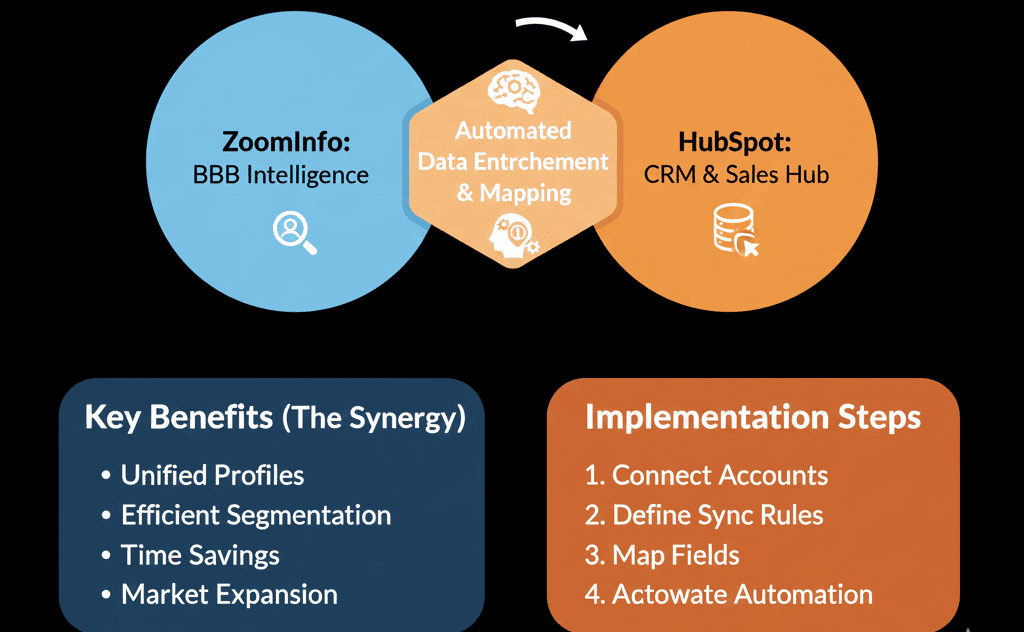
But buying the data is only half the battle. If your reps are still "copy-pasting" data from ZoomInfo into HubSpot, you haven't solved the problem. You need Automated Enrichment. ZoomInfo must "talk" to HubSpot so that the moment a lead arrives, the data is already there.
Here is the guide to setting up the "Data Engine" that fuels your revenue.
⛽ Feature 1: The "Inbound" Enrichment (FormComplete)
The Pain: You want short forms (higher conversion), but Sales needs long data (qualification).
The Fix: ZoomInfo FormComplete.
- The prospect types their email (j.smith@acme.com) into your HubSpot form.
- ZoomInfo recognizes the domain.
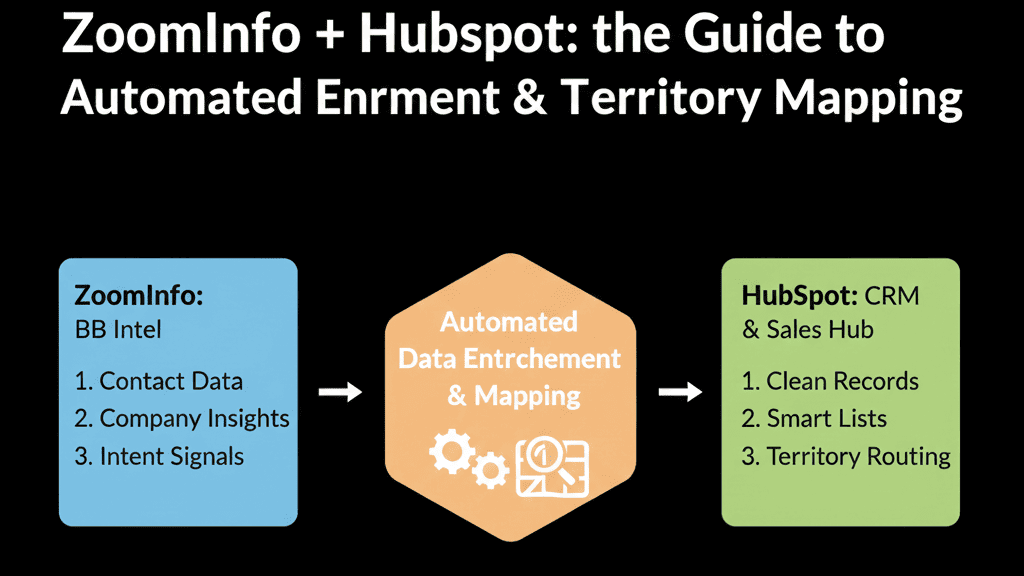
- ZoomInfo automatically appends the Company Size, Industry, Revenue, and Job Title to the HubSpot record in the background.
The Result: User fills 3 fields. Sales gets 20 fields. Conversion rises, and data quality stays perfect.
⛽ Feature 2: The "Outbound" Prospecting (Export to HubSpot)
The Pain: Reps build lists in ZoomInfo, download CSVs, and upload them to HubSpot—creating duplicates and static lists.
The Fix: Native "Export to HubSpot" Button. Connect integration, map fields.
The Workflow: A rep finds "VP Sales in California" in ZoomInfo. Clicks "Export to HubSpot."
The Result: Contacts appear instantly in HubSpot. "Lead Source" auto-set. Owner auto-assigned. No CSVs, no mess.
⛽ Feature 3: The "Territory" Unlock (Routing)
The Pain: You want leads routed by State or Company Size, but data is often missing or wrong.
The Fix: Enriched Routing using ZoomInfo standardized data (State = "CA", Country = "United States").
- Trigger: New Contact Created.
- Action: Delay 5 minutes (Allow ZoomInfo to Enrich).
- Branch: If State = 'CA', Rotate to 'West Team'.
The Result: Leads reach the right rep instantly, without manual triage.
⚠️ The "Data Overwrite" Danger (Governance)
Scenario: A rep spends 20 minutes getting the direct mobile number of a prospect and types it into HubSpot. The ZoomInfo "Scheduled Enrichment" runs that night. ZoomInfo sees the number doesn't match its database (which only has the HQ line) .
The Fix: Field Mapping Governance
- Never map "Notes" or "Description." Keep those safe for reps.
- Use "Update Rules": Configure to "Only update if blank" for sensitive fields like Mobile Phone.
- Use "Z-Fields": Create custom properties in HubSpot called ZI_Job_Title and ZI_Phone. Map ZoomInfo there. Then, use a Workflow to copy ZI_Phone to Phone only if Phone is currently empty. This protects your rep-generated data.
⚠️ The "Industry" Dropdown Nightmare
HubSpot has a default Industry dropdown (Computer Software, Marketing, etc.). ZoomInfo has hundreds of detailed Industries. Do not map them directly. If ZoomInfo tries to push "SaaS CRM Software" into a HubSpot field that only accepts "Technology," the sync will fail or create a messy option.
The Fix: Use a "Transformation Layer" (Operations Hub code or a mapped dropdown list) to translate ZoomInfo industries into your HubSpot standard.
Data is Fuel. Don't Use Diesel in a Gas Engine.
ZoomInfo = high-octane fuel. HubSpot = engine. Correct integration stops reps from "researching" and starts "selling." Routing and scoring work.
If you connect them poorly (bad mapping, overwrite errors), you will pollute your engine.
Stop Wasting Time on Manual Data Entry
We will audit your "Data Enrichment" strategy. We'll check your field mappings, your overwrite settings, and your territory logic. We’ll make sure ZoomInfo is helping your reps, not erasing their work.
Ensure ZoomInfo helps your reps, not erases their work.
Fuel Your Engine.Get Free Hubspot Audit.